Definition: An executive summary is a short decision-oriented overview of a longer document, meeting, or project. These executive summary examples show how to condense messy notes, transcripts, reports, and recordings into the context, decision, evidence, and next action a busy leader needs.
A good executive summary is not a polite recap of everything that happened. It is a filter. It says what changed, why it matters, what the team recommends, and what should happen next. That distinction matters because modern work produces more source material than most teams can read. Microsoft's 2023 Work Trend Index reported that people using Microsoft 365 spent 57% of their time communicating in meetings, email, and chat, and 43% creating documents, spreadsheets, and presentations. Atlassian research has also pointed to the cost of meetings that lack clear outcomes. The problem is not just too much information. The problem is weak distillation.
Use the examples below as a practical library. Each one is written in a concise, leader-ready style and includes the same decision logic: context, problem, decision or recommendation, evidence, and next action.
Executive Summary Examples You Can Reuse
The examples come first because that is usually what people need most. You can adapt the wording for a meeting recap, sales handoff, board update, research report, customer interview, podcast episode, or PDF report. Replace the specifics with your own source material, then cut anything that does not help the reader decide what to do.
1. Meeting Recap Executive Summary
Context: The product, customer success, and onboarding teams met to review first-month activation for new enterprise customers.
Executive summary: New enterprise customers are completing account setup on time, but activation is slowing during the first workflow configuration. The team agreed that the main issue is not training volume; it is unclear ownership after kickoff. Customer success will now assign a named activation owner within 24 hours of contract handoff, and product will add a setup checklist to the workspace. Evidence came from eight recent onboarding calls, three support tickets, and a 14-day delay pattern in accounts with more than two admin roles. The next step is to test the new handoff process with the next five enterprise accounts and review activation time on August 1.
2. Sales Call Executive Summary
Context: A sales team needs a short handoff after a discovery call with a mid-market operations lead.
Executive summary: The prospect is looking for a meeting documentation workflow that reduces manual follow-up after customer implementation calls. Their current process depends on one project manager typing notes, then copying summaries into Slack and a shared document. This creates delays and inconsistent action items. The strongest buying signal was the operations lead's comment that missed follow-ups are now affecting renewal conversations. Recommended next step: schedule a 30-minute demo focused on automatic meeting attendance, structured summaries, action items, and Slack or document sync. The account owner should send the implementation-call use case, not a generic product deck, by Friday.
3. Board Update Executive Summary
Context: A leadership team is updating the board on a strategic initiative.
Executive summary: The customer onboarding improvement project is on track for its first milestone, but the timeline depends on reducing cross-functional review cycles. The project has completed research interviews, mapped the current onboarding path, and identified three workflow bottlenecks: duplicate data entry, unclear success criteria, and late handoffs from sales. The recommended board-level decision is to approve a small implementation budget for automation and reporting. The evidence is consistent across customer interviews, support logs, and internal process mapping. If approved this month, the team can launch a pilot in Q3 and report early activation changes in the next board packet.
4. Research Report Executive Summary
Context: A team has completed a research report on customer support response quality.
Executive summary: The research found that response speed is no longer the only driver of customer satisfaction. Customers are more frustrated by incomplete answers than by moderate wait times. Across 42 reviewed tickets and 12 customer interviews, the clearest satisfaction signal was whether the first response included diagnosis, next step, owner, and expected timeline. The recommendation is to update the support response template and train agents to include decision-ready context rather than short status replies. The support lead should pilot the new template for two weeks, then compare reopen rates and customer comments against the prior month.
5. Customer Interview Executive Summary
Context: A product manager needs to brief leadership after a customer interview.
Executive summary: The customer values the product's collaboration features, but adoption is limited by uncertainty after meetings. Team members attend the same call, leave with different interpretations, and then duplicate follow-up work in separate tools. The strongest quote was, "We spend more time reconstructing the meeting than acting on it." The recommended product focus is source-linked meeting summaries with visible action owners. This would reduce confusion after complex calls and support the customer's distributed team. The next action is to group this interview with six similar feedback notes and validate whether cited summaries influence retention risk.
6. Podcast Episode Executive Summary
Context: A marketing team wants to turn a long expert podcast into reusable notes.
Executive summary: The episode argues that teams lose momentum when insight capture depends on memory. The guest's central point is that conversations become valuable only when decisions, stories, and examples are turned into retrievable knowledge. The most useful sections cover meeting overload, the limits of raw transcripts, and the importance of source-backed summaries. The marketing team should repurpose the episode into three assets: a short LinkedIn post on meeting memory, a blog section on searchable notes, and a customer education email about post-call follow-up. The producer should verify timestamps before publishing excerpts.
7. PDF Report Executive Summary
Context: An operations team uploaded a 38-page vendor report before a planning meeting.
Executive summary: The vendor report recommends consolidating three separate intake processes into one shared workflow. The recommendation is credible because the report compares cycle time, error rates, and staff workload across all three teams. The highest-risk finding is that handoffs fail most often when customer information is retyped between systems. The team should not approve the full migration yet; it should first run a four-week pilot with one region and a limited data set. The operations owner should prepare the pilot scope, success metrics, and approval questions before the next planning meeting.
The Formula Behind a Strong Executive Summary
Most weak summaries fail because they describe the source in the order it happened. A better executive summary is organized by decision value. It should answer five questions in plain English: What is this about? What problem or opportunity matters? What did we decide or recommend? What evidence supports that judgment? What happens next?
| Section | What It Answers | Example Phrase |
|---|---|---|
| Context | What meeting, report, project, or source is being summarized? | The team reviewed first-month activation for new enterprise customers. |
| Problem | What risk, gap, question, or opportunity should leadership notice? | Activation is slowing during workflow configuration, not during account setup. |
| Decision | What was agreed, recommended, rejected, or escalated? | Customer success will assign a named activation owner within 24 hours. |
| Evidence | Which facts, quotes, numbers, or source references support the summary? | The pattern appeared in eight calls, three tickets, and delayed accounts. |
| Next action | Who owns the next step, and when should it happen? | The team will test the handoff process with the next five accounts. |
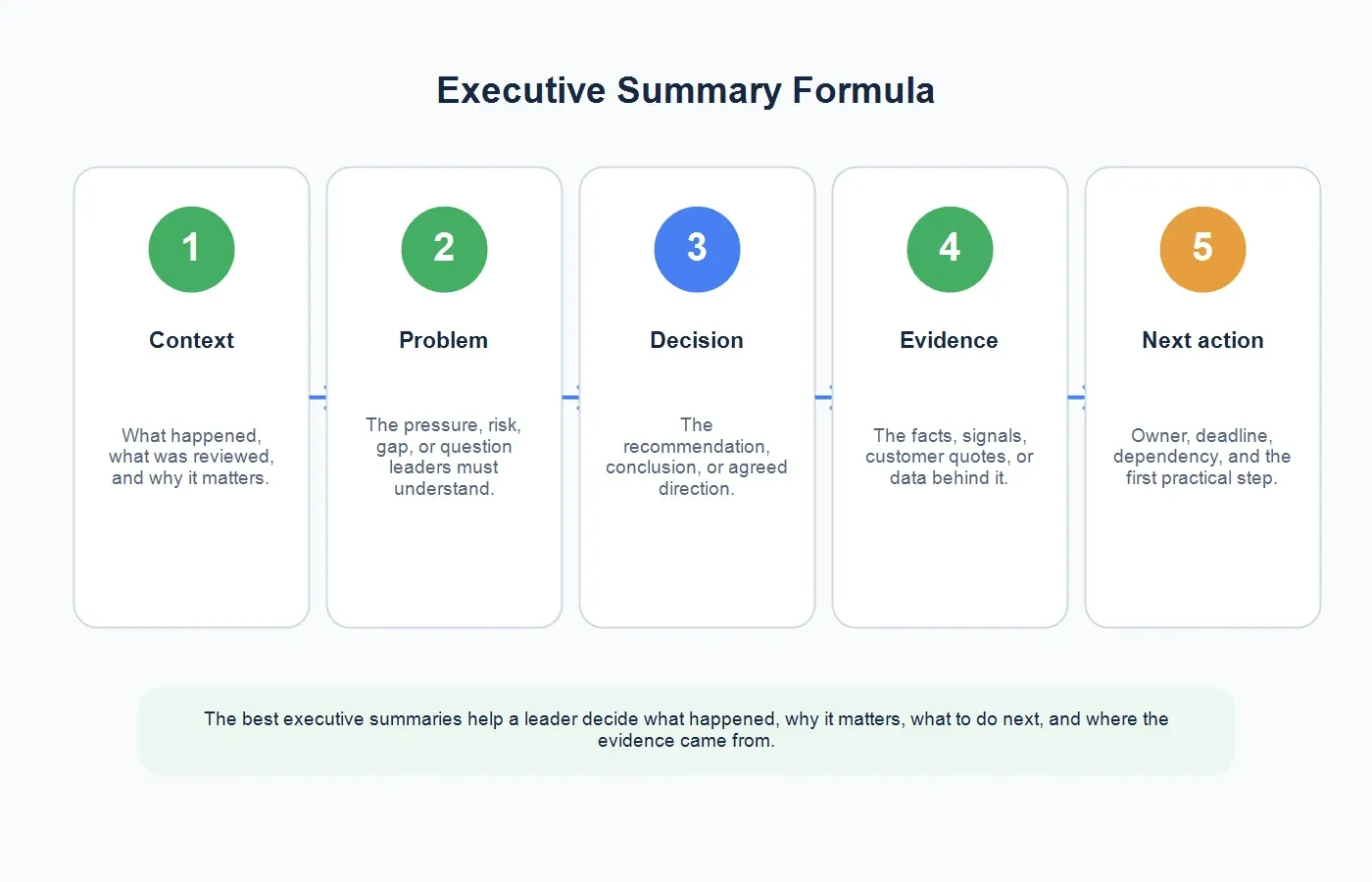
This structure is consistent with how university writing centers describe executive summaries: they should be concise, stand alone, and help a reader understand the main findings or recommendations without reading the full report. For workplace content, the same standard applies to meetings, audio recordings, videos, interviews, and PDFs.
Before and After: Turning Long Notes Into an Executive Summary
Before: Notes That Are Too Loose
We talked about onboarding and customer activation. Sales said handoffs are sometimes late. Customer success said customers often forget who owns the next step. Product mentioned that the checklist is hard to find. There were also support tickets about configuration questions. Everyone agreed we should improve the process and look at the next few customers.
After: Executive Summary
Enterprise activation is slowing because ownership becomes unclear after kickoff. The team agreed to assign a named activation owner within 24 hours of sales handoff and add a visible setup checklist to the workspace. Evidence came from recent onboarding calls, support tickets, and delayed accounts with multiple admin roles. Customer success owns the pilot for the next five enterprise accounts, with activation time reviewed on August 1.
The second version is not just shorter. It is more useful. It turns discussion into a decision record, names the evidence, and makes follow-up visible.
How HiNoter Generates Executive Summaries From Different Sources
Manual executive summaries are hard because the writer has to listen, transcribe, organize, judge importance, and rewrite under time pressure. HiNoter is designed to remove much of that mechanical work. For meetings, teams can use HiNoter's AI meeting assistant to auto-join scheduled calls, capture the conversation, and produce structured notes after the meeting. For recurring calls, that means managers do not have to chase every participant just to learn what happened.
When the source is a live meeting, AI meeting notes help capture decisions, action items, and owners while participants stay focused on the conversation. When the source is a report, the PDF to text converter can extract document content and make long reports easier to summarize. For webinars, demos, and public or permitted videos, the YouTube transcript generator helps turn video content into transcripts and notes. For interviews, podcasts, and lawful recordings, audio to text gives the summary a searchable foundation.
| Source | Best Executive Summary Output | HiNoter Workflow |
|---|---|---|
| Meeting | Decision recap, action items, owners, blockers, and follow-up context. | Connect calendar, auto-join, generate notes, summary, and mind map. |
| Sales call | Pain points, buying signals, objections, next step, and CRM-ready handoff. | Upload or capture the call, then summarize with source references. |
| PDF report | Purpose, findings, risks, recommendation, and cited supporting sections. | Upload the PDF, extract text, summarize sections, and chat with sources. |
| Video or podcast | Chaptered notes, key claims, reusable quotes, and content ideas. | Paste or upload permitted media, then create transcript, summary, and mind map. |
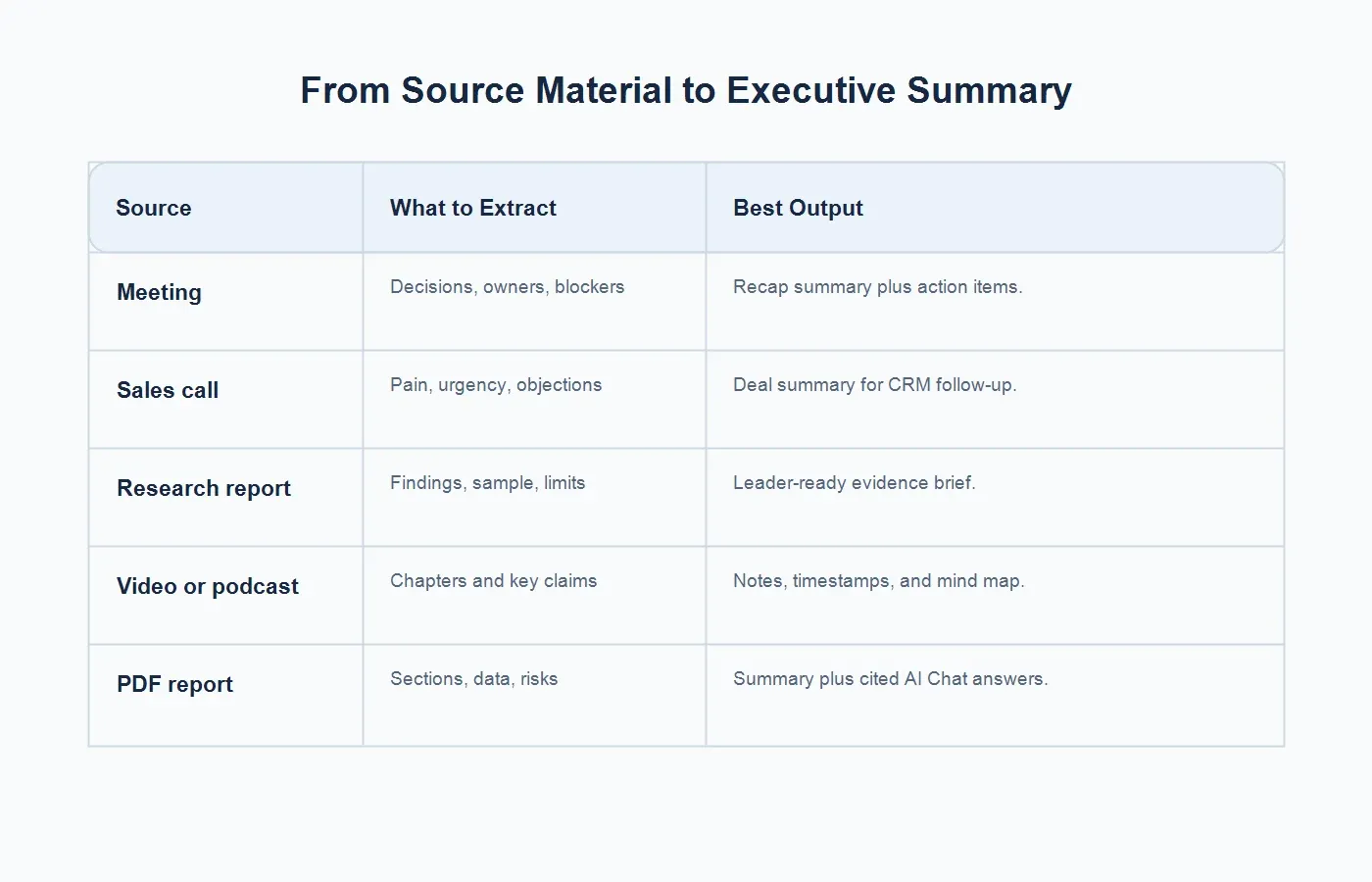
The useful part is not only speed. It is consistency. When every summary follows the same logic, leaders can scan across meetings, projects, customer calls, and documents without relearning each person's note style.
Templates for Executive Summaries
Meeting Recap Template
Context: [Team or attendees] met to discuss [topic].
Decision: The team agreed to [decision or recommendation].
Evidence: The decision was based on [data, customer feedback, transcript moment, support tickets, report section, or observed pattern].
Risk: The main unresolved issue is [risk, blocker, dependency, or open question].
Next action: [Owner] will [task] by [date].
Report or Project Template
Purpose: This report evaluates [problem or opportunity].
Finding: The most important finding is [finding].
Recommendation: The recommended course of action is [recommendation].
Basis: The recommendation is supported by [evidence].
Implementation: The first step is [action], owned by [owner], with [timeline or success metric].
Customer or Sales Call Template
Situation: [Customer or prospect] is trying to [goal].
Pain: The main obstacle is [pain point].
Signal: The strongest evidence is [quote, behavior, request, urgency, or objection].
Recommendation: The team should [follow-up action].
Owner: [Name] will [action] by [date].
Common Mistakes to Avoid
Writing a timeline instead of a decision brief. Leaders rarely need a minute-by-minute account. They need the outcome, evidence, and next step.
Using vague verbs. "Discussed," "reviewed," and "aligned" are often too soft. Use "approved," "rejected," "recommended," "delayed," "escalated," or "assigned" when those words are accurate.
Hiding the risk. A neat summary that omits unresolved risk creates false confidence. If a dependency, objection, or weak evidence point matters, name it.
Forgetting the owner. A summary without an owner is often just documentation. Add the person or team responsible for the next move.
Copying transcript language directly. A transcript is source material, not the final executive summary. The summary should reorganize the source around what matters to the reader.
Over-writing. Junior writers often try to prove they did the reading by including too much. A strong executive summary earns trust by selecting the few details that change the decision.
What Makes an Executive Summary Different From an Abstract or Regular Summary?
An abstract usually helps a reader decide whether to read a paper. A regular summary may simply condense what happened. An executive summary is more practical and more decision-oriented. It should stand alone for a leader who may not read the full material and still needs to understand the recommendation, evidence, and next step.
For a report, that may mean a one-page overview. For a meeting, it may be a 150-word recap. For a board packet, it may be a tight summary with risks and asks. For a podcast or video, it may be a structured brief that identifies the episode's main argument, strongest examples, and reusable moments.
How Long Should an Executive Summary Be?
Length depends on the source and the reader. For a short meeting recap, 100 to 250 words is usually enough. For a sales call, 150 to 300 words can capture pain, urgency, objections, and next step. For a long report or project update, one page is often a practical upper limit. Some formal guidance suggests executive summaries can be about 5% to 10% of the larger document, but in business settings the better rule is simpler: use the fewest words that let the reader understand the decision.
If the summary is longer than the source problem requires, it stops being executive. When in doubt, move supporting details to the full notes, transcript, appendix, or source-linked AI Chat answer.
Quality Checklist Before You Share
Before sending an executive summary, ask six questions. Can the reader understand the source without opening it? Is the main decision or recommendation visible in the first few sentences? Does the summary include evidence rather than opinion alone? Are risks and open questions named? Is the next action assigned to a real owner? Can someone verify the important claims from the source?
This last question is where source-linked notes are especially useful. If a leader asks, "Where did that customer say this?" or "Which section of the PDF supports that recommendation?" the summary should not collapse into guesswork. HiNoter turns notes into a searchable knowledge base by letting users ask questions and trace answers back to the source context.
Final Takeaway
Executive summaries are not decoration. They are a management tool for turning meetings, reports, customer calls, videos, podcasts, and PDFs into decisions people can act on. The strongest summaries share a clear pattern: context, problem, decision, evidence, and next action.
Use HiNoter to generate executive summaries automatically from meeting recordings, PDFs, videos, and audio. For recurring meetings, connect your calendar so HiNoter can capture the conversation without manual note-taking. For documents and media, upload the source, create structured notes, and ask source-linked questions when details need to be verified.
FAQs
What is an executive summary?
An executive summary is a short decision-oriented overview of a longer document, meeting, or project. It highlights the context, problem, decision or recommendation, evidence, and next action.
What should an executive summary include?
It should include the purpose or context, the central problem, the main finding or decision, the evidence behind that decision, risks or open questions when relevant, and the next step with an owner.
How long should an executive summary be?
For meetings and calls, 100 to 300 words is often enough. For reports or project updates, one page is usually practical. Formal report summaries are sometimes 5% to 10% of the source document, but clarity matters more than a fixed ratio.
How is an executive summary different from an abstract?
An abstract usually summarizes a paper for an academic reader and may help someone decide whether to read the full work. An executive summary is written for decision-makers and emphasizes recommendations, evidence, and actions.
Can AI write an executive summary from a meeting or PDF?
Yes. HiNoter can help generate executive summaries from meetings, PDFs, videos, and audio by extracting source content, structuring notes, summarizing decisions, and supporting source-linked questions.