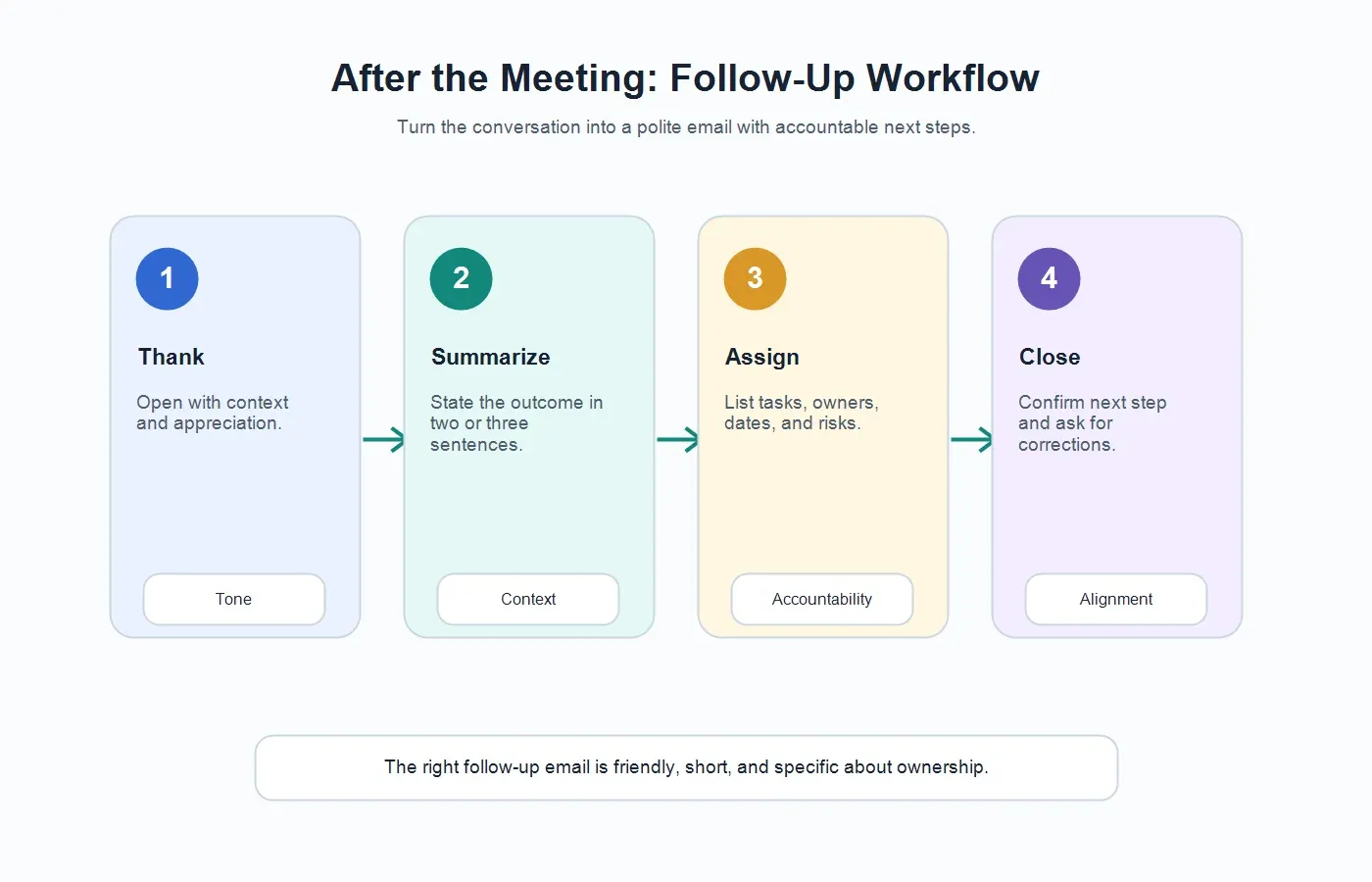
Direct answer: A follow up email after meeting should thank the recipient, summarize the discussion, confirm decisions, list action items with owners and due dates, mention risks or open questions, and state the next step. The best version is short, specific, and easy to act on without rereading the full meeting notes.
Copyable Follow Up Email After Meeting Template
Use this template when a meeting created decisions, tasks, open questions, customer promises, or internal next steps. It works for sales calls, project syncs, customer success meetings, interviews, leadership reviews, and one-on-ones.
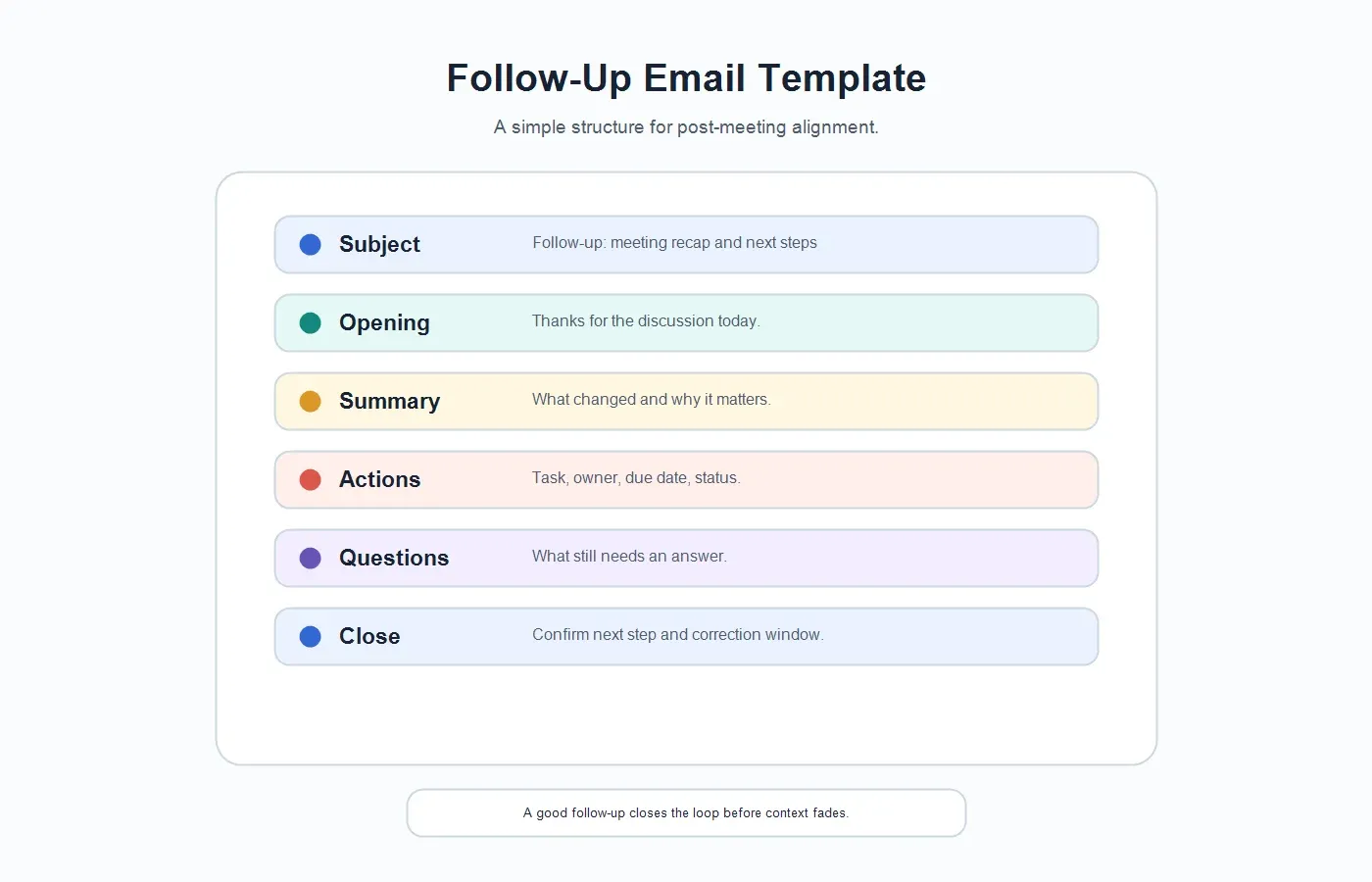
General follow-up email after meeting
Subject: Follow-up: [Meeting topic] and next steps
Hi [Name/team],
Thanks for taking the time to meet today. I appreciated the discussion around [main topic].
Quick summary: [Two or three sentences covering the meeting purpose, main outcome, and any important context.]
Decisions: [Decision 1] - [Decision 2] - [Decision 3]
Action items: [Task] - Owner: [Name] - Due: [Date] - Status: [Open / waiting / done]
Risks or blockers: [Risk] - Owner: [Name] - Next review: [Date]
Open questions: [Question] - Owner: [Name] - Needed by: [Date]
Next step: [What happens next, who owns it, and when.]
Full notes: [Link to notes, document, or workspace page]
Please reply with corrections or missing context by [deadline].
Thanks again, [Your name]
Generate this automatically with HiNoter: Connect your calendar, let HiNoter capture the meeting, then review the generated attendees, agenda summary, decisions, action items, owners, deadlines, risks, and follow-up email draft before sending it.
A follow-up email after a meeting is not just a nice closing gesture. It is the moment when a conversation becomes a shared record. Without it, decisions live in memory, tasks drift into chat, and people remember the same meeting differently.
Microsoft's Work Trend Index has reported that the average employee spends more time communicating than creating, and workers want AI help with finding information, summarizing meetings, and capturing action items. That is exactly where a strong follow-up email helps: it turns a live discussion into a usable artifact before context fades.
When Should You Send a Follow Up Email After Meeting?
Send the follow-up as soon as the information is useful, usually the same day. For customer calls, sales conversations, project escalations, hiring debriefs, and leadership decisions, faster is better because the next action often depends on the written record.
A routine team sync can tolerate a short same-day recap. A customer commitment or executive decision should be sent within a few hours, after any sensitive wording is reviewed. If the meeting involved legal, pricing, hiring, or customer escalation topics, send a clean version to the right audience rather than forwarding every internal note.
| Meeting Type | Best Timing | Why It Matters |
|---|---|---|
| Sales call | Within a few hours. | Keeps momentum and confirms the buyer's next step. |
| Project meeting | Same day. | Turns decisions into work before the next sprint or status update. |
| Customer success call | Same day, after reviewing customer-facing language. | Confirms commitments and reduces renewal or implementation confusion. |
| Leadership review | After decision wording is checked. | Creates an accountable record for high-impact decisions. |
| One-on-one | When there are decisions or commitments. | Avoids over-documenting casual conversations while preserving important agreements. |
What Should a Follow-Up Email Include?
A useful follow-up email has enough detail to remove ambiguity but not so much detail that people ignore it. Think of it as the action-facing version of your meeting notes.
| Field | What to Include | Common Mistake |
|---|---|---|
| Opening | A brief thank-you and meeting context. | Starting with a long paragraph before the outcome is clear. |
| Summary | The purpose, outcome, and most important context. | Repeating the whole conversation instead of summarizing it. |
| Decisions | What was agreed, changed, approved, rejected, or deferred. | Using vague wording such as "we talked about." |
| Action items | Task, owner, due date, and status. | Listing tasks without owners or dates. |
| Open questions | Unresolved topics and who will answer them. | Hiding uncertainty because the recap looks cleaner without it. |
| Next step | The next meeting, deliverable, reply deadline, or handoff. | Ending with "let me know" when a concrete next step is needed. |
Follow-Up Email Examples by Meeting Type
Sales follow-up email after meeting
Subject: Follow-up: next steps from today's product discussion
Hi [Name],
Thanks for meeting today. I appreciated learning more about your team's onboarding workflow and the reporting gaps you want to close this quarter.
Quick summary: We discussed your current approval process, the need for clearer usage reporting, and the security review required before a pilot. The main next step is to confirm whether the pilot can begin after your internal review next week.
Action items: I will send the security packet and pilot outline by Wednesday. You will confirm the technical review attendees by Friday. We will schedule a follow-up once your security team has reviewed the packet.
Open question: Should the pilot include the admin team only, or should support managers join from day one?
Thanks again, and I will send the materials shortly.
Generate this automatically with HiNoter: HiNoter can extract the customer's pain points, objections, commitments, owners, deadlines, and follow-up draft from the sales call so the account team does not have to rebuild the conversation from memory.
Project follow-up email after meeting
Subject: Follow-up: launch review decisions and owners
Hi team,
Thanks for the launch review today. Here is the follow-up record so everyone has the same next steps.
Summary: We agreed to keep the pilot scope focused on the core onboarding workflow. The security review is still the main dependency, and the customer-facing timeline needs to be updated before the walkthrough.
Decisions: Move two advanced settings to the post-pilot backlog. Keep Friday as the decision point for launch readiness. Send the revised timeline to customer success before the next customer call.
Action items: Maya will update the launch plan by Thursday. Jordan will confirm security review timing by Friday. Priya will draft the customer update today.
Next step: We will review the security status Friday afternoon and decide whether the pilot date moves.
Generate this automatically with HiNoter: HiNoter can fill the follow-up email with agenda items, decisions, risks, action items, owners, deadlines, and a concise next-step summary from the meeting record.
Customer success follow-up email after meeting
Subject: Follow-up: QBR recap and open items
Hi [Name],
Thank you for the QBR discussion. It was helpful to review adoption progress, renewal priorities, and the support your admin team needs before broader rollout.
Summary: Usage is strong in support and operations, while admin training and SSO documentation remain open items. We agreed to provide an updated rollout plan and a clearer view of adoption by department.
Action items: We will send SSO documentation by Wednesday. You will confirm the admin training group by Friday. We will prepare adoption reporting for the next review.
Open question: Should your executive sponsor join the next check-in, or would a written summary be more useful first?
Thanks again, and we will follow up with the documentation shortly.
Generate this automatically with HiNoter: HiNoter can turn the customer call into a follow-up email with customer commitments, renewal risks, owner assignments, due dates, and source-linked notes for internal review.
How HiNoter Creates AI-Generated Follow-Ups
1. Capture the meeting context
A strong follow-up email starts with an accurate meeting record. The HiNoter meeting assistant helps teams capture eligible meetings so participants can focus on the conversation instead of assigning a human note taker.
2. Turn the meeting into structured notes
HiNoter generates AI meeting notes with summary, decisions, action items, risks, and key points. That structured note becomes the source for the follow-up email instead of relying on one person's memory.
3. Extract owners, due dates, and open questions
Follow-up emails often fail because they describe the meeting without assigning the work. HiNoter helps identify tasks, owners, deadlines, blockers, and unanswered questions, so the draft email can make accountability visible.
4. Draft the email and sync the record
After the draft is reviewed, teams can share the follow-up and keep the full record in their workspace. HiNoter supports connected workflows such as the Google Docs integration and Notion integration, making the follow-up easier to find after the email thread moves on.
5. Ask source-linked questions later
If someone later asks why a decision was made, a follow-up email may not be enough. HiNoter AI Chat lets users ask questions about notes and supported content with source references, making the answer easier to verify.
Follow-Up Email vs Recap Email vs Meeting Minutes
| Format | Best Use | Main Difference |
|---|---|---|
| Follow-up email after meeting | Polite post-meeting message that confirms next steps and maintains momentum. | Often external-facing or relationship-aware. |
| Meeting recap email | Concise internal or external summary of decisions and action items. | Focused on the record of what happened. |
| Meeting notes | Detailed working record with transcript, context, and references. | Longer and more complete than the email. |
| Meeting minutes | Formal record for governance, committees, boards, or official project documentation. | More structured and official than a follow-up email. |
Common Mistakes to Avoid
| Mistake | Why It Hurts | Better Approach |
|---|---|---|
| Waiting too long to send it. | People start acting from memory and details drift. | Send the follow-up the same day whenever possible. |
| Writing a long transcript-style email. | Readers miss the decisions and tasks. | Lead with summary, decisions, actions, and next steps. |
| Listing action items without owners. | No one knows who is accountable. | Include owner, due date, and status for each task. |
| Using one version for every audience. | Customers, executives, and internal teams need different detail levels. | Edit tone and detail based on the recipient. |
| Forgetting the source record. | People cannot verify details later. | Link to notes, transcript, or workspace record when available. |
Choose the Right Tone for the Recipient
The same meeting can require different follow-up language depending on who receives the email. A customer needs confidence and clarity. An internal project team needs ownership and deadlines. An executive needs decisions, risks, and the few details that affect the business outcome. The structure can stay the same, but the tone should change.
| Recipient | Best Tone | What to Emphasize |
|---|---|---|
| Customer or prospect | Helpful, polished, and concise. | Appreciation, agreed next steps, promised materials, and reply expectations. |
| Internal project team | Direct and accountable. | Decisions, owners, due dates, risks, and what changed since the meeting. |
| Executive stakeholder | Brief and decision-oriented. | Outcome, risk, decision needed, and business impact. |
| Interview candidate | Warm and respectful. | Thank-you message, timeline, next step, and who will follow up. |
| Vendor or partner | Clear and operational. | Deliverables, dependencies, review deadlines, and contact owner. |
A follow-up email should sound like a person who was present in the meeting, not a generic automation. If the meeting had a sensitive moment, acknowledge the next step without overexplaining. If the meeting was positive, keep the tone warm but still concrete. If the meeting created risk, state the risk calmly and name the owner.
AI-Generated Follow-Up Review Checklist
AI can draft a strong follow-up email quickly, but the final email still needs human review. This is especially true when the message goes to a customer, candidate, executive, partner, or anyone outside the immediate meeting team.
| Review Item | Question to Ask | Why It Matters |
|---|---|---|
| Accuracy | Does the email match what was actually decided? | Prevents a polite draft from turning into a false commitment. |
| Ownership | Does every action item have a clear owner? | Turns the email into follow-through instead of a summary. |
| Dates | Are due dates correct, realistic, and visible? | Reduces status chasing after the email is sent. |
| Audience | Is the wording appropriate for the recipient? | Keeps internal context from leaking into external messages. |
| Source record | Is there a link to the full note when detail matters? | Lets readers verify context without starting a new thread. |
The best AI-generated follow-up is not the longest draft. It is the draft that gives a human editor the right structure: summary, decisions, actions, owners, deadlines, open questions, and a clean close. HiNoter helps create that structure from the meeting record, then the sender can adjust tone, audience, and final wording.
Subject Lines You Can Reuse
| Use Case | Subject Line | Tone |
|---|---|---|
| Sales call | Follow-up: next steps from today's discussion | Professional and momentum-focused. |
| Customer meeting | Follow-up: recap and open items | Helpful and clear. |
| Project sync | Follow-up: decisions, owners, and timeline | Direct and accountable. |
| Interview | Thank you for meeting today | Warm and concise. |
| Leadership review | Follow-up: approved plan and next steps | Brief and decision-oriented. |
Try HiNoter for AI-Generated Follow-Ups
If your team already has recordings but still struggles to send clean follow-ups, the problem is not capture. The problem is turning conversation into a useful next-step record. HiNoter helps generate that record by converting meetings into structured notes, action items, owners, risks, due dates, and follow-up email drafts.
You do not need a long follow-up after every meeting. If a meeting was purely informational, had no decisions, and created no tasks, a short thank-you or shared notes link may be enough. But when the meeting creates work, changes expectations, or involves a customer promise, a clear follow-up email protects the team from ambiguity. It gives everyone a shared version of the outcome before private memory starts to fill in the gaps.
CTA: Try HiNoter to turn your next meeting into a polished follow-up email while the discussion is still fresh.
FAQs
How do you write a follow up email after meeting?
Thank the recipient, summarize the meeting, confirm decisions, list action items with owners and due dates, mention open questions, and close with the next step.
How soon should I send a follow-up email after a meeting?
Send it the same day when possible. For customer calls, sales meetings, project escalations, and executive decisions, send it within a few hours after reviewing the wording.
What should be included in a follow-up email after meeting?
Include a thank-you, meeting summary, key decisions, action items, owners, due dates, risks or blockers, open questions, next step, and a link to full notes if available.
What is the difference between meeting notes and a follow-up email?
Meeting notes are the detailed working record. A follow-up email is the concise, recipient-ready version that highlights what happened and what needs action.
What is the difference between meeting minutes and a follow-up email?
Meeting minutes are often formal and official. A follow-up email is usually less formal and focused on alignment, relationship management, and next steps.
Can AI write a follow-up email after a meeting?
Yes. AI can draft a follow-up email from meeting notes or a transcript by extracting the summary, decisions, action items, owners, due dates, risks, and open questions. A human should review the final email before sending.