Meeting Knowledge Base: Short Answer
A meeting knowledge base turns conversations into searchable team memory by connecting transcripts, summaries, decisions, action items, mind maps, and source references. Instead of leaving knowledge scattered across recordings, private notes, chat threads, and follow-up emails, it gives teams a shared place to find what was decided, promised, or learned.
A useful meeting knowledge base does more than store meeting notes. It helps people retrieve the right context without asking someone to remember or replay a call.
| Team question | What a knowledge base returns | Source to inspect |
|---|---|---|
| “Why did we defer this work?” | Decision, rationale, trade-off, and related action | Roadmap review and decision record |
| “What did we promise the customer?” | Action item, owner, timing, and follow-up | Customer meeting and transcript passage |
| “What is still open?” | Open questions, risks, and uncompleted actions | Recent meeting summaries and linked tasks |
What Is a Meeting Knowledge Base?
A meeting knowledge base is a searchable system that turns meeting sources into organized team memory. It connects the original record, such as a transcript or recording, with structured outputs: summaries, decisions, action items, mind maps, source references, and links to related discussions.
The term matters because meetings create knowledge in many forms. A sales call contains customer language. A product review contains trade-offs. A project meeting contains deadlines and dependencies. A customer success check-in contains risk and commitments. None of that knowledge is useful to the wider team if it remains inside one person's notes or a recording nobody reopens.
Definition: A meeting knowledge base is a shared, searchable record that connects meeting content to the decisions, actions, insights, and sources a team needs to retrieve later.
The World Wide Web Consortium describes transcripts as text alternatives for audio and video. A meeting knowledge base takes that usable text layer further by adding structure, relationships, and a way to retrieve the important answer without scanning every word.
Why a Meeting Archive Is Not Enough
Many teams already have an archive. It may be a folder of recordings, a channel of recap messages, a shared drive of documents, or a set of private notes. The problem is not that information disappeared; it is that it became difficult to locate, interpret, or trust.
An archive answers “Where did we put the meeting?” A knowledge base answers “What did the team decide about this issue, which sources support it, and what should happen next?” The difference is not storage capacity. It is retrieval with context.
| Archive behavior | Knowledge-base behavior | Practical impact |
|---|---|---|
| Stores a recording or transcript | Connects source, summary, decisions, and tasks | People see the outcome before opening the full record |
| Searches for a word | Answers a question with supporting sources | Teams can locate context, not just a phrase match |
| Leaves notes in separate tools | Shares structured outcomes across the workflow | Knowledge does not become a private-document problem |
| Preserves chronological meetings | Links recurring themes, tasks, decisions, and sources | Patterns emerge across time instead of being re-discovered |
| Relies on memory for handoff | Gives new teammates a searchable team record | Onboarding and cross-functional work need fewer retellings |
How to Build a Meeting Knowledge Base From Everyday Conversations
Building a meeting knowledge base does not require turning every conversation into a formal report. It requires a repeatable path from source to structure to retrieval. Start with authorized sources, preserve their context, and create outputs that match the decisions the team needs to make.
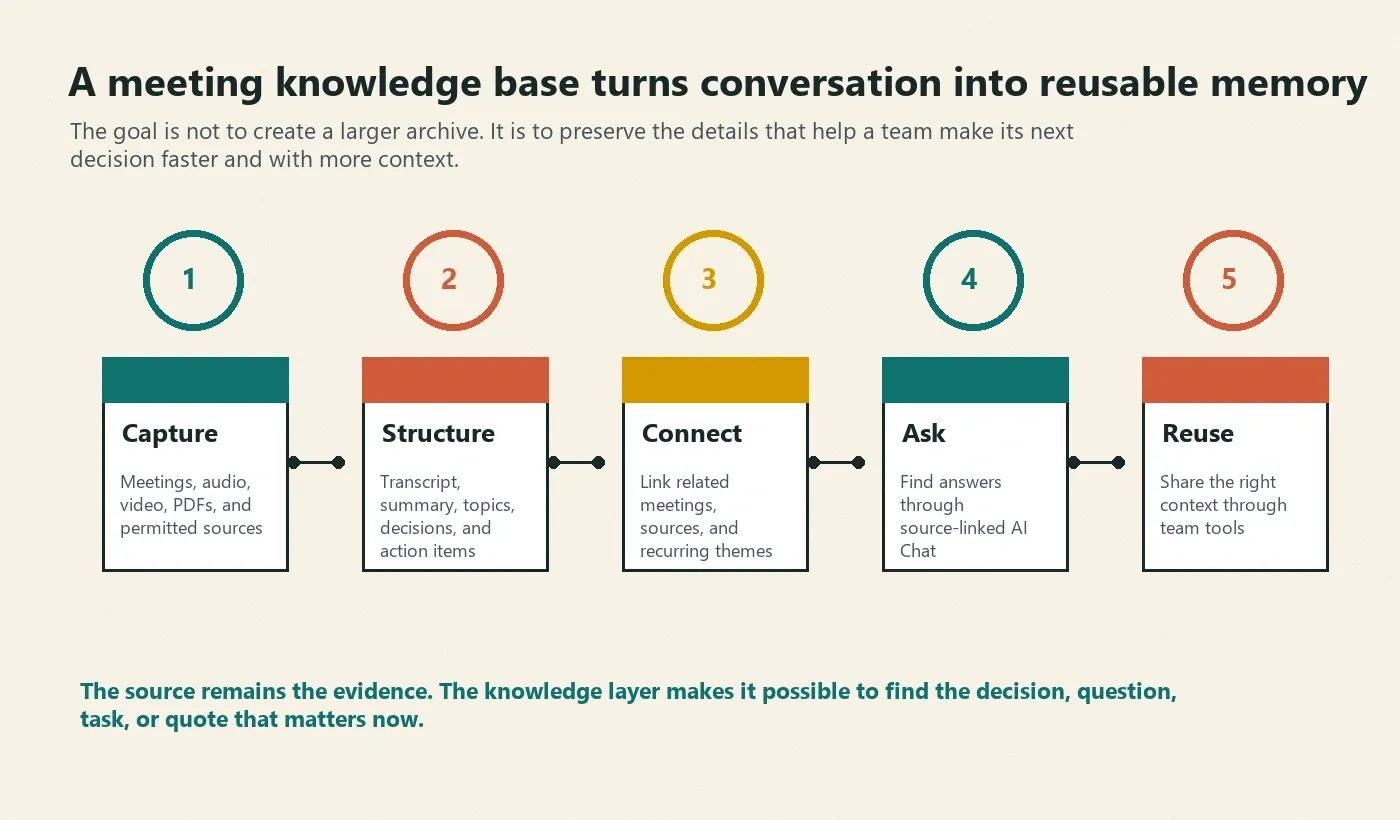
- Capture the right sources. Use authorized meetings, audio files, video, transcripts, PDFs, and permitted content that contain reusable business, customer, product, or project context.
- Turn the source into structured notes. Generate transcripts, summaries, decisions, action items, topics, and mind maps so people can scan the outcome before reading the whole source.
- Connect related knowledge. Link decisions to the meeting that created them, actions to their owners and dates, and recurring themes to their supporting conversations.
- Ask questions with source context. Let teammates retrieve a decision, commitment, risk, or customer insight through AI Chat and trace the answer back to the source record.
- Share the appropriate view. Send summaries, actions, and knowledge links to the tools where the team plans and communicates, while retaining more sensitive source material for authorized users.
Atlassian's guidance on knowledge management emphasizes making knowledge available to the people who need it. For meeting content, that begins with a source record but depends on a structure that makes the record useful in the next piece of work.
The Five Layers of a Useful Meeting Knowledge Base
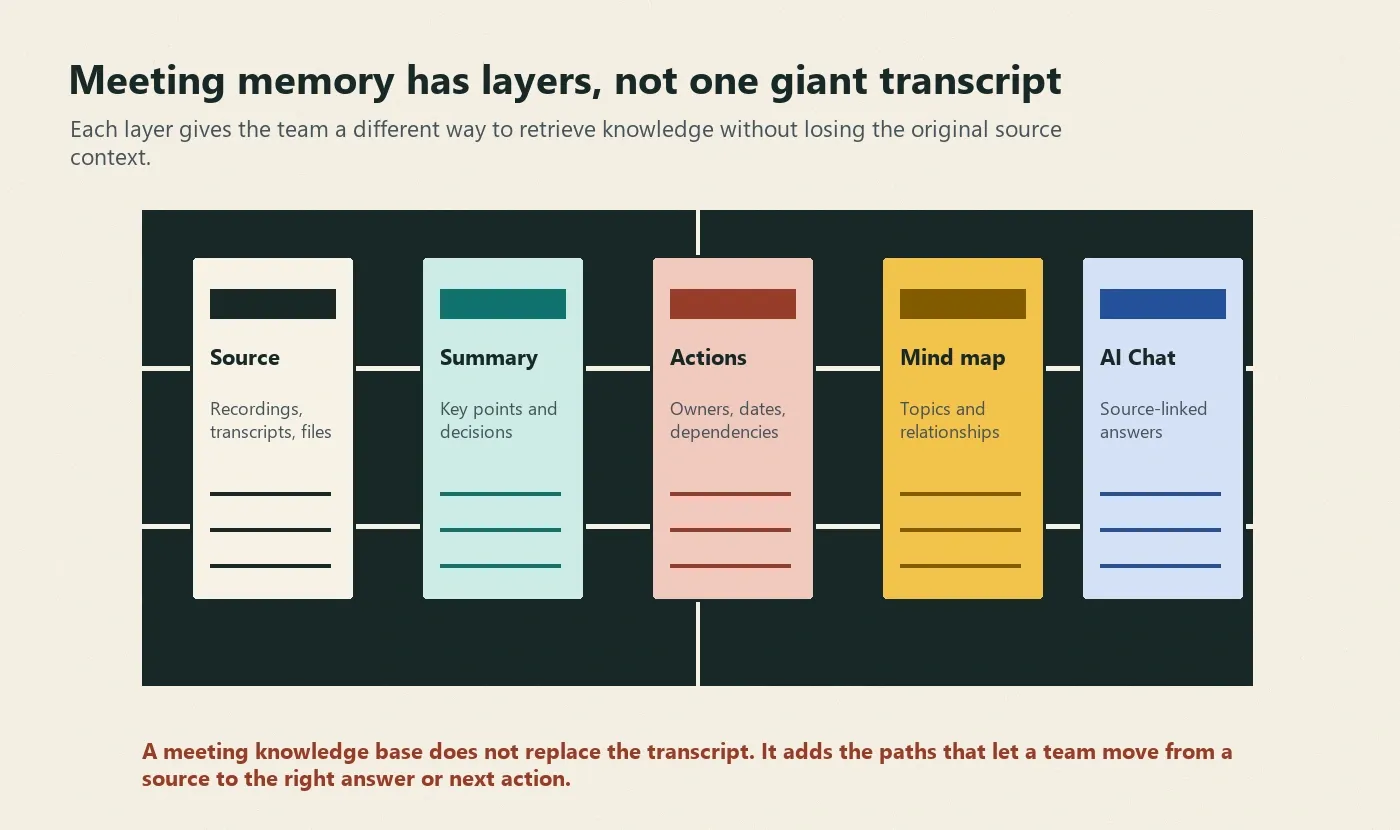
One transcript cannot satisfy every task. People need different layers depending on whether they are checking a fact, looking for a decision, preparing a follow-up, or understanding a relationship among topics. A good knowledge base keeps those layers connected.
| Layer | What it contains | Best use |
|---|---|---|
| Source | Meeting recording, transcript, audio, video, PDF, or original file | Verify exact wording and surrounding context |
| Summary | Key points, outcome, decision, risk, and open question | Quick orientation before a handoff or review |
| Action items | Task, owner, timing, dependency, and source | Follow-through after the meeting |
| Mind map | Topics, themes, decisions, and related dependencies | See the shape of a complex conversation |
| AI Chat | Source-linked questions and answers | Retrieve context without rereading every meeting |
Keep the source layer available even when the summary is good. A summary is an interpretation of what mattered. The source allows a reviewer to check what was said, by whom, and in what context.
Ask HiNoter AI Chat Questions Your Team Actually Has
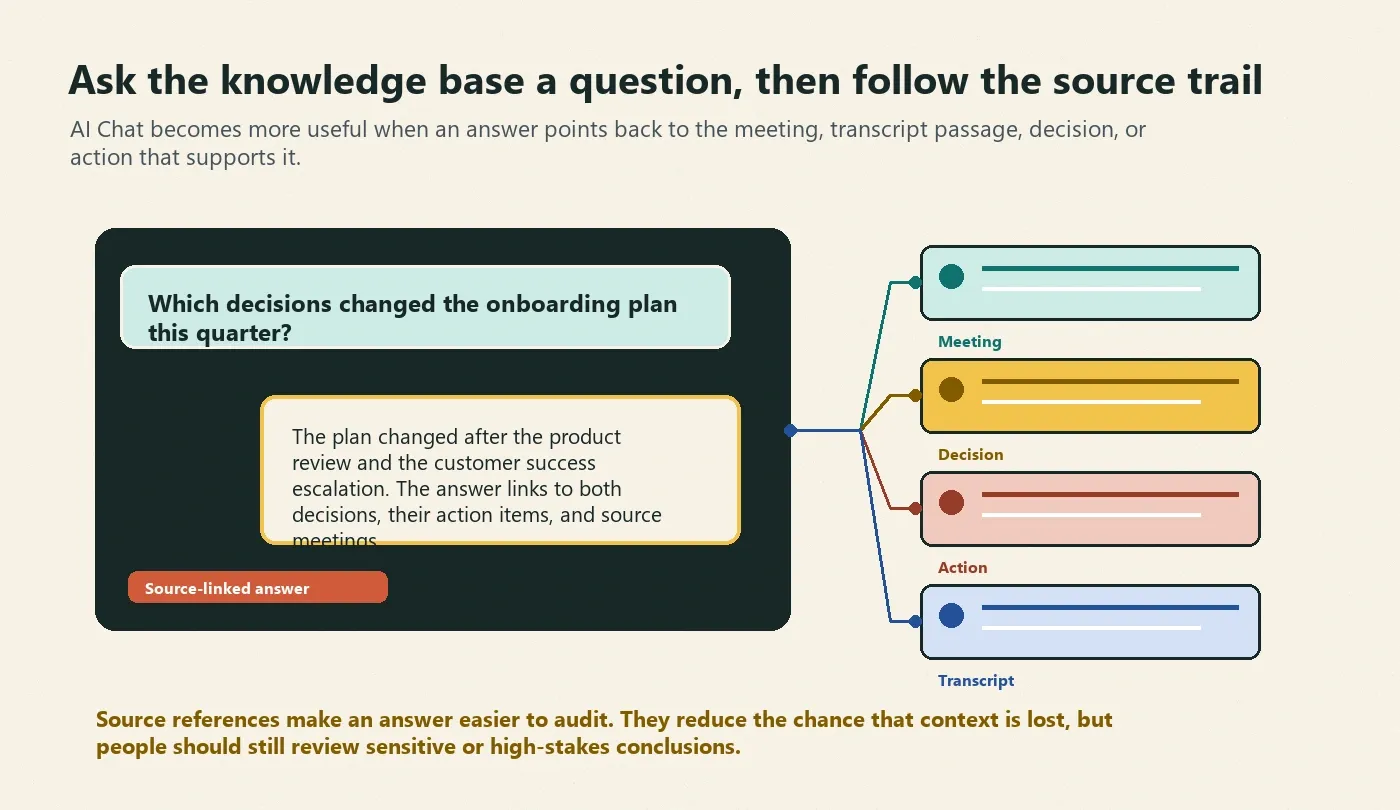
A meeting knowledge base is only valuable when a teammate can find an answer without knowing which call held the detail. HiNoter AI Chat gives users a way to ask about meeting content and navigate back to the source behind the answer.
| Question | What a useful answer includes | Source trail |
|---|---|---|
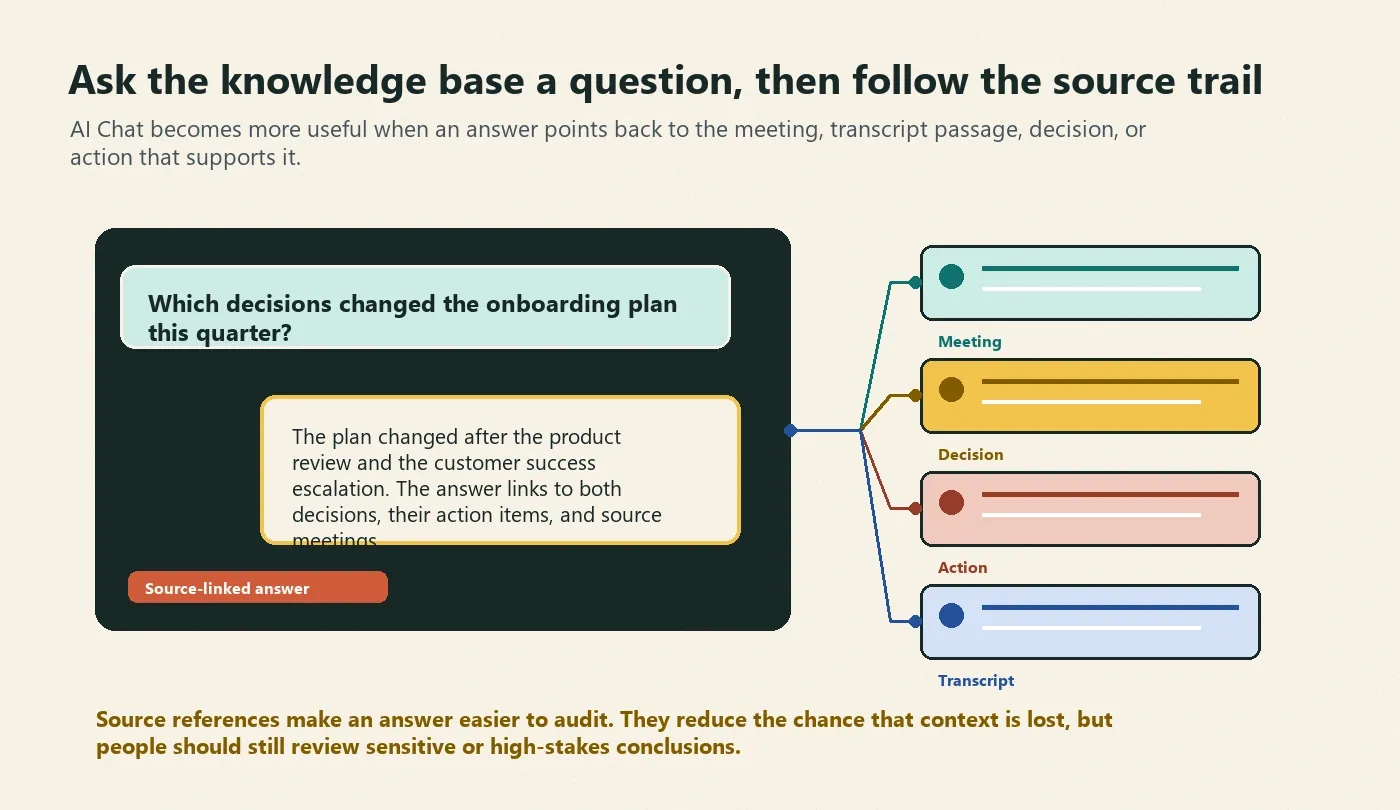
| “Which decisions changed the onboarding plan this quarter?” | Decision, reason, related action, and outcome | Product review, customer escalation, and source summaries |
| “What did we commit to before the pilot?” | Task, owner, date, and customer context | Meeting title, transcript excerpt, and follow-up record |
| “Who owns the security review?” | Current owner, timing, and dependency | Original assignment and subsequent updates |
| “What did the customer say about adoption risk?” | Customer language, summary, and related risk theme | Customer success meeting and timestamped source |
| “What is still unresolved?” | Open questions, actions, and pending decisions | Linked meetings and their latest status |
Source references make an AI answer auditable. They help a team move from a concise answer to the meeting, timestamp, transcript passage, decision, or action that supports it. That reduces the chance of a context-free paraphrase going unnoticed, but it does not remove the need to review sensitive, ambiguous, or high-stakes conclusions.
Sample Output: From a Meeting Note to Team Memory
The fictional example below shows how one customer implementation meeting can become a reusable record instead of another item in a recording folder.
Meeting: Pilot implementation review
Date: July 14
Participants: Customer operations director, solutions lead, project manager

Summary:
- The pilot scope depends on a completed security review and two confirmed regional participants.

Decision:
- Keep the pilot planning session on the calendar, but defer final scope approval until security review is complete.

Action items:
- Maya | Send revised rollout plan | Thursday | Source: 00:32:14
- Customer operations director | Confirm pilot participants | Before next call | Source: 00:36:40
- Project manager | Prepare leadership risk recap | Friday | Source: 00:41:08

Mind-map themes:
- Pilot scope -> security review -> participant confirmation
- Adoption risk -> onboarding dependency -> delivery timeline

AI Chat example:
Q: What is blocking pilot scope approval?
A: The security review and final participant confirmation. See the implementation review summary and the source-linked actions above.
This record is useful because it contains the outcome, not merely a list of things that were discussed. The original source remains available whenever the team needs the exact surrounding language.
Meeting Knowledge Base vs. Manual Notes vs. a Transcript Folder
| Approach | Best for | Strength | Limitation |
|---|---|---|---|
| Manual meeting notes | Personal observation and immediate shorthand | Flexible and selective | Inconsistent, private, and hard to search across a team |
| Transcript folder | Record retention and exact quotes | Preserves a source for later search | Knowledge remains chronological and difficult to connect |
| Meeting knowledge base | Cross-team retrieval, handoff, onboarding, and follow-through | Connects source, summary, action, decision, and AI Chat | Requires permission-aware capture and review of important outputs |
| Project wiki | Documented processes and planned work | Good home for curated information | Often misses the meeting sources that explain why work changed |
Use manual notes for momentary judgment. Keep transcripts as evidence. Use a meeting knowledge base when the team needs to retrieve, connect, and act on conversation over time.
One Source, Different Team Views
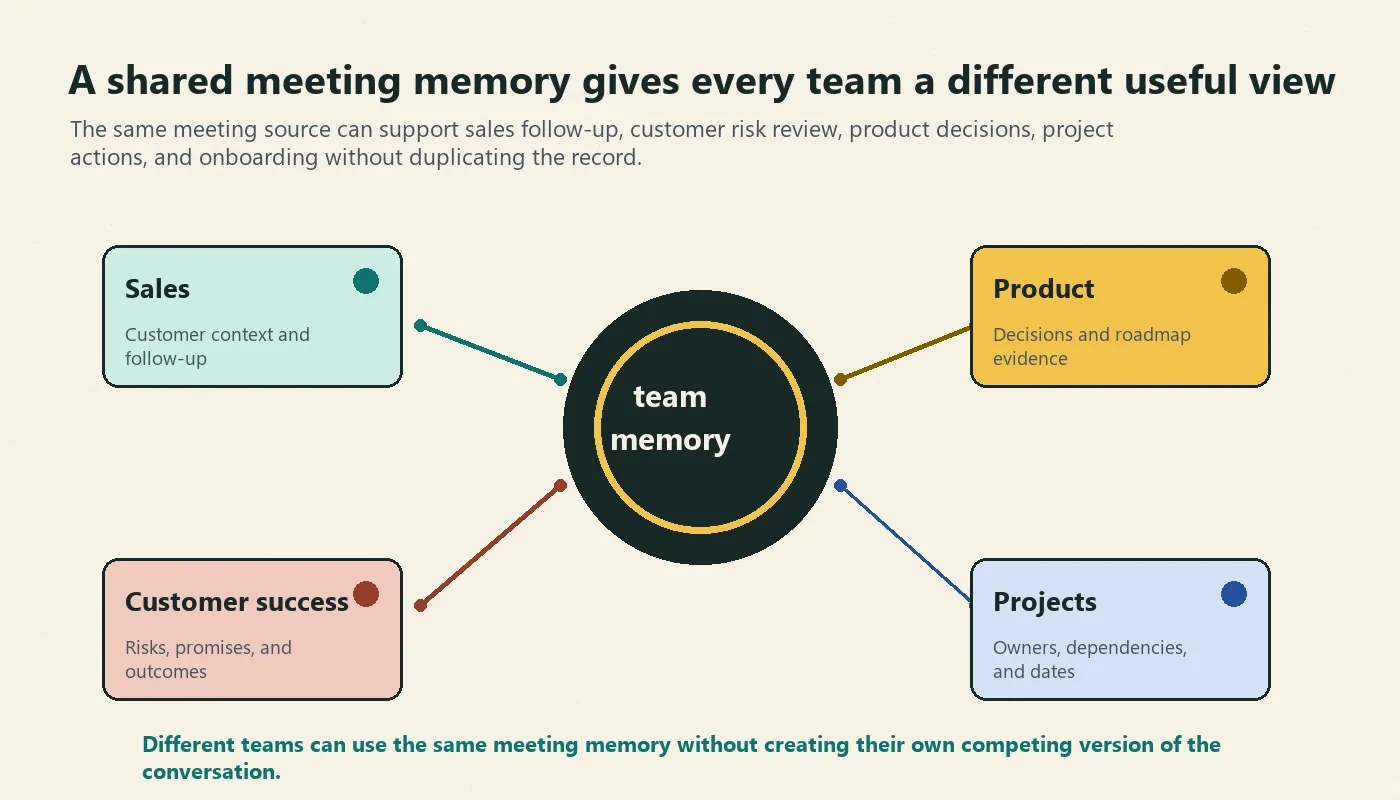
Meeting knowledge should not force every team into the same summary format. The same underlying conversation can support different useful views, as long as the source is preserved and the outputs remain connected.
| Team | What they need to retrieve | Useful knowledge-base output |
|---|---|---|
| Sales | Customer context, objections, commitments, and next steps | Account recap, action plan, and source quotes |
| Product | Feedback, decisions, trade-offs, and roadmap rationale | Decision record, mind map, and linked evidence |
| Customer success | Adoption risk, promised outcomes, stakeholder context | Health summary, risk themes, and follow-up actions |
| Project teams | Owners, dependencies, timing, and unresolved questions | Action tracker, decision summary, and source links |
| New employees | History, repeated questions, and prior decisions | Searchable answers with source context |
How HiNoter Builds a Meeting Knowledge Base
HiNoter is an AI meeting notes and transcription platform plus a meeting knowledge base. It gives teams a path from capture to structure to retrieval, without asking one attendee to type every decision while the meeting is happening.
- Capture meetings and content sources. Connect an approved calendar workflow or upload audio, video, permitted YouTube sources, PDFs, and files.
- Create structured knowledge. HiNoter generates transcripts, summaries, action items, and mind maps with support for more than 50 languages and automatic detection.
- Keep actions connected to the source. Review owners, timing, dependencies, and important commitments with the supporting meeting context available.
- Ask the knowledge base. Use source-linked AI Chat to retrieve decisions, insights, action items, and answers across meeting content.
- Send knowledge where work happens. Share outputs with Notion, Slack, Google Docs, calendar workflows, and email.
Explore related HiNoter workflows for AI meeting notes, an AI meeting assistant, meeting summary generation, audio to text, AI Chat with source references, and multilingual meeting support.
Integrations: Move the Right Knowledge to the Right Place
A meeting knowledge base should not create another isolated destination. The source and full transcript may be useful for a smaller group, while the summary and action list should move into the existing systems where teams plan, discuss, and follow up.
| Destination | Best use | What to share |
|---|---|---|
| Notion | Team knowledge base, initiative context, and decision history | Summary, mind map, decisions, actions, and source links |
| Slack | Fast visibility and ongoing discussion | Short recap, current actions, and links to full context |
| Google Docs | Collaborative review and annotated planning | Expanded notes, transcript excerpts, and open questions |
| Customer, executive, or stakeholder recap | Verified commitments, owners, and next meeting | |
| Calendar workflow | Recurring meeting continuity | Prior actions, latest decisions, and agenda prompts |
Access, Privacy, and Source Review
Meeting knowledge can include customer data, employee information, financial plans, product strategy, security discussion, hiring detail, and private opinions. Follow your organization's policy for recording, consent, access, retention, and sharing. One team may need a concise summary while a smaller group needs the full source.
Source-linked AI Chat supports review, but it does not make every answer automatically final. Confirm high-stakes information, customer promises, financial terms, hiring decisions, and security commitments against the original source before acting on them. This article describes an operating workflow, not legal advice.
Meeting Knowledge Base FAQ
What is a meeting knowledge base?
A meeting knowledge base is a searchable, shared system that turns meeting sources into structured team memory. It connects transcripts, summaries, decisions, action items, mind maps, source references, and related meetings so people can retrieve the context behind a question or task.
How is a meeting knowledge base different from a meeting archive?
A meeting archive stores recordings or notes. A meeting knowledge base organizes and connects the useful outcomes of those sources, such as decisions, owners, deadlines, themes, and source-linked answers. The difference is retrieval and context, not just storage volume.
How does AI Chat work with a meeting knowledge base?
AI Chat lets users ask questions about meeting content and receive structured answers. With source references, users can trace an answer to the meeting, timestamp, transcript excerpt, or related record that supports it.
Can a meeting knowledge base create action items?
Yes. A meeting knowledge base can include action items extracted from meeting content, along with owner, timing, dependency, source, and status information. Teams should verify important commitments when conversation is ambiguous or high-stakes.
What content can go into a meeting knowledge base?
HiNoter can turn authorized meetings, audio, video, permitted YouTube sources, PDFs, transcripts, and uploaded files into structured knowledge. The useful output can include notes, summaries, action items, mind maps, exports, and source-linked AI Chat.
Who should have access to meeting knowledge?
Access should follow the sensitivity of the source. A broad team may need the summary and action plan, while full recordings or transcripts may be limited to authorized people. Follow company policy, participant notice, and applicable privacy requirements.
Can a meeting knowledge base help new employees onboard?
Yes. It can help new employees find prior decisions, customer context, repeated questions, owners, and project history without requiring another teammate to retell every meeting. Use source links when the person needs fuller context.