Direct answer: A meeting recap email is a short follow-up message sent after a meeting to summarize what happened, what was decided, who owns each action item, when work is due, and what remains open. The best recap email is clear enough for absent stakeholders and specific enough for the team to act without another meeting.
Copyable Meeting Recap Email Template
Use this template when a meeting produced decisions, action items, owners, risks, or open questions. It works for project meetings, customer calls, sales handoffs, leadership reviews, product syncs, recruiting debriefs, and one-on-one follow-ups.
General meeting recap email
Subject: Meeting recap: [Meeting name] - [Date]
Hi [team/name],
Thanks for the discussion today. Here is a quick recap so everyone has the same record.
Summary: [Two or three sentences explaining the purpose of the meeting, the main outcome, and what changed.]
Key decisions: [Decision 1] - [Decision 2] - [Decision 3]
Action items: [Task] - Owner: [Name] - Due: [Date] - Status: [Open / waiting / done]
Risks or blockers: [Risk] - Owner: [Name] - Next review: [Date]
Open questions: [Question] - Owner: [Name] - Needed by: [Date]
Next step: [What happens next and when.]
Full notes: [Link to meeting notes or workspace page]
Please reply with corrections or missing context by [deadline].
Thanks, [Your name]
Generate this automatically with HiNoter: Connect your calendar, let HiNoter capture the meeting, then review the generated attendees, agenda summary, decisions, action items, owners, due dates, risks, open questions, and follow-up email draft before sending it.
A meeting recap email looks simple, but it solves a stubborn team problem. Meetings create decisions and commitments, then those details scatter across recordings, private notes, chat threads, and memory. By the time someone asks what was agreed, the team is already chasing context instead of doing the work.
The value of a recap is not politeness. The value is alignment. A good recap gives people who attended the same understanding, gives people who missed the meeting enough context to catch up, and gives managers a clear way to see whether the meeting produced action.
Microsoft Work Trend Index research found that people want AI to help with finding information, summarizing meetings and action items, and making meetings more useful as digital artifacts. That matches the everyday workflow problem: the meeting itself is not the finish line. The follow-up record is what keeps work moving.
Why a Meeting Recap Email Matters
Meeting notes can be long. Meeting minutes can be formal. A meeting recap email is the working version people actually read. It should be short, direct, and useful enough that someone can answer three questions within a minute: What happened? What did we decide? What do I need to do?
That matters for remote and hybrid teams because not everyone receives context at the same time. Time zones, back-to-back calls, missed invites, and private side conversations all create gaps. A recap email gives the team a shared record after the call, especially when it links to the full notes for anyone who needs detail.
Asana's Anatomy of Work research describes the drag of "work about work": searching for information, chasing updates, and coordinating status. A good meeting recap reduces that drag. It turns a conversation into a record the team can search, share, and act on.
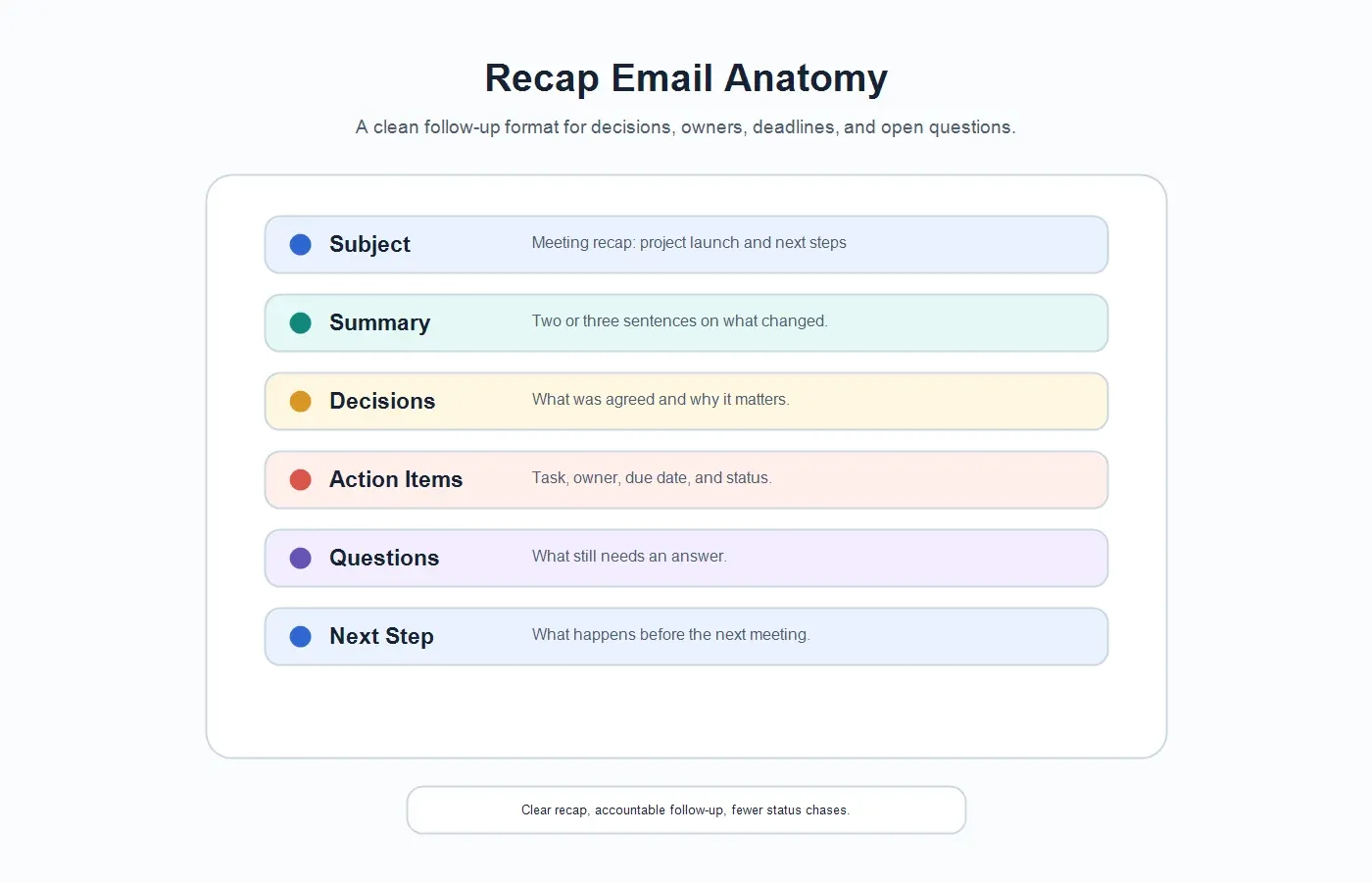
What Should a Meeting Recap Email Include?
| Field | What to Include | Why It Matters |
|---|---|---|
| Subject line | Meeting name, date, and the phrase "recap" or "next steps." | Makes the email easy to find later. |
| Short summary | Two or three sentences on the purpose, outcome, and context. | Helps busy readers understand the meeting without reading every detail. |
| Decisions | What was agreed, changed, approved, rejected, or deferred. | Prevents the team from reopening decisions accidentally. |
| Action items | Task, owner, due date, and status. | Turns discussion into accountable work. |
| Risks and blockers | Anything that could delay progress or needs escalation. | Gives managers early visibility before the issue becomes urgent. |
| Open questions | Unresolved topics, missing information, or decisions needed later. | Keeps uncertainty visible instead of hidden in vague notes. |
| Full notes link | Link to the transcript, meeting notes, workspace page, or source record. | Lets readers verify details without asking for another recap. |
Meeting Recap Email Examples by Meeting Type
Project meeting recap email
Subject: Project launch recap - decisions and next steps
Hi team,
Thanks for the launch review today. We aligned on the current timeline, confirmed the first pilot scope, and identified one open risk around security review timing.
Decisions: The pilot will include the core onboarding workflow. Two advanced admin settings will move to the post-pilot backlog. The customer-facing timeline will be updated before the next walkthrough.
Action items: Maya will update the release plan by Thursday. Jordan will confirm the security review date by Friday. Priya will send the revised customer email draft today.
Open risk: If the security packet is not reviewed by Friday, the pilot start date may move by one week.
Full notes: [Link]
Please reply by tomorrow if anything is missing.
Generate this automatically with HiNoter: HiNoter can extract the agenda, decisions, owners, due dates, risks, and follow-up email draft from the meeting so the project manager only needs to review and send.
Customer success recap email
Subject: Recap: QBR follow-up and renewal next steps
Hi [customer name],
Thank you for the QBR discussion. We reviewed adoption progress, discussed the renewal timeline, and agreed on the next steps needed before your internal review.
Summary: Your team is seeing strong usage in support and operations, while the admin team still needs additional training before broader rollout. Security review remains the main dependency for renewal confidence.
Action items: We will send updated SSO documentation by Wednesday. You will confirm the admin training attendees by Friday. We will prepare an adoption-by-team report for the next check-in.
Open question: Should the executive sponsor join the next review, or should we send a written summary first?
Thanks again, and we will follow up with the security packet shortly.
Generate this automatically with HiNoter: HiNoter can turn customer calls into a recap with renewal risks, customer commitments, owners, due dates, and source-linked notes for the account team.
Internal decision recap email
Subject: Decision recap: pricing page experiment
Hi everyone,
Here is the recap from today's decision meeting. We agreed to run the pricing page experiment for two weeks, using sign-up rate and sales-qualified conversion as the primary measures.
Decision: Launch Variant B on Monday. Keep the annual plan discount visible. Do not change trial length during the test.
Action items: Dana will publish the page by Friday. Leo will confirm tracking before launch. Morgan will prepare the results readout template.
Open question: Should the experiment exclude existing customer traffic?
Full notes: [Link]
Generate this automatically with HiNoter: HiNoter can detect the decision, capture the rationale, assign follow-up owners, and create a concise email draft that links back to the structured notes.
Meeting Recap Email vs Meeting Notes vs Meeting Minutes
| Format | Best Use | Typical Length |
|---|---|---|
| Meeting recap email | Fast follow-up after a meeting with summary, decisions, and action items. | 150 to 400 words for most business meetings. |
| Meeting notes | Detailed working record with transcript, context, ideas, and references. | As long as needed for internal review. |
| Meeting minutes | Formal record for boards, committees, governance, and project accountability. | Structured and more formal than a recap email. |
A recap email can link to notes or minutes, but it should not try to replace every detail. Its job is to make the next step obvious. If readers need the full transcript, source quote, or mind map, link to the full record instead of crowding the email.
How HiNoter Generates Meeting Recap Emails
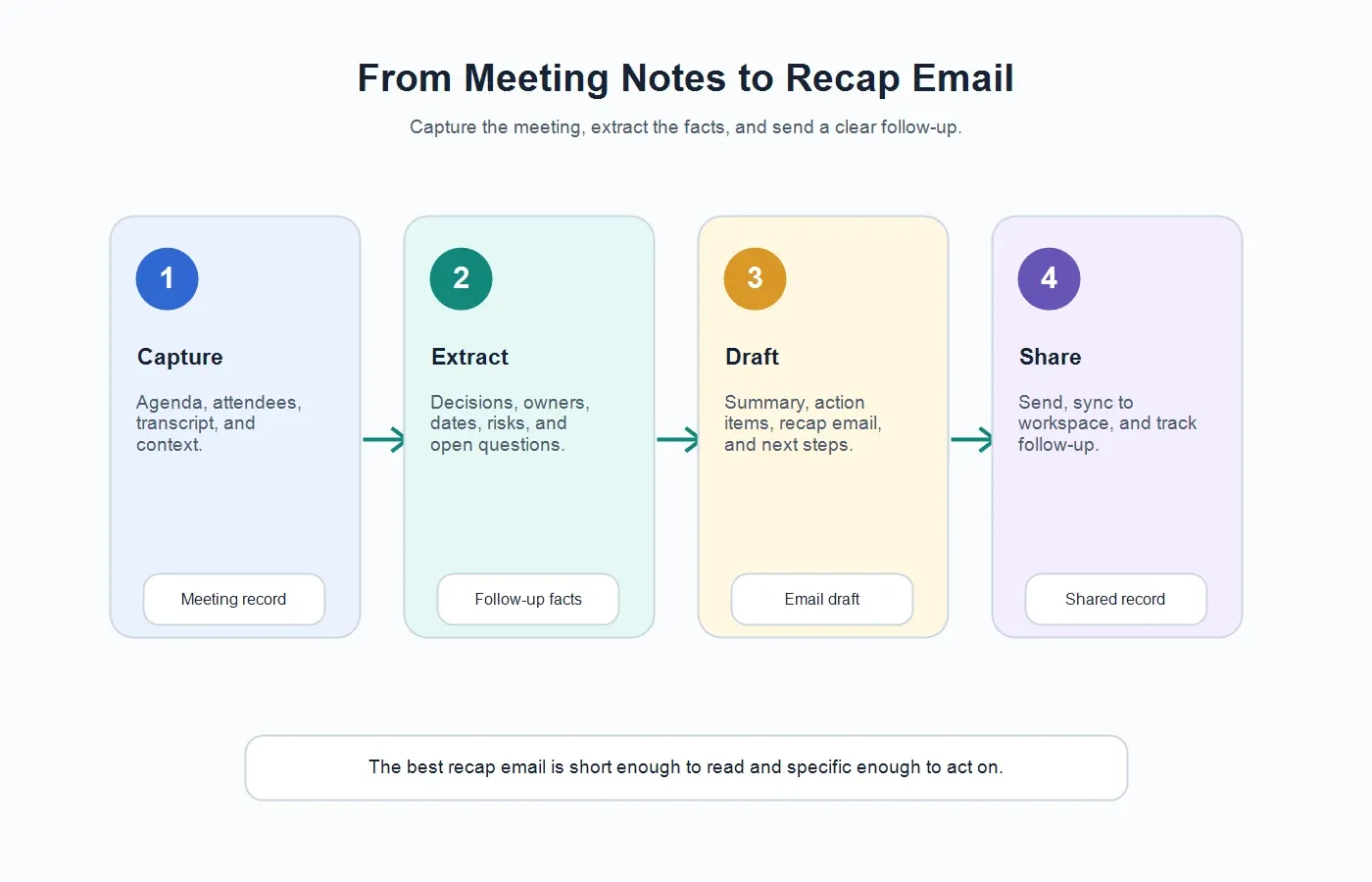
1. Capture the meeting without manual note-taking
HiNoter can support meeting capture through scheduled meeting workflows, recordings, and supported uploads. With the HiNoter meeting assistant, teams can reduce the chance that someone forgets to start notes or assign a human note taker.
2. Create structured AI meeting notes
The recap email should come from a reliable structured note, not from memory. HiNoter creates AI meeting notes that include summaries, key decisions, and action items, giving the email draft a cleaner source to work from.
3. Extract owners, dates, risks, and open questions
A useful recap is specific. HiNoter looks for tasks, owners, deadlines, blockers, and unresolved questions. If an item is ambiguous, the final email should leave space for human review instead of pretending the ownership is clear.
4. Draft the follow-up email
Once the meeting note is structured, HiNoter can help turn it into a recap email: summary first, decisions second, action items third, then risks, open questions, and the full notes link. This keeps the email readable while preserving access to the deeper record.
5. Sync the recap to the workspace
Many teams need the recap email and the workspace record. With the HiNoter Notion integration, meeting outputs can land in a shared knowledge base, so the email is not the only place where the follow-up exists.
6. Ask questions later with AI Chat
A recap email is useful on the day it is sent. A searchable note is useful weeks later. HiNoter AI Chat lets teammates ask questions about notes and receive answers with source references, which helps reduce unsupported claims and makes important details easier to verify.
Action Item Table for Recap Emails
For meetings with more than two tasks, use a small action item table. It is easier to scan than a paragraph and makes accountability visible.
| Action Item | Owner | Due Date | Status |
|---|---|---|---|
| Send revised customer timeline. | Alex | Friday | Open |
| Confirm security review date. | Jordan | Thursday | Waiting |
| Update launch plan with pilot scope. | Maya | Tomorrow | Open |
If you already use a tracker, link to it from the email. HiNoter-generated outputs can also be exported to a shared document through the HiNoter Google Docs integration, so tasks are easier to review after the recap is sent.
Subject Lines and Sending Timing
A recap email is easier to find when the subject line is predictable. Use the meeting name, the word "recap," and the action focus. Avoid clever subject lines. Nobody searches their inbox for a clever phrase when they need to confirm who owns the security packet.
| Meeting Type | Subject Line Example | When to Send |
|---|---|---|
| Project sync | Project launch recap: decisions and next steps | Same day, before the next work block starts. |
| Customer call | Recap: QBR follow-up and open items | Within a few hours, while the conversation is fresh. |
| Leadership review | Leadership recap: approved plan and risks | Same day, after confirming sensitive wording. |
| Decision meeting | Decision recap: pricing experiment launch | Immediately after review if work depends on it. |
Timing matters because a recap is most useful before people start acting from memory. For routine internal meetings, same-day follow-up is usually enough. For customer calls, sales handoffs, project escalations, or executive decisions, faster is better. The longer a team waits, the more likely details become fragmented across private notes and chat replies.
If the meeting involved sensitive topics, send the recap quickly but review the language first. A hiring debrief, legal discussion, pricing negotiation, or customer escalation may need a cleaner internal version and a separate external-facing version. HiNoter can help draft the raw follow-up, but the final audience and wording should still be chosen by a human.
Common Mistakes in Meeting Recap Emails
| Mistake | Why It Hurts | Better Approach |
|---|---|---|
| Sending a transcript instead of a recap. | Busy readers still have to find the important parts. | Lead with summary, decisions, action items, and risks. |
| Writing vague action items. | "Follow up" does not explain who does what by when. | Use task, owner, due date, and status. |
| Hiding open questions. | Unresolved issues become surprises later. | Add a short open questions section. |
| Overwriting the meeting record. | People cannot verify details if the recap is the only artifact. | Link to full notes, transcript, or source record. |
| Waiting too long to send it. | Context fades and follow-up slows down. | Send the recap soon after the meeting, ideally the same day. |
When to Keep the Recap Short
Keep the recap short when the meeting was routine, the decisions were straightforward, or the audience already has access to the full notes. A short recap works well for daily standups, weekly syncs, internal check-ins, and status updates where the action list is more important than the discussion history.
Use a longer recap when the meeting involved customers, executives, legal review, hiring decisions, launch tradeoffs, or unresolved risk. In those cases, include enough context to explain why the decision was made, then link to the full record for anyone who needs the exact wording.
Try HiNoter as a Meeting Recap Email Generator
If your team spends meeting time talking and then spends more time reconstructing what happened, the problem is not effort. It is workflow. A reliable recap email generator should start from the meeting record, extract the useful details, draft the follow-up, and keep the source available for review.
HiNoter helps teams move from meeting to recap without manual note-taking. Connect your calendar, capture the meeting, review the structured notes, and turn the output into a concise recap email with summary, decisions, owners, due dates, risks, open questions, and next steps.
CTA: Try HiNoter to generate your next meeting recap email automatically, then send a cleaner follow-up while the context is still fresh.
FAQs
What is a meeting recap email?
A meeting recap email is a follow-up message sent after a meeting. It summarizes the discussion, decisions, action items, owners, due dates, risks, open questions, and next steps.
What should be included in a meeting recap email?
Include the meeting name, date, short summary, key decisions, action items with owners and due dates, risks, open questions, next step, and a link to the full notes when available.
How long should a meeting recap email be?
Most recap emails should be 150 to 400 words. Longer meetings may need more detail, but the email should still be easier to scan than the full notes or transcript.
What is the difference between meeting notes and a meeting recap email?
Meeting notes are the fuller working record. A meeting recap email is the concise follow-up version that highlights the summary, decisions, action items, and next steps for the people who need to act.
What is the difference between meeting minutes and a recap email?
Meeting minutes are usually more formal and may be used as an official record. A recap email is less formal and focused on alignment, follow-up, and accountability.
Can AI write a meeting recap email?
Yes. AI can draft a strong recap email from meeting notes or a transcript by extracting the summary, decisions, action items, owners, due dates, risks, and open questions. A human should review the final message before sending.