Direct answer: Speech to text online converts spoken audio into written text through a browser-based workflow. Upload or record permitted audio, confirm the language, generate a transcript, review speakers and key terms, then export or summarize it. HiNoter adds summaries, action items, mind maps, and searchable Q&A with source context.
Online speech-to-text tools are popular because they remove friction. You do not need heavy desktop software to turn a meeting, interview, class recording, or voice memo into text. But text alone is rarely the finish line. Teams still need to know what was decided, which quote matters, who owns the next step, and where the source evidence lives.
This page explains how online speech recognition works in a practical business workflow. It covers uploads and browser recording, supported sources, language detection, speaker labels, timestamps, editing, exports, accuracy factors, privacy, and the reason many teams now need transcription plus a knowledge layer.
What Is Speech to Text Online?
Speech to text online is a browser-based way to convert spoken words into written text. Users typically upload an audio or video file, record from a microphone, or connect a meeting source, then receive an editable transcript. The output may include timestamps, speaker labels, paragraphs, and export formats depending on the tool.
Transcription is the broader workflow of turning recorded speech into a usable written record. Speech-to-text is the technology that performs the conversion. AI-assisted transcription goes further by using the transcript to generate summaries, action items, chapters, mind maps, and answers tied to the source.
How to Use Speech to Text Online
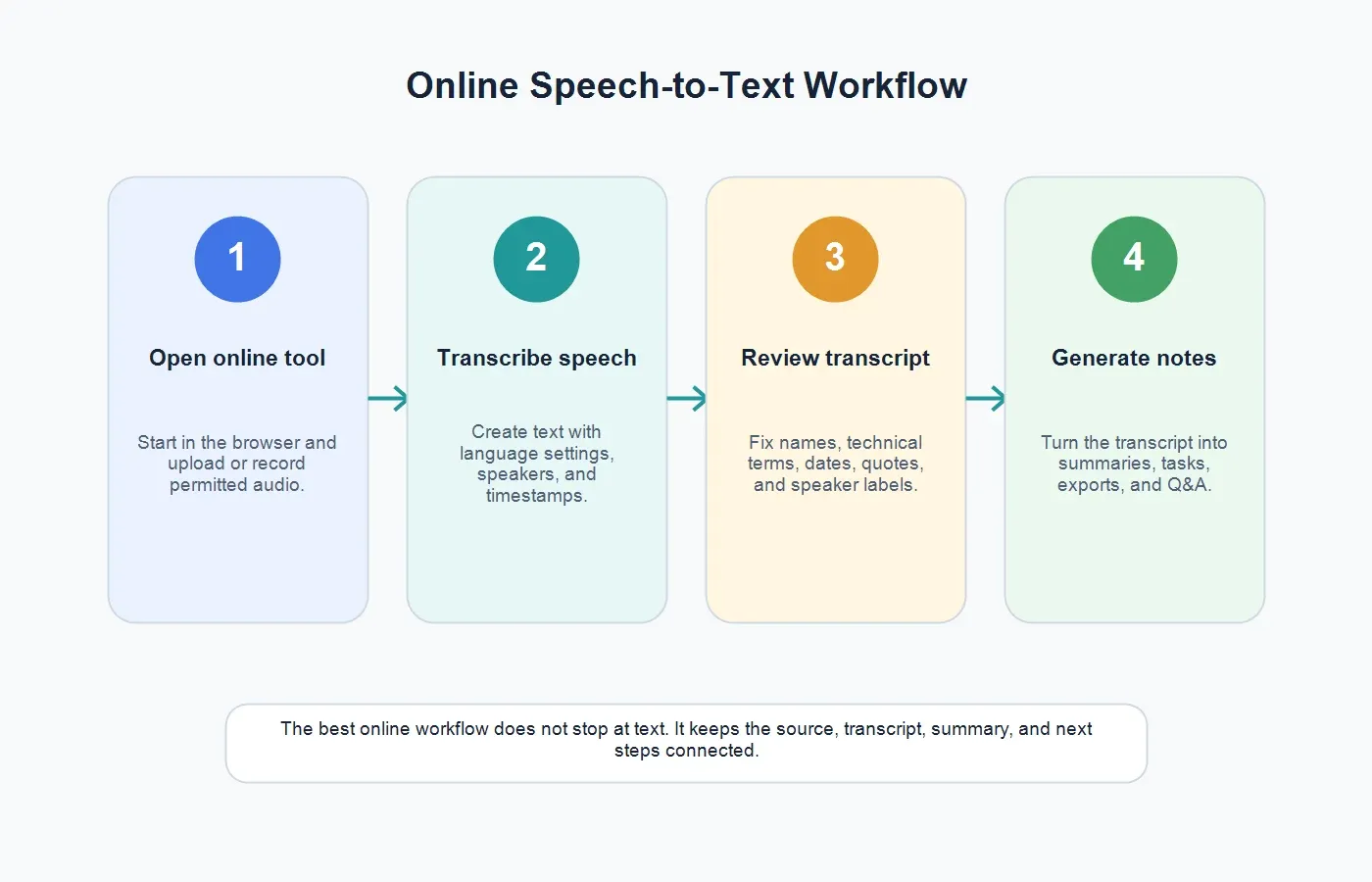
A good online workflow is simple on the surface but disciplined behind the scenes. The goal is not to collect transcripts for their own sake. The goal is to make spoken information searchable, reviewable, shareable, and useful for follow-up.
| Step | What to Do | Result |
|---|---|---|
| 1. Open online tool | Use an approved browser-based speech-to-text workspace. | A secure place to upload or record audio. |
| 2. Add source | Upload a permitted recording or capture a new voice note. | Source audio ready for transcription. |
| 3. Confirm language | Use automatic language detection or choose the spoken language. | Better transcript settings for the recording. |
| 4. Generate transcript | Create text with speaker labels and timestamps where available. | A searchable and editable transcript. |
| 5. Review and summarize | Fix important terms, then create summary, tasks, and exports. | Usable notes instead of raw text. |
If you need more than text, HiNoter turns audio into a transcript plus summary, action items, mind map, exports, and searchable Q&A. That makes it useful for teams that need decisions and follow-up, not just a text file.
What Sources Can You Convert?
Online speech-to-text workflows usually start with audio files such as MP3, WAV, M4A, or meeting exports. Many business users also work with video files because the spoken content lives inside a screen recording, demo, webinar, lecture, or customer training session. The best workflow should accept the source format your team already has rather than forcing someone to extract audio manually first.
For meetings, HiNoter can also support a capture-first workflow through its AI meeting assistant. That is useful when the team wants meeting notes after a scheduled call without assigning a human notetaker to listen, type, and chase action items later.
Always check permission before processing audio. Upload recordings you own, are authorized to process, or can lawfully use. Customer calls, hiring interviews, coaching sessions, private voice notes, and internal planning meetings may contain personal data or sensitive company information.
Voice Typing, Transcription Apps, and AI Notes Compared
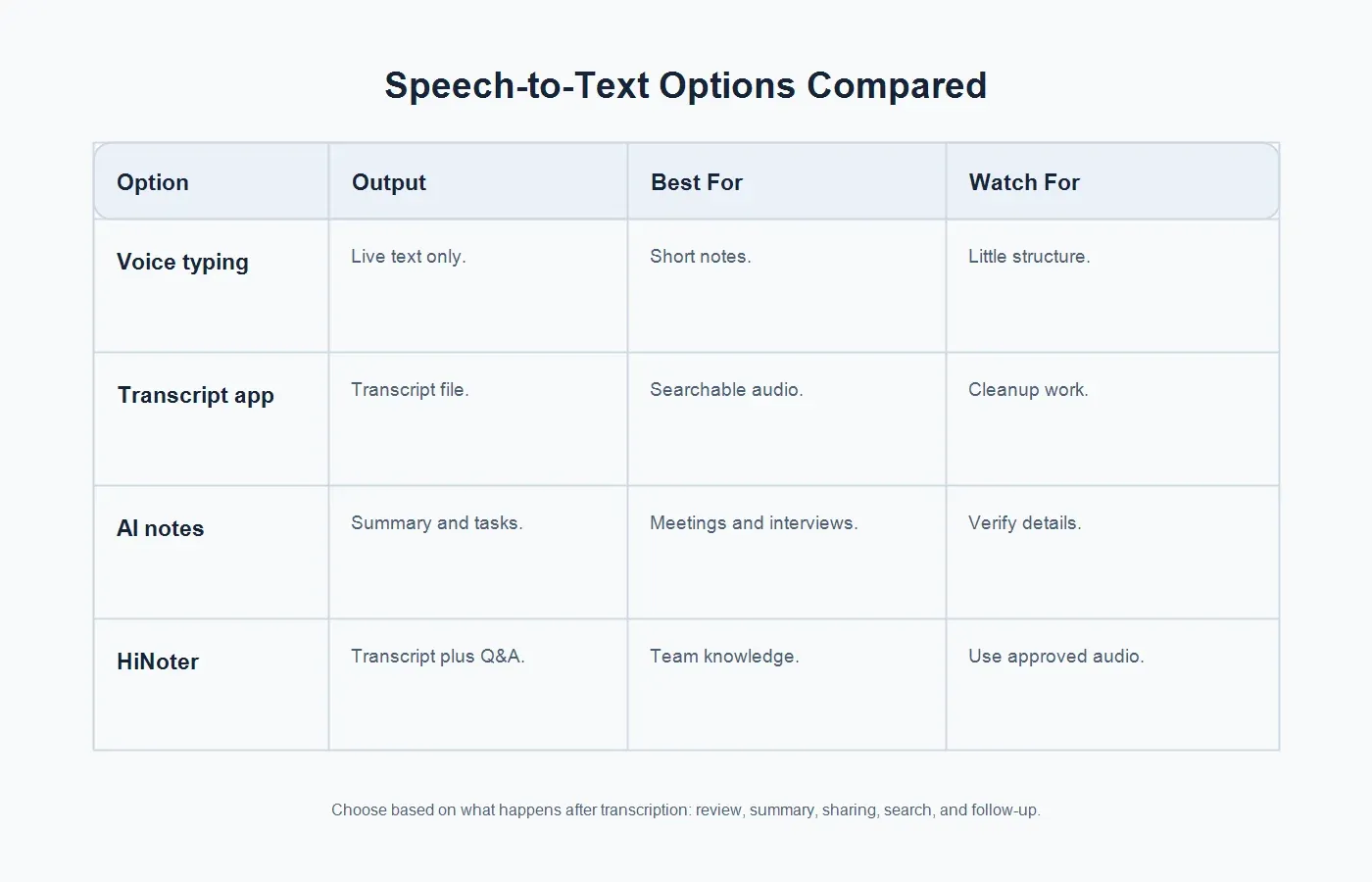
People use "speech to text" to describe several different tools. Some are built for live dictation. Others are built for file transcription. A smaller group turns speech into structured meeting notes and searchable team knowledge.
| Option | Output | Best For | Watch For |
|---|---|---|---|
| Voice typing | Live text while one person speaks. | Short notes, drafts, messages, and quick dictation. | Usually little structure, weak speaker context, and limited review workflow. |
| Basic transcription app | A transcript file from uploaded audio. | Searchable recordings, interviews, lectures, and simple audio files. | Cleanup, speaker correction, and summarization still fall to the user. |
| AI notes workflow | Transcript plus summary, actions, and key points. | Meetings, interviews, research calls, and customer conversations. | Important facts, names, numbers, and quotes still need review. |
| HiNoter | Transcript, summary, action items, mind map, exports, and AI Chat with source references. | Teams that need searchable knowledge across audio, meetings, and media. | Use clear audio and approved sources for best results. |
Speaker Labels and Timestamps
Speaker labels are what make a transcript practical for meetings and interviews. A transcript that says "Speaker 1" and "Speaker 2" is better than a wall of text, but named or role-based labels are better. If names are not available, use roles such as Customer, Sales Lead, Product Manager, Interviewer, Candidate, Instructor, or Student.
Timestamps make a transcript auditable. They let users jump back to a quote, verify a decision, create a clip, or review the surrounding context. For webinars, podcasts, customer interviews, and training sessions, timestamps also support chapters and repurposed content.
Language Detection and Multilingual Notes
Global teams often need more than English-only dictation. They may record calls with speakers in different regions, process interviews from Brazil or Portugal, or share notes with teammates who were not in the original conversation. Language detection helps the tool start with the right assumptions, while review helps confirm names, local expressions, and industry terms.
HiNoter's multilingual support is useful when speech-to-text output needs to become consistent notes across languages. The practical value is not only transcription. It is making the final summary, action items, and searchable record easier for a multilingual team to use.
Accuracy Factors for Online Speech Recognition
Accuracy is not just a product feature. It depends on the source recording, speaker behavior, environment, vocabulary, and review workflow. Google Cloud Speech-to-Text best practices emphasize audio quality, good recording configuration, and minimizing noise. Microsoft Azure AI Speech documentation discusses improving recognition with phrase lists, custom speech, and pronunciation support. NIST speech recognition evaluations use word error rate to measure system performance against reference transcripts.
For everyday users, the lesson is simple: do not expect perfect text from weak audio. Use a close microphone, reduce background noise, avoid overlapping speech, and keep the original recording available for verification. When the audio includes product names, customer names, acronyms, prices, technical vocabulary, or medical/legal-adjacent language, review those details manually.
Before Recording
Choose a quiet space, ask speakers to avoid talking over one another, and use headphones on remote calls. If recording in person, place microphones close to the speaker instead of relying on one device across a large room.
Before Uploading
Use the cleanest source file. Keep the original audio or video if the transcript will be reviewed later. Gather a short list of names, acronyms, product terms, and unusual vocabulary so review is faster.
After Transcription
Review the details that carry risk: dates, dollar amounts, names, commitments, objections, quoted statements, owners, and deadlines. A punctuation issue may be harmless. A wrong deadline in a client recap is not.
Editing and Export Options
Editing should correct the transcript without rewriting what happened. Fix recognition errors, speaker labels, names, terminology, numbers, and broken paragraphs. For publishing, you may remove filler words and false starts. For research, HR, legal, or compliance-sensitive material, preserve more of the original wording and mark uncertain phrases instead of guessing.
Exports should match the job. Plain text is useful for search. DOCX and Google Docs are better for editing. PDF works for review copies. CSV can help when timestamps need analysis. Team workflows need notes that can move into Slack, Notion, Google Docs, email, or a knowledge base. HiNoter is useful here because the transcript can become a summary, task list, mind map, and source-grounded answer set rather than a static document.
Meetings, Interviews, and Voice Notes
Meetings
Meeting transcripts are useful only when they lead to decisions and follow-up. AI meeting notes help teams capture key points, owners, deadlines, open questions, and source context without asking one participant to type while everyone else talks.
Interviews
Research, recruiting, and customer interviews need accurate quotes and theme extraction. The transcript should preserve the source, but the summary should help the team compare patterns across multiple conversations.
Voice Notes
Voice notes are fast to record and easy to forget. Online speech-to-text turns them into searchable text. AI summaries can organize rough ideas into decisions, reminders, briefs, outlines, or follow-up messages.
Webinars and Video Recordings
When spoken content lives inside a video, use a workflow that keeps the media source available. HiNoter's video to text workflow is useful for demos, webinars, lessons, and screen recordings that need transcripts and summaries.
From Transcript to Source-Grounded Q&A
A transcript helps when you know the word to search. A Q&A layer helps when you remember the question. A manager may ask, "What did the customer commit to?" A researcher may ask, "Which participants mentioned setup friction?" A trainer may ask, "What were the three safety steps?" The answer should point back to the source, not float without evidence.
This is where HiNoter becomes more than a speech-to-text online tool. It lets teams ask questions about captured content and use source-linked answers to verify the context. That keeps the transcript, summary, and knowledge base connected.
Privacy and Consent
Online transcription can involve personal information, customer details, hiring conversations, internal strategy, financial commitments, or sensitive research material. Before processing a recording, confirm that recording and transcription are allowed. Use approved storage. Limit access to people who need the transcript or summary. Apply your retention policy to the original files.
Do not treat summaries as automatically safe to share. A short recap can still reveal confidential information. Review sensitive content before sending it to a broader group, especially when the transcript came from customer calls, interviews, coaching sessions, or internal leadership meetings.
How to Choose a Speech-to-Text Online Tool
Choose based on the work after the transcript. If you only dictate personal notes, a simple voice typing tool may be enough. If you need searchable interview records, look for speaker labels and timestamps. If you need team follow-up, look for summaries, action items, exports, integrations, and source-grounded Q&A.
Ask practical questions: Which file types are supported? Can it record from the browser? Does it detect language? Can it identify speakers? Does it add timestamps? Can users edit the transcript? Can the tool summarize the content? Can it export to the formats your team uses? Can access be controlled? Does it keep source references available for review?
The best workflow is not "convert speech to text and move on." It is capture, transcribe, review, summarize, assign, export, and reuse. That is how spoken content becomes team memory instead of another file in a folder.
Online Tool Checklist Before You Upload
Before choosing a speech-to-text online tool, check the workflow around the transcript. A clean upload button is not enough if the team has to copy text into five other places afterward. Look for language controls, clear upload limits, speaker handling, timestamp options, editing tools, export choices, and a way to keep source context connected to the final notes.
For teams, admin and collaboration features matter as much as transcription speed. Ask whether files live in a shared workspace or a personal account. Check whether summaries can be shared without exposing the full recording. Confirm whether notes can be exported to the tools your team already uses. If the tool creates action items, check whether owners and deadlines remain visible after export.
Also consider how the tool behaves with long recordings. A two-minute voice memo and a two-hour customer workshop are different jobs. Long recordings need reliable upload handling, readable sections, timestamps, summary structure, and source references. Without those pieces, the transcript may technically exist but still be too exhausting for anyone to use.
Common Mistakes With Online Speech to Text
Using the first draft as the final record. Automatic transcripts are drafts. Review names, numbers, dates, decisions, owners, deadlines, and exact quotes before using the text in customer communication, research findings, or leadership updates.
Ignoring the source file. Keep the original audio or video when the transcript supports decisions. If a stakeholder questions a quote or commitment, timestamps and source references help the team verify the moment quickly.
Letting every transcript become a separate archive. A folder full of transcripts is not a knowledge system. Decide which recordings become meeting notes, which become customer insights, which become training material, and which can be deleted after review.
Skipping consent and access review. Online transcription makes sharing easy, which means mistakes travel faster too. Confirm permission before upload, and do not share summaries more widely than the underlying conversation allows.
A Practical Team Publishing Flow
For repeatable business use, create a simple publishing flow. First, capture or upload the recording in an approved workspace. Second, generate the transcript and review critical terms. Third, create a short summary for the people who need the outcome, not the full transcript. Fourth, extract action items with owners and due dates. Fifth, store the source, transcript, and summary together so future questions have a clear trail.
This flow keeps online transcription from becoming another inbox. Sales can preserve customer language. Product can collect feature requests. Research can compare themes. Managers can see decisions without attending every meeting. New teammates can search prior discussions without asking someone to replay a recording. The value is not only faster typing; it is better organizational memory.
Final Takeaway
Speech to text online is the fastest path from spoken content to searchable text. It is especially useful for meetings, interviews, webinars, lessons, voice notes, and customer calls. But the transcript is only the first layer. The real productivity gain comes when the text becomes a summary, action plan, searchable knowledge entry, and source-backed answer set.
HiNoter is built for that second layer. It helps turn audio and meeting content into transcripts, summaries, action items, mind maps, exports, and AI Chat answers with source references, so teams can use what was said without replaying every recording.
FAQs
What is speech to text online?
Speech to text online is a browser-based workflow that converts spoken audio into written text. It may support file uploads, microphone recording, speaker labels, timestamps, editing, and exports.
Can I use speech to text online for meetings?
Yes. Meeting recordings can be transcribed into searchable text, then summarized into decisions, action items, owners, deadlines, and follow-up notes.
What affects speech-to-text accuracy?
Audio quality, microphone distance, background noise, overlapping speakers, accents, vocabulary, compression, and review quality all affect accuracy.
Can AI summarize a speech-to-text transcript?
Yes. After transcription, AI can summarize the transcript into key points, action items, risks, open questions, chapters, and source-grounded answers.
Can HiNoter handle more than voice notes?
Yes. HiNoter supports audio and meeting workflows, plus video-to-text use cases where spoken content is embedded in webinars, lessons, demos, or screen recordings.