Direct answer: A podcast transcript generator converts podcast audio into searchable text. A stronger workflow also adds speaker labels, timestamps, show notes, summaries, quotes, action items, exports, and source-grounded Q&A. If you need more than text, HiNoter turns audio into a transcript plus summary, action items, mind map, exports, and searchable Q&A.
Podcast conversations are dense. A single episode may contain a guest's strongest quote, a product insight, a customer story, a research finding, a sales objection, and three follow-up ideas. The problem is that all of it lives inside audio. Unless someone transcribes, reviews, summarizes, and organizes the episode, the useful knowledge stays trapped in a file that few people will replay from beginning to end.
That is why podcast transcription has moved from a nice-to-have production task to a practical workflow for creators, marketers, researchers, educators, and business teams. Edison Research's Infinite Dial reporting has repeatedly shown podcast listening as a mainstream media habit in the U.S., while W3C accessibility guidance treats transcripts as a way to make audio and video information available to people who cannot hear the media, cannot play it, or need text for search and review. A transcript helps people find the content; structured notes help them use it.
This page explains what a podcast transcript generator does, how the workflow works, what to check for accuracy, and why raw transcripts are only the first layer. It also shows how HiNoter turns podcast audio, interviews, video podcasts, webinars, and meeting recordings into transcripts, summaries, show notes, action items, mind maps, exports, and source-linked AI answers.
What Is a Podcast Transcript Generator?
A podcast transcript generator is software that converts spoken podcast audio into written text. The output may be a plain transcript, a timestamped transcript, a speaker-labeled transcript, captions for a video podcast, or an editable document for production and publishing.
Transcription means converting speech into text. Speech-to-text is the technology that performs that conversion automatically. AI-assisted transcription adds a second layer: cleanup, structure, summaries, quotes, show notes, action items, and searchable answers. For podcast teams, that second layer is often where the production time savings appear.
Podcast Transcript Generator: Manual vs Automatic vs AI Notes
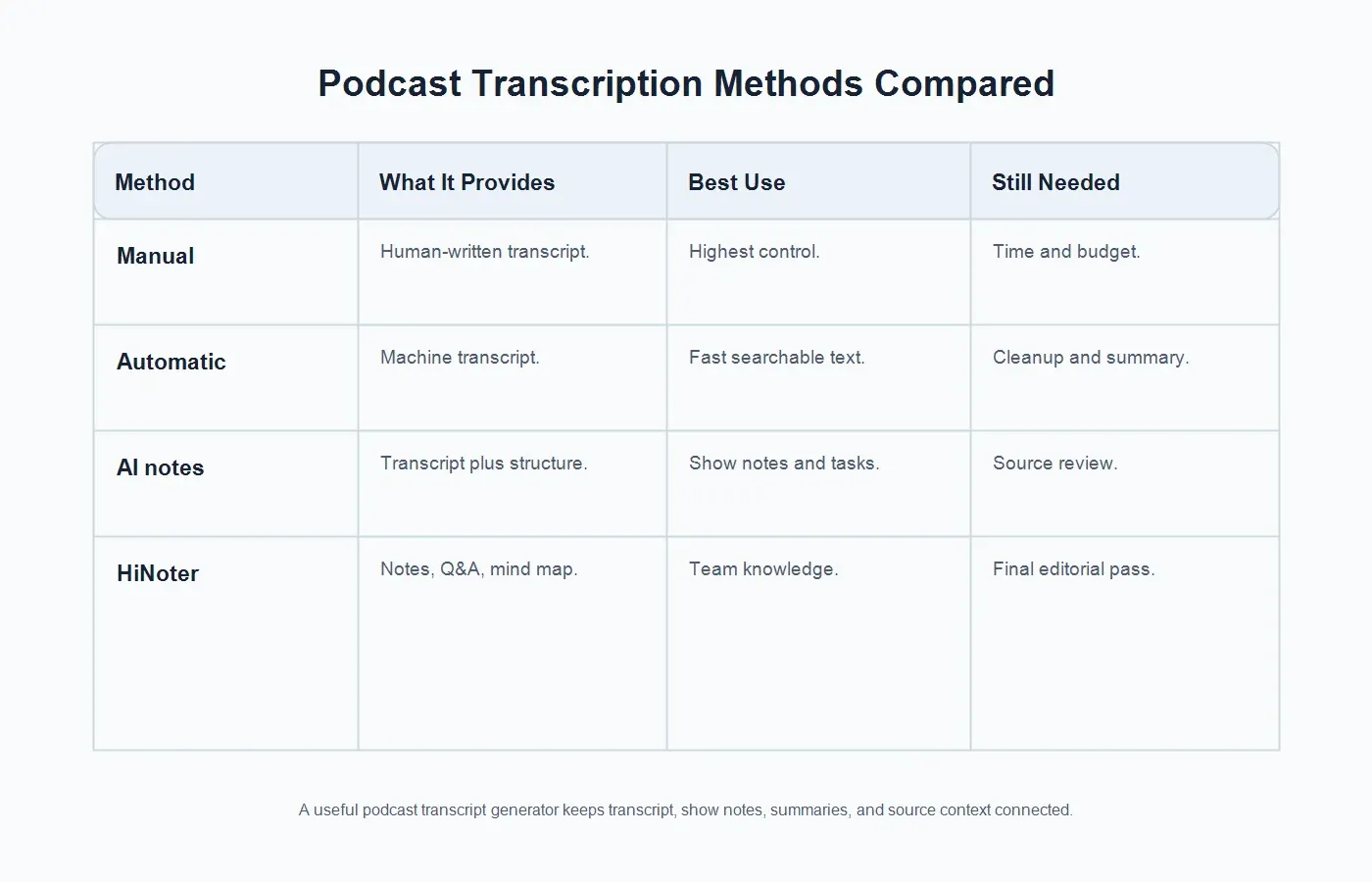
Not every transcript workflow produces the same result. Manual transcription can be precise, but it is slow and expensive. Automatic transcription is fast, but it often needs review. AI notes are useful when the transcript needs to become show notes, summaries, tasks, and reusable knowledge instead of another long document.
| Method | What It Provides | Best Use | Still Needed |
|---|---|---|---|
| Manual transcription | A human-written transcript with editorial control. | High-stakes quotes, legal review, and polished publication. | Time, budget, and a separate summary workflow. |
| Automatic transcription | Machine-generated text from the episode audio. | Fast search, rough drafts, and internal review. | Cleanup, speaker checks, and structured notes. |
| AI notes | Transcript plus summaries, quotes, tasks, and chapters. | Show notes, content repurposing, and team knowledge. | Source review and final editorial judgment. |
| HiNoter | Transcript, summary, action items, mind map, exports, and Q&A. | Teams that need searchable knowledge, not only text. | A final pass for sensitive claims and public copy. |
How to Generate a Podcast Transcript
The workflow starts before transcription. Good transcripts come from good source audio. A clean local recording, separate speaker tracks, consistent microphone distance, and minimal background noise make the transcript easier to generate and edit. If the episode is remote, ask guests to use headphones and record in a quiet room when possible.
| Step | What to Do | Output |
|---|---|---|
| 1. Prepare audio | Use the cleanest podcast file, interview recording, or video podcast source you have rights to process. | Reliable source media. |
| 2. Upload or import | Add the audio or video file to a transcript tool that supports your source and language. | Episode ready for transcription. |
| 3. Generate transcript | Create searchable text with speaker labels and timestamps where available. | Editable transcript draft. |
| 4. Review key details | Check names, product terms, URLs, numbers, guest titles, quotes, and sponsor mentions. | Cleaner transcript. |
| 5. Create notes | Generate show notes, summaries, quotes, action items, mind maps, exports, and Q&A. | Reusable episode knowledge. |
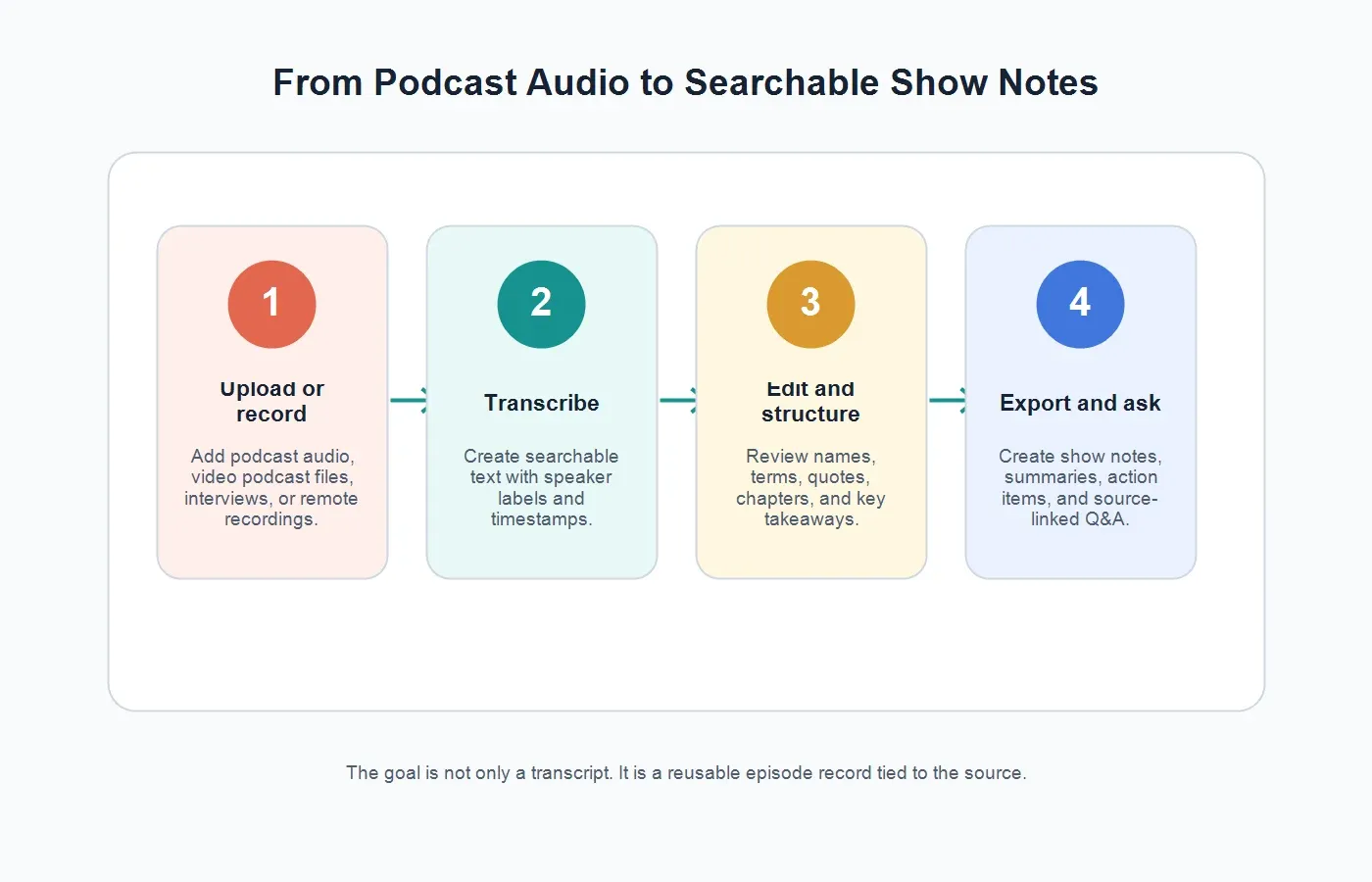
HiNoter supports this workflow through its audio to text tools. The difference is that HiNoter does not stop at raw transcription. It turns permitted audio into a transcript plus summary, action items, mind map, exports, and searchable Q&A with source references.
Supported Sources for Podcast Transcription
A podcast transcript generator should support more than a final MP3. Modern podcast production often includes remote interview recordings, raw WAV files, edited MP3s, video podcast files, webinar recordings, YouTube versions of episodes, and internal research calls. Teams may also process clips, guest interviews, customer stories, and event recordings that later become podcast material.
For video podcasts and YouTube-hosted episodes, HiNoter can also support related video workflows through video to text and the YouTube transcript generator. Use those workflows only for content you own, have permission to use, or can lawfully process. Do not use transcript tools to bypass access controls, private links, paid content, or platform restrictions.
Speaker Labels and Timestamps
Speaker labels help readers understand who said what. They are especially important for interviews, roundtables, panel shows, and podcasts with a host, co-host, guest, producer, or caller. Without speaker labels, the transcript may still be searchable, but quotes become harder to attribute and review.
Timestamps are equally useful. They let an editor jump from a quote to the source audio, help a producer build chapters, and help a researcher verify a claim without replaying the entire episode. Google Cloud Speech-to-Text documentation describes features such as word time offsets and speaker diarization, which reflect two common needs in audio transcription: knowing when something was said and who likely said it.
Speaker labels are not magic. Overlapping speech, similar voices, poor microphones, and crosstalk can make attribution harder. Treat automated labels as a strong draft, then review any quote or claim that will appear in public show notes, newsletters, social clips, or customer-facing content.
From Transcript to Show Notes
A transcript is useful, but most listeners and teams do not need every word. Show notes condense the episode into a clear title, short description, guest details, topic bullets, links, key quotes, chapters, and calls to action. A transcript helps you search the episode. Show notes help people decide whether to listen and where to jump in.
For creators, the show notes workflow often includes a short episode summary, topic chapters, guest bio, resources mentioned, quotes, newsletter copy, blog outline, and social snippets. For business teams, the same episode may also produce sales insights, customer language, research themes, action items, and internal knowledge base entries.
HiNoter is useful when the episode needs to become more than a public recap. Its summaries, action items, mind maps, and AI Chat help teams ask questions like "What did the guest say about pricing?", "Which objections came up?", or "What are the three strongest quotes for the newsletter?" while keeping answers tied to source context.
Accuracy Factors for Podcast Transcripts
Transcript quality depends on recording quality. The biggest factors are microphone clarity, background noise, compression, speaker overlap, accents, domain vocabulary, music under speech, and whether the episode includes names, acronyms, or technical terms. A polished studio episode will usually produce a cleaner draft than a noisy remote call recorded through laptop microphones.
Review the parts that matter most. Guest names, company names, book titles, URLs, dates, data points, sponsor copy, medical or legal claims, and direct quotes deserve attention. If the transcript will be published, verify quotes against the source audio. If the transcript will be used internally, mark uncertain sections so the team does not treat low-confidence text as fact.
Language detection also matters for global podcasts. A guest may answer in English, Portuguese, Spanish, French, or a mix of languages. HiNoter supports 50+ languages and automatic detection, which helps multilingual teams turn international interviews and episodes into consistent notes without assigning a human notetaker for every recording.
Editing and Export Options
Good transcript tools should let users edit text, correct speaker names, remove filler where appropriate, preserve quotes, export files, and share outputs with the team. Common exports include TXT for search, DOCX or Google Docs for editing, PDF for review, captions or subtitles for video workflows, and structured summaries for newsletters, blogs, or internal documentation.
Think about where the transcript goes next. A producer may need show notes in a CMS. A content marketer may need a blog outline. A sales team may need customer language in a shared workspace. A product researcher may need themes and quotes. A manager may need action items from a panel discussion. The right export format depends on the job after transcription.
Privacy and Permission Basics
Podcast transcription often involves guest voices, customer stories, internal interviews, unpublished episodes, or commercially sensitive discussions. Get the right permissions before recording, transcribing, publishing, or sharing. If the episode includes a guest, sponsor, customer, or private meeting, make sure the transcript workflow matches your release forms, consent practices, and internal data rules.
For public podcast episodes, transcripts and show notes can improve discoverability and accessibility. For private or pre-release episodes, access control matters more. Keep raw files, transcripts, summaries, and AI answers in systems that match the sensitivity of the content. Do not paste confidential episode material into tools that your team has not approved.
What HiNoter Adds Beyond Raw Transcription
Raw transcripts are often too long for busy teams. They contain the words, but not always the decisions, themes, follow-up, or reusable insight. If you need more than text, HiNoter turns audio into a transcript plus summary, action items, mind map, exports, and searchable Q&A.
That knowledge layer is useful when podcasts are part of a larger content operation. A team can turn a founder interview into show notes, extract customer language for sales enablement, convert a product discussion into action items, or ask the episode archive for source-grounded answers later. HiNoter can also connect adjacent workflows such as AI meeting notes when the podcast starts as an internal call or research session.
For teams that also work with PDFs, reports, and research documents, PDF to text can bring supporting materials into the same knowledge process. That matters when a podcast episode references a report, customer deck, white paper, or research brief and the team wants all source material to remain searchable.
Podcast Transcript Examples by Output
A strong transcript workflow can produce several assets from the same episode. The transcript gives editors the full text. The summary gives a busy reader the episode's thesis in a few paragraphs. Show notes list the guest, topics, timestamps, links, and key resources. Quote pulls help marketers and producers identify moments worth promoting. Action items capture follow-up from internal interviews, branded podcasts, customer conversations, or research episodes.
For example, a founder interview might produce a public episode description, five timestamped chapters, three quote candidates, a newsletter intro, and an internal note about customer positioning. A research podcast might produce themes, participant language, risks, and questions for the next interview. The same source audio can serve multiple teams when the transcript, summary, and source references stay connected.
Use Cases for Podcast Teams
Creators and Producers
Creators can use transcripts to build show notes, title options, episode descriptions, timestamps, guest quotes, newsletter blurbs, and social posts. Producers can review the transcript to catch factual errors, trim sections, and pull timestamps for chapters.
Marketing and Content Teams
Marketing teams can turn podcast episodes into blogs, email campaigns, quote cards, sales enablement notes, and campaign themes. The transcript provides the raw material. AI notes help decide what deserves to become a reusable asset.
Research and Product Teams
Interviews and podcast-style research calls often contain customer language, pain points, feature requests, objections, and competitive context. A transcript helps preserve the source. Summaries and mind maps help the team see patterns across episodes and interviews.
Sales, Customer Success, and Training
Sales teams can search episodes for proof points and customer stories. Customer success teams can turn internal audio briefings into follow-up notes. Training teams can convert recorded conversations into onboarding resources and searchable Q&A.
Common Mistakes With Podcast Transcripts
Publishing the raw transcript without review. Automatic text can mishear names, dates, URLs, and technical terms. Public transcripts need an editorial pass.
Skipping speaker cleanup. Speaker labels are helpful only when they are accurate enough for quote attribution and reader comprehension.
Separating transcript and show notes. If the transcript lives in one place and the summary lives somewhere else, the team loses source context.
Ignoring the next workflow. A transcript for captions, a transcript for SEO, and a transcript for internal research may need different formatting and review depth.
Treating AI notes as final copy. AI summaries and show notes are strong drafts, but sensitive claims and public-facing quotes still need human review.
Try HiNoter for Podcast Transcripts and Show Notes
Use HiNoter when your goal is not only to convert speech to text, but to turn episodes into searchable knowledge. Upload permitted podcast audio, interviews, video podcasts, or related recordings to generate transcripts, summaries, show notes, action items, mind maps, exports, and source-linked AI answers.
The practical benefit is simple: less manual note cleanup, faster publishing prep, better quote review, and a searchable record that creators and teams can use after the episode is released. A transcript makes the podcast searchable. HiNoter helps make it useful.
FAQs
What is a podcast transcript generator?
A podcast transcript generator converts podcast audio into written text. Advanced workflows can also add speaker labels, timestamps, summaries, show notes, action items, exports, and source-linked AI answers.
How do I transcribe a podcast episode?
Use the cleanest audio file, upload it to a transcription tool, generate the transcript, review names and key terms, then export the transcript or turn it into show notes and summaries.
What is the difference between transcription and speech-to-text?
Transcription is the process of turning speech into text. Speech-to-text is the automatic technology that performs that conversion. AI-assisted transcription adds summaries, structure, and searchable answers.
Can a podcast transcript generator create show notes?
Some tools only create text. HiNoter can turn permitted podcast audio into a transcript plus summary, show notes, action items, mind map, exports, and searchable Q&A.
How accurate are podcast transcripts?
Accuracy depends on audio quality, noise, speaker overlap, accents, microphone setup, compression, and vocabulary. Important names, quotes, data points, and sponsor mentions should be reviewed before publication.
Can I transcribe video podcasts or YouTube podcast episodes?
Yes, when you own the content, have permission, or can lawfully process it. For third-party YouTube or video content, respect copyright, access controls, and platform rules.