Direct answer: Project meeting minutes are a structured record of what happened in a project meeting: attendees, agenda items, key decisions, owners, due dates, risks, dependencies, and next steps. The best minutes are short, factual, easy to scan, and clear enough that the project can move forward without another status chase.
Copyable Project Meeting Minutes Template
Use this template when a project meeting creates decisions, commitments, risks, or follow-up work. It works for weekly project status meetings, sprint planning, launch reviews, client implementation calls, steering committee updates, and cross-functional project syncs.
Project Meeting Minutes
Project: [Project name] | Meeting date: [Date] | Meeting type: [Status / planning / risk review / launch review / client check-in] | Facilitator: [Name] | Note owner: [Name]
Attendees: [Names and teams]
Purpose: [One sentence explaining why this meeting happened]
Agenda: 1. [Agenda item] 2. [Agenda item] 3. [Agenda item]
Decisions: [Decision] - Owner: [Name] - Rationale: [Why this decision was made]
Action items: [Task] - Owner: [Name] - Due date: [Date] - Status: [Open / waiting / done]
Risks and blockers: [Risk] - Impact: [Impact] - Owner: [Name] - Next review: [Date]
Dependencies: [What depends on another team, vendor, approval, asset, or decision]
Follow-up email draft: [Short recap that can be sent to attendees]
Next meeting: [Date / owner / agenda focus]
Generate this automatically with HiNoter: Connect your calendar, let HiNoter capture the project meeting, then review the generated attendees, agenda summary, decisions, action items, owners, due dates, risks, and follow-up email draft before sharing it with the team.
Project teams do not usually fail because nobody met. They fail because the important part of the meeting disappears afterward. A decision is made but not written down. A blocker is discussed but not assigned. A due date is implied but not confirmed. The next week starts with the same question: "Who owns this?"
That is why project meeting minutes should be more than polite documentation. They should be the shared operating record for the project. A useful minute tells the team what changed, what was decided, who owns the next step, what risk needs attention, and what must be reviewed before the next meeting.
This page gives you copyable templates first, then explains what each field means, when to use different formats, how to avoid common mistakes, and how HiNoter for product and tech teams can help automatically fill project minutes from real meeting conversations.
What Are Project Meeting Minutes?
Project meeting minutes are the official or working record of a project discussion. They summarize the meeting purpose, attendees, agenda items, decisions, action items, owners, dates, risks, blockers, dependencies, and follow-up requirements. They do not need to capture every sentence. They need to capture what the project team will rely on later.
For project managers, the value is accountability. For contributors, the value is clarity. For stakeholders, the value is confidence that decisions and risks are visible without attending every conversation.
When to Use This Project Meeting Minutes Template
Use this template whenever the meeting changes the project record. A casual brainstorm may only need rough notes, but a project meeting needs minutes when the team approves scope, changes a timeline, assigns work, reviews blockers, accepts risk, escalates a dependency, or makes a commitment to a client or executive sponsor.
Weekly status meetings benefit from the template because they create a reliable rhythm. Each week, the team can see what changed, which actions closed, which risks remain open, and which decisions were deferred. That keeps the meeting from becoming a repeated verbal tour of the same problems.
Planning meetings need minutes because the team is translating ideas into execution. If a planning call produces five tasks but no named owners, the project manager will spend the next day rebuilding the plan from chat messages. Strong minutes preserve the work breakdown, dependencies, assumptions, and timeline decisions while the conversation is still fresh.
Risk reviews and steering committee meetings need a more formal version of the same template. Senior stakeholders rarely need every detail from the discussion. They need the approved decision, the reason it was made, the risk level, the owner, the next checkpoint, and any tradeoff that affects budget, scope, quality, or launch timing.
Client and vendor meetings need special care. The minutes should confirm shared commitments, not internal strategy. Keep the external recap factual and professional: what was agreed, who owns what, when the next update is due, and what information is still needed. Internal negotiation notes, staffing concerns, and sensitive risk assessments should stay in a separate private record.
What Each Field Means
Purpose: Write one sentence that explains why the meeting happened. A purpose like "discuss launch" is too vague. A stronger version is "decide whether checkout scope is ready for beta launch." Clear purpose makes the minutes easier to judge because readers can tell whether the meeting achieved the intended outcome.
Decisions: Record decisions as finished statements, not loose discussion points. "Team talked about analytics" is not a decision. "Team approved delaying analytics dashboard until phase two" is a decision. Add a short rationale when the decision may be questioned later.
Action items: Every action item should include a verb, an owner, and a date. "Update deck" is weak. "Priya updates launch deck with revised timeline by July 19" is useful. If the task depends on another person or approval, include that dependency in the same line.
Risks and blockers: A risk is a possible future issue; a blocker is something currently stopping progress. The minutes should say which one it is. For example, "legal approval may slip by one week" is a risk, while "contract cannot be signed until legal approves clause 8" is a blocker.
Follow-up recap: The recap should be short enough to send. It is not a second set of minutes. It should confirm the most important decisions, open action items, owners, dates, and the next meeting focus. When teams skip this field, people often leave the meeting with different memories of the same agreement.
Why Project Meeting Minutes Matter
PMI has long connected communication quality with project outcomes. In its Pulse of the Profession research, PMI reported that poor communication contributed to 56% of projects that failed. That number is older, but the underlying pattern still shows up in modern work: projects drift when decisions, risks, and responsibilities are not communicated clearly.
Microsoft's Work Trend Index found that inefficient meetings were the number one productivity disruptor, while Microsoft 365 signals showed the average employee spent more time communicating than creating. Asana's Anatomy of Work research has also described "work about work" as a major drain, including chasing updates, switching tools, and looking for information. Project minutes are one practical way to reduce that drag.
The minutes do not make a project succeed by themselves. They make the next action visible. That visibility is what helps a team avoid duplicate meetings, repeated status questions, missed dependencies, and vague ownership.
Project Meeting Minutes: What to Include
Use the table below as a checklist. The goal is not to make every project minute long. The goal is to make each field do real work.
| Field | What to Include | Why It Matters |
|---|---|---|
| Project context | Project name, meeting type, date, facilitator, note owner, and attendees. | People need to know which project record they are reading. |
| Purpose | The reason for the meeting and the outcome expected by the end. | A meeting without a purpose often creates vague notes. |
| Decisions | What was approved, rejected, changed, deferred, or escalated. | Decisions should not live only in memory or chat. |
| Owners | The person accountable for each action, risk, dependency, or approval. | Tasks without owners become project fog. |
| Due dates | Specific date or next checkpoint for each action item. | Deadlines turn good intentions into trackable work. |
| Risks | Blockers, dependencies, scope concerns, timing issues, and impact. | Risks need visibility before they become delays. |
| Follow-up | Recap email, next meeting date, open questions, and agenda focus. | The minutes should make the next meeting easier. |
Examples by Project Meeting Type
Weekly Project Status Minutes
Project: Website launch | Purpose: Confirm readiness for beta | Decision: Freeze checkout scope for beta release | Owner: Maya | Due date: July 18 | Risk: Analytics implementation depends on final API response schema | Follow-up: Owen to confirm API format with engineering before Friday.
Generate this automatically with HiNoter: HiNoter can extract agenda items, decisions, owners, due dates, and risks from the status call, then produce a concise recap the project manager can review and send.
Sprint Planning Minutes
Project: Mobile onboarding | Purpose: Agree sprint scope and blockers | Decision: Prioritize passwordless sign-in over settings redesign | Owner: Priya | Due date: Sprint end | Risk: Design QA depends on updated component states | Follow-up: Design sends final component list by Tuesday.
Generate this automatically with HiNoter: For sprint planning and product syncs, HiNoter can capture the discussion, summarize scope decisions, identify action items, and create a mind map for dependencies.
Steering Committee Minutes
Project: Data warehouse migration | Purpose: Approve phase-two budget and review timeline risk | Decision: Approve two-week extension for data validation | Owner: Elena | Due date: July 26 | Risk: Vendor contract amendment still pending legal review | Follow-up: Legal and procurement review amendment by next committee check-in.
Generate this automatically with HiNoter: HiNoter helps turn executive meetings into formal minutes with decisions, rationale, accountable owners, and a customer- or stakeholder-safe recap.
Project Meeting Minutes vs Meeting Notes
Project meeting minutes and meeting notes are related, but they are not the same. Notes can be informal and personal. Minutes are usually a shared record that other people rely on. A project manager may take rough notes during the call, but the final minutes should be cleaner, shorter, and more accountable.
| Format | Best For | What It Must Include |
|---|---|---|
| Personal notes | Private memory, ideas, and context while listening. | Anything useful to the note taker. |
| Meeting notes | Team recap, discussion summary, and next-step context. | Key points, decisions, and action items. |
| Project meeting minutes | Shared project record and stakeholder accountability. | Attendees, decisions, owners, due dates, risks, and follow-up. |
| Decision log | Tracking what changed and why across the project. | Decision, date, rationale, owner, and impact. |
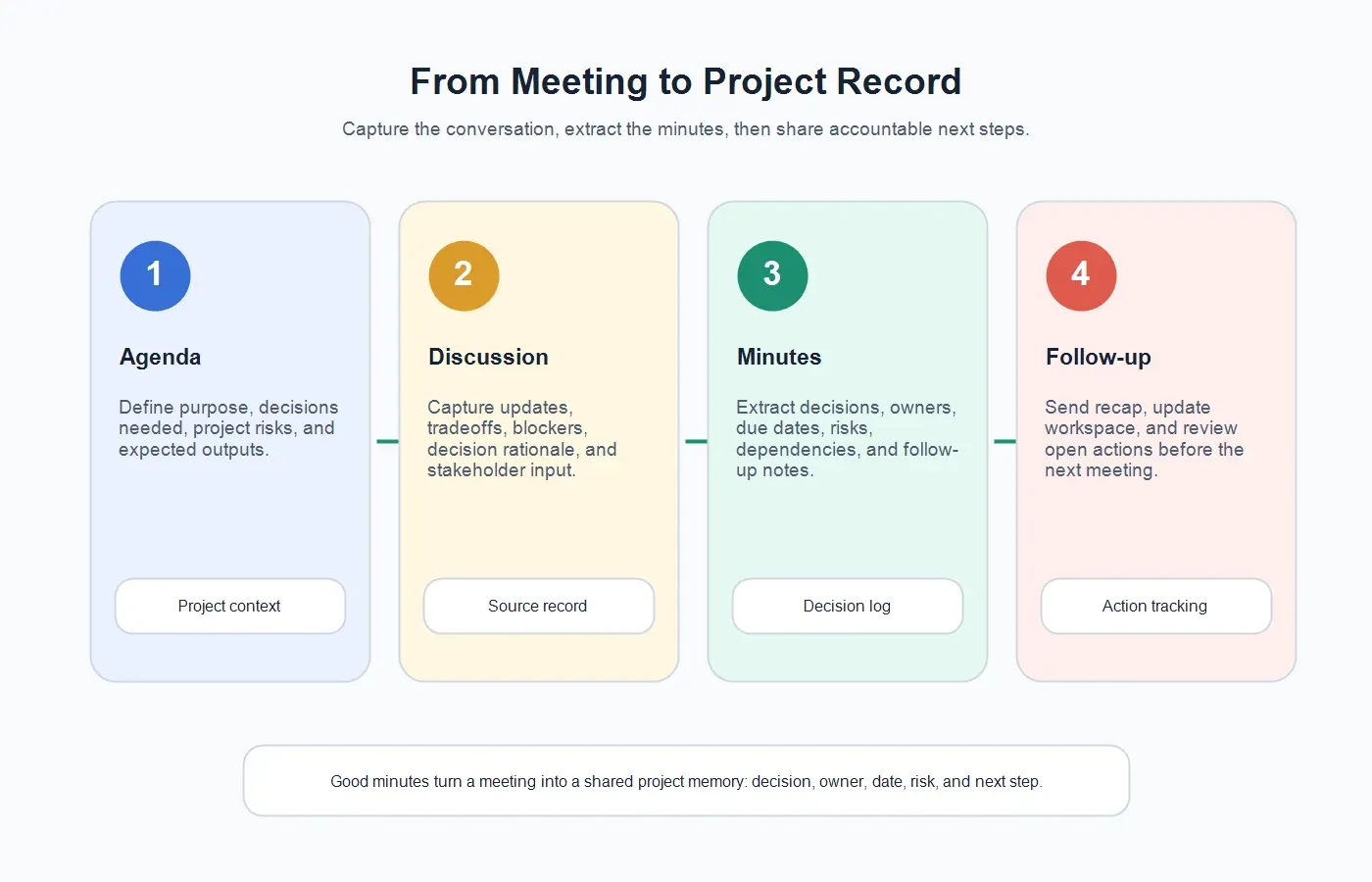
How to Run a Project Minutes Workflow
1. Start With the Decision You Need
Before the meeting, write down the decision, risk, or alignment point the team needs by the end. If the meeting is only a status update, decide what status should change afterward. Good minutes start before the call because the agenda tells the note owner what evidence to listen for.
2. Capture the Meeting Without Splitting Attention
Project managers often lead the meeting, read the room, manage stakeholders, answer questions, and take notes at the same time. That is why decisions get half-recorded. With HiNoter AI Meeting Assistant, teams can capture scheduled meetings with consent and let the project lead stay engaged in the discussion.
3. Convert the Transcript Into Minutes
After the meeting, the transcript should become a structured project record. Use HiNoter AI meeting notes to generate summaries, decisions, action items, owners, due dates, and mind maps. Then review the output for accuracy, sensitive wording, and stakeholder-safe language.
4. Send the Minutes Where Work Happens
Minutes should not sit in a forgotten document. Put them where the team tracks work. The HiNoter Notion integration can push meeting notes, summaries, tags, dates, and action items into a selected database so project records stay searchable and connected to the work.
5. Reuse Minutes Before the Next Meeting
The best project minutes make the next meeting shorter. Before the next sync, review open decisions, overdue actions, unresolved risks, and dependencies. With HiNoter AI Chat, teams can ask source-linked questions such as "What did we decide about launch scope?" or "Which actions are still open from the steering committee?"
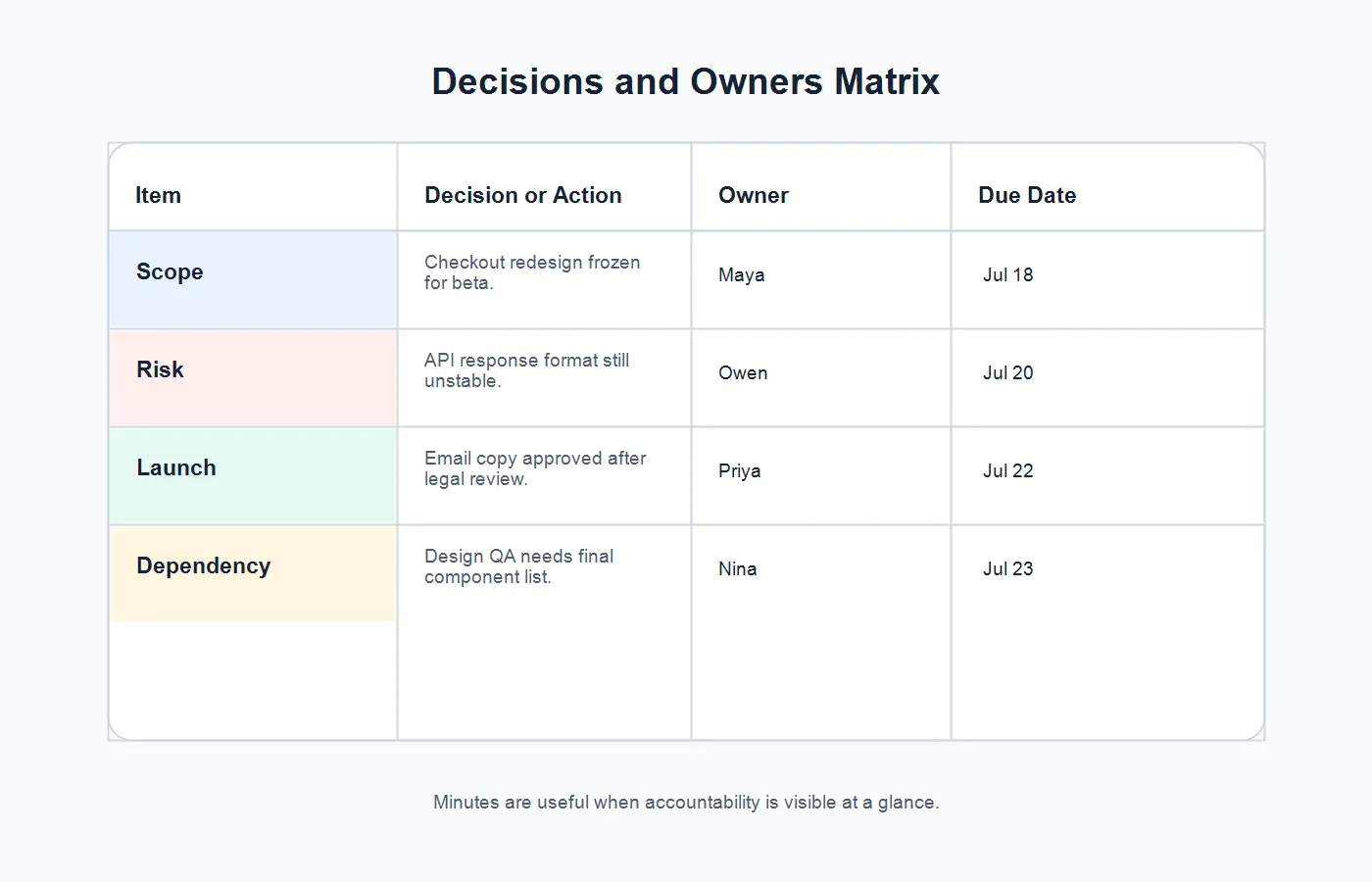
Decision and Owner Matrix
For projects with many moving parts, add a decision and owner matrix below the minutes. This gives executives and contributors the fastest view of accountability.
| Item | Decision or Action | Owner | Due Date |
|---|---|---|---|
| Scope | Checkout redesign frozen for beta. | Maya | Jul 18 |
| Risk | API response format still unstable. | Owen | Jul 20 |
| Launch | Email copy approved after legal review. | Priya | Jul 22 |
| Dependency | Design QA needs final component list. | Nina | Jul 23 |
Common Mistakes With Project Meeting Minutes
Recording discussion but missing decisions. A meeting can sound productive and still leave no clear outcome. Always pull decisions into a separate section.
Writing "team" as the owner. Teams do not complete tasks; people do. Assign a named owner even when several people contribute.
Using vague due dates. "Next week" is weaker than "July 20." Specific dates reduce follow-up confusion.
Mixing risks with action items. A risk is something that might affect the project. An action is the next move. Track both, but label them clearly.
Sending minutes too late. Minutes lose value when the team receives them after everyone has already moved on. Send the recap soon after the meeting.
Try HiNoter for Project Meeting Minutes
Use HiNoter when project conversations need to become accountable records, not another recording in a folder. The workflow is simple: connect your calendar, let HiNoter capture the meeting with consent, review the generated transcript-backed minutes, confirm owners and due dates, then share the recap in the workspace where the project already lives.
This is especially useful for cross-functional projects where decisions move across product, engineering, marketing, operations, legal, finance, and customer teams. HiNoter does not replace project judgment. It gives the project lead a faster first draft and a searchable source record, so the team can spend less time reconstructing what happened and more time closing the work.
FAQs
What should project meeting minutes include?
Project meeting minutes should include the project name, meeting date, attendees, purpose, agenda, decisions, action items, owners, due dates, risks, dependencies, next meeting, and follow-up recap.
What is the difference between meeting notes and minutes?
Meeting notes can be informal and personal. Minutes are a shared record that other people rely on. Project meeting minutes should clearly capture decisions, owners, due dates, risks, and next steps.
How long should project meeting minutes be?
Project meeting minutes should be as short as possible while still documenting the decisions and commitments the team needs. Most project minutes can fit on one or two pages when they use clear sections and tables.
Who should own project meeting minutes?
The project manager, program manager, scrum master, team lead, or delegated note owner can own the minutes. The important part is that one person reviews and shares the final record.
Can AI create project meeting minutes?
Yes. AI can generate a strong draft from a meeting transcript by extracting agenda items, decisions, action items, owners, due dates, risks, and next steps. A human should review the minutes before sharing.
Can project minutes be shared with stakeholders?
Yes. Project minutes are often meant for stakeholders, but sensitive internal notes, negotiation details, or personnel issues should be separated from the stakeholder-facing recap.