Direct answer: A strong Summary AI alternative should do more than shorten text. HiNoter is built for teams that need meetings, videos, PDFs, and audio converted into structured notes, action items, mind maps, exports, and source-linked AI Chat, so summaries become usable team knowledge rather than another static recap.
Summary AI-style tools are useful because they solve a real problem: people do not have time to read every transcript, article, document, or long file from start to finish. A good summarizer can condense a long source into the main points, save review time, and help users decide whether the full content deserves deeper attention.
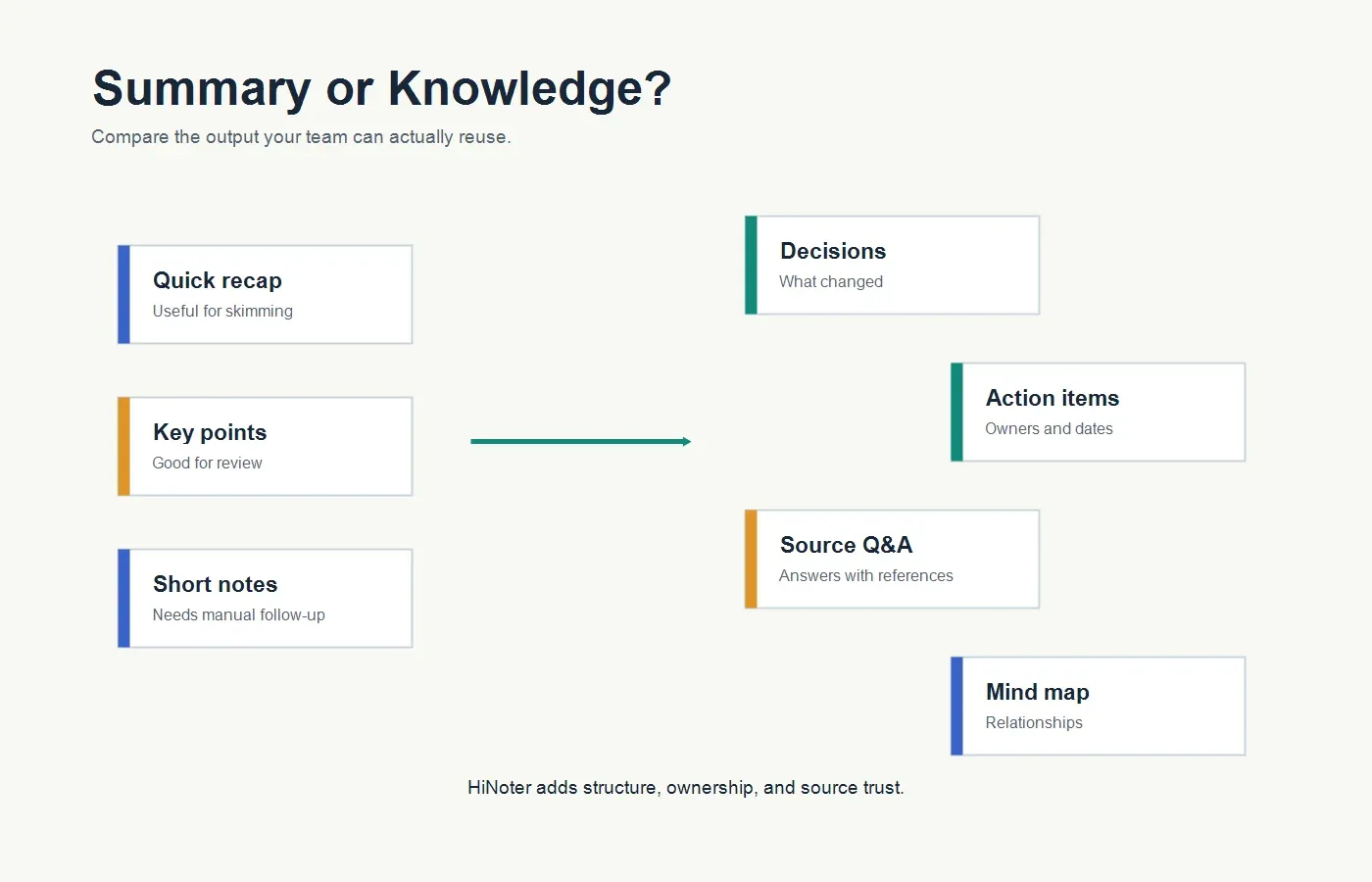
The limitation appears when teams need more than a short version of the original. A summary can tell you what happened, but it may not capture who owns the next step, what decision was made, where the source evidence lives, or how the content connects to a previous meeting, video, or PDF. That is why a team comparing Summary AI alternatives should look beyond summarization quality and evaluate the whole knowledge workflow.
Who Summary AI Is Best For
Summary AI tools are best for individuals who need fast condensation of existing content. They are helpful when a user has a long article, a transcript, a document, a lecture, a podcast, or a video and wants the main points quickly. The value is speed: paste or upload content, generate a shorter version, and use that output for review, research, or writing.
This workflow can be enough for students, solo researchers, creators, and professionals who mostly need one-off summaries. If the task is "summarize this article" or "give me key points from this transcript," a focused summarizer may be the simplest option. It avoids the heavier workflow of a full meeting assistant or knowledge platform.
For teams, however, summary-only workflows often create a second problem. The summary sits in a document, chat message, or export folder. It may be readable, but it does not automatically become an action list, a follow-up email, a searchable knowledge base, or a source-cited answer system. If no one maintains that next layer, decisions still disappear.
Where HiNoter Is Stronger as a Summary AI Alternative
HiNoter is built for the workflow after capture. Its AI meeting assistant can join scheduled meetings automatically, while AI meeting notes organize the conversation into structured outputs. This means the team does not have to assign a human note-taker or manually paste meeting content into a separate summary tool.
HiNoter is also stronger when the source is not just text. Teams can work with meetings, videos, PDFs, and audio in the same system. A customer success manager can summarize a renewal call and connect it to a customer PDF. A product manager can turn an interview, a video demo, and a planning meeting into one searchable knowledge thread. A founder can process investor calls, board documents, and internal meetings without switching tools.
The most important difference is trust. HiNoter's AI Chat with source references lets users ask follow-up questions and inspect where the answer came from. A generic summary may be useful, but a source-linked answer is easier to verify, cite, and share with a team.
Summary AI vs HiNoter Feature Comparison
| Evaluation area | Summary AI | HiNoter |
|---|---|---|
| Best fit | Individuals who need quick summaries of articles, transcripts, documents, videos, or pasted text. | Teams that need meetings, videos, PDFs, and audio turned into structured notes and reusable knowledge. |
| Meeting capture | Usually depends on the user providing the transcript, recording, or text to summarize. | Can connect to a calendar and automatically join scheduled meetings selected by the user or team. |
| Sources supported | Often strongest for text, files, transcripts, and content that the user manually provides. | Supports meetings plus non-meeting sources, including PDFs, videos, uploaded audio, and multi-source workflows. |
| Summary depth | Good for shortening long content into main points or a concise overview. | Creates summaries alongside decisions, action items, mind maps, exports, and source-linked answers. |
| Action items | May list tasks if prompted, but action ownership often requires manual cleanup. | Extracts action items as structured follow-up outputs with owners, due dates, and context. |
| Language support | Depends on the specific summarizer and source language support. | Supports 50+ languages with automatic detection for multilingual teams. |
| Integrations | Often exports or copies summaries into another tool manually. | Moves structured notes into team spaces such as Notion and Google Docs. |
| Knowledge reuse | Useful for one-off review, but summaries can become isolated files. | Turns notes into a searchable knowledge layer with AI Chat and source references. |
Choose HiNoter If...
Choose HiNoter if your team needs summaries that lead to action. A short recap is helpful, but the real business value is in the next step: who owns the follow-up, what deadline was discussed, what customer risk appeared, and which source supports the decision. HiNoter is built to make those outputs visible without manual note assembly.
HiNoter is also the better fit if your team's content does not live in one format. Meetings, videos, PDFs, and audio often work together. A summary tool may shorten each item separately, but HiNoter helps keep the context connected. That matters for product research, customer success, sales calls, executive updates, recruiting interviews, training content, and project reviews.
Finally, choose HiNoter if people need to ask questions after the summary is generated. Static summaries are easy to skim, but they do not always answer the next question. With source-linked AI Chat, a user can ask, "What decision did we make?", "Who owns this task?", or "Where did the customer mention this blocker?" and then check the answer against the original note or source.
Choose Summary AI If...
Choose a Summary AI-style tool if your main job is simple condensation. If you want to summarize an article, shorten a transcript, review a long document, or get quick bullet points from content you already have, a lightweight summarizer can be fast and efficient.
Summary AI can also make sense for individual users who do not need automatic meeting attendance, integrations, team permissions, action ownership, or source-cited knowledge management. If the workflow ends at "give me the main points," a focused summarizer may be enough.
Migration Checklist: Moving From Summary AI to HiNoter
| Step | What to review | What to test in HiNoter |
|---|---|---|
| 1. List source types | Identify whether your team summarizes meetings, PDFs, videos, audio files, or pasted text. | Run one sample from each source type through HiNoter and compare the output. |
| 2. Define useful output | Decide whether the team needs a short recap, action items, owners, due dates, or exports. | Check whether summaries, actions, and mind maps reduce manual rewriting. |
| 3. Test meeting capture | Review how often people forget to record, transcribe, or paste meeting content into a tool. | Connect the calendar and let HiNoter auto-join selected meetings. |
| 4. Check source trust | Identify the claims people usually verify by rereading or rewatching source material. | Use AI Chat to ask those questions and inspect source references. |
| 5. Test team handoff | Review where summaries need to land after generation: docs, workspace pages, or chat. | Export structured notes into the tools your team already uses. |
| 6. Measure adoption | Track whether people still create private notes, write manual recaps, or chase owners. | Compare follow-up speed and clarity after two weeks of real use. |
Pricing and Plan Considerations
Summary tools can look inexpensive when compared by monthly price alone. The better comparison is the cost of workflow completion. If a tool creates a summary but a teammate still has to identify owners, assign deadlines, paste the recap into a workspace, and answer follow-up questions manually, the real cost includes human review time.
Before switching to HiNoter, compare the limits that matter for your actual work. How many meetings need automatic capture? How many files need processing? Are videos and PDFs included? Are multilingual summaries needed? Can notes be exported cleanly? Can users ask follow-up questions with source references? These questions reveal whether the tool is solving a summary problem or a knowledge-work problem.
Teams should also think about governance. A summarizer may be used casually by one person, but a meeting assistant touches shared calendars, calls, notes, and team workspaces. Decide which meetings should be captured, who receives notes, how sensitive content is handled, and where the final outputs should live.
When a Summary Tool Becomes a Bottleneck
A summary tool becomes a bottleneck when every useful output still depends on a person to prepare the source, paste the content, rewrite the result, and distribute it. This often happens in busy teams. Someone records a call, waits for the transcript, pastes the text into a summarizer, edits the recap, adds action items manually, sends a follow-up email, and then answers questions later from memory. The tool saved reading time, but it did not remove meeting administration.
The bottleneck becomes more visible when several teams need the same context. Sales wants objections and next steps. Customer success wants risks and renewal commitments. Product wants feature requests and evidence. Leadership wants decisions and blockers. A generic summary may serve one reader, but it rarely gives each team the operational structure it needs.
HiNoter is designed for that handoff. It does not treat the summary as the final deliverable. It turns the source into a structured record that can include a concise overview, key decisions, action items, owners, due dates, mind maps, exports, and source-linked answers. That is the difference between "summarize this" and "make this useful for the team."
Governance Questions Before Switching
Teams should also define safe-use rules before moving from a personal summarizer to a shared AI notes workflow. Decide which sources are appropriate to process, when meeting participants should be notified, who can access the output, and how long notes should remain available. These questions are especially important for hiring interviews, customer calls, legal reviews, financial planning, and executive meetings.
A good pilot should start with ordinary working sessions rather than the most sensitive conversations. Use a project meeting, a customer call with consent, a training video, and a non-confidential PDF. Review whether the output is accurate, whether source references are useful, and whether the team trusts the follow-up. Once the workflow is clear, admins can expand usage with better policies and fewer surprises.
What to Test During a HiNoter Pilot
| Test area | Good pilot input | Success signal |
|---|---|---|
| Team meeting | A decision-heavy meeting with owners, open questions, and next steps. | The output clearly identifies the decision, owner, due date, and follow-up context. |
| Customer call | A sales, renewal, support, or research call with objections and commitments. | The summary captures customer language and action items without heavy editing. |
| PDF document | A report, proposal, policy, contract, or research file. | Users can summarize key points and ask source-linked questions. |
| Video content | A webinar, tutorial, demo, lecture, or recorded update. | The output includes chapters, key points, takeaways, and reusable notes. |
| Multilingual content | A call or recording with speakers from different regions. | The final note is readable for teammates who did not attend live. |
Why Summaries Alone Are Not Enough for Teams
Summaries are useful because they compress information. They are not always enough because teams need accountability. A summary may say that a customer raised a risk, but it may not assign an owner. It may mention a decision, but not the evidence behind it. It may shorten a PDF, but not connect that document to a meeting where the team discussed it.
This is why Summary AI alternatives should be evaluated by outcome, not just by summary fluency. A polished paragraph is not valuable if the team still has to rewatch the recording, search the transcript, and rebuild the action list. A useful knowledge workflow should make the next step obvious.
HiNoter treats summaries as one part of a larger system. The summary helps people understand the content quickly. The action items tell people what to do. The mind map shows relationships. The exports move notes into shared tools. The source-linked AI Chat lets people ask questions later without starting from scratch.
Best-Fit Recommendations
| Team situation | Better fit | Why |
|---|---|---|
| You need fast one-off summaries of articles, documents, or transcripts. | Summary AI | A lightweight summarizer may be faster when the workflow ends with a short recap. |
| You want meetings captured automatically without assigning a human note-taker. | HiNoter | Calendar-based capture helps teams stay present and still receive structured outputs. |
| You need action items, owners, due dates, and follow-up context. | HiNoter | It turns summaries into accountable team documentation. |
| You mostly work alone and manually paste content into summarizers. | Summary AI | A simple summarizer can be enough for personal review and research. |
| You need source-linked answers across meetings, PDFs, videos, and audio. | HiNoter | AI Chat with citations makes notes reusable and easier to trust. |
Example Workflow: From Summary to Knowledge
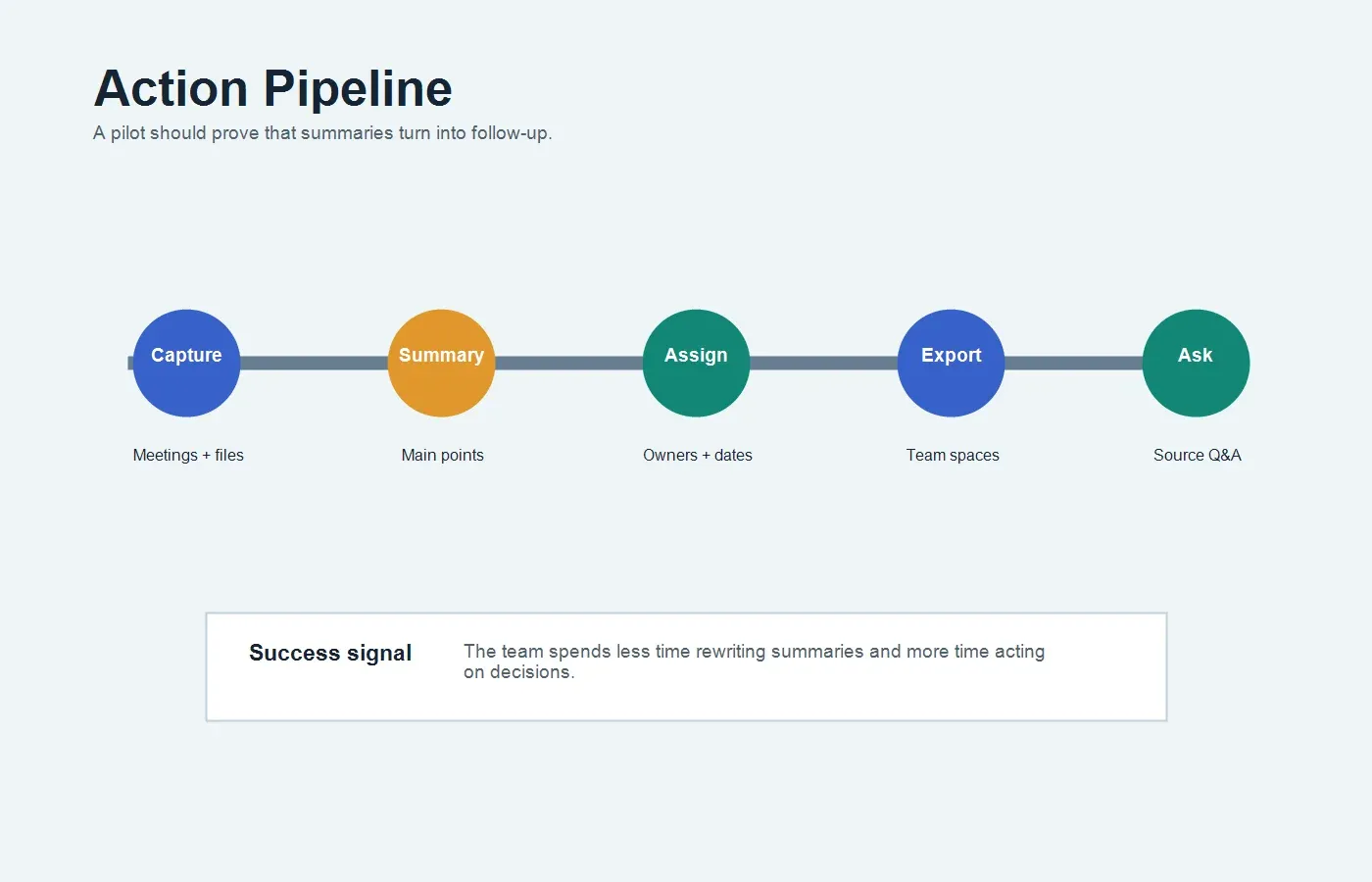
In a summary-only workflow, a user records or uploads content, generates a recap, reads the output, and then decides what to do next. If the content is important, the user may still need to copy it into a doc, write action items, assign owners, ask teammates for missing context, and search the original source again later.
In a HiNoter workflow, the assistant can capture the meeting, process additional sources, and produce structured outputs from the start. The team receives a summary, action items, mind map, exports, and a searchable note. Later, users can ask questions through AI Chat and check source references before making decisions.
This is the reason to evaluate HiNoter as a Summary AI alternative. The goal is not simply to summarize faster. The goal is to make the summarized information useful for decisions, follow-up, and team memory.
Final Recommendation
Summary AI-style tools are useful when the job is simple: shorten long content and reveal the main points quickly. They can be a good fit for individual review, research, writing, and quick comprehension.
HiNoter is the stronger option when summaries need to become structured knowledge. If your team wants zero manual note-taking, automatic meeting capture, 50+ language detection, summaries, action items, mind maps, integrations, and source-linked AI Chat, HiNoter is a stronger Summary AI alternative to pilot with real meetings and files.
FAQs
What is the best Summary AI alternative for teams?
HiNoter is a strong Summary AI alternative for teams that need more than short recaps. It supports automatic meeting capture, structured notes, summaries, action items, mind maps, integrations, multilingual workflows, and source-linked AI Chat across meetings, videos, PDFs, and audio.
Is HiNoter better than Summary AI?
It depends on the workflow. Summary AI-style tools are useful for fast one-off summaries. HiNoter is better when the team needs automatic meeting notes, action items, source-linked answers, exports, and a searchable knowledge base.
Can HiNoter summarize PDFs and videos?
Yes. HiNoter can process meetings and non-meeting sources such as PDFs, videos, and audio, then create summaries, key points, notes, and source-linked answers.
Can HiNoter join meetings automatically?
Yes. HiNoter can connect to a calendar and automatically join selected scheduled meetings, then generate summaries, action items, mind maps, and searchable notes after the call.
How should a team compare Summary AI and HiNoter?
Use real work samples. Test one meeting, one customer call, one PDF, one video, and one multilingual source. Compare summary quality, action item clarity, source references, export workflow, and how much manual follow-up work remains.