Direct answer: To transcribe audio to text, upload or record permitted audio, confirm the language, generate a transcript, review speaker labels and key terms, then export or summarize the result. HiNoter adds a knowledge layer by turning audio into summaries, action items, mind maps, exports, and source-grounded Q&A.
People rarely need another recording. They need the quote from a customer call, the decision from a meeting, the training step from a webinar, or the next task buried in a 40-minute discussion. Raw transcription helps because it turns speech into searchable text. It still leaves a hard problem: someone has to clean the transcript, find the useful parts, summarize them, and share the next step.
This page explains the practical workflow for audio transcription and the layer that comes after it. It covers uploads and recordings, supported sources, speaker labels, timestamps, language detection, editing, exports, privacy, accuracy factors, and how HiNoter turns transcripts into reusable team knowledge rather than another long document.
What Does It Mean to Transcribe Audio to Text?
Audio transcription is the process of converting recorded speech into written text. Speech-to-text is the technology that performs that conversion automatically. AI-assisted transcription goes further: it uses the transcript as a source for summaries, action items, chapters, mind maps, and question answering.
Those distinctions matter when choosing a workflow. A speech-to-text tool may produce a plain transcript. A transcription editor may help you correct names and timestamps. A knowledge workflow should help your team understand what happened, what was decided, who owns the follow-up, and where the answer came from.
How HiNoter Turns Audio Into Text and AI Summaries
Use this workflow when a recording needs to become searchable, shareable, and actionable. The same structure works for meeting audio, voice memos, interview recordings, podcasts, webinars, training sessions, and permitted video files with spoken content.
| Step | What Happens | Why It Matters |
|---|---|---|
| 1. Upload or record | Add a permitted audio or video source to the workspace. | The source stays connected to the transcript and later notes. |
| 2. Detect language | Use automatic language detection or confirm the spoken language. | Language-aware processing improves transcript usability for global teams. |
| 3. Generate transcript | Create editable text with speaker labels and timestamps where available. | People can search, quote, review, and verify the recording. |
| 4. Review key details | Check names, acronyms, numbers, product terms, and decision points. | Small transcription errors can change the meaning of a commitment. |
| 5. Summarize and share | Create a summary, action items, mind map, exports, and source-linked AI answers. | The transcript becomes useful knowledge instead of a long text file. |
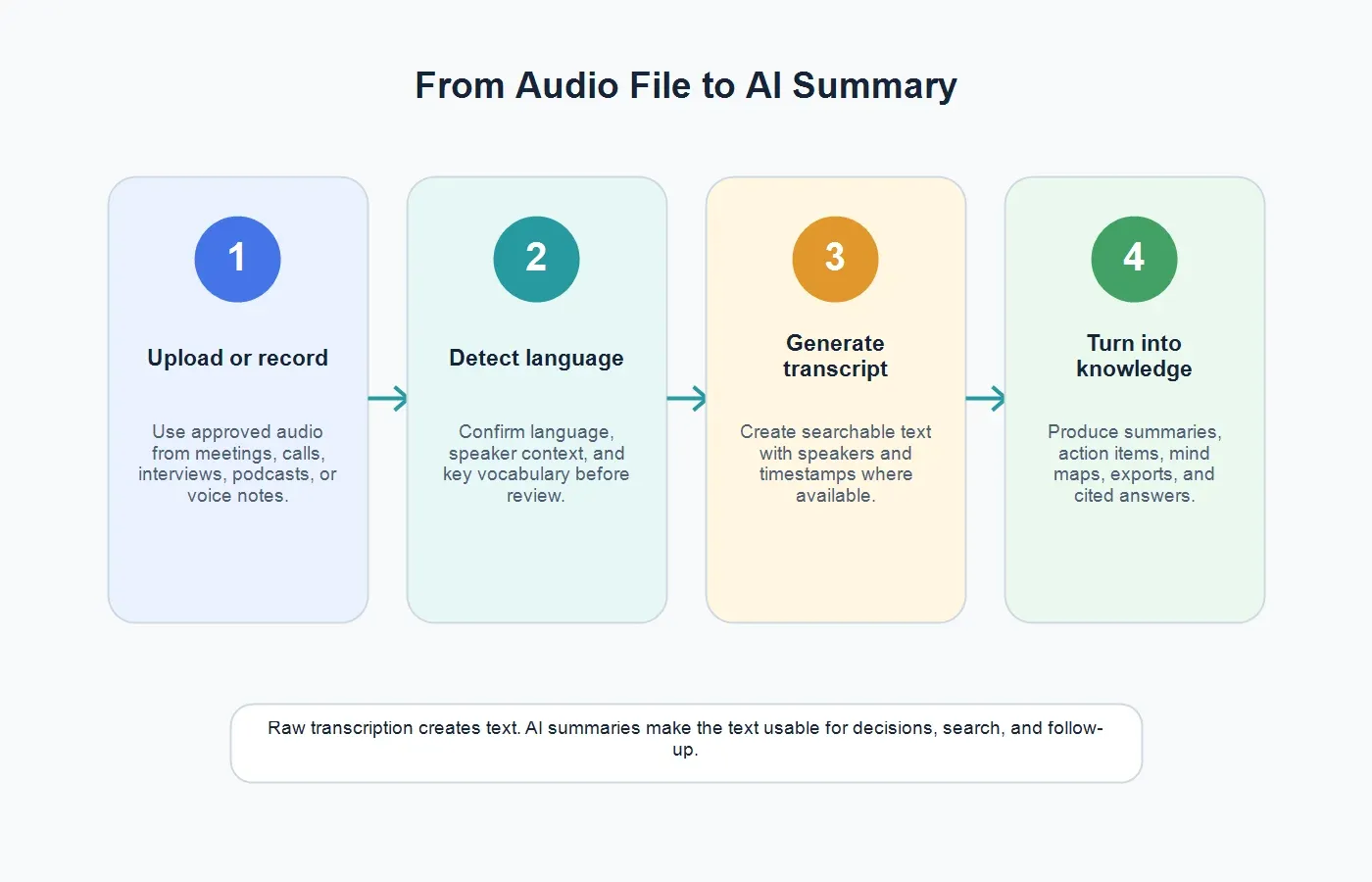
If you need more than text, HiNoter turns audio into a transcript plus summary, action items, mind map, exports, and searchable Q&A. That is the practical difference between recording storage and a working knowledge system.
Manual Transcription vs Automatic Transcription vs AI Notes
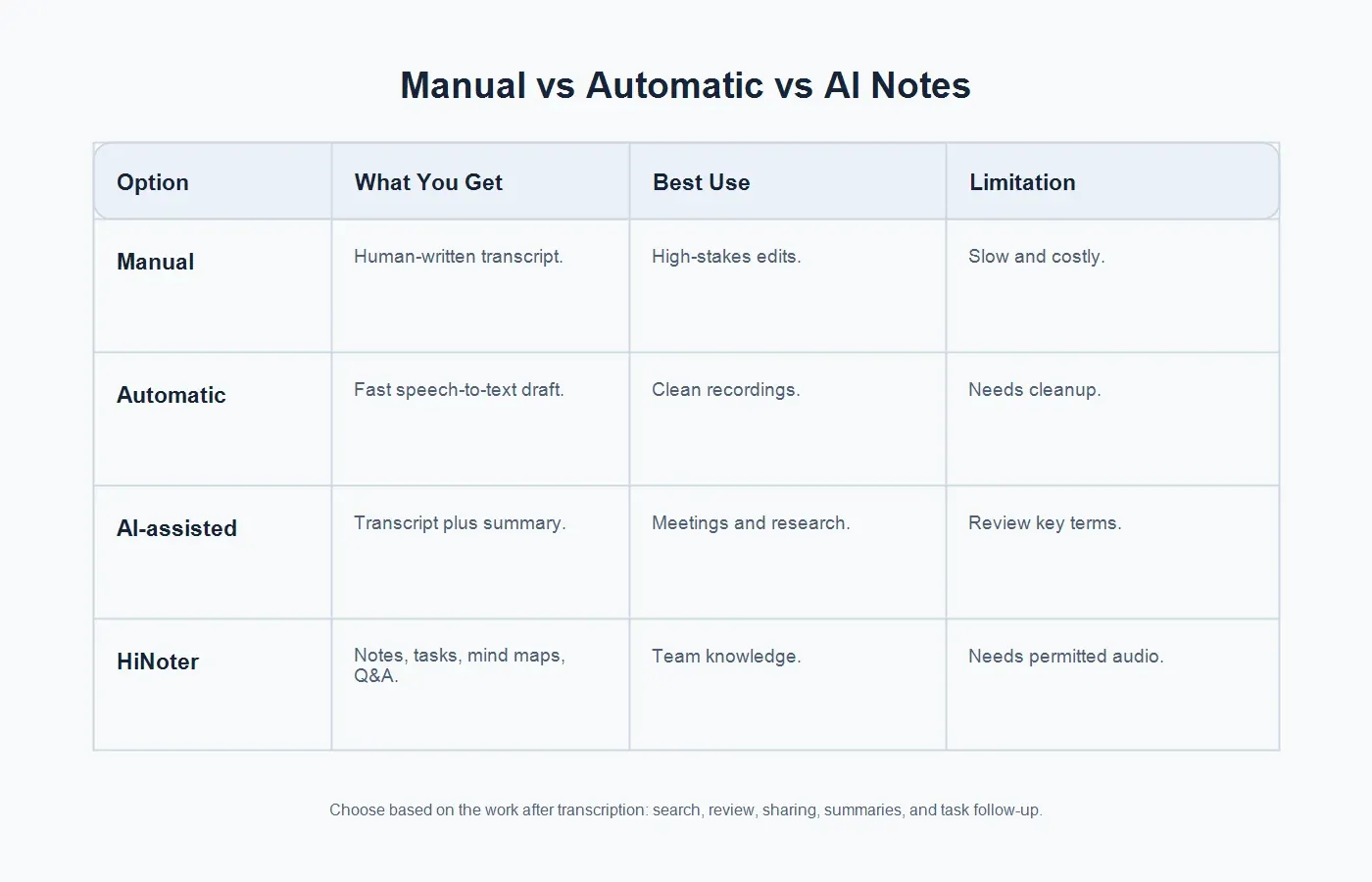
Not every recording needs the same treatment. A journalist preparing a quote for publication may need careful manual review. A team lead preparing a meeting recap may care more about decisions and owner assignments. A researcher may need both searchable text and organized themes.
| Option | What You Get | Best Use | Limitation |
|---|---|---|---|
| Manual transcription | A human-created transcript with careful judgment. | Legal review, edited interviews, research quotes, and publication drafts. | Slow turnaround, higher cost, and limited scale. |
| Automatic transcription | A fast speech-to-text draft. | Clean audio, voice notes, single-speaker recordings, and quick search. | Names, speakers, punctuation, and formatting may need cleanup. |
| AI-assisted transcription | Transcript plus summaries, key points, and structured outputs. | Meetings, interviews, customer calls, podcasts, lectures, and webinars. | Human review is still needed for high-stakes facts and terminology. |
| HiNoter workflow | Transcript, summary, action items, mind map, exports, and AI Chat with source references. | Teams that want searchable knowledge, not isolated transcripts. | Works best with clear audio and permission to process the recording. |
Supported Sources: Audio, Meetings, Video, and More
The simplest use case is an audio file: a voice memo, interview, call recording, podcast episode, lecture, or webinar export. Many business recordings also arrive as video files, because the audio is embedded in a meeting, demo, screen recording, or customer training session. A good transcription workflow should not force the team to manually strip audio from every source before work can begin.
HiNoter fits this broader pattern because it is not limited to raw audio. Teams can use HiNoter for meeting capture, audio transcription, video content, YouTube-style source material, and document workflows. For meetings specifically, HiNoter can function as an AI meeting assistant that helps capture scheduled conversations and turn them into structured notes.
Before uploading any source, check permission. Use recordings you own, are allowed to process, or have clear authorization to use. Customer calls, hiring interviews, medical-adjacent conversations, internal strategy meetings, and private coaching sessions often contain sensitive information. Consent and access control are part of the workflow, not legal decoration at the end.
Speaker Labels and Timestamps Make Transcripts Usable
A transcript without speakers is searchable, but it is not always trustworthy for decisions. If the text says, "We can ship that next Friday," the team needs to know who said it. Speaker labels turn a transcript from a wall of text into a usable record. Named labels are best. If names are not available, role labels such as Customer, Account Executive, Product Lead, Interviewer, Candidate, Instructor, or Student are still helpful.
Timestamps add a second layer of verification. They let a reviewer jump back to a quote, confirm a disputed decision, create a clip, or check the tone around a sensitive statement. For long recordings, timestamps also help people skim by section instead of reading every line. Podcasts, webinars, training recordings, and research interviews benefit especially from timestamped transcripts because the transcript often feeds chapters, notes, and citations.
Language Detection for Global Teams
Transcription becomes harder when a team works across languages, accents, and regional terminology. A multilingual workflow should let users confirm the spoken language, detect language automatically when supported, and organize output for people who were not present in the conversation. That is especially important for distributed teams in the United States, Europe, Brazil, Portugal, and other markets where one project may include several working languages.
HiNoter supports multilingual work through multilingual transcription and notes, which makes it better suited to global teams than a single-language recorder. The practical benefit is not only translation. It is consistency: meeting recaps, action items, and searchable notes can follow a shared structure even when the original audio comes from different languages or regions.
Accuracy Depends on the Recording, Not Just the Tool
Speech recognition is sensitive to source quality. Google Cloud's Speech-to-Text best practices emphasize clean audio, suitable encoding, good microphones, and minimizing background noise. Microsoft Speech documentation also points users toward phrase lists and pronunciation support when specific vocabulary matters. NIST evaluates speech recognition using word error rate, a reminder that transcription accuracy is measured against a reference, not promised as a universal percentage.
In practice, accuracy drops when speakers talk over one another, microphones sit too far away, audio is heavily compressed, or the recording contains names and technical terms the system has never seen. The answer is not to expect perfect text from bad input. The answer is to improve the recording, provide context where possible, and review the transcript where the details matter.
Before Recording
Use a quiet room, ask speakers to avoid cross-talk, keep microphones close, and record locally when possible. For remote meetings, headphones reduce echo. For in-person meetings, one small microphone in the center of a large table is usually not enough for clean transcription.
Before Uploading
Use the cleanest available file. Trim long dead air if it is not needed. Keep the original source when the transcript might be reviewed later. Gather names, product terms, customer names, acronyms, and unusual vocabulary so the review process is faster.
After Transcription
Review the parts that carry business weight: dates, dollar amounts, commitments, objections, quotes, owners, deadlines, and risk statements. A typo in a filler sentence may not matter. One wrong number in a proposal recap can.
Editing and Export Options
Editing a transcript is not the same as rewriting the meeting. The goal is to correct recognition errors while preserving meaning. Fix speaker names, company names, product terms, numbers, acronyms, dates, and places. If the transcript is meant for publication, clean filler words and false starts. If it is meant for legal, HR, or research review, preserve more of the original wording and mark uncertainty rather than guessing.
Exports should match the job. Plain text is useful for search. DOCX or Google Docs are better for editing. PDF works for locked review copies. CSV can help when timestamps need analysis. Collaboration teams may prefer structured notes that can move into Slack, Notion, Google Docs, email, or a knowledge base. HiNoter is most useful when the transcript can leave the page as an organized summary, action list, and reusable note rather than a static transcript.
What to Summarize After Transcription
A long transcript is evidence, not an answer. The summary should reduce the recording to what a busy person needs to know. That usually means the purpose, main topics, decisions, risks, open questions, action items, owners, and source moments. A strong AI summary does not hide the transcript. It points back to it.
For meetings, use AI meeting notes to capture decisions, owners, deadlines, and follow-up. For training recordings, summarize key concepts and create review questions. For customer calls, extract pain points, objections, competitors, requested features, and next steps. For podcasts and webinars, build show notes, quotable moments, chapters, and repurposing ideas. If the content starts as a video rather than pure audio, HiNoter's video to text workflow can keep the video source in the process.
From Transcript to Searchable Q&A
Search is useful when you remember the exact word. Q&A is useful when you remember the question. A manager may ask, "What did the customer say about onboarding?" A recruiter may ask, "Which candidates mentioned remote work constraints?" A product lead may ask, "Which calls included requests for SSO?" A transcript alone can answer those questions only if someone searches well and reads patiently.
HiNoter's AI Chat makes the transcript more like a knowledge base because answers can be tied back to source context. That matters for trust. If a summary says a customer requested an integration, the team should be able to inspect the source rather than treat the AI output as a free-floating claim.
Privacy and Permission Checklist
Audio can contain customer data, personal information, hiring details, commercial strategy, contract terms, health-adjacent topics, and private opinions. Before transcription, decide who is allowed to upload recordings, who can access transcripts, how long source files are retained, and when summaries may be shared more broadly than the raw transcript.
Use this checklist before processing sensitive audio:
- Confirm that recording and transcription are allowed for the conversation.
- Use approved storage rather than personal folders.
- Limit access to people who need the transcript or summary.
- Review sensitive sections before sharing outside the original group.
- Delete or archive source files according to your retention policy.
How to Choose an Audio Transcription Tool
Start with the work after transcription. If you only need a quick searchable draft, a basic speech-to-text tool may be enough. If you need polished publication copy, manual review matters. If your team needs meeting memory, project follow-up, customer insights, or searchable knowledge, choose a tool that moves beyond transcript generation.
Look for practical capabilities: supported file types, language detection, speaker labels, timestamps, editing, export formats, summaries, action item extraction, integrations, privacy controls, and source-grounded Q&A. Pricing clarity matters too, especially for teams that process long webinars, training libraries, or recurring meetings.
The strongest workflow is not "record everything and hope someone reads it." It is capture, transcribe, verify, summarize, assign, and reuse. That is the point where transcription becomes operational knowledge for busy teams.
Examples by Team
Sales
Sales teams can transcribe discovery calls, review objections, capture buying criteria, and turn promised follow-up into action items. A summary can give managers account context without making them replay every call.
Customer Success
Customer teams can extract renewal risks, feature requests, escalation details, and next steps from support calls. Searchable transcripts make it easier to find the exact customer wording later.
Research
Researchers can transcribe interviews, tag themes, collect quotes, and compare patterns across participants. Source references help prevent summaries from drifting away from what participants actually said.
Education and Training
Students and training teams can turn lectures, webinars, and onboarding sessions into notes, chapters, study prompts, and Q&A. The recording remains the source, but the notes become the usable learning layer.
Final Takeaway
To transcribe audio to text well, do more than upload a file and accept the first draft. Start with clean, permitted audio. Confirm the language. Generate the transcript. Review important names, numbers, speakers, and timestamps. Then summarize the transcript into decisions, tasks, and reusable knowledge.
HiNoter is built for that second half of the job. It can turn audio into text, then create summaries, action items, mind maps, exports, and source-grounded AI answers so recordings become useful team memory instead of files nobody has time to replay.
FAQs
What is the fastest way to transcribe audio to text?
The fastest way is to upload a permitted audio file to an automatic transcription tool, confirm the language, generate the transcript, then review important terms, speaker labels, and timestamps before sharing or summarizing it.
What is the difference between transcription and speech-to-text?
Speech-to-text is the technology that converts spoken words into written text. Transcription is the broader workflow of turning recorded audio into a usable document, often with editing, speakers, timestamps, summaries, and exports.
Can AI summarize audio after it is transcribed?
Yes. Once audio is transcribed, AI can summarize the transcript into key points, decisions, action items, chapters, risks, and follow-up notes. Important details should still be reviewed by a human.
Does audio quality affect transcription accuracy?
Yes. Background noise, overlapping speakers, distant microphones, heavy compression, and unfamiliar terms can reduce accuracy. Clean recording conditions and review of key vocabulary improve the final transcript.
Can HiNoter transcribe meetings as well as audio files?
Yes. HiNoter supports audio-to-text workflows and can also help teams capture meetings, generate AI meeting notes, summarize decisions, extract action items, and ask source-grounded questions about the content.