Direct answer: Video summarizer AI converts permitted videos into transcripts, summaries, key points, chapters, action items, mind maps, and searchable notes. HiNoter goes beyond a basic recap by keeping source references attached, so teams can ask questions, verify details, and reuse the knowledge without rewatching long recordings.
Most teams do not need another video file. They need the value hidden inside the video: the customer objection in a demo, the decision in a meeting, the quote from a webinar, the process explained in a tutorial, or the research insight buried 48 minutes into a recording. A raw transcript helps, but it can still feel like a wall of text. A useful AI video summarizer turns that recording into something people can scan, search, share, and act on.
The pressure is real because the volume of video keeps climbing. YouTube's official press page says more than 20 million videos are uploaded every day. Add internal Zoom calls, Google Meet sessions, Microsoft Teams recordings, webinars, product walkthroughs, podcasts, training clips, and customer interviews, and the knowledge problem becomes obvious. Teams create more spoken content than they can reasonably review.
This guide explains how video summarizer AI works, what outputs to expect, how to handle YouTube and copyrighted videos safely, and how HiNoter turns permitted meetings, webinars, YouTube content, and uploaded videos into transcripts, chaptered summaries, action items, mind maps, and AI Chat answers with source references.
What Is Video Summarizer AI?
Video summarizer AI is software that analyzes spoken or visual video content and condenses it into a shorter, structured record. At minimum, it may produce a summary. A stronger workflow also generates a transcript, timestamps, chapters, key points, quotes, decisions, action items, and source-grounded answers.
The best way to think about it is simple. A transcript answers, "What was said?" A summary answers, "What matters?" AI notes answer, "What can we use, verify, share, or do next?" For team work, the third layer is usually where the real value appears.
Video Summarizer AI: Transcript vs Summary vs Notes
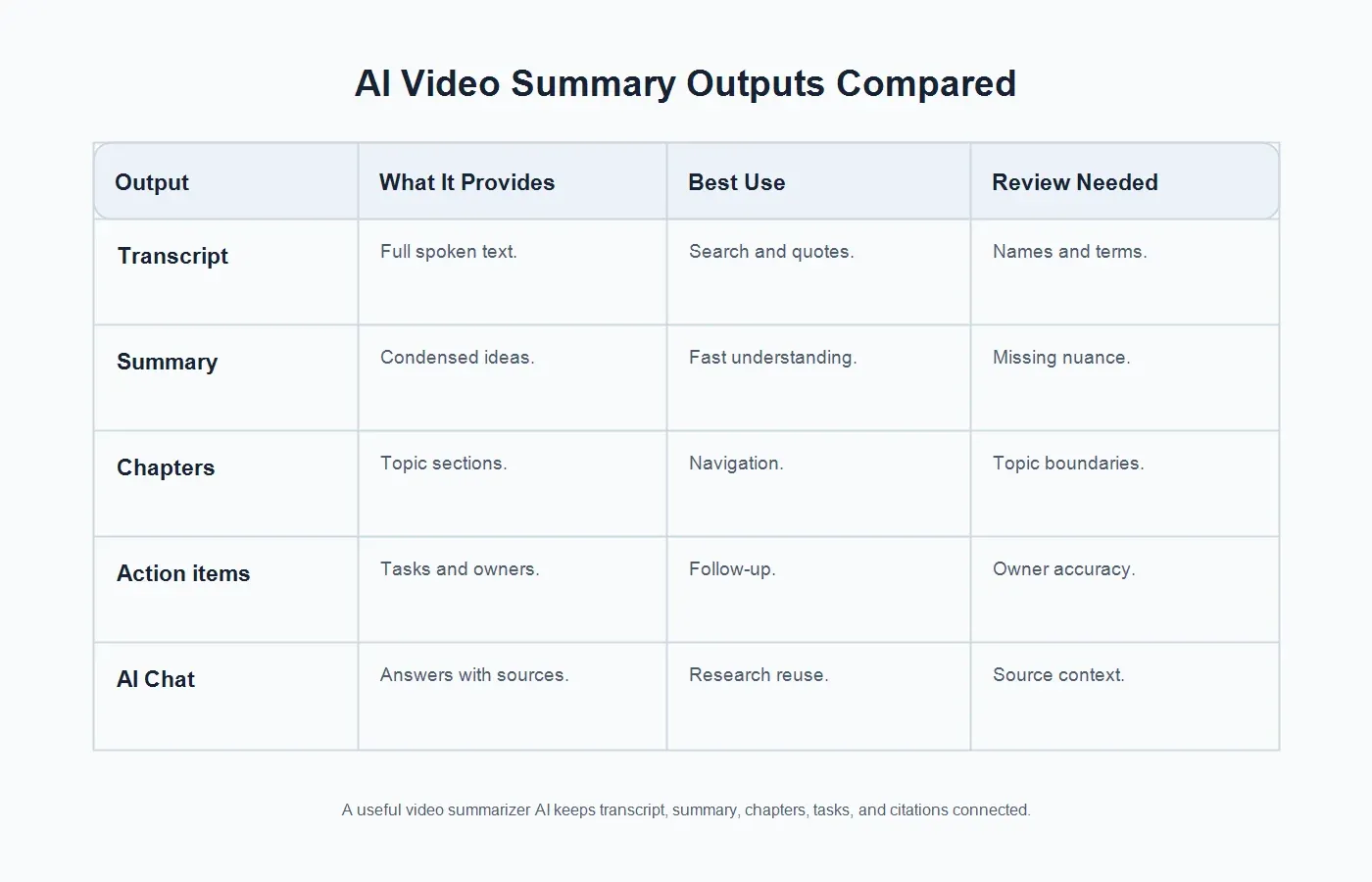
People often use transcript, summary, and notes as if they mean the same thing. They do not. If you choose a tool only because it creates a short recap, you may still end up manually extracting tasks, quotes, context, and follow-up. A commercial video workflow should preserve the transcript while producing structure on top of it.
| Output | What It Provides | Best Use | Review Needed |
|---|---|---|---|
| Raw transcript | Full spoken text from the video. | Search, quotes, captions, and close review. | Names, technical terms, and speaker context. |
| Summary | A condensed version of the main ideas. | Fast understanding and leadership recaps. | Nuance, caveats, and exact wording. |
| Chapters | Topic sections that map the recording. | Navigation, training, show notes, and research. | Topic boundaries and missing context. |
| Action items | Tasks, owners, commitments, and next steps. | Meetings, demos, interviews, and webinars. | Owner accuracy, deadlines, and dependencies. |
| AI Chat | Answers grounded in the source video and notes. | Reusable knowledge, onboarding, and research. | Source context and permission boundaries. |
Safe Use for YouTube and Copyrighted Videos
Video summarization should stay inside permission boundaries. Use content you own, created, are authorized to process, have licensed, is in the public domain, or can otherwise use lawfully. Do not use AI summarization to bypass access controls, download restrictions, private links, paid content, membership videos, or platform rules.
YouTube's copyright guidance explains that creators generally own original videos they create and that copyright owners control many uses of their work. YouTube's fair use guidance and the U.S. Copyright Office both describe fair use as a context-specific analysis based on factors such as purpose, nature of the work, amount used, and market effect. There is no universal percentage, disclaimer, or short excerpt rule that automatically makes reuse safe.
For practical teams, keep the rule visible: summarize your own videos freely, process customer or partner recordings only with permission, treat third-party YouTube videos cautiously, and verify rights before publishing or commercially reusing the output. HiNoter is positioned for permitted content. It should not be used to evade creator rights or platform access limits.
How to Turn a Video Into AI Notes
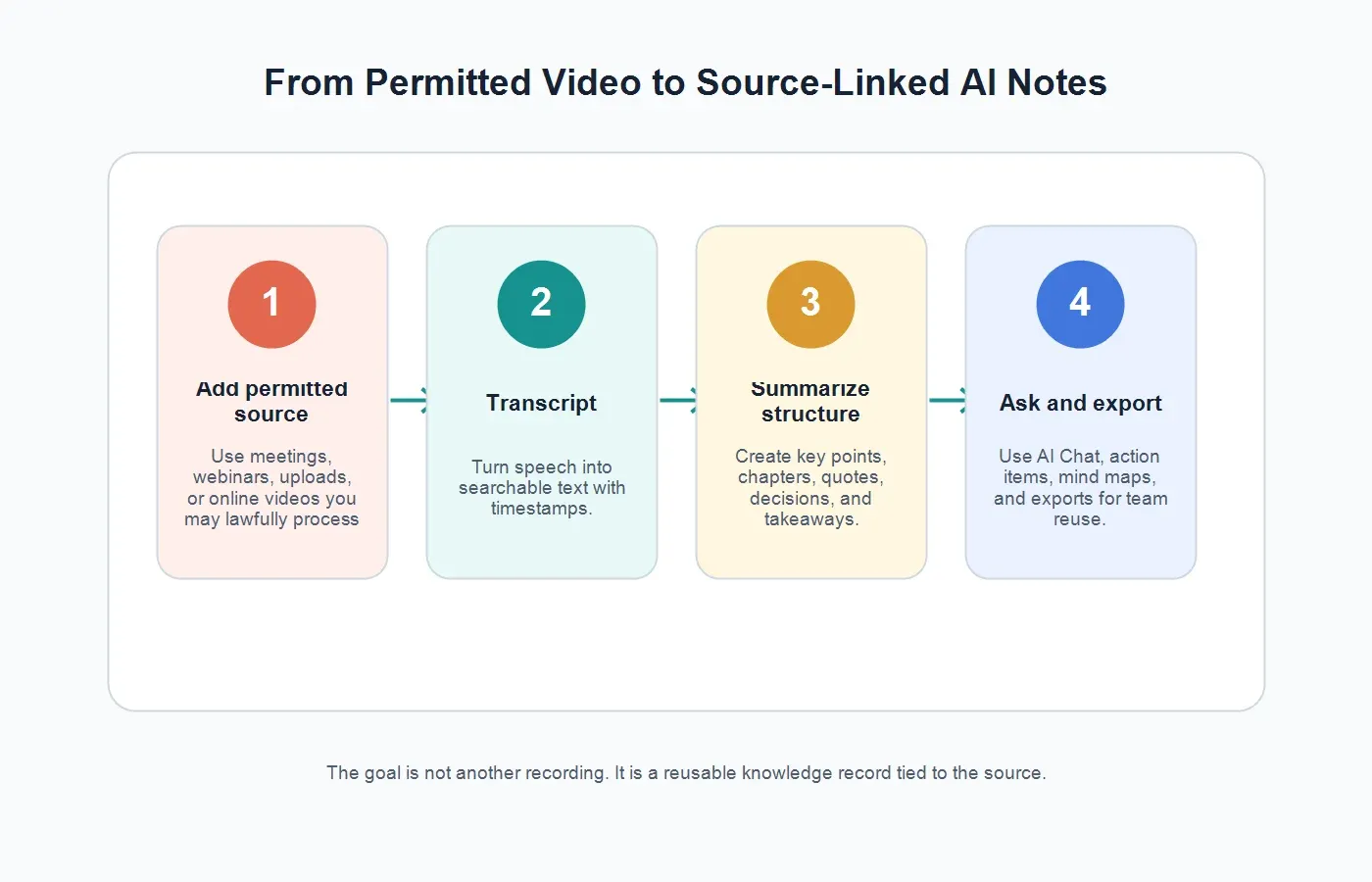
The workflow is similar whether the source is a meeting recording, webinar, tutorial, podcast episode, online course, product demo, or permitted YouTube video. Start with the source rights, create or import the transcript, then use AI to organize the content into outputs people can actually use.
| Step | What to Do | Output |
|---|---|---|
| 1. Confirm access | Use a video you own, recorded with consent, have permission to process, or can lawfully use. | A safe source. |
| 2. Add the video | Upload a permitted file or paste an allowed source where the tool supports it. | Video ready for analysis. |
| 3. Generate transcript | Convert the spoken content into searchable text with timestamps where available. | Editable transcript. |
| 4. Summarize structure | Create key points, chapters, quotes, decisions, and action items. | Structured AI notes. |
| 5. Ask and share | Use source-linked AI Chat, mind maps, exports, and workspace sharing. | Reusable knowledge. |
HiNoter supports this workflow through its video to text and YouTube transcript generator features. The difference is that HiNoter is not only a transcript generator. It turns permitted videos into summaries, chapters, action items, mind maps, exports, and source-linked AI answers.
Where Video Summarizer AI Helps Most
Meetings and Recorded Calls
Meeting recordings often capture decisions, objections, commitments, and follow-up that never make it into chat. With HiNoter, teams can use AI meeting notes to capture summaries, decisions, tasks, owners, and source-backed answers. For scheduled calls, HiNoter can also support the meeting workflow directly, reducing the need to manually start, stop, rewatch, and summarize recordings.
Webinars and Virtual Events
Webinars are rich but slow to repurpose. A one-hour event may contain an executive framing, three proof points, a product walkthrough, customer questions, objections, and follow-up ideas. Video summarizer AI can turn the session into a recap, chapter list, pull quotes, sales enablement notes, FAQ ideas, and campaign angles. The transcript remains important because marketing claims and quotes should be verified before publication.
YouTube Videos and Tutorials
Owned YouTube videos are strong candidates for AI summaries because creators and teams can reuse them as blog outlines, study notes, show notes, product help, and internal knowledge. Third-party YouTube content requires more care. Public availability does not mean unlimited permission to copy, republish, or commercialize the work. Use permitted, lawful, and attribution-aware workflows.
Product Demos and Customer Research
Product demos and research interviews often contain the exact language customers use to describe their problems. A simple summary may miss that nuance. Structured notes can preserve pain points, feature requests, objections, success criteria, competitor mentions, and notable quotes. Source references matter because product and research teams need evidence, not just a cleaned-up recap.
Training, Courses, and Internal Knowledge
Training videos lose value when employees cannot find the relevant section. AI chapters, key points, and searchable Q&A make a long recording easier to reuse. A new hire can ask, "What did the trainer say about escalation?" or "Which steps are required before the handoff?" and review the cited context instead of replaying the full file.
What HiNoter Adds Beyond a Basic Video Summarizer
Basic video summarizers often produce a short paragraph. That may be fine for casual learning, but it is not enough for teams that need accountability, search, reuse, and source verification. HiNoter acts as a content-understanding layer for permitted video sources. It creates transcripts, summaries, chaptered notes, key takeaways, action items, mind maps, and AI Chat answers with source references.
This is especially useful when video is not the only source. A marketing team may combine webinar recordings with podcast audio and PDFs. A product team may combine user interviews with meeting notes and demo clips. A sales team may combine discovery calls with proposal documents. HiNoter keeps the knowledge layer consistent across media instead of leaving each file in a separate archive.
If the source is audio-only, HiNoter's audio to text workflow can convert speech into searchable notes. If the source is a report, paper, contract, manual, or slide export, PDF to text helps bring document knowledge into the same process. The practical result is one workflow for meetings, videos, audio, and PDFs.
Accuracy and Review: What to Check
AI summaries depend on the transcript, and transcripts depend on the quality of the source. Google Cloud's video speech transcription documentation describes speech transcription as converting speech in a video or video segment into text. In practice, transcription quality is affected by microphone clarity, background noise, speaker overlap, accents, compression, domain vocabulary, and whether the recording has clean audio.
Before sharing an AI video summary, review the details that carry risk. Names, numbers, dates, pricing, medical or legal claims, product specifications, deadlines, and direct quotes should be checked against the transcript and source video. If the summary will guide a customer response, executive decision, research finding, or public asset, the source should remain available for verification.
This is where source-linked AI Chat matters. A free-floating answer is hard to audit. A cited answer lets a user inspect the underlying segment, check the transcript, and decide whether the answer is strong enough to use. HiNoter's source references help teams move faster without treating summaries as unquestionable facts.
Outputs to Expect From a Strong AI Video Summarizer
A serious workflow should produce more than "here is the gist." Look for a transcript for search, a short summary for speed, chaptered notes for navigation, key points for understanding, quotes for evidence, action items for follow-up, and AI Chat for source-grounded questions. Mind maps are useful when a video contains multiple topics that connect, branch, or depend on each other.
Export options also matter. A creator may need show notes and a draft blog outline. A manager may need a decision recap in email. A researcher may need quotes and themes in a document. A customer team may need tasks in a workspace. A knowledge team may need searchable notes that can be reused later. If the tool cannot move outputs into the way your team works, the summary may become another isolated file.
How to Choose Video Summarizer AI for a Team
Start with the source types. Does the tool handle meeting recordings, uploaded files, webinars, permitted YouTube content, podcasts, and screen recordings? Then look at the output quality. Does it create clear chapters? Does it distinguish action items from general discussion? Does it preserve quotes and source context? Can users ask questions and verify answers?
Next, check collaboration. Teams need sharing controls, exports, searchable storage, language support, and a repeatable format. Global teams should look for automatic language detection and support for multilingual content. HiNoter supports 50+ languages, which is useful when a webinar, customer call, or training session includes English, Portuguese, Spanish, French, or mixed-language discussion.
Finally, consider whether the tool creates knowledge or just files. A transcript generator gives you text. A video summarizer gives you a recap. A knowledge workflow gives you source-backed summaries, tasks, mind maps, exports, and a place to ask questions later. That is the difference between archiving content and making it useful.
Common Mistakes With AI Video Summaries
Skipping the rights check. Public video is not automatically free to copy, republish, or commercialize. Confirm that the source is allowed before processing or sharing the output.
Trusting a summary without the transcript. A short recap can hide nuance. Keep transcripts and source references connected for important work.
Using one output for every video. Webinars need chapters and quotes. Meetings need decisions and tasks. Training videos need steps and Q&A. Research videos need evidence and themes.
Letting notes scatter. If the transcript sits in one folder, the summary in chat, and tasks in a separate app, the team will lose context again. Keep source, notes, actions, and exports connected.
Publishing without review. AI can mishear names, flatten caveats, or overstate a point. Review important claims before sharing outside the team.
When You Need Recording vs When You Need AI Notes
A screen recorder, meeting recorder, or webinar platform is still useful when you need the original file for compliance, training review, design critique, or full context. Recording preserves everything, including tone, pauses, slides, demos, and visual walkthroughs. It is the source of truth when someone needs to inspect exactly what happened.
AI notes become more valuable after the recording exists. They help people who do not need to watch every minute but do need the decisions, steps, examples, objections, risks, and next actions. In many teams, the best workflow is not recording versus summarization. It is recording for evidence, transcription for search, summarization for speed, and source-linked AI notes for reuse.
HiNoter fits that second half of the workflow. After a permitted recording is available, it helps convert the content into a structured knowledge record. That makes long-form video easier for managers, marketers, researchers, sales teams, trainers, and support teams to use without losing the underlying source.
Try HiNoter for Permitted Videos
If you need more than a quick recap, HiNoter turns permitted videos into a transcript plus summary, key points, chapters, action items, mind map, exports, and searchable Q&A. Use it for meeting recordings, webinars, product demos, tutorials, podcasts, screen recordings, and YouTube videos you own, have permission to use, or can lawfully process.
The practical benefit is straightforward: less rewatching, fewer manual notes, better follow-up, and a searchable record of what the video actually contained. HiNoter helps teams move from "someone should review this recording" to "here is what matters, where it came from, and what happens next."
FAQs
What is video summarizer AI?
Video summarizer AI analyzes permitted video content and creates a shorter, structured record such as a transcript, summary, key points, chapters, quotes, action items, mind maps, and source-linked answers.
Can AI summarize YouTube videos?
Yes, when the video is yours, you have permission, the content is licensed or public domain, or your use is otherwise lawful. Do not bypass access controls, paid restrictions, private links, or copyright rules.
What is the difference between video transcription and video summarization?
Video transcription turns speech into written text. Video summarization condenses the content into main ideas. AI notes go further by organizing chapters, tasks, decisions, mind maps, and source-grounded answers.
Can HiNoter summarize meetings and webinars?
Yes. HiNoter can process permitted meeting recordings, webinars, videos, and audio into transcripts, summaries, chapters, action items, mind maps, exports, and AI Chat answers with source references.
Is an AI video summary accurate enough to share?
Review important details first. Names, numbers, dates, quotes, pricing, legal or medical claims, and product specifications should be checked against the transcript and original source before publication or customer use.
What files can become AI video notes?
Common sources include meeting recordings, webinars, product demos, tutorials, podcasts, screen recordings, customer interviews, training videos, and permitted YouTube content. The right workflow depends on source quality, permissions, and the output you need.