
I’ve sat through something like four thousand video calls since 2020. Nobody ever handed me a list of virtual meeting etiquette rules for professional video calls, so somewhere around meeting number 1,200, I started keeping my own. The same mistakes kept repeating across companies, continents, and seniority levels. The guy eating cereal into a hot mic. The manager who shared her entire desktop, 14 browser tabs visible, three of them personal. The new hire who joined in a hoodie and went white when the CEO dropped in.
Consider this that manual. It’s built from a few thousand hours of watching what works and what cratered.
If you only remember five things:
1. Show up with an agenda, even a rough one.
2. Mute your mic the second you stop talking.
3. Look at the camera lens, not your own face.
4. Share one window, never your whole screen.
5. Send a recap with action items within 24 hours.
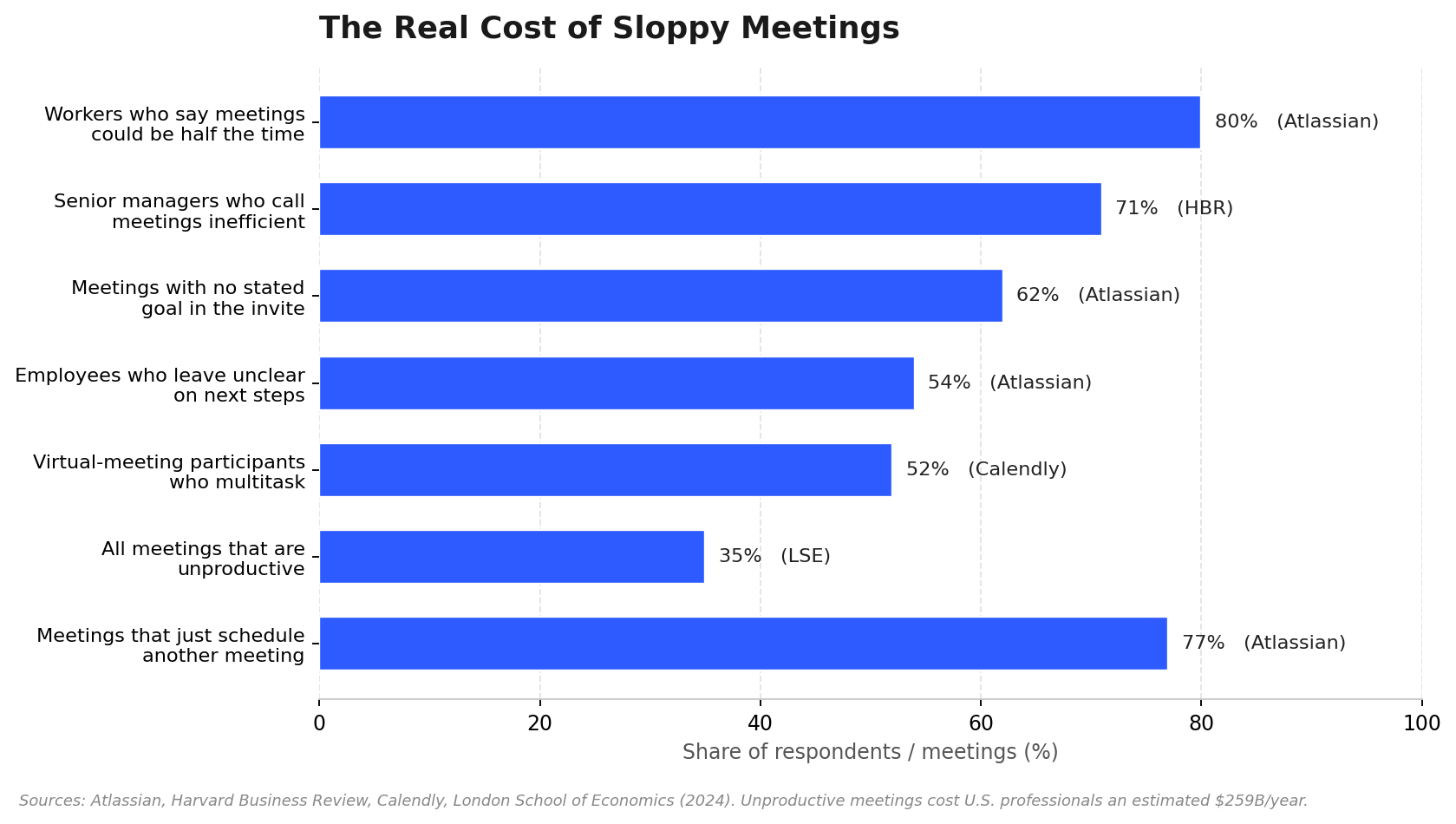
The stakes are real. The London School of Economics puts the annual cost of unproductive meetings at $259 billion for U.S. professionals alone. Atlassian found that 80% of workers think most meetings could be done in half the time. And here’s the kicker from Zoom’s own data: 54% of employees want post-meeting summaries, but only 39% ever get them. The gap between what we know we should do and what actually happens is where this guide lives.
What Counts as Virtual Meeting Etiquette?
It’s not about looking good on camera or knowing which button mutes you, though both help. Virtual meeting etiquette is the set of shared habits that make a video call worth having instead of an email. Three phases: what you do before you join, how you behave while the camera’s on, and what happens after everyone logs off. Skip any one phase and the meeting gets worse. Skip two and you’re better off canceling.
Before You Join: Rules 1 to 8
Owl Labs found that 72% of employees blame tech problems for late starts. Nearly every one of those delays is preventable, which is what makes them so aggravating.
1. Test your gear five minutes early. Not five seconds early. Open Zoom, Teams, or Meet, run the audio test, check your camera. If you’re presenting, confirm that screen-share permissions are turned on, because discovering they aren’t while eight people watch is a special kind of humiliation.
2. Send an agenda. Then read it. Only 37% of meetings actually use an agenda (Flowtrace). Meanwhile, 62% of workers regularly sit through calls where the goal was never stated in the invite (Atlassian). The fix is embarrassingly simple: the host circulates three to five bullet points 24 hours ahead. Julia Austin, who teaches at Harvard Business School, calls 24 hours the minimum notice for a productive discussion. As an attendee? Read it. Come with one question ready. That alone puts you in the top quartile of meeting participants.
3. Dress for the meeting you’re in. This one causes more hand-wringing than it should. The rule of thumb I’ve landed on: match your company culture, then dial it half a notch more formal than you think necessary. A client pitch means a collared shirt or the equivalent. An internal standup? A clean sweater is fine. Yes, the top half matters more because that’s what’s on camera. No, you should not gamble on never standing up. People stand up. Fire alarms happen.
4. Fix your background. Face a window or a plain wall. If your space is genuinely chaotic, use a Zoom blur or a neutral virtual background. I’ve never heard anyone complain about a background being too boring. I’ve heard plenty of complaints about the opposite.
5. Join two or three minutes early. Treat the start time as when discussion begins, not when you launch the app. Those two minutes let you settle, say hi, and handle any tech hiccups without burning the first chunk of the agenda.
6. Silence everything that pings. Turn on Do Not Disturb for your phone and your laptop. Set Slack to away. Close email. This takes ten seconds. I once watched a colleague present to a client while a Slack notification popped up that read, and I’m paraphrasing, “this deck is killing me.” The client could read it. My colleague could not unfry that egg.
The screen-share horror show. Most accidental information leaks on video calls don’t come from hackers. They come from people sharing their full desktop with notifications on. Salary spreadsheets, private Slack threads, job-offer emails from competitors. Real things that really happened. The fix is in Rule 7.
7. Prep your materials and close everything else. Open the exact document you’ll share in its own window. Close every other window. When it’s time to present, share that single window, not your whole screen. Your taskbar, your bookmarks bar, your desktop files, all of it stays private. Microsoft Teams even ships a feature called “sensitive content detection” that flags risky material before it goes live, which tells you this problem is common enough that Microsoft built a guardrail for it.
8. Check your lighting. Light source in front of you, not behind. A backlit window turns you into a silhouette, and no amount of engaged body language reads through a shadow. Stack a couple books under your laptop so the camera sits at eye level. Your eyes should hit the top third of the video frame.
During the Call: Rules 9 to 19
This is where etiquette either holds the meeting together or lets it fall apart. The two deadliest sins are people talking over each other and nobody talking at all.

9. Mute. Always mute. This is the cardinal rule of online meeting tips and I will die on this hill. Unmuted keyboards, barking dogs, echoey kitchens, family members who don’t know you’re on a call. These are the disruptions people complain about most, and every single one is solved by one click. Mute the instant you stop talking. Unmute to speak. Mute again. Learn the keyboard shortcut (hold Spacebar in Zoom and Teams) so it becomes muscle memory. If you take exactly one thing from this article, take this.
10. Look at the camera, not the gallery. When you speak, look into the lens. It feels weird, like you’re talking to a dot. But to everyone else, it reads as direct eye contact. Staring at your own face or the speaker’s tile makes you look distracted even when you’re paying full attention. 64% of employees say seeing colleagues on video makes it easier to trust their team (Jabra research). Eye contact is a big part of why.
11. Don’t interrupt. Use the raise-hand button. Video latency makes overlap worse than in-person. Two people start, both stop, both start again. You know the dance. The raise-hand feature, or a quick chat note saying “question after this point,” fixes it. Let the host call on people. It feels stiff for about a week. Then it becomes the only way you want to run a call.
12. Let the host steer, and learn to redirect politely. Someone has to own the clock. The best phrase I’ve found for pulling a meeting back from a tangent is some version of: “That’s a great point. Let’s park it and come back if we have time.” Then you return to the agenda. “Park it” works because it acknowledges the person without letting the meeting slide off the road. What doesn’t work is the blunt “Okay, we need to move on,” which leaves the speaker feeling dismissed and the room a little tense.
13. Share one window, not your life. I covered the prep in Rule 7. During the call, the additional rule is: stop sharing the moment you’re done. Don’t leave your screen up while you tab over to check something. And if you absolutely must share your full desktop for some reason, at least turn off notifications first. Microsoft built that sensitive-content detector for a reason.
14. Don’t multitask. 52% of virtual-meeting participants admit to multitasking when there are two or more people on the call (Calendly). We all think we’re the exception who can email and listen at the same time. We are not. The delayed “sorry, can you repeat that?” gives it away every time. If the meeting doesn’t need you, ask to be excused. People respect that more than half-attendance.
15. Slow down. Audio compression, latency, and cheap headsets eat clarity. Fast talkers become unintelligible the moment the connection dips. Non-native speakers on the call? Slow down another 10%. Pause between points. If you’re hosting, summarize decisions out loud so nothing gets lost in the audio wash.
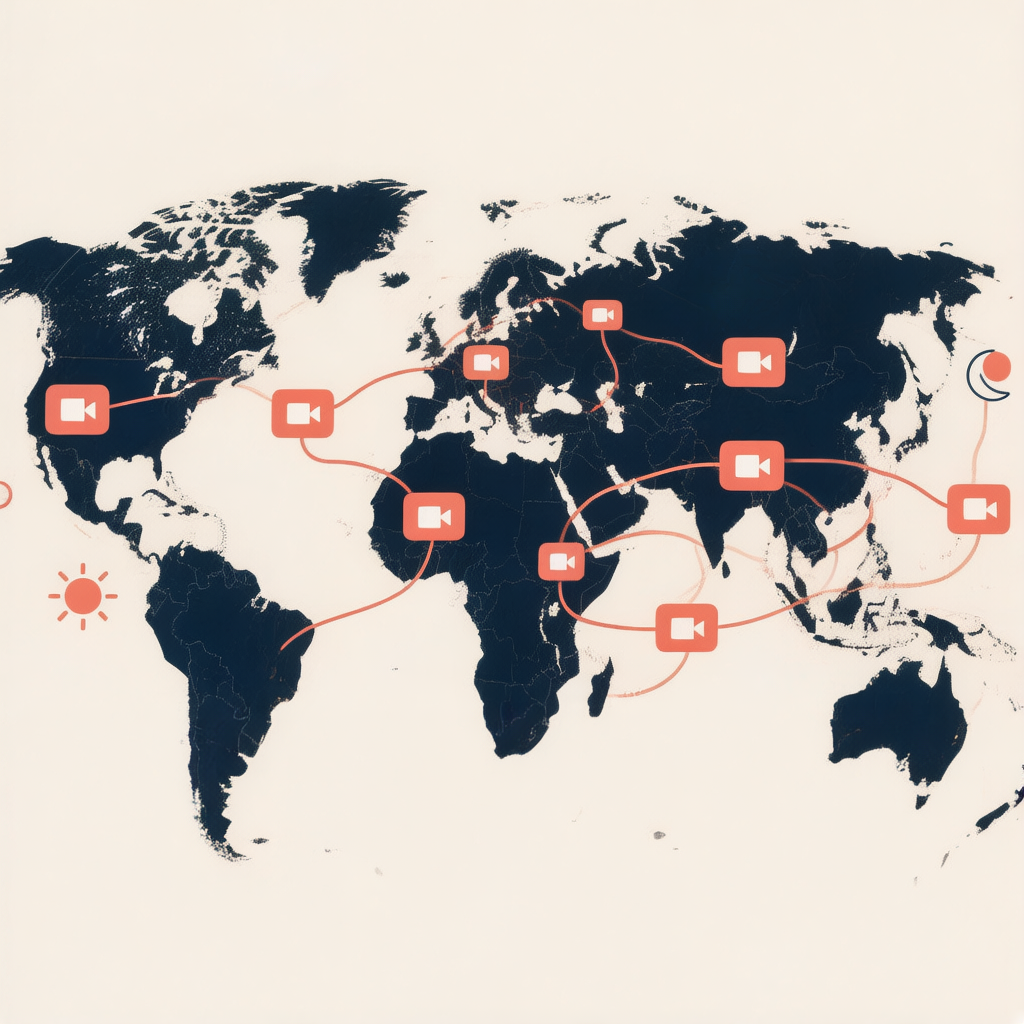
16. Read the room across cultures. This one deserves more space than the others, because it’s where most global teams stumble. 71% of teams now hire internationally, and only about 17% of the world speaks English. The unspoken rules around directness, hierarchy, and silence are not universal.
Some patterns I’ve seen burn teams: In the U.S. and the Netherlands, directness reads as competence. People speak up, push back, expect it. In Japan, a pause before responding means the person is thinking, not that they disagree. Filling that silence is a mistake. In India, a head nod often signals “I hear you,” not necessarily “I agree.” And in the UK, “this might need a bit more work” frequently means “this needs a major rewrite,” a phrasing Americans routinely misread as a pass.
Skip idioms. “Let’s touch base next week” is confusing to half the planet. Say “let’s meet Monday to review progress” instead. For multilingual teams, real-time captions and translation close more of the comprehension gap than you’d expect. Tools that auto-detect the language being spoken and transcribe across 50+ languages mean one set of notes works for a team spread from São Paulo to Lisbon to Berlin. Nobody’s stuck decoding a fast English call at midnight.
- Keep side chat professional. The meeting chat is a public record. It can be screenshotted, forwarded, read aloud. Treat it accordingly. Questions and links, fine. Snark about the vendor while the vendor’s co-presenter is on the call? Not fine.
18. Share the time-zone burden. On global teams, someone is always inconvenienced. The question is whether that burden rotates or gets dumped on the same region every time. Rotate meeting times quarterly. Use World Time Buddy to find overlap windows. When there’s no humane overlap, record the meeting and circulate notes so nobody has to choose between sleep and inclusion. A “global all-hands” at 9 a.m. in New York is 1 a.m. in Bangalore. Do that every month and you’re telling your Bangalore team something, whether you mean to or not.
19. Cameras: on when it counts, off when it doesn’t. Jabra found that Gen Z and millennial workers feel excluded in online meetings two to three times more often than older colleagues. Part of that is camera fatigue from being “on” constantly. The rule isn’t “always on” or “always off.” Small meetings, intros, relationship-building? Cameras on. A 90-person town hall where three people talk? Give people permission to turn off. Say it out loud as the host: “Cameras welcome, not required.” That sentence alone improves participation.
After the Meeting: Rules 20 to 25
This is where most teams lose. The meeting happens, decisions get made, and then nothing gets written down. 54% of employees leave meetings unclear on next steps (Atlassian). 54% want summaries, only 39% get them (Zoom). The follow-up is where decisions turn into results, or don’t.
20. Send a recap within 24 hours. Memory degrades fast. By the next morning, half the room has forgotten what was decided and the other half remembers it differently. A written recap, even a short one, aligns everyone before those divergent memories harden into conflicting assumptions. Keep it to three things: decisions made, action items with owners and deadlines, and anything parked. The format matters less than the timing.
This is also the part that eats the most admin time, which is why a lot of teams have started using an AI note taker that joins the call on its own and produces a structured summary the second the meeting ends. The recap writes itself instead of sitting on someone’s to-do list for three days until it’s irrelevant.
21. Assign action items with names and dates. “We should follow up with the client” is not an action item. “Maria emails the client by Thursday” is. The difference is whether anything actually happens. Every action item needs three things: a verb, an owner, and a deadline. If it doesn’t have all three, it’s a wish.
22. Put the recording and notes somewhere findable. People miss meetings. Sick days, conflicts, time zones. If the recording lives on someone’s local desktop, it might as well not exist. Drop it in a shared workspace your team already uses. If your notes tool syncs to Notion, Google Docs, or Slack, the recap lands where people already work, and nobody has to go hunting. The best setups turn past meeting notes into a searchable archive you can query later, which beats scrolling through a year of recordings to find one decision.
23. Clear the parking lot. “Let’s park that” is honest triage during a call. But parked topics have a way of staying parked. They show up on the next agenda, and the next, until the parking lot becomes the agenda. Keep a running list. Assign each item an owner or a revisit date. Spend two minutes at the start of the next meeting clearing it.
24. Handle more than just live audio. Meetings aren’t only live conversations anymore. A teammate shares a pre-recorded demo. Someone references a PDF spec. A candidate submits a video intro. If your follow-up process only handles live audio, you end up doing the same work twice in two places. The cleanest fix is treating recordings, PDFs, and video clips as sources for your notes, the same way you’d treat a live call. A tool that transcribes a YouTube walkthrough, a PDF brief, and a recorded Zoom meeting into one consistent format keeps your summaries uniform regardless of where the content came from. One workflow, not three.
25. Make notes something you can ask questions to. Notes that sit unread in a folder are an archive. Notes you can query are a knowledge base. The difference matters. When someone can ask “what did we decide about the pricing change last quarter?” and get an answer in seconds, with a citation pointing back to the exact meeting, the whole team uses it. When they have to dig through six documents titled “meeting_notes_final_v3_FINAL(2).docx,” nobody does. If your notes tool includes an AI chat that cites its sources, even better. It turns a pile of transcripts into something people actually open.
Formal vs. Casual: The Rules Bend, They Don’t Break
Not every call needs the same level of formality. The video call rules above flex depending on context, but they don’t disappear. Here’s how the key ones shift.
Area | Formal call (client, board, exec) | Internal call (standup, 1:1, sync) |
Agenda | Written, circulated 24h ahead | Bullet list or verbal at the start |
Attire | Business professional | Smart casual, clean |
Camera | On for everyone | Encouraged, not mandatory |
Mute | Strict | Strict (this one never relaxes) |
Screen share | Rehearsed, single window, notifs off | Single window, notifs off |
Small talk | 30 to 60 seconds, then agenda | 2 to 5 minutes is fine |
Recap | Formal minutes, same day | Short chat summary, within 24h |
Recording | Ask permission, announce it | Mention if you’re recording |
Quick Answers to Common Questions
Q: What is virtual meeting etiquette?
A: It’s the set of shared habits that keep video calls professional and worth having. Three stages: preparation (tech check, agenda), in-call conduct (muting, screen sharing, eye contact), and follow-up (recaps and action items). Think of it as the social contract that stops a call from becoming a waste of an hour.
Q: Should I keep my camera on?
A: Usually yes. Seeing colleagues builds trust; 64% of employees say video makes it easier to trust their team (Jabra). Use a blurred background if your space isn’t ready. But in large one-way meetings, give people permission to turn off. Camera fatigue is real, especially for younger workers.
Q: When should I mute?
A: Anytime you’re not talking. Background noise from keyboards, family, echo, pets is the most common virtual-meeting disruption. One click fixes it. There’s a reason it’s Rule 9.
Q: How do I stop someone who won’t stop talking?
A: Use a verbal bridge: “That’s a great point, let’s build on it.” Then redirect to the agenda. The raise-hand feature lets you signal without cutting in. “Park it” is the phrase that acknowledges the tangent without letting it derail everything.
Q: What if I accidentally share something sensitive on screen?
A: Stop sharing immediately. Acknowledge it briefly, something like “let me close that out,” and move on. Don’t panic and don’t over-explain, drawing attention makes it worse. The real fix is preventive: share one window, silence notifications, close sensitive files before the call starts.
Q: How long should a meeting last?
A: Shorter than you think. Parkinson’s Law means meetings fill whatever time you give them. Research suggests 25 minutes is about the ceiling for sustained focus. Default to 25 or 50 minutes instead of 30 or 60. And 80% of workers say most meetings could be half as long (Atlassian).
The Bottom Line
None of these rules are hard. The hard part is building the habits. Muting without thinking about it. Sending a recap without being asked. Closing your tabs before you share your screen. Small actions, repeated across hundreds of meetings, compound into a team that actually gets things done instead of one that talks about getting things done.
The numbers make the case better than I can. $259 billion lost to bad meetings every year (LSE). 71% of senior managers call meetings inefficient (HBR). More than half of employees leave without knowing what to do next (Atlassian). Good Zoom etiquette isn’t about politeness for its own sake. It’s about clawing back some of that wasted time and money, one habit at a time.
Pick one rule from this list. Just one. Mute is usually where I tell people to start, because it’s the easiest to fix and the most immediately noticeable. Work on it this week. Then come back for the next one.
About the author: This guide was written by the HiNoter editorial team, which has spent years documenting how distributed teams communicate across continents. Our reporting draws on research from Harvard Business Review, the London School of Economics, Atlassian, Fellow, and Zoom’s own meeting data. We build tools that help teams capture, structure, and act on what gets said in every meeting, without anyone taking manual notes.