Direct answer: A YouTube summarizer turns a permitted video into a shorter, easier-to-use record: transcript, key points, chapters, quotes, action items, and searchable AI notes. HiNoter adds source-linked AI Chat and mind maps so teams can reuse the value of a video without rewatching every minute.
YouTube is not short on content. YouTube's own press page says more than 20 million videos are uploaded daily. That scale is the reason people search for a YouTube summarizer in the first place. The problem is not access to video. The problem is extracting the right sentence, decision, lesson, quote, or task from a long recording before the next meeting starts.
Students, creators, marketers, researchers, customer teams, and product teams all run into the same wall. A webinar may contain five usable ideas, but it is 63 minutes long. A tutorial may explain one crucial setting, but the answer is buried in the middle. A podcast may produce great quotes, but nobody wants to scrub through the episode again. A summary alone helps, but the real value comes when the video becomes a structured knowledge record with source context.
This guide explains how to summarize videos you own, have permission to use, or can lawfully access. It also shows where raw transcripts stop, where AI summaries help, and how HiNoter turns permitted YouTube and video content into transcripts, chaptered notes, key takeaways, action items, mind maps, and AI Chat answers with source references.
What Is a YouTube Summarizer?
A YouTube summarizer is software that condenses permitted YouTube or video content into a shorter record of what matters. Depending on the tool, that record may include a transcript, plain-language summary, chapter outline, key points, quotes, action items, timestamps, and AI-generated answers grounded in the source.
A good summary should not replace judgment. It should shorten the path from video to understanding. The best workflow keeps the transcript close to the summary so a user can verify important claims, names, dates, numbers, product details, and quotes before sharing them.
YouTube Summarizer: Transcript vs Summary vs AI Notes
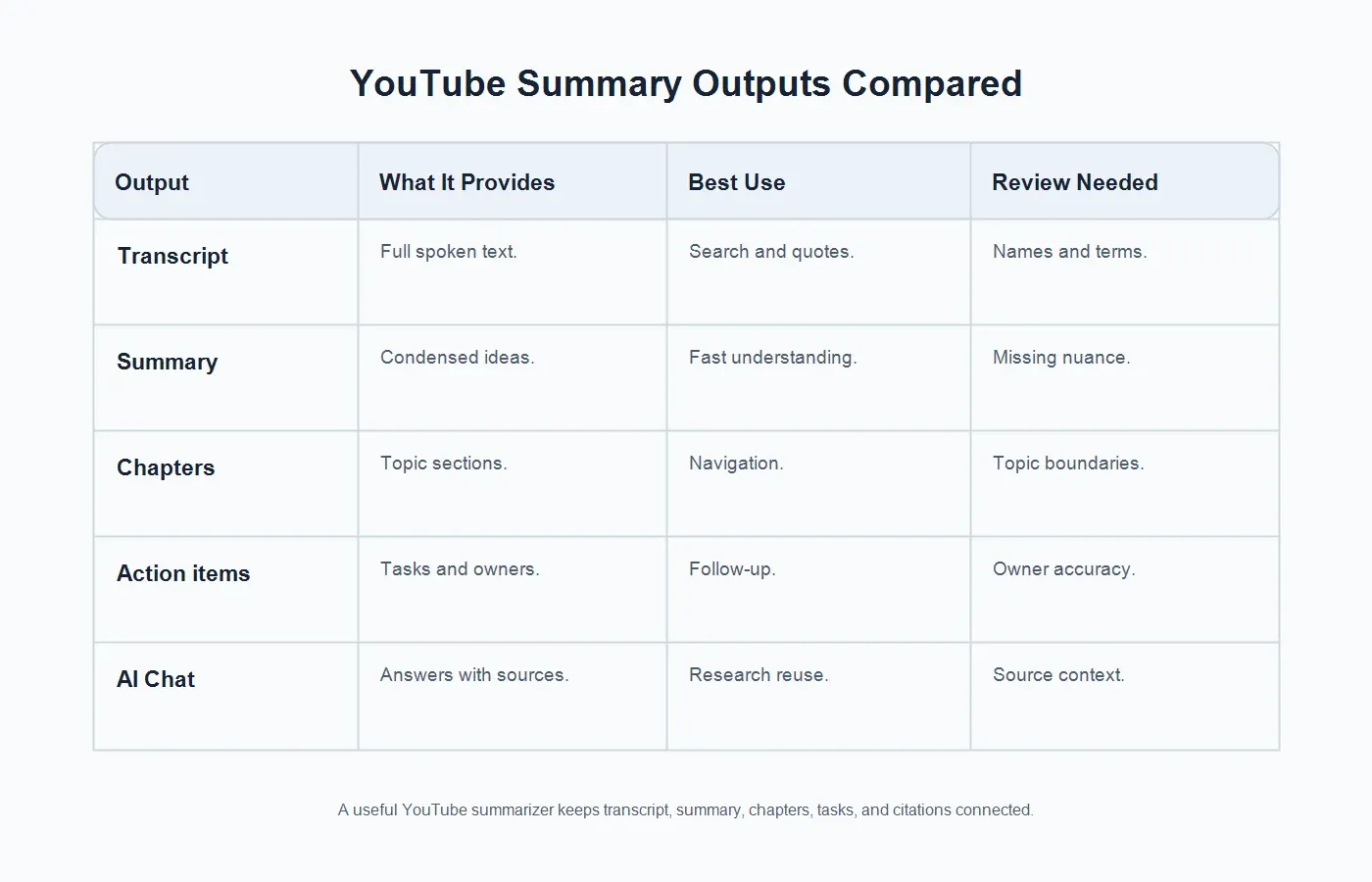
These words are often used together, but they do different jobs. A transcript captures the spoken words. A summary compresses the meaning. AI notes organize the content into reusable sections for people who need to act on it later. For business use, notes usually matter more than a plain recap because they connect the video to decisions, owners, follow-up, and team knowledge.
| Output | What It Provides | Best Use | Review Needed |
|---|---|---|---|
| Raw transcript | Full spoken text from the video. | Search, quotations, captions, and close review. | Names, technical terms, and speaker context. |
| Summary | A shorter version of the main ideas. | Fast understanding and leadership recaps. | Nuance, tradeoffs, and exact wording. |
| Chapters | Topic sections that map the video's flow. | Navigation, training, show notes, and research. | Topic boundaries and missing segments. |
| Action items | Tasks, owners, commitments, and next steps. | Meetings, demos, interviews, and webinars. | Owner accuracy, deadlines, and dependencies. |
| AI Chat | Question-answering grounded in the video record. | Reusable knowledge, onboarding, and research. | Source context and permission boundaries. |
Safe Use for YouTube and Copyrighted Videos
Use a YouTube summarizer only for content you own, created, are authorized to process, have licensed, is in the public domain, or can otherwise use lawfully. Do not use summarization tools to bypass access controls, download restrictions, paywalls, private links, membership content, or platform rules. If the output will be published, commercialized, quoted, repackaged, or distributed outside your organization, get the rights question settled before relying on the summary.
YouTube's copyright guidance explains that creators generally own original videos they create and that copyright owners decide who can use and distribute their work. YouTube's fair use page and the U.S. Copyright Office both describe fair use as a context-specific analysis based on factors such as purpose, the nature of the work, the amount used, and market effect. There is no magic word count, percentage, or disclaimer that automatically makes a use safe.
For practical teams, the safest habit is simple: summarize your own videos freely, summarize customer or partner videos only with permission, treat third-party videos cautiously, and keep source links or file names attached to the notes. HiNoter is designed for processing content you are allowed to use. It should not be used to evade creator rights or platform access limits.
How to Summarize a Permitted YouTube Video
The exact workflow depends on the source, but the core process is consistent. Start with permission, then move from transcript to structure. If the video already has accurate captions or a transcript, use that as a source where allowed. If you own the video file, upload it directly. If you are working with public material, make sure the use is lawful and narrow enough for the purpose.
| Step | What to Do | Output |
|---|---|---|
| 1. Confirm access | Check that you own, have permission to use, or can lawfully process the video. | A safe source. |
| 2. Add content | Paste or upload permitted video content where the tool supports it. | Video ready for analysis. |
| 3. Generate transcript | Convert speech into searchable text with timestamps where available. | Editable transcript. |
| 4. Build summary | Create key points, chapters, takeaways, quotes, and action items. | Structured notes. |
| 5. Ask and share | Use source-linked AI Chat, mind maps, exports, and team sharing. | Reusable knowledge. |
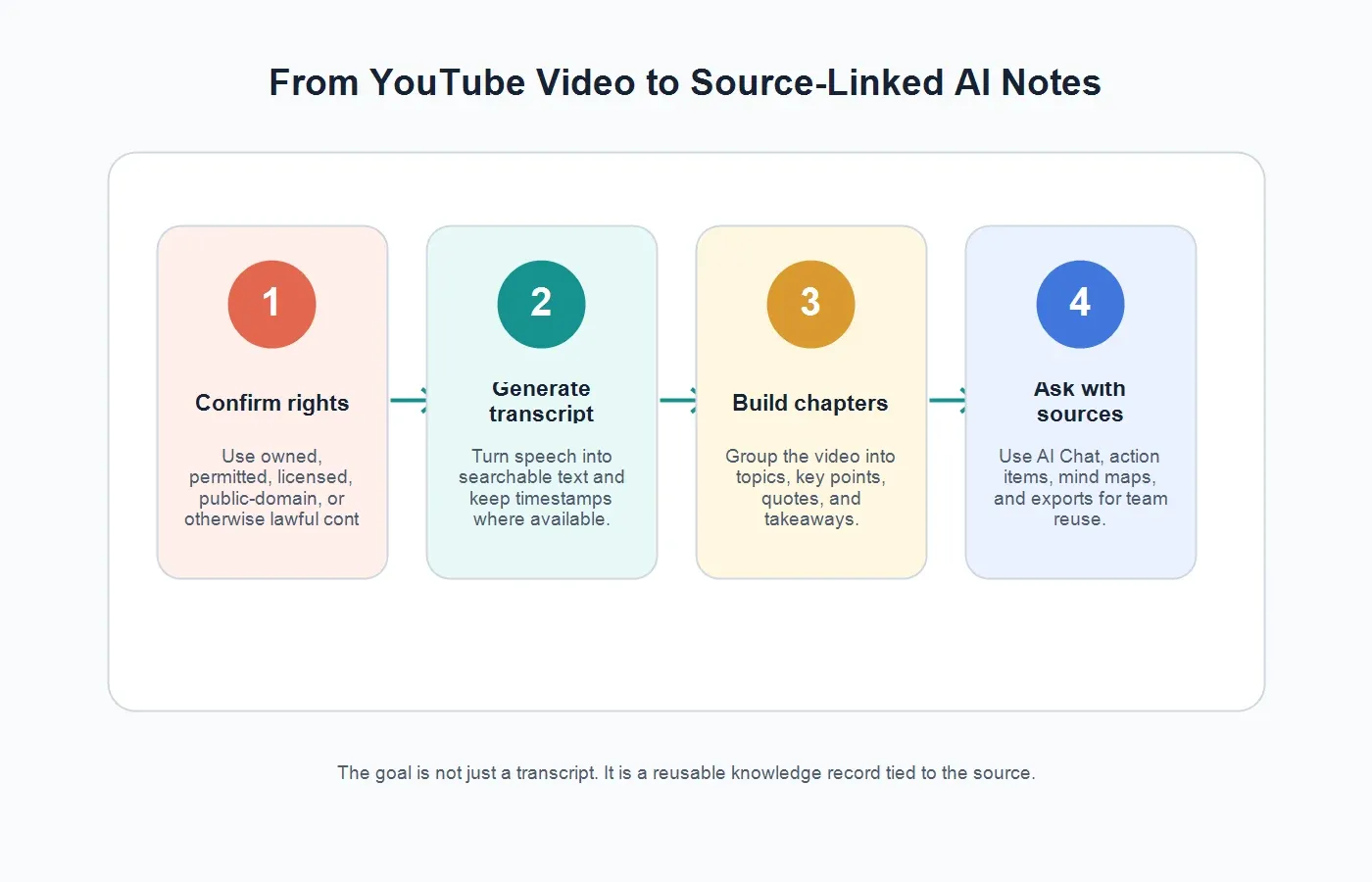
HiNoter supports this video-to-knowledge workflow through its YouTube transcript generator and video to text features. The important difference is that HiNoter does not stop at raw text. It turns permitted videos into summaries, action items, mind maps, and source-linked answers your team can search later.
What HiNoter Adds Beyond a Basic Video Summarizer
Many summarizers produce a paragraph recap. That can be enough for casual viewing, but it is often too shallow for work. Teams need to know what was said, what matters, who owns the next step, which quote supports the conclusion, and where the original source sits. Otherwise the summary becomes another disconnected note.
HiNoter acts as a content-understanding layer for permitted videos. It can generate a transcript, summarize sections, extract key takeaways, identify action items, create a mind map, and let users ask questions through AI Chat with source references. That turns a recording from a passive archive into a working knowledge asset.
The same approach is useful when video is only one source among many. A product team may combine demo recordings with customer interviews and PDFs. A marketing team may combine a webinar with podcast audio and slide exports. A research team may combine video evidence with meeting notes. HiNoter is built as an AI meeting notes and transcription platform, so teams can keep meeting records, videos, audio, and documents closer together instead of scattering them across folders and chat threads.
Common Use Cases for a YouTube Summarizer
Creators and Marketers
Creators can turn their own videos into show notes, newsletter drafts, chapter outlines, blog angles, quotes, and social snippets. Marketers can summarize webinars, product demos, interviews, and video podcasts into campaign briefs. The best results keep quotes tied to the source so the team can verify wording before publishing.
Students and Educators
Students often need the lesson, not a second full viewing. For permitted lectures, tutorials, and course videos, a summarizer can create chapter notes, definitions, study prompts, and a review path. Educators can use summaries to create lesson recaps or help students navigate long recordings.
Sales and Customer Success
Sales demos, recorded discovery calls, customer webinars, and implementation walkthroughs contain objections, feature requests, risks, and promises. A summary can tell the team what happened. Action items tell the team what to do next. Source references help the account owner verify sensitive details before sending follow-up.
Product and User Research
User research videos often contain valuable evidence, but watching every clip again is slow. A structured video summary can surface pain points, jobs to be done, feature language, quotes, and recurring patterns. For research, source context is not optional; it is how teams avoid turning a participant's words into an unsupported claim.
Operations and Training
Training videos, policy walkthroughs, onboarding sessions, and internal demos can become checklists, procedures, and knowledge base entries. Instead of asking new employees to watch an hour-long recording, teams can provide a transcript, chaptered summary, and searchable Q&A.
Accuracy: What to Check Before You Trust the Summary
AI summaries are strongest when the source audio is clear and the transcript is reliable. Google Cloud's video speech transcription documentation describes the basic task as converting speech from a video or video segment into text. In everyday terms, the quality of that text depends on microphone quality, speaker overlap, accents, background noise, vocabulary, and whether the original video is compressed or distorted.
Before sharing a video summary, check the high-risk details. Names, numbers, pricing, deadlines, medical or legal claims, product specifications, and direct quotes deserve a source review. If the summary will guide a business decision, keep the transcript and original video available. If the summary will be published, verify quotes and attribution carefully.
HiNoter's AI Chat with source references helps here because users can ask follow-up questions and inspect where an answer came from. A cited answer is easier to audit than a free-floating paragraph, especially when the content will be reused in sales, research, support, training, or public marketing.
From YouTube Summary to Team Knowledge
The strongest workflow does not end at "summary generated." A useful video record should include the source link or file name, transcript, short summary, chapter list, key takeaways, quotes, action items, owner, follow-up status, and related documents. That record should be searchable and shareable, but not carelessly public.
HiNoter helps teams move from video notes into working systems. A marketer can export a webinar summary. A customer success manager can capture tasks after a product walkthrough. A researcher can ask the video record for repeated themes. A manager can use the mind map to brief a team quickly. If the video is part of a broader knowledge process, audio to text and PDF to text workflows can bring calls, podcasts, reports, papers, and slide documents into the same knowledge layer.
What Outputs Should a YouTube Summarizer Provide?
Look for more than a short paragraph. A useful tool should give you a transcript for search, a short summary for scanning, chapters for navigation, key points for understanding, quotes for evidence, action items for follow-up, and source references for verification. For team work, exports matter too. Notes should be easy to move into a document, workspace, email, task list, or knowledge base.
Mind maps are valuable when the video covers many related ideas. A tutorial may branch into prerequisites, setup, mistakes, examples, and troubleshooting. A research call may branch into pain points, current workflow, buying triggers, objections, and quotes. A mind map lets a team see the structure quickly without flattening the video into a single summary block.
Common Mistakes When Summarizing YouTube Videos
Ignoring permission. Public access is not the same as permission to copy, redistribute, or commercially reuse someone else's video. Confirm the use case before processing or publishing the output.
Trusting one paragraph too much. A short summary can miss caveats, conditions, or contradictions. Use chapters and source checks for important videos.
Separating the notes from the source. A summary without source context is hard to verify. Keep links, timestamps, transcripts, and file names attached.
Skipping quote review. If a quote will appear in a blog, report, deck, or customer-facing document, verify it against the transcript and original recording.
Using the wrong output for the job. Students may need study notes. Sales teams may need tasks. Researchers may need themes and evidence. Creators may need show notes. Choose the output before you summarize.
How to Choose a YouTube Summarizer
Choose based on the work after the summary. If you only need a quick recap of your own video, a simple video summarizer may be enough. If you need searchable knowledge for a team, look for transcription, chaptering, action items, mind maps, exports, and AI Chat with source references.
Also look at language support, supported inputs, file length limits, privacy controls, export options, and whether the tool handles meetings, audio, documents, and videos in one place. A single-purpose summarizer may create another isolated archive. A multi-source notes platform can help a team turn content into a shared knowledge base.
For global teams, language detection matters. A webinar may include one speaker in English, another in Portuguese, and a Q&A in Spanish. HiNoter supports 50+ languages and automatic detection, which helps multilingual teams create consistent notes without assigning a human notetaker for every source.
Try HiNoter for Permitted YouTube and Video Content
If you need more than a YouTube summary, use HiNoter to process permitted videos into a transcript plus summary, chapters, key points, action items, mind map, exports, and searchable Q&A. You can use it for your own YouTube content, webinars, tutorials, demos, podcasts, screen recordings, and meeting recordings where you have the right to process the file or source.
The practical benefit is simple: less rewatching, less manual note cleanup, and less knowledge trapped in long recordings. HiNoter helps the team move from "someone should watch this" to "here is what matters, where it came from, and what happens next."
FAQs
What is a YouTube summarizer?
A YouTube summarizer condenses permitted YouTube or video content into a shorter record. It may include a transcript, key points, chapters, quotes, action items, and AI-generated answers tied to the source.
Can I summarize any YouTube video?
No. You should summarize videos you own, have permission to use, have licensed, are in the public domain, or can otherwise use lawfully. Do not bypass access controls, paid restrictions, private links, or copyright rules.
What is the difference between a YouTube transcript and a YouTube summary?
A transcript captures the spoken words. A summary condenses the main ideas. AI notes go further by organizing the content into chapters, key points, action items, mind maps, and searchable source-linked answers.
Can HiNoter create chaptered summaries from videos?
Yes. HiNoter can turn permitted videos into transcripts, chaptered summaries, key points, action items, mind maps, exports, and AI Chat answers with source references.
Is a YouTube summary accurate enough to publish?
Review it first. Important names, numbers, quotes, claims, product details, and legal or medical statements should be checked against the transcript and source video before publication.
Can I use a YouTube summarizer for webinars and podcasts?
Yes, when you own the content, have permission, or can lawfully process it. Webinars and podcasts are strong use cases because summaries, chapters, quotes, and action items make long recordings easier to reuse.