Quick answer: To learn how to record a podcast, plan the episode, choose a quiet room and microphone, prepare your guest, record local or high-quality remote audio, keep a backup, edit the episode, then upload the audio or video to HiNoter to generate a transcript, show notes, summary, quotes, and reusable team knowledge.
Recording a podcast is no longer the hardest part. A creator can record a good conversation with a USB microphone, a remote recording platform, and a quiet room. The bottleneck usually comes after the call: transcripts, timestamps, show notes, guest quotes, social snippets, newsletter copy, and internal notes for sales, content, or product teams.
This guide covers the full workflow, from planning and recording to post-production and knowledge reuse. HiNoter fits after the recording is captured. It is the layer that turns raw podcast audio or video into text, summaries, show notes, and searchable insights.
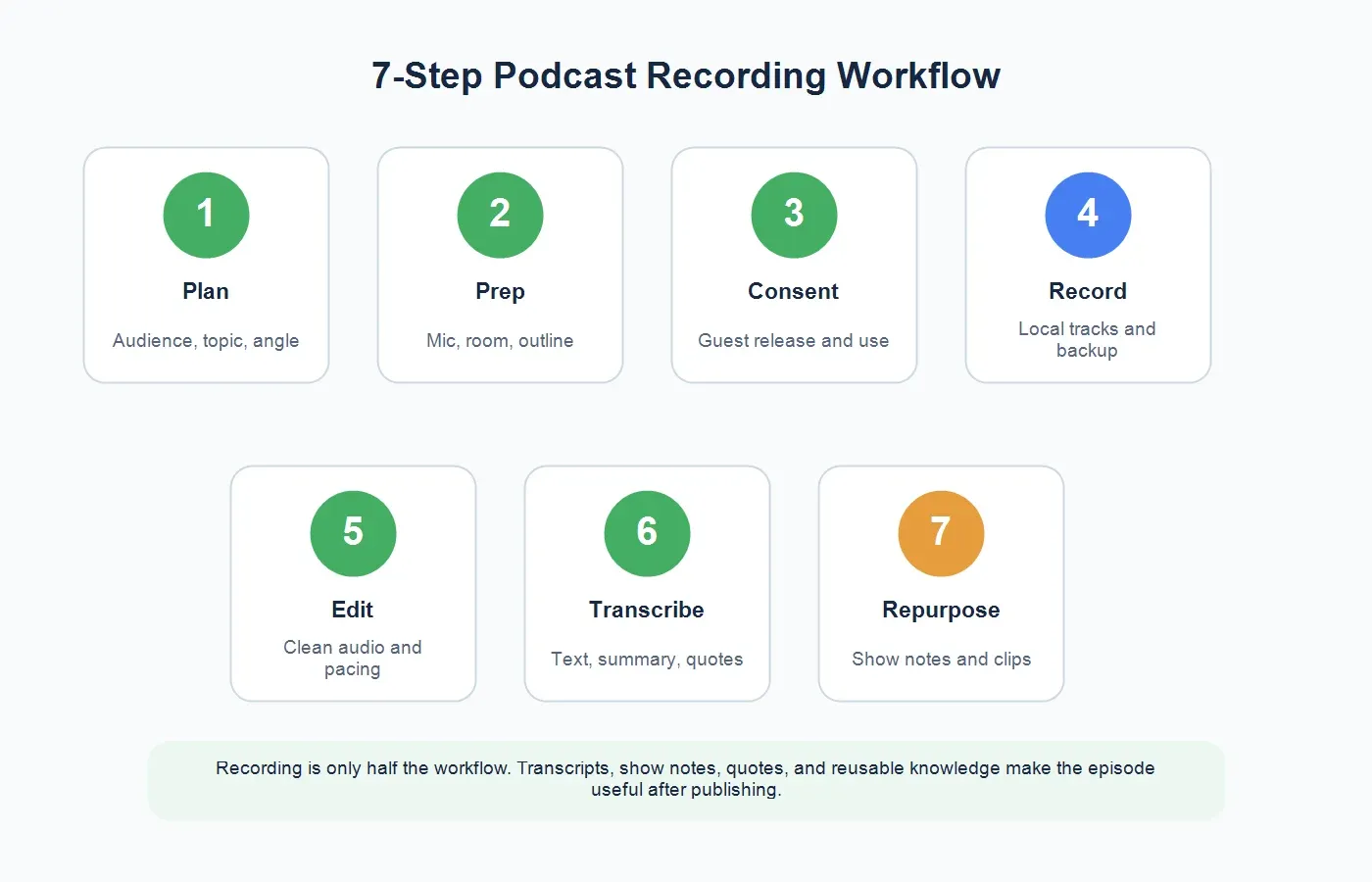
The 7-Step Podcast Recording Workflow
Use this workflow for solo shows, interview podcasts, branded series, webinars republished as podcasts, and internal company podcasts. It keeps the process simple enough for beginners while still covering the pieces that professional teams tend to forget.
| Step | Goal | Output |
|---|---|---|
| 1. Plan the episode | Define audience, topic, angle, and guest value. | Episode brief and question outline. |
| 2. Prepare the setup | Choose mic, headphones, room, software, and backup. | Recording checklist. |
| 3. Get consent | Confirm guest release, recording permission, and content use. | Written approval or release note. |
| 4. Record the conversation | Capture clean local or remote audio with backup. | Raw audio or video file. |
| 5. Edit the episode | Remove distractions, improve flow, and prepare final audio. | Edited episode file. |
| 6. Transcribe and summarize | Turn the file into searchable text and a clear episode brief. | Transcript, summary, and quotes. |
| 7. Repurpose and archive | Create show notes, clips, posts, and internal knowledge. | Publishing assets and knowledge entry. |
Plan the Episode Before You Touch the Record Button
Good podcast recording starts with an editorial decision, not a microphone. Before the session, write a short brief with the target listener, episode promise, guest context, key questions, and the main takeaway you hope the audience will remember. This does not mean scripting every sentence. It means giving the conversation a reason to exist.
For interview shows, send the guest a simple prep note: topic, audience, estimated recording length, technical requirements, whether video is used, how the recording will be edited, and how quotes may be repurposed. Guests perform better when they know what kind of conversation they are joining. They also trust the process more when usage rights are clear.
For branded podcasts, align the episode with the content strategy before recording. Decide whether the episode supports thought leadership, customer education, sales enablement, product research, recruiting, or community building. That decision affects the questions you ask and the assets you create later.
Choose Basic Podcast Equipment
You do not need a studio to record a podcast, but you do need clean audio. A good USB microphone, wired headphones, and a quiet room are enough for many beginner and branded shows. The room matters more than beginners expect. A modest microphone in a quiet, soft-furnished room often sounds better than an expensive microphone in a reflective office.
Use headphones to prevent echo and audio bleed. Keep the microphone close enough to capture voice clearly, but not so close that plosives and breathing dominate. Record a 30-second test before the real episode. Listen for hum, keyboard noise, air conditioning, chair squeaks, and room echo.
If your podcast will be published widely, check platform requirements before final export. Apple Podcasts publishes show and artwork requirements, and podcast hosting platforms usually specify accepted audio formats. Your recording setup should support the quality your publishing workflow needs.
Remote Recording Tips for Guests
Most podcasts are recorded remotely now, especially for marketing teams and distributed creators. The best remote setup records each speaker locally, then uploads the separate tracks. This reduces problems caused by unstable internet, compressed call audio, and overlapping speakers. Riverside and similar platforms are built around this kind of local recording workflow.
Send guests a simple checklist before the call: use a laptop if possible, wear headphones, close noisy apps, choose a quiet room, plug in the microphone, and join five minutes early for a sound check. Ask them not to record from a car, cafe, or echo-heavy conference room unless the episode format demands it.
Always have a backup. If your remote recording platform fails, a secondary audio recording can save the episode. The backup does not need to be perfect. It only needs to be good enough to recover the conversation if the main track fails.
Consent, Guest Release, and Usage Rights
Before recording, confirm that the guest knows the conversation is being recorded and may be edited, published, quoted, clipped, and promoted. For a casual independent show, an email confirmation may be enough. For a company podcast, customer interview, employee story, or sponsored episode, use the release process your legal or marketing team approves.
The release should cover more than the audio file. Ask whether the guest agrees to video use, transcript publication, social clips, quote cards, newsletter excerpts, and internal sharing. A guest may be comfortable appearing in the episode but not want raw interview notes shared broadly inside a company. Be specific.
Consent also matters for internal knowledge reuse. If the conversation includes customer feedback, product requests, pricing details, or personal stories, decide who can access the transcript and summary. Use the minimum useful access rather than treating every transcript as company-wide material.
How to Record the Podcast Session
Start with a short pre-roll: confirm guest name pronunciation, title, company, recording consent, and any off-limits topics. Then pause before the real introduction. This makes editing easier. During the conversation, keep a light outline visible, but do not stare at it. Follow strong answers. A podcast that sounds alive usually has room for discovery.
Watch levels while recording. If one speaker is much louder than the other, fix it early. Ask guests to repeat a sentence if a notification, cough, or connection glitch interrupts an important thought. It feels awkward for five seconds and saves editing time later.
When the episode ends, keep recording for a minute while you confirm next steps. Guests often share useful context after the formal close. If anything from that section may be used publicly, ask for permission clearly.
Back Up and Organize Your Podcast Files
Create a folder structure before the season starts. A simple system is: show name, season, episode number, raw audio, edited audio, transcript, show notes, clips, artwork, and approvals. This prevents the messy reality of final-final-new-export files scattered across downloads folders.
Store raw files separately from publishable assets. Raw audio may include private comments, false starts, or off-the-record material. Edited audio and approved show notes can be shared more broadly. If your podcast is part of a company content engine, assign an owner for archive hygiene and retention.
Edit for Clarity, Not Perfection
Editing should serve the listener. Remove long pauses, obvious mistakes, background noise where possible, and sections that do not support the episode promise. Keep natural speech patterns. A heavily polished interview can sound less human than a clean but conversational edit.
For tutorials, product conversations, and educational podcasts, consider adding chapter markers or timestamps. They help listeners jump to the right section and make the transcript easier to scan. If the episode will become a YouTube video or webinar replay, plan clips during the edit rather than trying to rediscover them later.
Turn Podcast Audio Into a Transcript
The transcript is the foundation for everything that comes after. Upload the episode audio or video to HiNoter's audio to text converter to turn spoken content into searchable text. If you recorded video, use the video to text workflow so the episode can be processed as a media asset rather than only an audio file.
Review the transcript before publishing. Correct names, company terms, product names, URLs, and technical language. Speaker labels are especially important for interview episodes. If the transcript will be public, clean obvious errors but do not rewrite the guest's meaning. If it will be internal only, focus on searchability and accuracy around important claims.
Create Show Notes That People Actually Use
Show notes are not a dumping ground for the transcript. They should help listeners decide whether to listen, find resources, revisit key moments, and share the episode. A practical show notes template includes episode title, one-paragraph summary, guest bio, key topics, timestamps, links, standout quote, and call to action.
HiNoter can help draft show notes by summarizing the episode, identifying key themes, extracting quotes, and organizing the conversation into sections. For longer interviews, ask for chaptered notes so listeners can navigate the conversation. For internal podcasts, add a "team use" section: sales insight, product feedback, customer language, objections, and follow-up ideas.
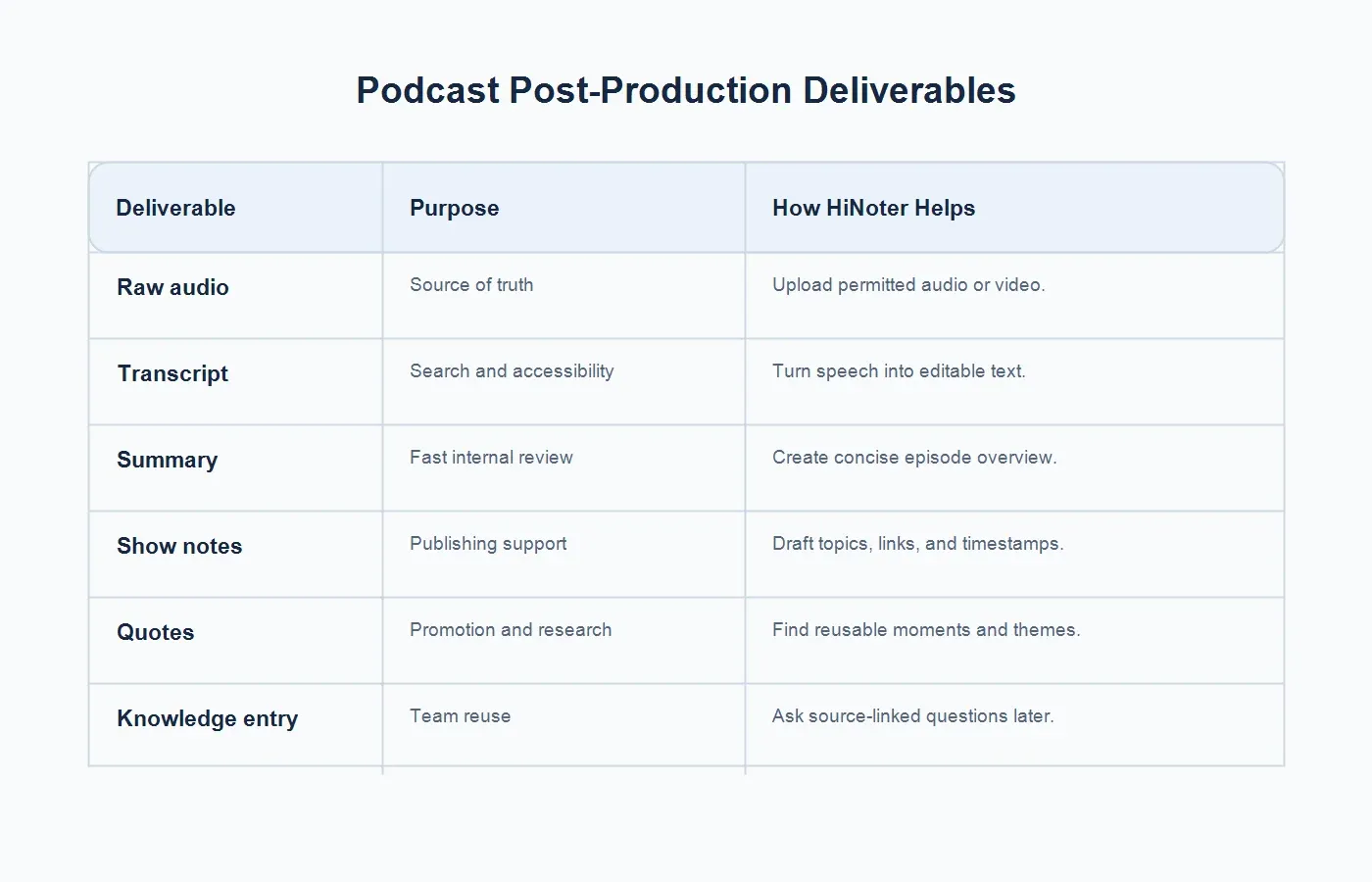
Podcast Deliverables After Recording
The recording is the source. The deliverables are what make the episode useful across publishing, marketing, sales, and research.
| Deliverable | Purpose | How HiNoter Helps |
|---|---|---|
| Raw audio or video | Preserves the source conversation. | Upload permitted files for transcription and summaries. |
| Transcript | Supports accessibility, search, review, and quoting. | Turns speech into editable, searchable text. |
| Episode summary | Helps teams and listeners understand the core argument quickly. | Creates concise summaries and key points. |
| Show notes | Supports publishing, SEO, listener navigation, and resources. | Drafts topics, timestamps, links, and takeaways. |
| Quotes and clips | Feeds social posts, newsletters, and promotional assets. | Finds reusable moments and source context. |
| Knowledge base entry | Makes insights reusable for sales, content, and product research. | Lets teams ask source-linked questions later. |
Repurpose the Episode Without Losing the Point
One podcast episode can become many useful assets, but only if the repurposing keeps the original insight intact. Start with the episode summary. Then pull three to five strong quotes, two short social posts, one newsletter angle, and one internal insight for the team. If the episode has a video version, use the transcript to identify the best moments before cutting clips.
If the episode is published on YouTube, use HiNoter's YouTube transcript generator for permitted video content and create summaries, timestamps, and notes from the published version. This is useful when the podcast exists as both audio and video, or when a webinar becomes a podcast episode later.
For executive-facing recaps, use a tighter format. A podcast with a customer, analyst, or subject-matter expert may contain insight that leadership needs. The summary should emphasize the problem, evidence, recommendation, and next action. HiNoter's executive summary examples can help teams shape podcast insights into leader-ready briefs.
Make Podcast Insights Useful Inside the Company
Marketing teams often treat podcasts as top-of-funnel content only. That leaves value on the table. A strong episode may include customer objections, competitor mentions, product language, use cases, market signals, and sales stories. Those details should not stay buried in a media folder.
Create a simple internal knowledge entry for each episode. Include the episode summary, guest profile, top customer or market insights, useful quotes, sales angles, product feedback, and source links. Then store it where sales, content, and product teams can find it. HiNoter helps by making the episode searchable and by allowing source-linked questions later.
For example, a sales enablement team might ask, "What objections did the guest mention about implementation?" A product marketer might ask, "Which phrases did the customer use to describe the pain?" A content strategist might ask, "Which section would make the strongest LinkedIn post?" These are knowledge questions, not just podcast production tasks.
Publishing Checklist Before the Episode Goes Live
Before publishing, run one final check across the episode page and internal handoff. Confirm the title matches the actual promise of the conversation. Check the guest's name, title, company, links, and approved bio. Review timestamps, resource links, and any claims that mention numbers, customers, products, or competitors. If the episode includes a sensitive story, verify that the guest approved the final use.
Then prepare the distribution set: episode description, show notes, transcript, social copy, newsletter blurb, short clips, internal summary, and follow-up tasks. This is where many teams lose momentum. They publish the episode, then scramble later for clips and quotes. A better habit is to create the post-production package while the transcript is fresh.
For company podcasts, send a short internal note when the episode goes live. Include who the episode is for, why it matters, the best quote, and one suggested use for sales, product, or customer success. That turns podcast publishing from a marketing-only activity into a shared knowledge event.
Beginner Mistakes to Avoid
Recording without a clear promise. A podcast episode needs a reason to exist. "A conversation with an expert" is not enough. Define what the listener will learn.
Ignoring the room. Echo, hum, and background noise are harder to fix than many creators expect. A quiet room with soft surfaces is part of the equipment.
Skipping the backup. Remote recording can fail. Always keep a backup track or secondary recording when the episode matters.
Treating the transcript as show notes. A transcript is raw material. Show notes should be curated, readable, and structured for listeners.
Publishing quotes without checking context. A strong quote can become misleading if clipped poorly. Verify meaning against the transcript before publishing.
Forgetting internal reuse. Podcast conversations often contain insight for teams beyond marketing. Create a knowledge entry while the episode is fresh.
Final Takeaway
The best podcast workflow does not end when the recording stops. Plan the episode, capture clean audio, get consent, back up the files, edit for clarity, and then turn the episode into assets people can use. That means transcript, show notes, summary, quotes, clips, and internal knowledge.
Upload podcast audio or video to HiNoter to generate the transcript, show notes, episode summary, quotes, and reusable team knowledge. Your audience gets a better episode page, and your team gets insight they can search long after the episode is published.
FAQs
What equipment do I need to record a podcast?
Beginners can start with a good USB microphone, wired headphones, a quiet room, and reliable recording software. Improve the room before buying expensive gear.
How do I record a podcast remotely?
Use a remote recording platform that can capture separate local tracks when possible. Ask guests to use headphones, join from a quiet room, and record a short sound check before the episode.
Do I need guest consent to record a podcast?
Yes. Tell guests the session will be recorded and explain how the audio, video, transcript, quotes, and clips may be used. For company or customer podcasts, use an approved guest release process.
How do I make podcast show notes?
Use the transcript to create a short summary, guest bio, key topics, timestamps, links, standout quote, and call to action. HiNoter can help draft show notes from the episode file.
Can HiNoter transcribe a podcast episode?
Yes. Upload permitted podcast audio or video to HiNoter to create a transcript, summary, show notes, quotes, action items, and source-linked notes for future reuse.