Short answer: How to record a phone call depends on four things: your device, your carrier, your recording app, and the law that applies to the people on the call. You can record a phone call only when those conditions allow it; in many places consent is required. For work calls, the safest habit is to disclose the recording before it starts, get clear permission, and keep the file in an approved system.
That careful first step is not a formality. Phone calls often contain the exact details that teams need later: the customer's objection, the candidate's availability, the support workaround, the research participant's quote, the pricing promise, or the next step that someone agreed to own. Yet raw recordings are hard to use. They sit in a folder, run for 30 or 60 minutes, and force people to replay audio just to recover one sentence.
A better workflow treats the recording as source material, not the finished record. Once a call has been recorded lawfully, the file can be transcribed, summarized, organized into action items, and made searchable. That is where a tool such as HiNoter fits naturally: upload a lawful call recording, generate a transcript, review the summary, assign follow-up, and ask questions later with source-linked answers.
First, Decide Whether Recording Is Allowed
Call recording laws vary by country, state, and the location of every participant. The United States has federal wiretap law, but state rules and industry requirements can add stricter obligations. A call between two people in the same city may be handled differently from a call with a customer, candidate, or interview subject in another state or country. Company policy, customer contracts, health or financial privacy rules, and platform terms may also matter.
Because of that, a responsible guide should not promise a universal button sequence. The real answer is conditional: record only when the device, carrier, app, and applicable law allow it. If you are not sure, ask your legal, compliance, or security team before creating the recording. For personal calls, check the rules in your location and the other participant's location. For business calls, document the policy so employees are not improvising on every conversation.
A Practical Consent Checklist
Before any work call is recorded, use a checklist that is simple enough for people to follow during a busy day.
- Confirm where each participant is located, especially for interstate or international calls.
- Check local law, company policy, customer contracts, and any industry-specific privacy requirements.
- Tell participants that the call will be recorded before recording begins.
- Use plain language, such as "I would like to record this call so we can keep an accurate record. Is that okay?"
- Keep the consent in the call record when appropriate, either in the recording itself or in the CRM, ticket, or research log.
- Do not record sensitive calls unless the purpose, storage, access, and retention rules are approved.
- Store recordings in a secure location with limited access.
- Delete recordings according to your organization's retention policy.
This article is a workflow guide, not legal advice. It is meant to help teams avoid casual, risky recording habits and build a cleaner process for turning approved calls into usable notes.
Phone Call Recording Methods Compared
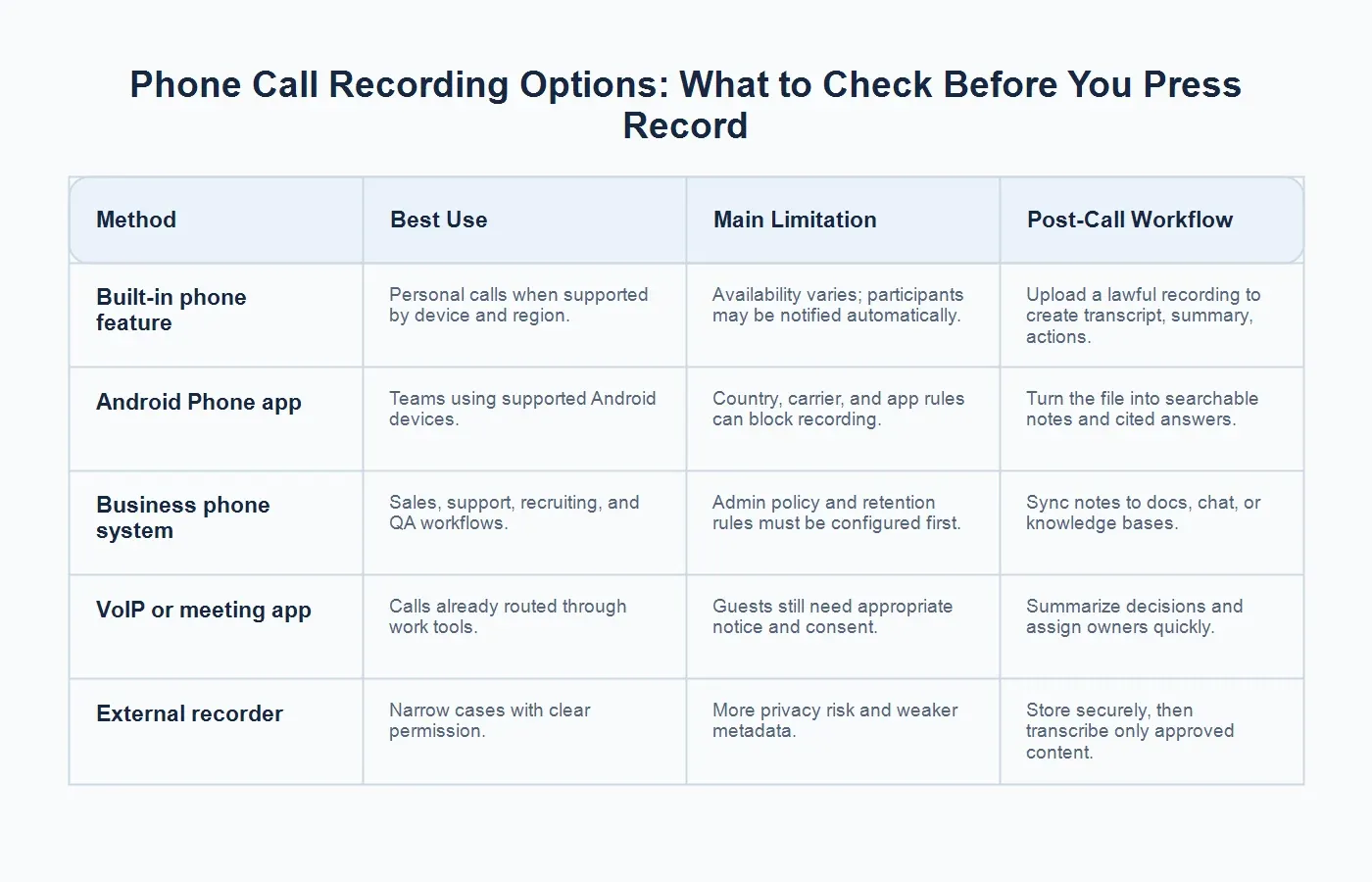
The best method depends on how the call happens. A smartphone feature may be enough for a one-off call, while a revenue or support team usually needs an approved business phone system with admin controls. The table below keeps the choice practical: what the method is best for, what can block it, and what to do after the recording exists.
| Method | Best Use | Limitation and Post-Call Workflow |
|---|---|---|
| Built-in phone feature | Personal or work calls when the feature is supported. | Availability varies by region and device. Upload a lawful recording to HiNoter for transcript, summary, and action items. |
| Android Phone app | Supported Android devices and approved work calls. | Country, carrier, and app rules may block recording. Process allowed audio into searchable notes after the call. |
| Business phone system | Sales, recruiting, support, QA, and customer success teams. | Admins must manage notice, retention, and access. HiNoter can turn exported recordings into structured team knowledge. |
| VoIP or meeting app | Calls routed through workplace tools or scheduled discussions. | Guests still need appropriate notice. Use the recording to create decisions, owners, and follow-up notes. |
| External recorder | Limited cases with explicit permission and no better option. | Higher privacy risk and weaker metadata. Store securely, then transcribe only content you are allowed to process. |
How to Record a Phone Call on iPhone
On supported iPhone models and iOS versions, Apple provides call recording and transcription features in the Phone app. Apple notes that availability can depend on region, language, and device support. Apple also says that participants are notified when recording begins. If the option does not appear for you, do not assume the phone is broken; the feature may not be available in your location, language, carrier setup, or software version.
For business use, iPhone recording should still follow your organization's policy. A built-in feature can make recording easier, but it does not answer whether a sales rep, recruiter, researcher, or manager is allowed to record that specific conversation. The same consent and storage rules apply. If the conversation involves a customer, candidate, patient, student, or confidential partner, treat the file as controlled business information rather than a casual voice memo.
Common iPhone Caveats
Users often search for a single iPhone instruction because older workarounds were confusing. Some third-party apps used three-way calling, some carriers blocked those workflows, and some regions did not support the same features. The modern takeaway is still the same: use supported, transparent methods only. Avoid hidden recording tools, unclear app permissions, and manual workarounds that make it hard to prove consent or manage retention.
How to Record a Phone Call on Android
Android call recording also varies. Google's Phone app supports call recording only on certain devices and in certain countries or regions. Google notes that some laws require all participants to consent, and the app may play a disclosure before recording starts and after it stops. Device manufacturers, carriers, and local regulations can all affect whether the feature appears.
For teams, Android variability is a reason to standardize the workflow. If employees use different devices and carriers, a business phone system or approved VoIP tool may be easier to govern than a patchwork of personal phone features. If Android recording is allowed and supported, make sure employees know where the recording is saved, who can access it, how long it should be retained, and how it should be transferred to an approved transcription workflow.
When a Business Phone System Is the Better Choice
Sales, recruiting, support, and customer success teams often need more than a record button. They need consistent disclosure, admin permissions, retention settings, searchable call histories, and the ability to connect call context to the rest of the team's work. A business phone system, contact center platform, or VoIP tool usually gives administrators more control than personal devices do.
That control matters when managers need to answer operational questions: Which calls happened? Which calls were recorded? Was consent captured? Which customer issue was escalated? Who owns the follow-up? Which candidate needs a scheduling response? A phone system may handle the recording, but it usually does not turn every call into a crisp, reusable note. That second layer is where transcription and AI note-taking become valuable.
How to Turn a Lawful Call Recording Into Searchable Notes
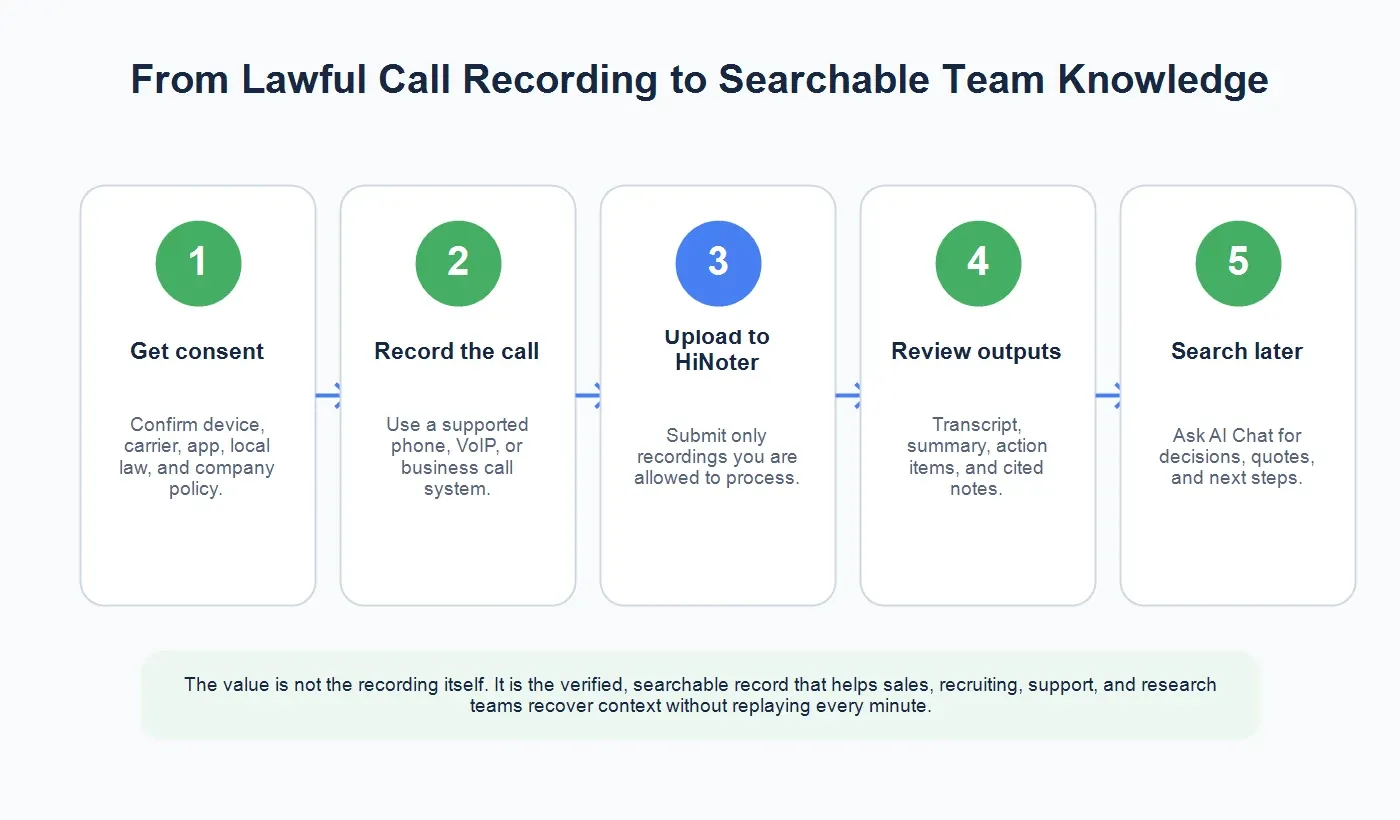
A recording preserves the conversation, but it does not make the conversation easy to reuse. If a manager has to listen to a 50-minute call to find one commitment, the record exists but the knowledge is still trapped. The post-call workflow should convert the recording into structured information that a team can search, share, and act on.
1. Upload Only Recordings You Are Allowed to Process
Start with the compliance boundary. Upload only recordings your organization is allowed to process. If the call contains sensitive personal, legal, medical, financial, or confidential information, confirm that your chosen tool is approved for that content. Teams should also decide whether every recording belongs in a shared workspace or whether some files should stay restricted.
With HiNoter, the simplest path is to use the audio to text workflow for recordings that are already approved for processing. The goal is not to keep more audio for its own sake. The goal is to create a reliable written record that helps people work without replaying the entire call.
2. Generate a Transcript
A transcript turns a call into searchable text. That alone saves time for teams that frequently need to recover exact details. A salesperson can find the moment a buyer mentioned budget. A recruiter can check a candidate's notice period. A researcher can locate a quote. A support lead can compare what the customer said with what the ticket currently claims.
Transcripts should still be reviewed when accuracy matters. Names, product terms, numbers, dates, and domain-specific language are the details most likely to need a human pass. The best workflow is not blind automation; it is fast automation plus focused review where the stakes are highest.
3. Summarize the Call Without Losing the Thread
Raw transcripts are long. A good summary should reduce the time needed to understand the call while preserving the thread of the conversation. It should identify why the call happened, what was discussed, what was decided, what remains unresolved, and what should happen next. That is especially important for managers who did not attend the call but still need to understand its outcome.
HiNoter is useful here because it can move beyond plain speech to text. Instead of leaving the user with a block of transcript, it can produce a structured summary, action items, and notes that are easier to review. This is the difference between an archive and a working knowledge record.
4. Extract Action Items and Owners
Most business calls create follow-up. Someone promises to send pricing, share a calendar link, escalate a bug, confirm a requirement, update a candidate, or check a policy. Manual notes often miss those commitments because the person taking notes is also trying to lead the conversation. A structured post-call note should separate action items from general discussion and identify the owner when the call makes that clear.
That structure helps teams avoid the "I thought you were handling it" problem. A call note that lists action, owner, and context is much easier to review in a one-on-one, pipeline meeting, support handoff, or research synthesis session.
5. Ask Questions Later With Source References
The most useful call notes are not just saved; they are queryable. HiNoter's AI Chat lets teams ask questions of their notes and see source-linked answers. That matters because memory is unreliable after several calls in a row. A manager can ask, "Which customer blocker was unresolved?" A recruiter can ask, "What did the candidate say about remote work?" A researcher can ask, "Which participants mentioned onboarding friction?"
Source references make the answer easier to trust. Instead of treating the note as a detached summary, the team can trace an answer back to the relevant record. That is how call notes start acting like a knowledge base rather than a folder of files.
Use Cases for Searchable Phone Call Notes
Sales Calls
Sales teams need accurate notes without forcing reps to choose between listening and typing. Searchable notes can capture objections, pricing concerns, competitor mentions, stakeholder names, evaluation timelines, and next steps. Managers can review call outcomes without asking every rep to rewrite the conversation in a CRM field. Reps can also search past calls before a renewal, negotiation, or handoff.
Recruiting Calls
Recruiting teams handle details that are easy to misremember: compensation range, relocation constraints, visa status, interview availability, notice period, role preferences, and candidate questions. A structured call note helps recruiters brief hiring managers without relying on shorthand. It also reduces repeat questions, which makes the process feel more professional to candidates.
Customer Support and Success Calls
Support calls often include troubleshooting steps, customer emotion, product context, and commitments that never fit neatly into a ticket. Searchable notes help teams preserve what was tried, what failed, what the customer expects, and who owns the follow-up. Customer success teams can also review recurring themes across renewal calls, onboarding calls, and escalation calls.
User Research and Interviews
Research interviews are full of nuance. A raw recording may be useful for auditability, but synthesis requires searchable quotes, themes, and evidence. Transcripts and structured notes help researchers compare patterns across participants, pull accurate supporting quotes, and keep sensitive material controlled. Consent is especially important here because interview subjects may share personal or confidential experiences.
What Good Call Notes Should Include
A usable call note should be more than a transcript. At minimum, it should include the call purpose, participants, date, short summary, key points, decisions, objections or risks, action items, owners, deadlines, and links back to the source. For long calls, chaptered sections or topic breaks make the record easier to scan. For complex discussions, a mind map can help teams see how themes connect.
HiNoter can support that kind of structure across more than phone audio. Teams can also work with meetings, videos, YouTube content, PDFs, and other source materials, which keeps knowledge from fragmenting across formats. A sales call, a webinar, a training video, and a PDF brief can all become searchable source material in the same knowledge workflow.
Common Mistakes to Avoid
The first mistake is recording without a clear consent process. Even if a tool makes recording technically possible, that does not mean every call should be recorded. The second mistake is keeping audio but never turning it into usable notes. A recording that nobody can search is only slightly better than no record at all. The third mistake is copying summaries manually into several tools, which creates inconsistent versions of the truth.
A cleaner workflow is narrower and more deliberate: record only when allowed, process the recording in an approved tool, review critical details, and share the structured note where the team already works. If your team uses docs, chat, or a knowledge base, connect the call output to that workflow instead of leaving it in a private download folder.
A Responsible Team Workflow
For managers, the ideal process is repeatable enough that employees do not have to guess. Write a short policy that explains when recording is allowed, what consent language to use, where files should be stored, which tool should process them, who can access transcripts, and how long recordings should be retained. Then train teams on the workflow using real examples from sales, support, recruiting, or research.
A simple version looks like this: get consent, record with an approved method, upload the lawful recording to HiNoter, generate the transcript and summary, review action items, share the note in the right workspace, and use AI Chat later when someone needs the context. That turns a risky ad hoc habit into a controlled knowledge process.
Final Takeaway
The best answer to "how to record a phone call" is not just a device shortcut. The better answer is a full workflow that confirms recording is allowed, gets consent, uses a supported method, protects the file, and turns the approved recording into searchable knowledge. For teams, the value is not the recording itself. The value is knowing what happened, what was decided, and who owns the next step without chasing every participant.
Try HiNoter by uploading a lawful call recording to generate a transcript, summary, action items, and cited notes. You can also explore audio to text, AI meeting notes, AI meeting assistant, and meeting summary workflows for broader team documentation.
FAQs
Is it legal to record a phone call?
It depends on where the participants are located and which laws apply. Some places allow one-party consent; others require all-party consent. For business use, check local law, company policy, contracts, and platform rules before recording.
Do I need to tell someone I am recording a call?
In many places, yes. Even where one-party consent may apply, informing participants is often the safer and more professional business practice. Some phone apps also automatically notify participants when recording starts.
Can I record a phone call on iPhone?
Apple supports call recording on certain iPhone models, iOS versions, regions, and languages. If the option is unavailable, your setup may not support it. Follow Apple's instructions and get appropriate consent before recording.
Can I record a phone call on Android?
Google's Phone app allows call recording only in supported countries, regions, devices, and carriers. Google notes that laws vary and that some places require all participants to consent.