Interview transcription software converts recorded or live interviews into searchable, editable text with speaker labels and timestamps. The most useful tools also detect language, support common audio and video sources, and turn long transcripts into summaries, action items, mind maps, exports, and source-grounded answers for faster recruiting and research follow-up.
What Is Interview Transcription Software?
Interview transcription software turns spoken interviews into text that teams can search, edit, quote, compare, and share. It is used for recruiting screens, panel interviews, qualitative research, focus groups, expert interviews, customer discovery, journalism, and other conversation-heavy work.
The basic transcription layer answers one question: what was said? A stronger knowledge layer answers what mattered, what still needs investigation, and what someone should do next. The two layers should remain connected so reviewers can verify a summary, quotation, or action item against the original recording.
Transcription
Transcription is the written record of spoken content. It may be produced manually, automatically, or through a hybrid workflow that combines software with human review.
Speech-to-Text
Speech-to-text is the automated process that converts an audio signal into written words. It is the technical conversion layer behind many audio transcription and voice-to-text tools.
AI-Assisted Transcription
AI-assisted transcription begins with speech-to-text, then adds useful structure such as punctuation, speaker turns, timestamps, summaries, themes, action items, mind maps, and question answering grounded in the source.
Why Raw Interview Transcripts Still Create Work
Conversation-heavy teams rarely suffer from a lack of recordings. They suffer from too many recordings, transcripts, chat threads, and private notes with no reliable path from evidence to action. Raw text helps, but it does not automatically reveal the strongest quote, the hiring concern that needs verification, the recurring research theme, or the task someone agreed to own.
Long transcripts also create review fatigue. Speaker labels can be wrong, names and technical terms may be misheard, and the important point may be buried in minute 47. If the software stops at speech-to-text, a recruiter still has to write the scorecard summary and a researcher still has to code themes, pull quotations, and connect findings across interviews.
If you need more than text, HiNoter turns audio into a transcript plus summary, action items, mind map, exports, and searchable Q&A.
Manual vs Automatic vs AI-Assisted Interview Transcription
Manual transcription can be appropriate when human judgment, specialist terminology, or publication-ready accuracy matters most. Automatic transcription is faster and more scalable, but it usually leaves cleanup and synthesis to the user. AI-assisted notes add the structured outputs that recruiting and research teams need after the transcript is created.
| Method | Best for | Strength | Main limitation |
|---|---|---|---|
| Manual transcription | Sensitive, publication-ready, or highly specialized interviews | Human judgment can resolve nuance and difficult terminology | Slow, expensive, and difficult to scale |
| Automatic transcription | Fast conversion of clear recordings | Searchable text in far less time | Cleanup, synthesis, and follow-up remain manual |
| AI-assisted notes | Recruiting, qualitative research, customer interviews, and expert calls | Adds summaries, actions, themes, mind maps, and Q&A | High-stakes evidence still requires source review |
What Interview Transcription Software Should Do
A commercial evaluation should start with the job your team needs to complete. The minimum requirement is usable text. The stronger requirement is a reliable workflow from capture to evidence, analysis, follow-up, and sharing.
- Accept a recording or capture an authorized live interview.
- Support the audio, video, meeting, voice memo, or link sources your team uses.
- Separate speaker turns and make labels easy to correct.
- Attach timestamps so quotations and claims can be checked against the recording.
- Detect the spoken language and support multilingual interviews.
- Provide transcript editing, search, comments, and practical export options.
- Summarize the interview without discarding the underlying evidence.
- Extract action items, open questions, risks, and next steps.
- Organize themes visually and answer questions with source references.
- Provide clear privacy, access, retention, and deletion controls for the intended use case.
How to Use Interview Transcription Software
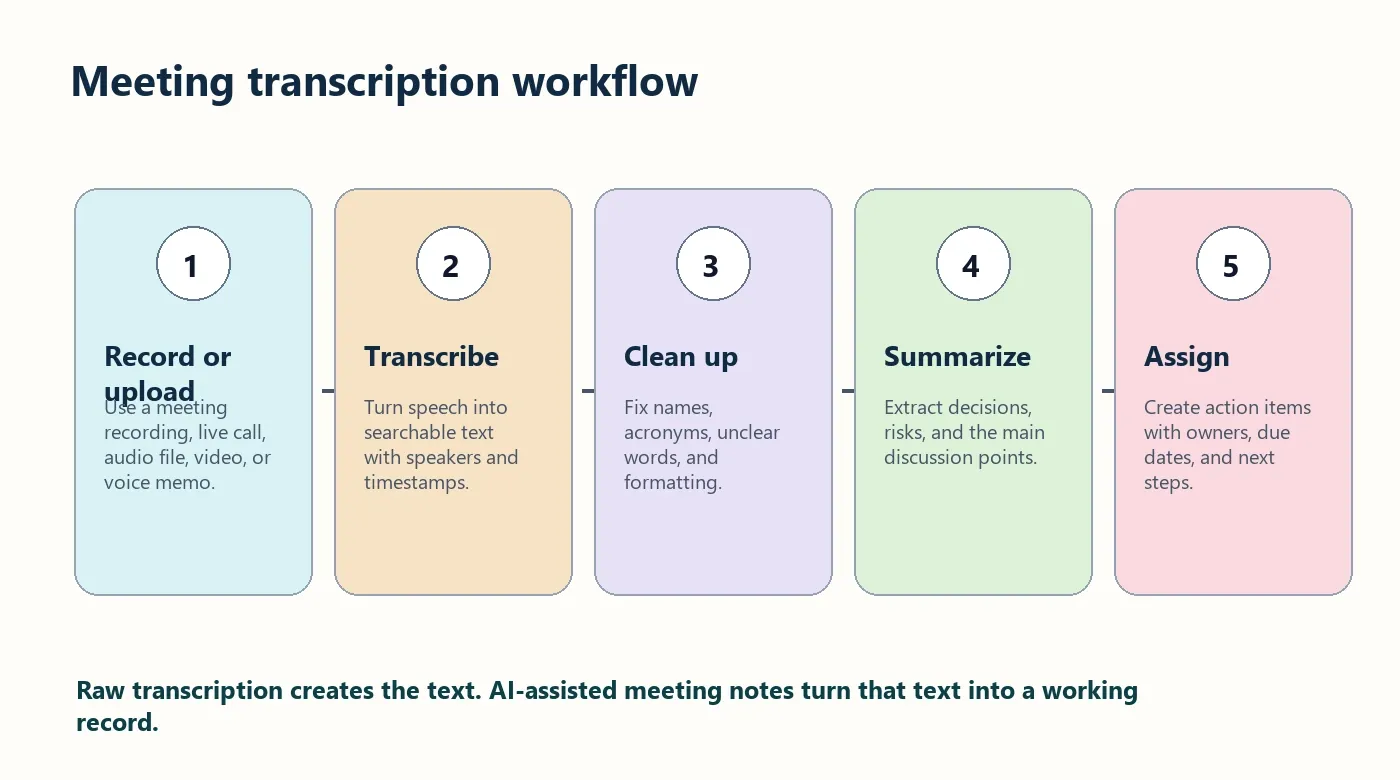
- Get permission and capture clean audio. Tell participants how the recording and transcript will be used. Use a close microphone or a reliable meeting recording and reduce background noise.
- Upload or connect the interview source. Use an authorized audio file, video, voice memo, supported meeting source, or approved link. Keep the original recording until review is complete.
- Generate the transcript. Select or confirm the language, then create text with speaker turns, timestamps, punctuation, and searchable segments.
- Review speakers and critical evidence. Correct names, roles, companies, acronyms, numbers, specialist terms, and quotations. Check disputed or high-impact statements against the source.
- Create the knowledge layer. Generate a concise summary, recruiting or research themes, action items, open questions, and a mind map. Use source-grounded Q&A to find evidence without rereading every line.
- Export and share selectively. Send the right output to Google Docs, Notion, Slack, email, or another approved workflow. A stakeholder may need the summary without needing the full transcript.
Supported Sources, Formats, and Languages
Exact file-extension, duration, and size limits vary by product and plan, so verify the current upload screen before standardizing a workflow. Interview teams commonly need support for live or recorded Zoom, Google Meet, and Microsoft Teams calls; in-person recorders; phone recordings; voice memos; and uploaded audio or video.
Common audio formats include MP3, WAV, M4A, AAC, and FLAC. Common video formats include MP4, MOV, and WebM. Authorized YouTube or hosted-video links can also be useful for public interviews, research references, and training material.
HiNoter supports multi-source work across meetings, audio, video, YouTube, PDFs, and uploaded files. Documents such as interview guides, resumes, research briefs, and supporting reports can provide context for later knowledge retrieval even though they are not audio transcript sources.
Its multilingual workflow supports more than 50 languages with automatic detection, which is useful when interview programs cross regions or switch languages. Explore the HiNoter audio-to-text workflow and the guide to speech to text for meetings and interviews.
Speaker Labels and Timestamps
Speaker labels answer the first evidence question: who said this? Timestamps answer the second: where can I verify it? Together they make a transcript easier to review, quote, and audit. They are especially important in panel interviews, focus groups, multi-interviewer recruiting calls, and research sessions with an observer or interpreter.
No automated label should be treated as infallible. Speaker overlap, similar voices, people joining late, and weak microphone separation can all cause attribution errors. Rename speakers early, then verify key statements before they enter a hiring decision, research report, customer claim, or publication.
What Affects Interview Transcription Accuracy?
Speech recognition accuracy is usually evaluated by counting substitutions, insertions, and deletions. NIST describes word error rate as the sum of those errors divided by the number of words in the reference transcript. That metric is useful for comparing systems, but a team should also measure whether the transcript preserves names, numbers, speaker attribution, and decision-critical evidence. See the NIST Open Speech Analytic Technologies evaluation plan.
- Microphone and distance: use individual headsets or place the recorder close to participants.
- Room noise and echo: choose a quiet room and reduce hard-surface echo.
- Overlapping speech: ask participants to pause and avoid talking over one another.
- Names and specialist terms: prepare a glossary and review important terminology.
- Accents and language switching: confirm language settings and review multilingual quotations.
- Compression or clipping: upload the cleanest original recording available.
- Human review: check quotations, names, dates, numbers, and critical conclusions against the audio.
Editing and Export Options
Editing should be fast enough that users correct the transcript instead of abandoning it. Look for search and replace, speaker renaming, timestamp navigation, highlight or comment tools, and a clear way to preserve the original audio as the source of truth.
Google Docs works well for editable transcripts, summaries, and selected quotations. Notion can hold interview repositories, research themes, and source links. Slack is useful for short recaps and action items. Email fits candidate follow-up or participant recaps, while calendar workflows can create the next interview, follow-up task, or agenda item.
For a broader conversion workflow, review HiNoter's audio to text converter guide. For recurring interview calls and automatic notes, see the AI meeting assistant.
From Transcript Layer to Knowledge Layer
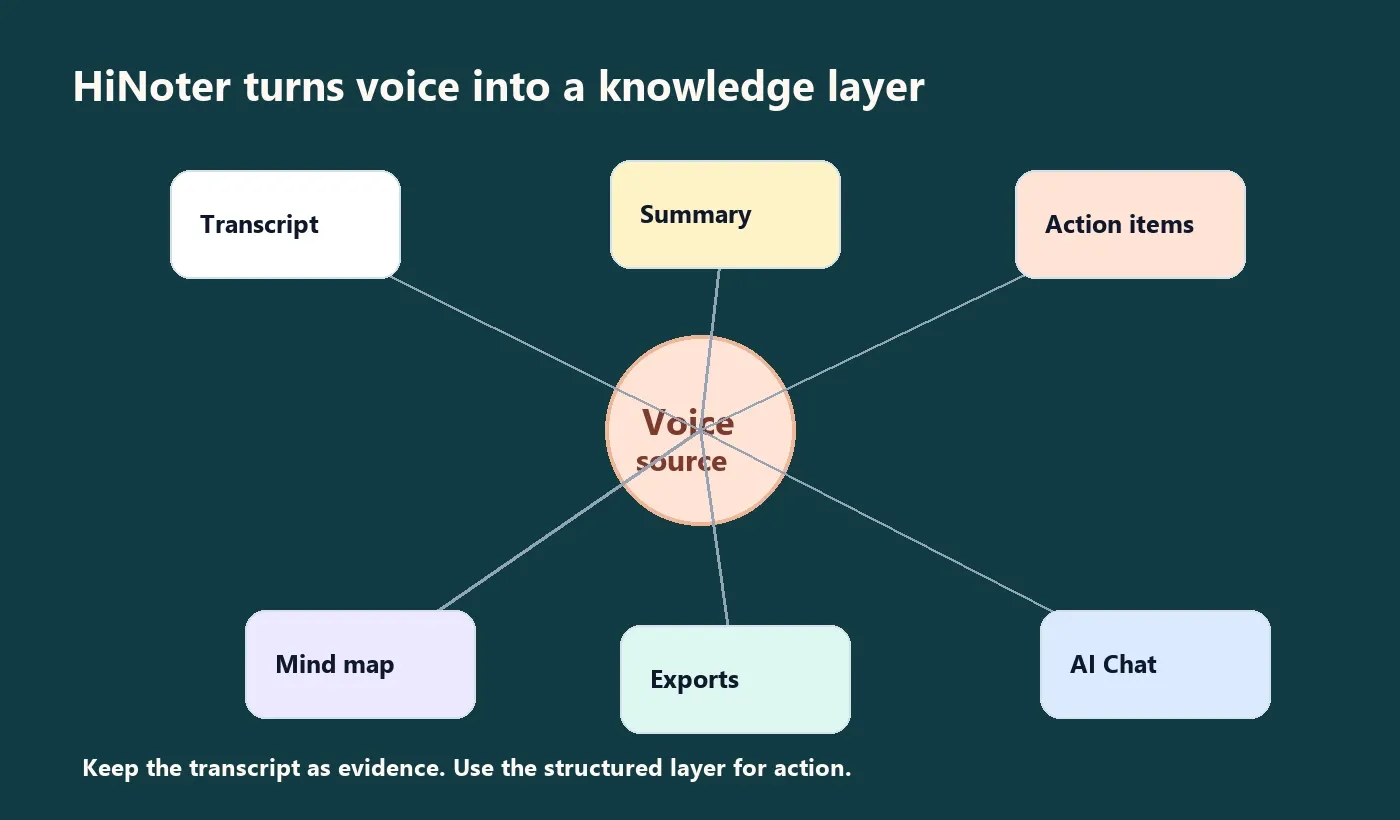
The transcript layer answers what was said. The knowledge layer answers what matters, what changed, what still needs investigation, and what someone should do next. The two layers should remain connected so a summary can be checked against the original conversation.
- A concise summary reduces the time required to understand a long interview.
- Themes and key moments make evidence easier to compare across interviews.
- Action items turn informal commitments into assignable follow-up.
- A mind map makes relationships, dependencies, and research gaps visible.
- Source-grounded Q&A helps users find a claim and trace it back to the interview.
- Exports and integrations move useful outputs into the team's working systems.
HiNoter combines this workflow with AI meeting notes and a searchable meeting knowledge base. Users can ask questions with source citations, then distribute the result through Notion, Slack, Google Docs, calendar, and email workflows.
Interview Transcription for Recruiters
A recruiter screen needs a reliable record of candidate answers, role history, preferences, and follow-up questions. A panel interview also needs accurate speaker separation. The knowledge layer can draft a neutral recap, organize evidence by competency, and surface unanswered questions, but hiring decisions and scorecards should still be completed and reviewed by people.
Interview Transcription for Researchers
User researchers and qualitative researchers need participant language, timestamps, and quotations that remain connected to the source. Structured outputs can help identify recurring themes, pain points, disagreement, missing evidence, and areas that require another interview. Expert interviews also benefit from searchable terminology and a source-linked briefing document.
Interview Transcription for Customer Discovery
Customer discovery calls contain needs, objections, current workflows, workarounds, and product language. A transcript preserves the wording. Summaries and themes make calls easier to compare, while action items help sales, product, and customer-success teams follow up on commitments.
Privacy, Consent, and Access
Interview recordings may contain candidate data, personal stories, customer information, confidential research, or commercially sensitive plans. Obtain permission before recording and explain how the audio, transcript, and notes will be used. An HHS interviewing tip sheet notes that interviews are usually recorded after permission is obtained, allowing the interviewer to focus on the discussion. See the HHS Interviewing Tip Sheet.
Consent and retention requirements depend on jurisdiction, organization, research protocol, and the sensitivity of the interview. Use approved legal or ethics language where required.
- Record only with appropriate notice and permission.
- Limit access to people who need the full recording or transcript.
- Share summaries instead of raw transcripts when the audience does not need sensitive detail.
- Define retention and deletion rules before collecting interviews at scale.
- Remove or de-identify unnecessary personal information when possible.
- Check vendor privacy, security, permissions, export, and deletion documentation before regulated or confidential use.
For formal human-subjects research, follow the applicable institutional review and informed-consent process. The HHS informed consent FAQ provides general federal research guidance; it is not a substitute for your institution's policy or legal advice.
How to Choose Interview Transcription Software
Use a short real interview as a pilot. A polished demo is less useful than seeing how the software handles your microphones, accents, terminology, speaker count, privacy requirements, and export workflow.
Test Source Compatibility
Confirm upload types, meeting platforms, mobile recordings, video, links, duration limits, and maximum file sizes. Use the sources your team already collects rather than changing the entire interview process to fit a tool.
Test Transcript Reliability
Review speaker attribution, timestamps, names, numbers, terminology, punctuation, and audio navigation. Measure how much correction a typical interview requires.
Test the Knowledge Outputs
Check whether summaries preserve nuance, whether action items are supported by the source, whether themes are useful across interviews, and whether Q&A answers point back to the relevant evidence.
Test Governance and Team Fit
Review language support, collaboration, permissions, exports, consent workflows, retention, deletion, security documentation, and administration. Measure time saved, evidence-retrieval time, correction rate, and follow-up completion instead of relying on general productivity claims.
Turn an approved interview recording into searchable text, then create a summary, action items, mind map, exports, and source-grounded Q&A with HiNoter.
Start with the HiNoter audio-to-text tool or explore the full HiNoter AI meeting notes platform.
Frequently Asked Questions
What is interview transcription software?
Interview transcription software converts recorded or live interviews into searchable, editable text. Useful products add speaker labels, timestamps, language detection, editing, exports, summaries, action items, and source-grounded Q&A.
What is the difference between transcription and speech-to-text?
Speech-to-text is the automated conversion process. Transcription is the written record produced by software, a human, or a hybrid review workflow.
Can interview transcription software identify speakers?
Many tools separate speaker turns and apply labels. Review the names and any statement that matters because overlapping speech, similar voices, and poor audio can cause attribution errors.
How accurate is automatic interview transcription?
There is no single accuracy rate for every interview. Microphones, noise, overlap, accents, language changes, terminology, and file quality all affect results. Check names, numbers, quotations, and decision-critical evidence against the recording.
Can I transcribe multilingual interviews?
Yes, if the tool supports the languages involved. HiNoter supports more than 50 languages with automatic detection, which helps distributed recruiting and research teams.
What should I export after an interview?
Export the smallest useful artifact for the audience: a full transcript for evidence review, selected quotations for research, a scorecard recap for recruiting, or a short summary and action list for stakeholders.
Is AI interview transcription private?
Privacy depends on the tool, configuration, consent process, and organizational controls. Review access, retention, deletion, sharing, and security documentation before using any transcription service for sensitive interviews.
How does HiNoter go beyond a transcript summarizer?
HiNoter keeps the transcript as the source layer and adds summaries, action items, mind maps, exports, and searchable Q&A with source citations, helping teams retrieve evidence and act on it.