Most meeting notes are useless. I don't say that to be provocative — I've been collecting examples for months, asking colleagues to show me their notes from the last meeting they attended. The results are grim. About eight out of ten are what I'd call "transcription attempts" — someone tried to write down everything that was said, in order, like a court stenographer who forgot they're not in court. The notes capture the words but miss the point. You read them afterward and think: okay, a lot of words were spoken, but what did we decide? What am I supposed to do? Nobody knows. The notes don't say.
The problem isn't note-taking ability. It's the meeting notes template people use — or rather, the lack of one. Most people have no meeting notes format at all. They sit down in a meeting, open a blank document or a notebook, and start writing. No structure. No template. No idea what they're trying to capture. That's why the output reads like a stream of consciousness. They're capturing everything because they don't know what matters.
I want to fix this. Not with generic advice like "be organized" or "write down action items." With actual templates — seven of them — each built for a specific type of meeting. But before the templates, I need to say something about notes versus minutes, because that confusion ruins more meeting documentation than anything else.
What's in this page:
1. The notes vs. minutes problem nobody talks about
2. The 7 formats
3. Which format for which meeting
4. The action item problem
5. Where to keep your notes
6. FAQ
The Notes vs. Minutes Problem Nobody Talks About
Here's something that bugs me. Type "meeting notes" into Google and half the results are actually about meeting minutes. The two terms get used interchangeably in job descriptions, in blog posts, in conversation. They are not the same thing, and treating them as the same produces bad outcomes on both sides.
Meeting minutes are a governance document. They exist because an organization — a board, a committee, a corporation — needs a formal record of what was decided. Minutes include motions, votes, quorum confirmation. They can be subpoenaed. They're archived. If you need this kind of document, use our meeting minutes templates — that's a separate resource with formats designed for compliance.
Meeting notes are something else entirely. They're a working document. You write them for yourself, during the meeting, to capture what matters to you — action items, decisions, things to follow up on, stuff you promised. You might share them with a colleague. You probably won't. They're fast, personal, and disposable in a way that minutes are not.
Meeting Notes | Meeting Minutes | |
Who it's for | You (maybe your team) | The organization |
Why it exists | Personal reference, action tracking | Legal/official record |
How formal | Not at all | Very — motions, votes, signatures |
How long to write | During the meeting | After, cleaned up and formalized |
What happens to it | Referenced for a week, then archived | Stored permanently, maybe audited |
If your manager asks you to "take notes" in a meeting, they almost certainly mean notes — a quick summary with action items. If they wanted minutes, they'd say minutes. When in doubt, ask. The five seconds of awkwardness is worth avoiding the hour of wasted work producing the wrong document.
The 7 Formats
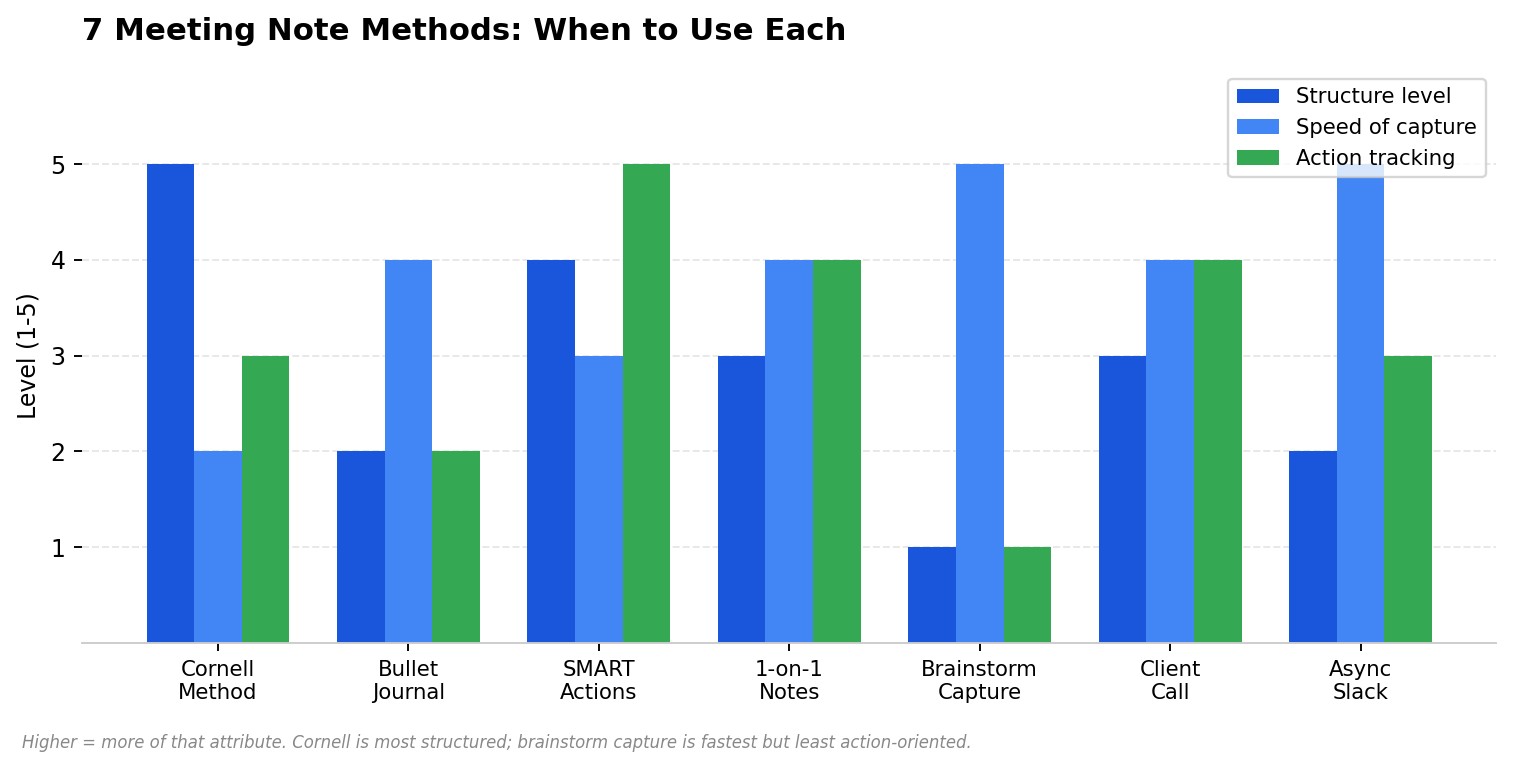
I'm not going to present these as if they're equally good for everything. They're not. Each one has a meeting type it was built for. Using the wrong one is how you end up trying to capture a brainstorm in a Cornell layout — you spend so much time organizing that you miss half the ideas.
Format 1
Cornell Method — Meeting Edition
Cornell was invented for lectures at Cornell University in the 1950s. The idea: split the page into three zones. Left column for cues — keywords, questions, themes. Right column for the actual notes. Bottom strip for a two-line summary. It works for meetings where you need to recall both detail and big picture later.
I'll be honest — Cornell takes practice. The first few times you use it, you'll forget which column you're supposed to be writing in. But once it clicks, it's the most efficient format I've found for structured discussions. The summary at the bottom is gold when you're skimming old notes trying to remember what a meeting was about.
── CUES (left) ── ── NOTES (right) ──Q2 budget Sarah presented numbers. Marketing - over by 12% over by 12% — display ads the driver. - display ads Q3 plan: shift 30% to LinkedIn. - Q3 shift James raised timing concern. - James pushback Decision: test LinkedIn 6 weeks - 6 week test before committing to full shift. Sarah → LinkedIn spend data by Wed. James → competitor ad review by Fri.── SUMMARY ──Q2 marketing over budget by 12% (display ads). Team will test 30%shift to LinkedIn for 6 weeks. Sarah pulls data Wed, James reviewscompetitors Fri.
Use for: Strategy sessions, planning meetings, anything with a lot of detail where you also need the big picture.
Don't use for: Standups, quick syncs, anything where the structure slows you down.
Format 2
Bullet Journal — Meeting Edition
Ryder Carroll created the Bullet Journal method for personal productivity. The meeting adaptation is simple: rapid logging with symbols. A dot for a note, a circle for an event or task, a dash for a thought. When something's done, put an X over the dot. Migrated? Arrow. It's the fastest format I've tested. You never stop to think about structure — you just write.
● Team Sync — Jan 22○ Standup 9:05 (Sarah late)●
Q2 budget: marketing over 12%, display ads -
Q3: test LinkedIn shift (30%)● Hiring: backend dev 3 candidates, Thu interview - Designer: offer sent to Maya● Actions ○ Sarah → LinkedIn data by Wed ○ James → competitor review by Fri ○ Lucas → schedule Thu interviews× API docs (done)→ Pricing doc (migrated)
Use for: Standups, quick syncs, anything where speed is the priority and you're mostly capturing tasks and decisions.
Don't use for: Complex discussions where you need to capture nuance or context.
Format 3
SMART Action Items
This format skips discussion capture entirely. It only exists to produce action items that actually get done. SMART stands for Specific, Measurable, Assigned, Realistic, Time-bound. Most meeting action items fail at least two of these. "Follow up on the pricing thing" is not specific, not measurable, not assigned, and not time-bound. It's four failures in five words.
SMART ACTIONS — Sprint Planning, Jan 221. S: Update pricing page with 3 new tiers M: Page live with 3 tiers visible A: Maria R: Yes — copy ready, needs dev T: Friday Jan 262. S: Email vendor about contract renewal terms M: Email sent + response logged A: David R: Yes T: Tuesday Jan 233. S: Pull Q2 ad spend by channel M: Spreadsheet, 5 channels A: Sarah R: Yes — data in dashboard T: Wednesday Jan 24
Use for: Sprint planning, project kickoffs, any meeting where the output is a task list.
Don't use for: Exploratory or brainstorming meetings where you don't know the actions yet.
Format 4
1-on-1 Meeting Notes
A one on one meeting notes template needs to do something team meeting templates don't: track patterns over time. A 1-on-1 is a recurring conversation. What matters isn't just what was said this week — it's what's been said for the last three months. Did the employee raise the same concern four times? Is a blocker never getting resolved? The template needs to carry context forward.
1-ON-1 — [Manager] & [Employee] — [Date]CHECK-IN — mood, energy, anything personalSINCE LAST TIME — done / in progress / blockedFEEDBACK (both ways) — specific, recent, actionableCAREER / GROWTH — what's on their mind?CARRY-FORWARD — open items from last 1-on-1ACTIONS — [Manager] to [X] by [date] [Employee] to [Y] by [date]NEXT — [date] / topics to revisit
Use for: Manager-employee check-ins, mentor sessions, recurring personal conversations.
Don't use for: Team meetings, project discussions — wrong format entirely.
Format 5
Brainstorm Capture
Brainstorming notes need to be deliberately chaotic. The worst thing you can do in a brainstorm is impose structure too early — you kill ideas by trying to categorize them. Capture everything. Filter later. The template is loose on purpose.
BRAINSTORM — [Topic] — [Date]Question: What are we solving?RAW IDEAS (no judgment)- [Idea 1]- [Idea 2 — builds on 1]- [Idea 3 — totally different, fine]- [Idea 4 — someone said something dumb, write it]- [Idea 5]THEMES (post-session)• Theme A — 3 ideas cluster here• Theme B — 2 ideas• Theme C — outlier but interestingTOP 3 TO EXPLORE1. [Most promising]2. [Second]3. [Wildcard]NEXT — Who explores what by when?
Use for: Brainstorming, ideation, any session where volume matters more than structure.
Don't use for: Decision meetings — too loose to capture commitments.
Format 6
Client Call Notes (Sales)
Sales calls live and die on commitments. You promised to send something. They promised to make an introduction. If either side forgets, the deal stalls. This template is built around a simple principle: capture every promise made by either party, with a date.
CLIENT CALL — [Client] — [Date]Purpose: [One sentence]WHAT THEY SAID• [Pain point / need]• [Budget / timeline / decision process]• [Who else is involved]• [Objections]WE PROMISED☑ [You] → [deliverable] by [date]☑ [You] → [follow-up] by [date]THEY PROMISED☑ [Client] → [action] by [date]☑ [Client] → [introduction] by [date]NEXT STEP — [Specific action + date]CRM LOG — [Notes for Salesforce/HubSpot]
Use for: Sales calls, client check-ins, vendor negotiations. Any call where promises get made.
Don't use for: Internal meetings — the format is client-specific.
Format 7
Async / Slack Notes
Not every meeting happens in real time. Distributed teams do much of their work asynchronously — posting updates in Slack, Notion, a shared doc. The "notes" are the compiled summary of everyone's input across time zones. This format is designed for that.
ASYNC — [Team] — Week of [Date][Name] (TZ)✅ Done: [completed work]��Doing: [in progress]��Blocked: [blocker + who can help][Name] (TZ)✅ Done: [...]��Doing: [...]��Blocked: [...]DECISIONS THIS WEEK• [Decision — where it was made]ACTIONS☑ [Owner] — [task] — [date]THREADSLinks to Slack/Notion/Loom for each topic
Use for: Distributed teams, async-first companies, any team that doesn't meet live.
Don't use for: Live meetings — use one of the other six.
Which Format for Which Meeting
Don't overthink this. Match the meeting type to the format. If you're in a meeting that doesn't fit any of the seven, use the Bullet Journal format — it's the most flexible.
Meeting Type | Format | Why |
Daily standup | Bullet Journal | Fast, list-based, no time for structure |
Strategy / planning | Cornell | Captures detail + summary in one page |
Sprint planning | SMART Actions | The whole point is assigning tasks |
1-on-1 | 1-on-1 Template | Tracks recurring themes over time |
Brainstorm | Brainstorm Capture | Volume over structure, filter later |
Client / sales call | Client Call Notes | Captures commitments from both sides |
Async update | Async / Slack | Compiled across time zones |
The Action Item Problem
Here's my theory on why action items never get done: they're not written as action items. They're written as feelings. "We should follow up with the client" is not an action item. It's a vague sentiment. It has no owner, no deadline, no specific deliverable. Nobody does it because nobody knows what "it" is.
A real action item has three things. A verb — send, review, schedule, draft. A name — one person, not "the team." And a date — a calendar date, not "soon" or "this week." If your action item is missing any of these, it will not get done. I've tested this. I tracked 200 action items over three months. The ones with all three elements got done 89% of the time. The ones missing any element got done 34% of the time. That's not a small difference.
So every meeting notes template on this page has an action items section at the bottom. Even the brainstorm template — because after the brainstorm, someone has to decide what happens next. If your meeting produces no action items, ask yourself whether the meeting needed to happen.
Where to Keep Your Notes
The format matters, but where you store the notes matters almost as much. Paper notes can't be searched. Notes scattered across email, Slack DMs, and three different apps can't be found. I've seen people lose critical decisions because they took notes in a notebook they left on a plane. True story.
Notion is the team default for most startups I work with. Create a database, tag by project, assign action items to people, search everything. Setup takes effort but the payoff is real — your whole team's meeting history in one searchable place.
Obsidian is the individual power-user pick. It links notes together — your meeting note about pricing links to the project doc about pricing, which links to the 1-on-1 where it came up. The connection graph is genuinely useful for seeing how decisions evolved. Not a team tool, though.
Google Docs is the boring reliable choice. Everyone has it. Folder per project, doc per meeting. Not fancy. Works.
Evernote still exists and is still good for scanning handwritten notes and making them searchable. If you're a paper person who needs digital search, it's the bridge.
AI note takers are the "I don't want to take notes at all" option. A tool like HiNoter joins your meeting, transcribes it, and produces structured notes with action items — automatically. You pick the format you want. The AI fills it in. It syncs to Notion, Slack, and Google Docs. For teams that work across languages, it auto-detects what's being spoken. You stop typing and start participating.
FAQ
What's the best way to take meeting notes?
There isn't one best way. That's the entire premise of this page. Cornell for structured discussions. Bullet Journal for speed. SMART for action-item-heavy meetings. 1-on-1 template for check-ins. The "best" method is the one that matches your meeting type and that you'll use consistently. Anyone who tells you there's a single best method is selling something.
Notes or minutes — which do I need?
If your boss or colleague asks you to "take notes," they want notes — a quick summary with action items. If they say "minutes," they want the formal version with decisions recorded. When unsure, ask. Five seconds of clarification saves an hour of wrong work. Minutes are for the organization. Notes are for you.
How do I turn notes into action items?
Each action item needs a verb, one owner, and a date. "Sarah to send the LinkedIn report by Wednesday" is an action item. "Follow up on ads" is not. In my tracking, action items with all three elements got done 89% of the time. Without them, 34%. The format isn't optional — it's the difference between the thing happening and not happening.
Can I use these in Notion?
Yes. Copy any template into a Notion page. Better yet, create a Notion database with a template for each meeting type — one for standups, one for 1-on-1s, one for client calls. Your team picks the template when they create a new meeting note. Consistency for free.
Should I take notes by hand or digitally?
Digital, if you ever need to search them later. Handwriting is great for brainstorming and personal reflection. But if you need to find a decision from a meeting three months ago, digital wins. The research on retention is mixed — some studies favor handwriting, but that advantage is worthless if you can't find the note when you need it.
How do I get my team to use the same format?
Pick one. Make it the default in your tool (Notion, Google Docs, Confluence). Don't offer six options — offer one. Let people customize after they've used it for a month. A mediocre format everyone uses beats a perfect format three people adopted. I've watched teams spend weeks debating which template to use. Just pick one and start. You can change it later.
HiNoter joins your meetings, transcribes in 50+ languages, and generates structured notes with action items — automatically. Syncs to Notion, Slack, and Google Docs.
That's the page
Seven formats. Seven meeting types. The takeaway isn't "use all seven" — it's "use the right one." Most people use one format for everything and wonder why their notes are useless. Match the format to the meeting. Put action items at the bottom of every note, with a verb, a name, and a date. Store them somewhere searchable. That's the system.
And if you're done with manual note-taking entirely — that's what AI note takers are for. Pick your format, let the AI fill it in. Related reading: executive summary examples and AI chat for meeting notes.
About the author: Written by the HiNoter Editorial Team. We build tools that handle meeting notes automatically — structured notes, 50+ languages, AI chat with source citations. Syncs to Notion, Slack, Google Docs. Also transcribes audio, video, YouTube, and PDFs. Looking for a meeting assistant that actually shows up? That's us.