The best note taking methods do more than preserve information. They help you understand it, find it again, and decide what happens next. Cornell notes are excellent for review. Outlines expose hierarchy. Mind maps make relationships visible. Zettelkasten builds long-term connections. For meetings, recordings, videos, PDFs, and multilingual work, AI-assisted notes can remove the conflict between listening and typing while creating a searchable record.
Short Answer: Which Note-Taking Method Should You Use?
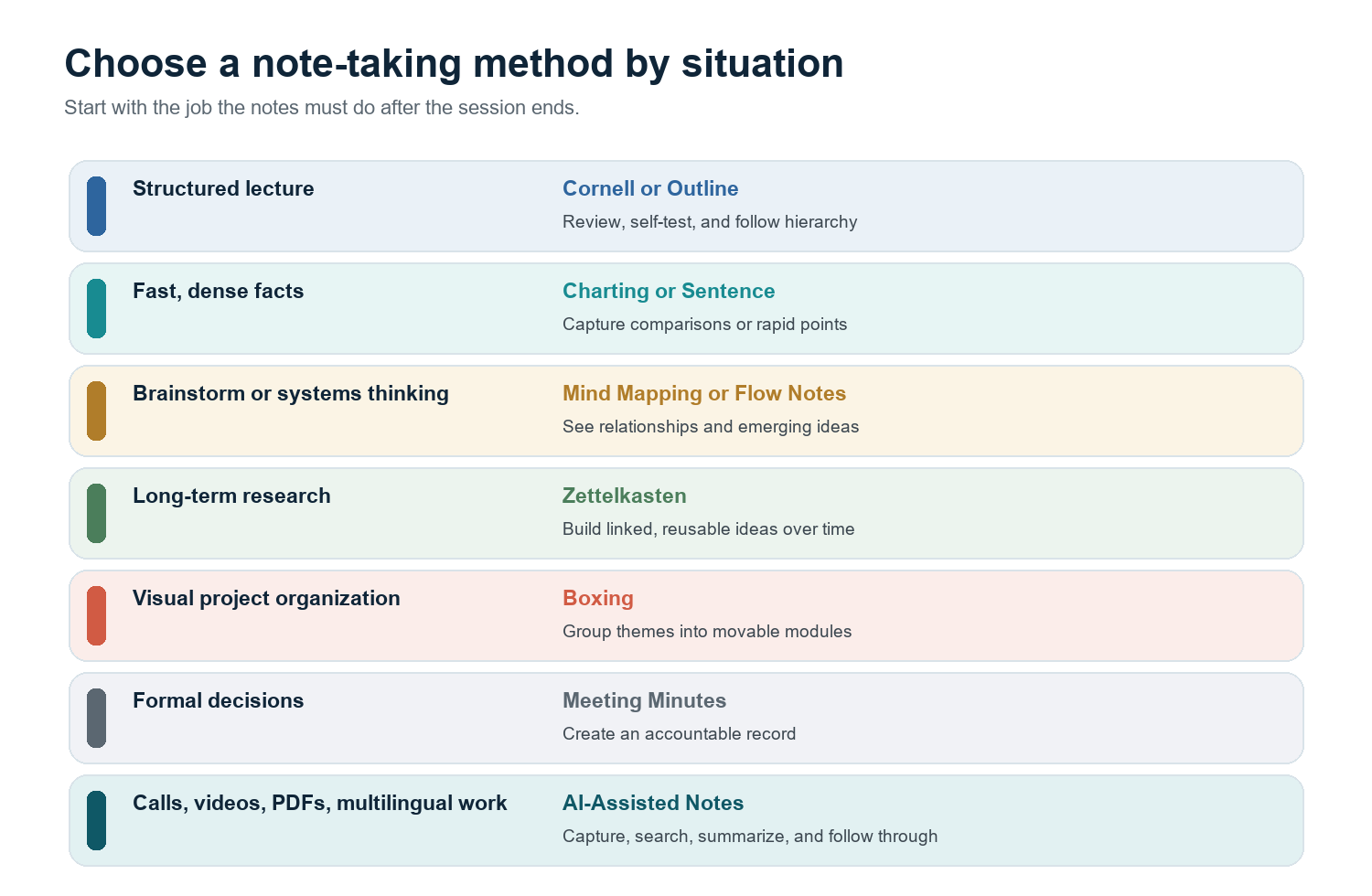
Quick recommendation: Use Cornell for study and review, Outline for structured presentations, Charting for comparisons, Mind Mapping for relationships, Sentence notes for speed, Zettelkasten for long-term research, Boxing for visual grouping, Flow Notes for active thinking, Meeting Minutes for formal decisions, and AI-assisted notes for meetings or media that must become searchable actions. |
There is no universal winner because note-taking has several jobs. A student preparing for an exam needs retrieval cues. A researcher needs durable connections between ideas. A project team needs decisions, owners, and deadlines. Choosing by output is more reliable than choosing the prettiest template.
A Better Way to Compare Note Taking Methods
Most comparisons stop at layout. This guide evaluates methods across four layers: manual capture, structured recall, searchable knowledge, and action follow-through. The framework explains why a page can look organized yet still fail when you need an answer three weeks later.
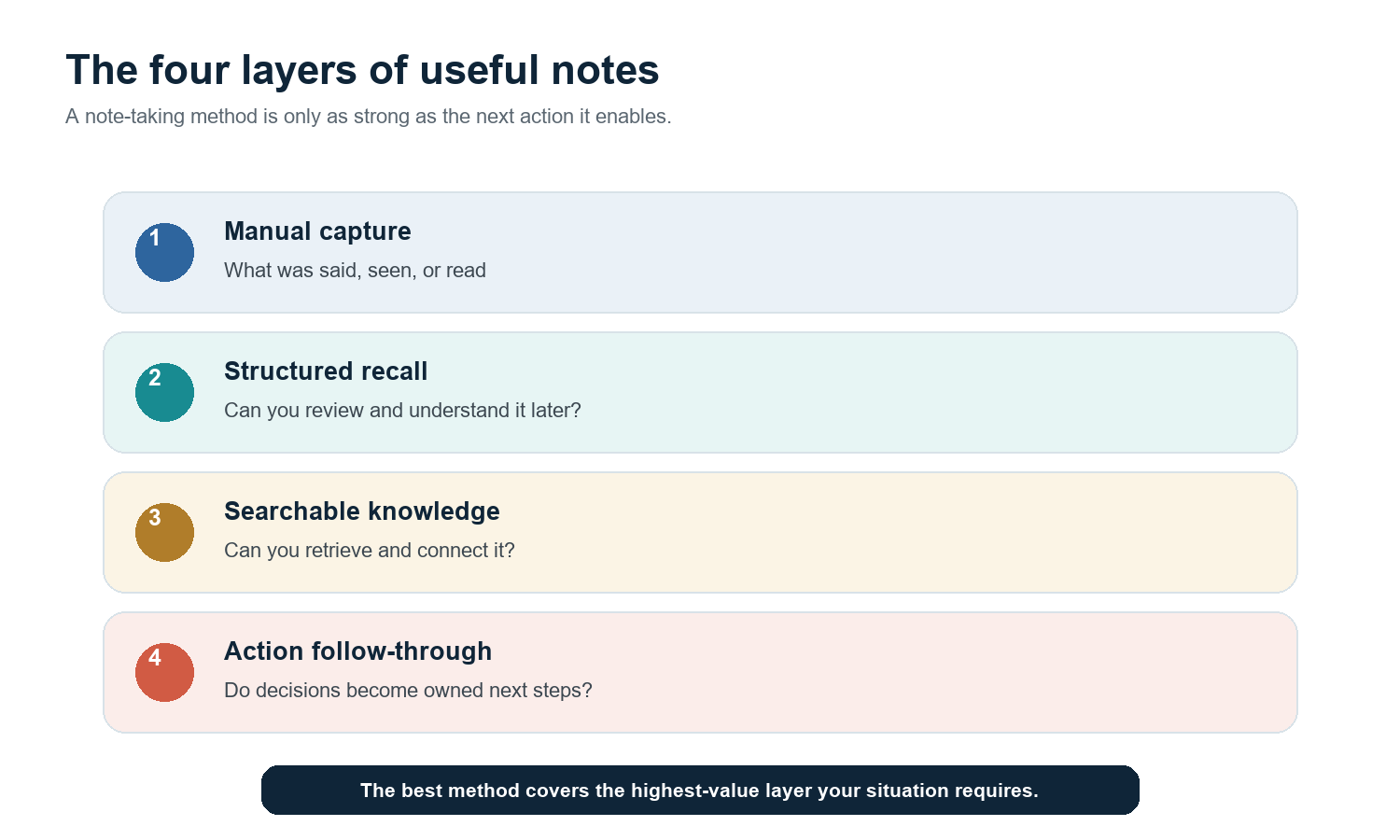
Manual capture asks whether important information was recorded accurately.
Structured recall asks whether the page helps you reconstruct meaning without replaying the source.
Searchable knowledge asks whether notes can be found, linked, and reused across time.
Action follow-through asks whether decisions become assigned tasks, reminders, or updated systems.
The distinction matters at work. Microsoft's 2025 Work Trend Index analyzed 31,000 workers across 31 countries and reported that employees were interrupted every two minutes during the workday by meetings, messages, or email. In that environment, a method that depends on perfect attention and later cleanup is fragile. The record must be easy to create and easier to use.
Note Taking Methods Comparison Table
Method | Core structure | Best use | Recall | Search | Action |
Cornell | Split page: notes, cues, summary | Lectures, training, exam review | High | Low | Low |
Outline | Indented hierarchy | Structured talks, chapters, plans | High | Low | Low |
Charting | Rows and columns by category | Comparisons, timelines, recurring fields | High | Medium | Low |
Mind Mapping | Radial visual relationships | Brainstorms, systems, concept learning | High | Medium | Low |
Sentence | One numbered point per line | Fast, unstructured information | Medium | Low | Low |
Zettelkasten | Atomic linked notes | Research, writing, long-term learning | High | High | Low |
Boxing | Visual blocks by topic | Digital notes, project modules | High | Medium | Low |
Flow Notes | Personal mix of text, arrows, sketches | Workshops, creative reasoning | Medium | Low | Low |
Meeting Minutes | Agenda, decisions, actions, owners | Governance and formal meetings | High | Medium | High |
AI-Assisted | Automated transcript plus structured outputs | Meetings, video, audio, PDFs, global teams | High | High | High |
Ratings describe the method's built-in tendency, not a guarantee. A carefully tagged outline can be highly searchable, while an AI transcript can remain useless if nobody reviews decisions or connects it to the team's workflow.
The 10 Note Taking Methods, With Examples and Templates
1. Cornell Method
Definition: A page is divided into a wide note area, a narrow cue column, and a summary section. The cues support later self-testing instead of passive rereading. |
Best for: Lectures, certification training, interviews, and any material you expect to review more than once.
Record the main content on the right. After the session, reduce the material into questions, keywords, or prompts on the left. Cover the note area and answer from the cues. Finish with a short summary that states the central idea in your own words. Cornell University's Learning Strategies Center traces the system to education professor Walter Pauk and recommends trying different methods for different situations.
Example: For a lecture on customer retention, the notes area captures definitions and examples; the cue column asks, "What is net revenue retention?"; the summary explains how expansion and churn affect the metric.
What it does well | Where it breaks down |
Builds review into the page, | Requires a cleanup pass. It is less comfortable when a |
Copy-ready cornell method template TOPIC / DATE: CUES OR QUESTIONS | MAIN NOTES Key term: | Explanation, evidence, examples Question: | Answer and supporting detail SUMMARY: 3-5 sentences in your own words |
2. Outline Method
Definition: Information is arranged in a hierarchy of main ideas, supporting points, and evidence using indentation. |
Best for: Well-structured lectures, project plans, book chapters, process documentation, and presentations with a clear agenda.
Start a new top-level line when the subject changes. Indent supporting explanations beneath it, then indent examples or evidence one level further. The method works best when the source itself has a logical structure. It also converts cleanly into a memo, study guide, or project brief.
Example: A product launch outline might begin with Positioning, then indent Audience, Problem, Promise, and Proof. Launch channels and owners become a second major branch.
What it does well | Where it breaks down |
Fast to scan, easy to edit, | Can create false order when the |
Copy-ready outline method template I. Main idea A. Supporting point 1. Evidence or example 2. Exception or risk B. Supporting point II. Next main idea |
3. Charting Method
Definition: A table organizes repeated categories across topics, cases, time periods, people, or options. |
Best for: Comparative history, product evaluations, interview panels, scientific categories, and recurring status meetings.
Choose the columns before the information arrives whenever possible. Each row should represent the same kind of entity, and each column should answer the same question. Good categories prevent you from writing full sentences and make missing data immediately visible.
Example: When comparing vendors, use rows for tools and columns for price, security, integrations, limits, owner, and decision. The resulting notes already resemble an evaluation matrix.
What it does well | Where it breaks down |
Excellent for comparison, | Weak for narrative explanations and |
Copy-ready charting method template ITEM | DEFINITION | EVIDENCE | RISK | NEXT QUESTION A | | | | B | | | | C | | | | |
4. Mind Mapping
Definition: A central idea branches into related concepts, subtopics, examples, and connections in a radial visual structure. |
Best for: Brainstorming, systems thinking, concept review, content planning, and conversations where relationships matter more than sequence.
Place the core question in the center, create one branch per major theme, and add short labels rather than sentences. Use arrows or cross-links when two branches influence each other. Cornell's Learning Strategies Center also teaches concept mapping as a way to organize and connect course ideas.
Example: A map for remote collaboration could branch into Communication, Documents, Meetings, Projects, and Knowledge. Cross-links show that meeting decisions feed both project tasks and the knowledge base.
What it does well | Where it breaks down |
Makes relationships memorable | Large maps become hard to read. |
Copy-ready mind mapping template [CENTRAL QUESTION] -> Theme 1 -> detail / example -> Theme 2 -> detail / example -> Theme 3 -> detail / example Cross-link: Theme 1 affects Theme 3 because... |
5. Sentence Method
Definition: Every new fact or idea is written as a separate numbered sentence or compact line. |
Best for: Fast lectures, live events, unfamiliar subjects, and situations where structure is unclear in the moment.
Write one point per line and keep moving. Add a simple margin symbol for a question, action, definition, or follow-up. Afterward, group related lines or convert them into a stronger structure. Sentence notes are often a capture method rather than a finished knowledge system.
Example: During a conference session, line 12 records a benchmark, line 13 records the speaker's caveat, and line 14 captures a follow-up resource. Later, those lines can be regrouped under Evidence, Risks, and Resources.
What it does well | Where it breaks down |
Low setup cost and resilient | Produces long pages with weak |
Copy-ready sentence method template 1. Main fact or claim. 2. Example or evidence. 3. ? Question to verify. 4. @ Name or source. 5. -> Follow-up action. |
6. Zettelkasten Method
Definition: A personal knowledge system built from small, self-contained notes that link to related ideas rather than living only inside folders. |
Best for: Research, writing, doctoral work, strategy, and subjects you expect to develop over months or years.
Capture a source note, rewrite the useful idea as an atomic permanent note, give it a clear title, and link it to existing notes. Each note should make sense when encountered alone. The method is associated with sociologist Niklas Luhmann's extensive card index, now documented by Bielefeld University's Niklas Luhmann Archive.
Example: Instead of storing one long page called "Meeting Productivity," create linked notes such as "Interruptions reduce decision quality," "Meeting records need owners," and "Searchability changes the value of transcripts."
What it does well | Where it breaks down |
Compounds over time, supports | Demands consistent rewriting |
Copy-ready zettelkasten method template TITLE: One clear claim IDEA: Explain the claim in your own words SOURCE: Author / URL / page / timestamp LINKS: [[Related note A]] [[Related note B]] USE: Where this idea may matter |
7. Boxing Method
Definition: Related notes are grouped into bordered visual blocks so each topic becomes a movable, scannable module. |
Best for: Tablet note-taking, project dashboards, mixed media, design reviews, and sessions with several parallel workstreams.
Create one box per theme and keep the contents short. A box can contain a definition, diagram, list, or mini-table. Use consistent box titles so the page can be reviewed quickly. In digital tools, boxes can be rearranged as the structure becomes clearer.
Example: A quarterly planning page might contain separate boxes for Revenue, Hiring, Product Risks, Customer Evidence, and Decisions. The Decisions box stays visible even as detail grows elsewhere.
What it does well | Where it breaks down |
Visually clean, flexible, and | The page can become decorative |
Copy-ready boxing method template [TOPIC BOX] Key point: Evidence: Open question: Decision / action: |
8. Flow Notes
Definition: A flexible mix of short text, arrows, sketches, annotations, and questions that records your thinking as it develops. |
Best for: Workshops, creative lectures, coaching, design critiques, and complex subjects where interpretation matters.
Write fewer words from the source and more reactions in your own language. Use arrows to show cause and effect, circles for unresolved questions, and small diagrams for structure. The goal is active processing, not a clean transcript.
Example: In a strategy workshop, you might connect a pricing constraint to a customer segment, add a question about willingness to pay, and sketch a two-step experiment beside it.
What it does well | Where it breaks down |
Encourages engagement, | Highly personal notes may be |
Copy-ready flow notes template IDEA -> consequence -> question Evidence: ______ My interpretation: ______ Connection to prior idea: ______ What I need to test: ______ |
9. Meeting Minutes
Definition: A formal record organized around agenda items, decisions, motions, action items, owners, and deadlines. |
Best for: Boards, governance, client commitments, project reviews, regulated work, and any meeting where accountability matters.
Prepare the agenda and attendee list in advance. During the meeting, record outcomes rather than every sentence. Separate discussion from decisions, and write every action with one owner and a due date. Send the minutes promptly so participants can correct material errors.
Example: Under "Launch date," the minutes record the decision to move release by one week, the reason, the approving group, and two owned actions for customer communication and quality assurance.
What it does well | Where it breaks down |
Creates an accountable shared | A dedicated note taker may |
Copy-ready meeting minutes template MEETING / DATE / ATTENDEES AGENDA ITEM: DISCUSSION: essential context only DECISION: final outcome ACTION: owner | task | due date OPEN ISSUE: question | next review date |
10. AI-Assisted Notes
Definition: Software captures or imports a source, creates a transcript or extracted text, and generates structured summaries, actions, visual maps, and searchable answers. |
Best for: Meetings, interviews, classes, webinars, videos, audio, PDFs, and multilingual collaboration where complete capture and retrieval matter.
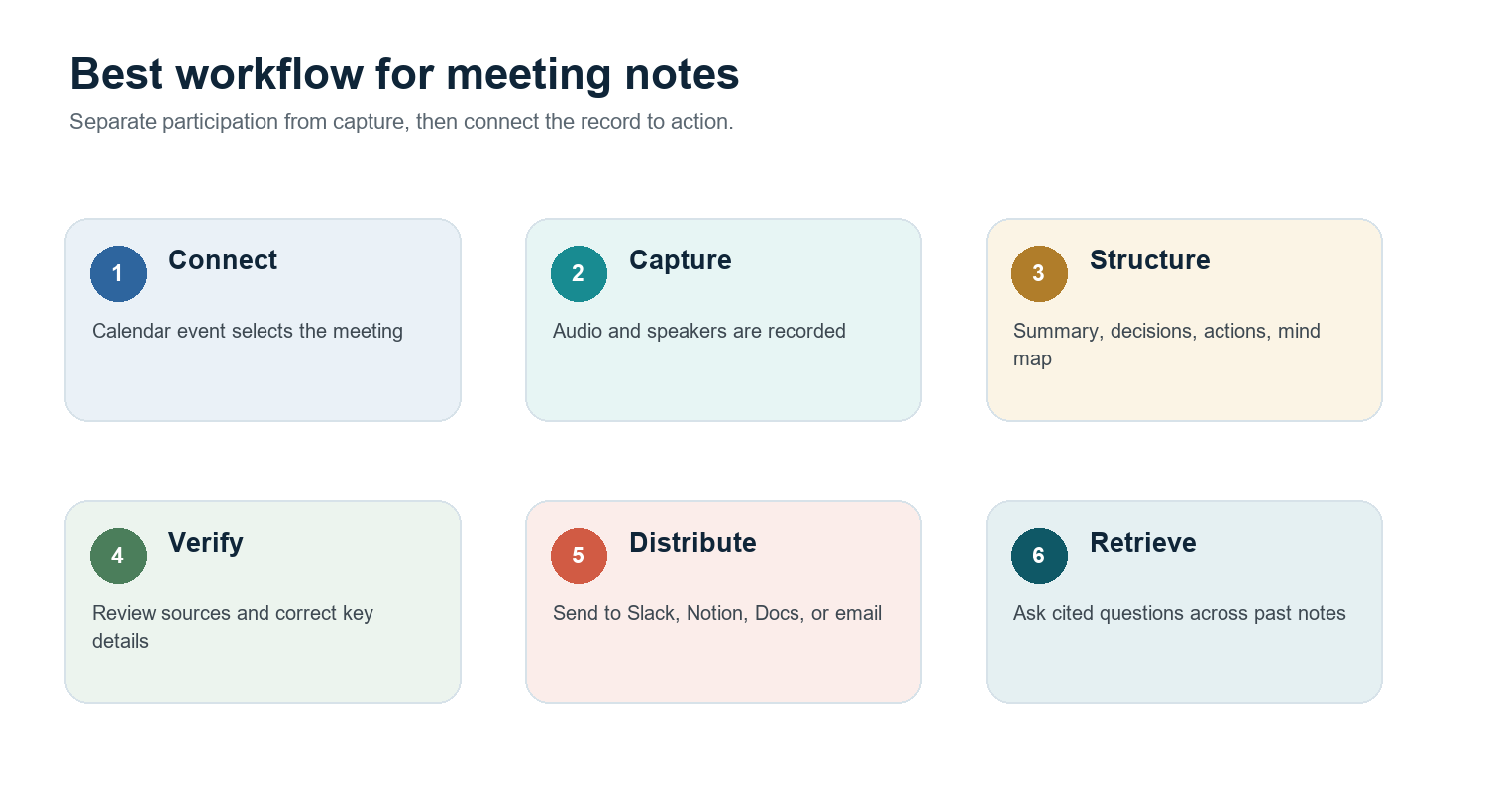
The strongest workflow begins before the meeting: connect the calendar and choose which calls the assistant may join. After capture, review names, numbers, decisions, and commitments against the source. Then distribute the approved output to the systems where work continues. HiNoter, for example, can auto-join supported meetings, structure notes and action items, create a mind map, process videos and PDFs, and let users ask questions with source references.
Example: A product sync in English and Portuguese becomes one transcript, a concise summary, a list of owned follow-ups, a visual map of dependencies, and a searchable record distributed to the team's tools.
What it does well | Where it breaks down |
Removes the listening-versus-typing tradeoff, | Output still requires human review. Consent, access control, retention, |
Copy-ready ai-assisted notes template BEFORE: connect calendar / confirm consent / choose meetings CAPTURE: transcript with speakers and timestamps OUTPUT: summary / decisions / action items / mind map VERIFY: names / figures / commitments / sensitive content SHARE: Notion / Slack / Google Docs / email RETRIEVE: ask questions with source references |
Which Note-Taking Method Is Best for Meetings?
Direct answer: For formal governance, use meeting minutes. For a workshop where ideas are still forming, use flow notes or a mind map. For recurring team meetings, customer calls, interviews, and multilingual discussions, AI-assisted notes are usually the strongest default because they preserve participation, capture the source, and support action follow-through. |
Manual notes force one person to split attention between listening, interpreting, and typing. That can be acceptable when the note taker is a neutral recorder, but it is costly when every attendee is expected to contribute. AI assistance changes the division of labor: the system handles capture and first-pass structure; people remain responsible for judgment, correction, consent, and decisions.
A Practical Shared Workflow With HiNoter
Connect the calendar and select the meetings HiNoter may attend.
Tell participants that the meeting will be recorded or transcribed, and follow applicable laws and company policy.
Let the assistant capture the call while the team stays focused on the conversation.
Review the transcript, structured summary, decisions, action items, and mind map immediately after the meeting.
Send the approved record to Notion, Slack, Google Docs, or email so the information reaches the team's existing workflow.
Use AI Chat with source references to retrieve details from past notes without replaying the recording.
HiNoter AI Meeting Notes explains the structured output workflow; AI Meeting Assistant covers calendar-based auto-join; and Multilingual Support is designed for global conversations with automatic language detection.
How to Build a Note-Taking System That You Will Actually Use
1. Separate capture from processing
A fast capture method does not have to be the final format. Sentence notes can become an outline. A transcript can become meeting minutes. A mind map can become a project brief. Decide when raw material will be converted into something reusable.
2. Use one naming convention
Use predictable titles such as YYYY-MM-DD - Project - Meeting Type. Add the customer, course, or project name before adding clever tags. Search works better when basic metadata is consistent.
3. Put decisions and actions in fixed locations
Do not leave a commitment buried in the seventh paragraph. Use stable labels for Decision, Owner, Due Date, Risk, and Open Question. The format can change; the labels should not.
4. Link notes to their sources
Include a page number, URL, timestamp, document title, or transcript reference. Source links make notes easier to verify and more trustworthy when someone who was not present uses them later.
5. Review on a schedule
A note becomes knowledge through reuse. Review Cornell cues before an exam, process Zettelkasten inbox notes weekly, and inspect open meeting actions before the next team sync. Without a review rhythm, every method becomes storage.
Downloadable and Copy-Ready Templates
The following compact templates are intentionally plain so they can be pasted into a document, note app, learning platform, or team workspace without rebuilding the design.
Universal learning-note template TOPIC / SOURCE / DATE What I expected to learn: Key ideas: Questions or contradictions: Connections to prior knowledge: Three-sentence summary: Next review date: |
Meeting minutes template MEETING / DATE / ATTENDEES / FACILITATOR Purpose: Decision 1: outcome | approver | rationale Action 1: owner | task | due date Risk or blocker: Open question: Distribution list / source recording: |
Zettelkasten permanent-note template CLEAR CLAIM AS TITLE Idea in my own words: Why it matters: Source and locator: Links to existing notes: Possible use in a project or article: |
AI note review checklist [ ] Participants were informed and consent requirements were met [ ] Names, dates, amounts, and technical terms are correct [ ] Decisions match the source [ ] Every action has one owner and a due date [ ] Sensitive material has the right access controls [ ] Summary was delivered to the correct workspace |
Where AI Notes Help - and Where They Do Not
Use AI when... | Prefer manual or hybrid notes when... |
You need complete capture while participating fully. | The activity is designed to practice recall or synthesis. |
The source is a long meeting, video, audio file, or PDF. | Recording is prohibited, inappropriate, or not consented to. |
A multilingual team needs one searchable record. | The subject requires private reflection that should not enter a shared system. |
Actions must move into team tools quickly. | A small sketch or personal cue is faster and sufficient. |
People need to ask later questions with source references. | The notes are a formal legal record requiring a designated process. |
HiNoter is most useful when the best note-taking method is to stop typing. It can turn supported meetings, user-provided videos, audio, and PDFs into structured notes, action items, mind maps, and source-linked answers. The human role shifts from stenography to verification and judgment.
Explore AI Meeting Notes, PDF to Text, and AI Chat with source references.
Frequently Asked Questions
What are the most effective note taking methods?
Cornell, outlining, charting, mind mapping, sentence notes, Zettelkasten, boxing, flow notes, meeting minutes, and AI-assisted notes are all effective when matched to the right job. The best choice depends on whether you need recall, comparison, creative connections, formal accountability, or searchable follow-through.
Is the Cornell method better than outlining?
Cornell is usually better for repeated review because it adds cues and a summary. Outlining is faster when the source already has a clear hierarchy. A useful hybrid is to outline in the main Cornell note area and write retrieval questions in the cue column.
Which note-taking method is best for meetings?
Use formal meeting minutes for boards and governance. Use mind maps or flow notes for workshops. Use AI-assisted notes for recurring calls, interviews, customer conversations, videos, and multilingual meetings where participants need to stay engaged and retrieve details later.
Are AI notes better than handwritten notes?
They solve different problems. Handwriting can support active processing and personal recall. AI notes are stronger for complete capture, scale, search, distribution, and action extraction. A hybrid approach often works best: let AI preserve the source, then write a short personal synthesis.
How do I make my notes searchable?
Use consistent titles, dates, project names, stable labels, and source links. Keep one idea per Zettelkasten note or one meeting per record. When using AI, choose a tool that supports full-text search and cited answers rather than summaries alone.
Can HiNoter summarize PDFs and videos as well as meetings?
Yes. HiNoter supports meeting capture and also processes user-provided or permitted audio, video, YouTube content, and PDFs. Outputs can include transcripts, summaries, structured notes, action items, mind maps, and source-linked answers, depending on the source and workflow.