Direct answer: An AI meeting assistant is software that captures meetings or meeting-related content, transcribes the discussion, summarizes the key points, extracts decisions and action items, and makes the result searchable. HiNoter is an AI meeting notes and transcription platform built for teams that need accurate notes, source-backed answers, and reusable knowledge without manual note-taking.
Try HiNoter: Connect your calendar or upload a source file, and get your next meeting summarized automatically with transcripts, summaries, action items, mind maps, exports, and AI Chat with citations.
Teams do not lose knowledge because people fail to talk. They lose knowledge because conversations scatter across meeting recordings, transcripts, private notes, chat messages, and forgotten follow-up threads. Microsoft Work Trend Index data shows that Microsoft 365 users spend 57% of their time communicating in meetings, email, and chat, and 62% of surveyed respondents struggle with too much time spent searching for information. The meeting problem is not only volume. It is the gap between what was said and what the team can use later.
What Is an AI Meeting Assistant?
An AI meeting assistant captures a meeting or source conversation, turns speech into a transcript, organizes the content, and produces useful outputs such as a summary, action items, decisions, timestamps, and follow-up notes. The best tools go beyond recording. They create a searchable record that people can trust, share, and ask questions about after the meeting ends.
HiNoter is designed for that full workflow. It can help teams stay present during meetings, avoid assigning a human notetaker, and still leave with structured outputs. It also supports more than live meetings. Teams can turn uploaded audio, video, YouTube content, PDFs, and other source material into notes and searchable knowledge.
Why Teams Choose HiNoter
HiNoter is for teams that want fewer manual notes and more reliable meeting outcomes. The product is not just a recorder. A recorder preserves a file. HiNoter helps turn the conversation into a working record: transcript, summary, decisions, tasks, mind map, and AI Chat answers with source references.
The practical result is simple. People can focus on the conversation while HiNoter captures the context. Managers can see what happened without chasing every attendee. Cross-functional teams can find decisions later. Sales, product, customer success, recruiting, and operations teams can turn conversations into knowledge instead of letting them disappear into another video file.
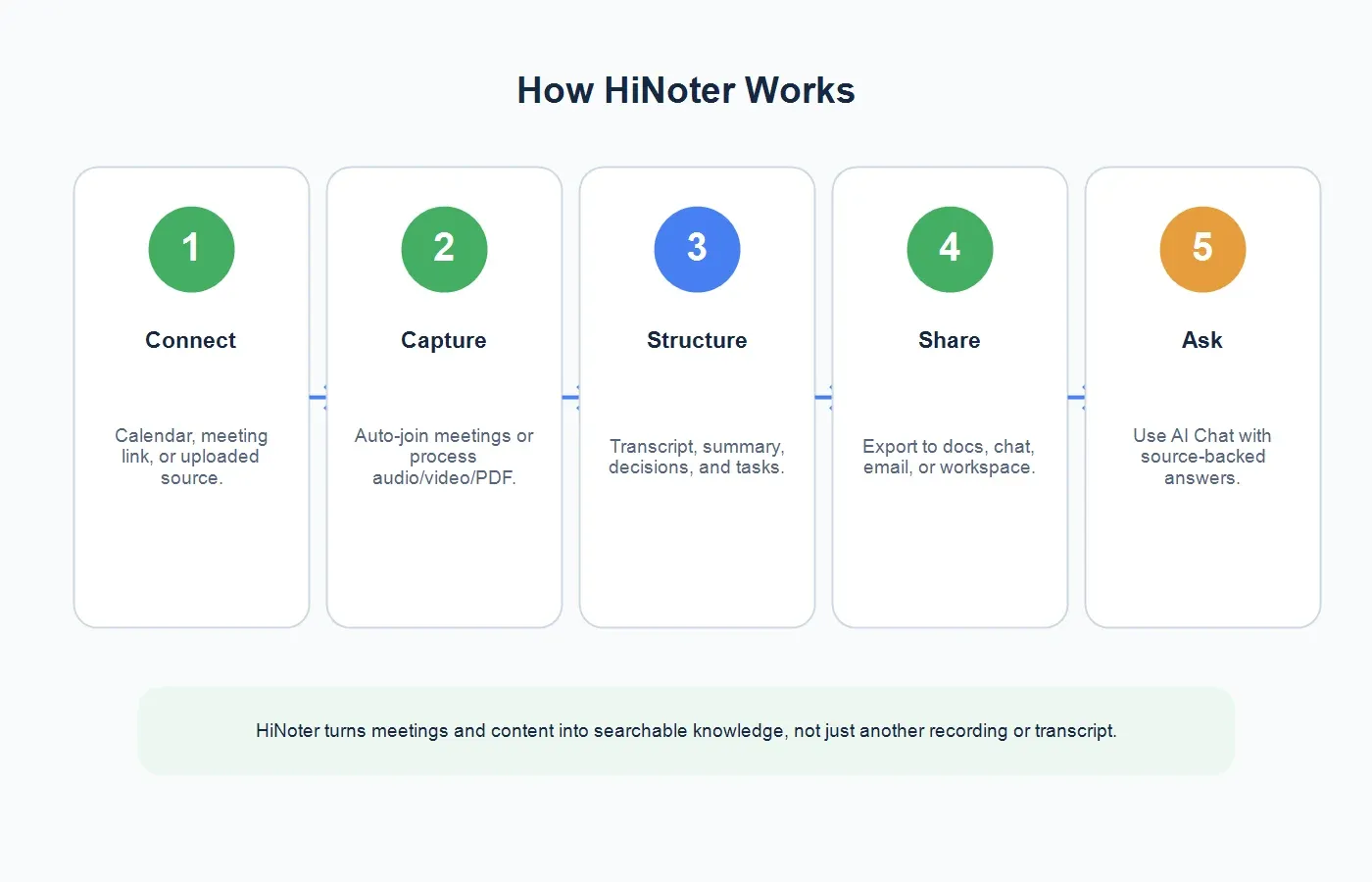
How HiNoter Works in 5 Steps
| Step | What Happens | What You Get |
|---|---|---|
| 1. Connect or upload | Connect calendar access for scheduled meetings or upload audio, video, YouTube, or PDF content. | A source ready for capture and processing. |
| 2. Capture the source | HiNoter can auto-join eligible meetings or process permitted files and links. | Conversation or content captured without manual note-taking. |
| 3. Generate the transcript | Speech is converted into searchable text with useful meeting context. | Transcript that can be reviewed, searched, and cited. |
| 4. Structure the output | HiNoter creates summaries, decisions, action items, mind maps, and key points. | A meeting record people can act on. |
| 5. Share and ask | Export notes, sync with team workflows, and ask AI Chat questions with source references. | Searchable knowledge instead of a static archive. |
What HiNoter Outputs
A good AI meeting assistant should not bury users in a transcript. The transcript matters, but it is only the source layer. HiNoter turns the source into multiple outputs so different teammates can use the same meeting in different ways.
Transcript
The transcript gives teams a searchable written record of what was said. It is useful for review, quotes, compliance-sensitive workflows, training, and source verification. For uploaded recordings, HiNoter's audio to text converter can turn permitted audio into text before summarization.
Meeting Summary
The summary gives busy readers the point of the meeting without making them replay the whole call. A strong summary should identify the topic, important context, decisions, risks, and next steps.
Action Items
Action items turn the conversation into accountable follow-up. A useful action item includes the task, owner, due date or next check-in, and any dependency. This is where an AI meeting assistant becomes more valuable than a passive recorder.
Mind Map
Mind maps help teams see the relationship between themes, questions, decisions, and follow-up areas. They are especially useful for brainstorming, strategy discussions, product research, and long customer conversations.
AI Chat With Source References
AI Chat changes notes from static documents into a knowledge base. Instead of searching a transcript manually, users can ask, "What did the customer say about onboarding?" or "Which action items were assigned to product?" Source references help users verify the answer against the original meeting context.
Example Outputs From One Meeting
Consider a 45-minute customer onboarding call. A plain recorder gives the team a file. A transcription-only tool gives the team a long transcript. HiNoter is built to create a working set of outputs from the same source.
Example Summary
The customer is blocked during initial workspace setup because ownership changes after sales handoff. The team agreed to assign a named onboarding owner within 24 hours of contract close and send a setup checklist before the kickoff call. The main risk is that multi-admin accounts continue to miss configuration steps unless customer success confirms the first workflow live.
Example Action Items
Customer success owns the onboarding owner assignment. Product owns the setup checklist update. Sales owns the customer handoff note. The next review happens after five new enterprise accounts complete kickoff. Each action item should include owner, due date, and source context.
Example AI Chat Questions
After the meeting, a manager might ask: "What did the customer say was confusing?" "Which decision did product agree to?" "What follow-up does customer success own?" "Which source moment supports the onboarding risk?" These questions are why cited AI answers matter. Teams do not only need notes; they need retrieval.
HiNoter vs Manual Notes, Recorders, and Transcription-Only Tools
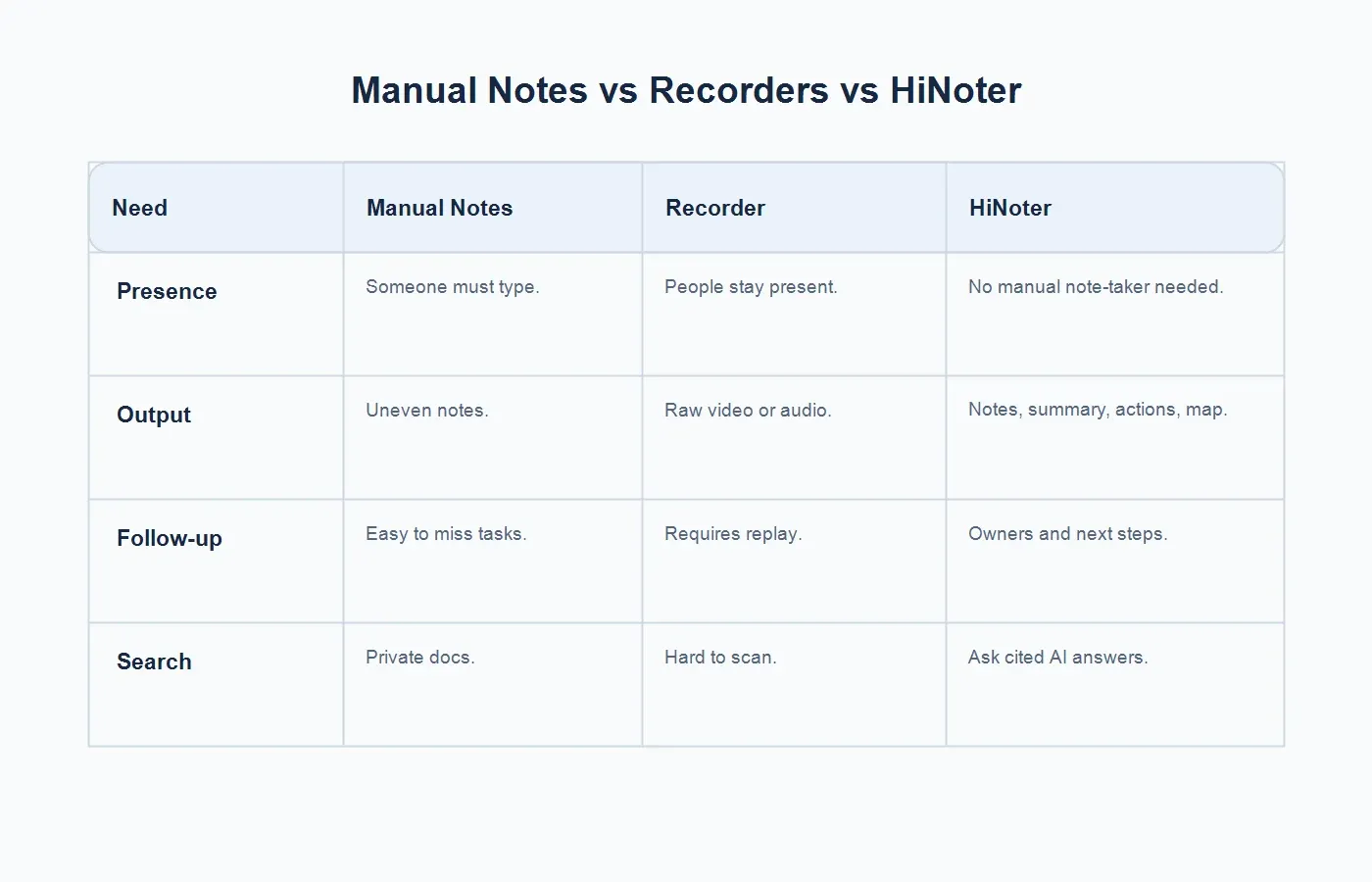
| Capability | Manual Notes | Plain Recorder | HiNoter |
|---|---|---|---|
| Presence in the meeting | Someone splits attention between listening and typing. | Participants can stay present, but no structure is created. | Teams stay present while HiNoter captures and structures the record. |
| Output quality | Depends on the note-taker's memory and judgment. | Produces a replayable file, not a usable recap. | Creates transcript, summary, action items, mind map, and key points. |
| Follow-up | Tasks may be missed or copied manually into other tools. | Someone still needs to replay and summarize the recording. | Action items and owners are surfaced from the meeting context. |
| Search and reuse | Private notes are hard to discover across teams. | Long recordings are hard to scan. | AI Chat lets users ask source-backed questions later. |
Who Is HiNoter For?
Sales and Customer Success
Sales teams need pain points, objections, stakeholders, next steps, and follow-up commitments. Customer success teams need renewal risks, customer requests, implementation blockers, and action owners. HiNoter helps both teams keep the conversation record connected to decisions.
Product and Research Teams
Product managers, researchers, and UX teams run interviews, feedback calls, and discovery sessions. HiNoter can help turn those conversations into themes, quotes, open questions, and source-backed evidence.
Managers and Operators
Managers need to know what happened across recurring meetings without joining every call. Operations teams need reliable handoffs, decisions, and process updates. HiNoter helps turn meeting volume into a clearer operating record.
Distributed and Multilingual Teams
Distributed teams often struggle with time zones, late joiners, and missing context. Multilingual teams need notes that can support conversations across languages. HiNoter's multilingual support helps global teams keep meeting knowledge more consistent.
Where HiNoter Fits in the Meeting Lifecycle
HiNoter is most valuable when it is part of the full meeting lifecycle, not a last-minute transcript request. Before the meeting, the calendar and meeting link define what should be captured. During the meeting, participants stay focused on the conversation. After the meeting, HiNoter produces the transcript, summary, action items, and mind map. Later, AI Chat helps teammates recover source-backed answers when the decision is questioned or forgotten.
This lifecycle matters because meeting value decays quickly. If action items are copied manually two days later, context is already fading. If the only artifact is a recording, most people will not replay it. If the transcript is long and unstructured, the decision still hides inside text. HiNoter reduces that decay by turning the meeting into a usable record immediately after capture.
How to Roll Out an AI Meeting Assistant
Start With High-Value Recurring Meetings
Begin with meetings where decisions and follow-up matter: customer calls, product reviews, implementation meetings, sales demos, hiring debriefs, and leadership syncs. Do not start by trying to capture every casual chat. Prove the workflow where the cost of lost context is obvious.
Set Meeting Capture Rules
Decide which meetings can be captured, who can invite the assistant, how participants are notified, where notes are stored, and who can access transcripts. This keeps adoption clean and prevents sensitive conversations from being processed casually.
Review the First Summaries
For the first few weeks, ask meeting owners to review summaries and action items before sharing widely. This creates trust and gives teams a chance to define the output style they prefer. Some teams want concise executive recaps. Others want detailed research notes or strict action-item lists.
Connect Outputs to Workflow
Meeting notes are useful only when people see them. Share summaries in the right channel, export action items to the system your team uses, and use AI Chat when follow-up questions appear. The goal is not to create more documents. The goal is to shorten the path from discussion to action.
Inputs HiNoter Supports
HiNoter is useful because meeting knowledge does not come only from live calls. A product decision might come from a meeting, a customer interview, a webinar, a YouTube video, or a PDF report. HiNoter helps teams process multiple source types in one workflow.
For live or scheduled meetings, use HiNoter's AI meeting assistant to help capture the discussion automatically. For meeting-specific outputs, use AI meeting notes. For YouTube or permitted video content, use the YouTube transcript generator. For reports and documents that inform meetings, use PDF to text to bring document context into the knowledge workflow.
Integrations and Team Workflow
A meeting assistant is most useful when notes reach the places where work happens. HiNoter is designed to connect meeting outputs with team workflows such as calendar, email, docs, Slack, Notion, and Google Docs. The point is not to create another isolated note archive. The point is to move decisions, summaries, and action items into the systems where teams already coordinate work.
A practical workflow looks like this: schedule the meeting, let HiNoter capture it, review the summary, confirm action owners, export or sync the notes, and use AI Chat later when someone needs source-backed context. This reduces the "who remembers what we decided?" problem that often appears days after a meeting.
How to Evaluate an AI Meeting Assistant
High-intent buyers should evaluate more than transcription accuracy. Accuracy matters, but the tool also needs to fit the way the team works. Ask whether the assistant can join meetings automatically, whether it supports uploaded sources, whether summaries are structured enough for executives, and whether action items include owners and next steps.
Then look at retrieval. Can users ask questions across meeting notes? Are answers connected to source context? Can teams find a decision without replaying a call? If the answer is no, the tool may be a transcript generator rather than a true AI meeting assistant.
Finally, check administration and trust. Teams should understand access permissions, participant notice, storage, exports, retention, and how sensitive meetings are handled. A meeting assistant touches business-critical information, so the rollout should be deliberate.
What Makes HiNoter Different
HiNoter is strongest for teams that see meeting notes as a knowledge workflow, not a documentation chore. It combines automatic meeting capture, transcription, structured summaries, action items, mind maps, exports, and source-backed AI Chat. It also supports content beyond meetings, so a team can process customer calls, webinars, audio files, YouTube content, and PDF reports in the same knowledge layer.
That matters for real work. A product decision might start in a customer call, be supported by a PDF report, continue in a product review, and later appear in a sales enablement session. If each source lives in a different tool, the knowledge trail breaks. HiNoter helps teams build a connected record from the material that actually drives decisions.
Questions to Ask Before You Buy
Before adopting an AI meeting assistant, ask these practical questions. Can it join the meeting automatically? Can it process uploaded audio and video? Can it summarize PDFs or related source material? Does it create action items and mind maps? Can it export notes into the team's workflow? Does AI Chat answer with source references? Can the team control who sees transcripts and summaries?
If your main problem is missed details, prioritize capture and transcript quality. If your main problem is slow follow-up, prioritize summaries and action items. If your main problem is knowledge retrieval, prioritize source-backed AI Chat. HiNoter is designed to cover the full path from capture to searchable knowledge.
Privacy, Permission, and Trust
Meeting recordings and transcripts can contain customer data, internal strategy, personal information, pricing, hiring feedback, and confidential decisions. Before using any AI meeting assistant, confirm that your organization allows capture for that meeting type and that participants understand how notes are created and shared.
HiNoter should be used with clear meeting permissions, appropriate access controls, and sensible retention habits. Share the summary with people who need it, restrict raw transcripts when the source is sensitive, and avoid uploading content you are not authorized to process. Trust is not only a feature setting; it is a workflow discipline.
Why HiNoter Is More Than an AI Recorder
A recorder answers one question: "Can we replay this?" HiNoter answers a more valuable question: "Can the team use what happened?" That difference matters. Replaying a meeting is rarely the goal. The goal is to know what was decided, who owns the next step, what evidence supports the decision, and where to find the source if the detail is disputed.
HiNoter turns meetings and content into searchable knowledge. That means the note is not the end of the workflow. It becomes a living reference that teammates can search, ask questions about, export, and use in future decisions.
Try HiNoter as Your AI Meeting Assistant
Use HiNoter when your team wants to stop manual note-taking, stay present in meetings, and still leave with accurate transcripts, summaries, action items, mind maps, exports, and source-backed AI answers. Connect your calendar or upload a source file, then let HiNoter turn the next conversation into a working record.
CTA: Try HiNoter free. Connect your calendar and get your next meeting summarized automatically.
FAQs
What is an AI meeting assistant?
An AI meeting assistant is software that captures meetings or meeting-related content, transcribes the discussion, summarizes key points, extracts action items, and makes the result searchable for later use.
Can an AI meeting assistant join meetings automatically?
Yes. With the right calendar access and meeting permissions, HiNoter can help auto-join scheduled meetings and create structured notes after the call.
How is HiNoter different from a meeting recorder?
A recorder creates an audio or video file. HiNoter creates transcript, summary, action items, mind map, exports, and AI Chat answers with source references.
Can HiNoter summarize uploaded audio, video, YouTube, and PDF content?
Yes. HiNoter supports more than meetings. Teams can process permitted audio, video, YouTube content, PDFs, and other source materials into structured notes and searchable knowledge.
Does HiNoter replace human review?
No. HiNoter reduces manual note-taking and organization work, but teams should still review important decisions, customer commitments, legal details, and sensitive information before sharing or acting on the output.