Direct answer: AI meeting notes automatically capture a permitted meeting, convert the conversation into a searchable transcript, and organize it into a summary, decisions, action items, owners, and deadlines. HiNoter connects the transcript to mind maps, exports, and source-linked AI Chat, so teams can verify what was said and reuse the knowledge without replaying the call.
For sales, product, customer success, recruiting, research, and project teams, the result is less post-meeting administration and a more reliable path from conversation to accountable work.
Try HiNoter for free: Turn your next meeting into structured, searchable notes.
Updated: July 17, 2026. Editorial review environment: public product and official help pages reviewed in Google Chrome on Windows 11. Product limits and platform settings can change, so confirm the current plan, admin controls, and consent workflow before deployment.
By HiNoter Editorial Team: researchers and writers focused on meeting productivity, transcription workflows, knowledge reuse, and team collaboration.
| Question | Practical answer |
|---|---|
| What goes in? | Calendar meetings, permitted recordings, audio, video, PDFs, and other supported content. |
| What comes out? | Transcript, summary, decisions, action items, owners, deadlines, mind map, exports, and AI Chat answers. |
| What makes it useful? | The output is structured for follow-up and connected to source context instead of being another long recording. |
| Who should use it? | Teams that need repeatable documentation, clear ownership, fast handoffs, and searchable meeting memory. |
| What must be checked? | Participant notice, consent rules, host/admin permissions, retention policy, data sensitivity, and human review. |
What Are AI Meeting Notes?
AI meeting notes are structured records generated from a meeting's audio, video, or transcript. Unlike a manual notebook, they can preserve the full conversation. Unlike a raw transcript, they can identify what matters: decisions, commitments, objections, risks, unanswered questions, owners, and deadlines. The best workflow keeps the original source close enough that a user can verify every important claim.
An AI meeting assistant is the capture component. It may join a scheduled online meeting, record locally with permission, or process an uploaded file. Speech-to-text converts spoken language into a transcript. The knowledge layer then summarizes, categorizes, links, and makes the content searchable. These stages are related, but they are not interchangeable.
| Output | Definition | Main limitation |
|---|---|---|
| Recording | An audio or video file preserving the meeting. | Users still need to replay it to find details. |
| Transcript | A time-ordered text representation of speech. | Long transcripts still require interpretation and cleanup. |
| AI meeting notes | A structured summary of decisions, actions, topics, and context. | Generated details require review, especially in high-stakes work. |
| Meeting knowledge base | Searchable, connected notes across meetings and related content. | Its value depends on source quality, permissions, organization, and retrieval controls. |
Why Recordings and Raw Transcripts Still Create Work
The painful part of a meeting often begins after the call. Someone replays the recording, searches a transcript, compares private notes, confirms who volunteered, writes a recap, moves tasks into another system, and answers follow-up questions from people who missed the discussion. A recording preserves information, but preservation is not the same as operational clarity.
Raw transcripts improve searchability, yet they frequently contain speaker-label errors, repeated phrases, filler words, incomplete sentences, and ambiguous commitments. A participant may say, “I can take that next week,” without restating the task. The meaning depends on several minutes of context. A useful meeting-note system must connect the promise, task, owner, deadline, and source passage.
This is why HiNoter is positioned as more than a recorder. HiNoter is an AI meeting notes and transcription platform that can automatically capture meetings and turn meetings, permitted YouTube content, PDFs, video, and audio into structured, searchable, source-linked knowledge. The objective is not to create the longest transcript. It is to reduce the distance between what the team discussed and what the team does next.
How HiNoter AI Meeting Notes Work
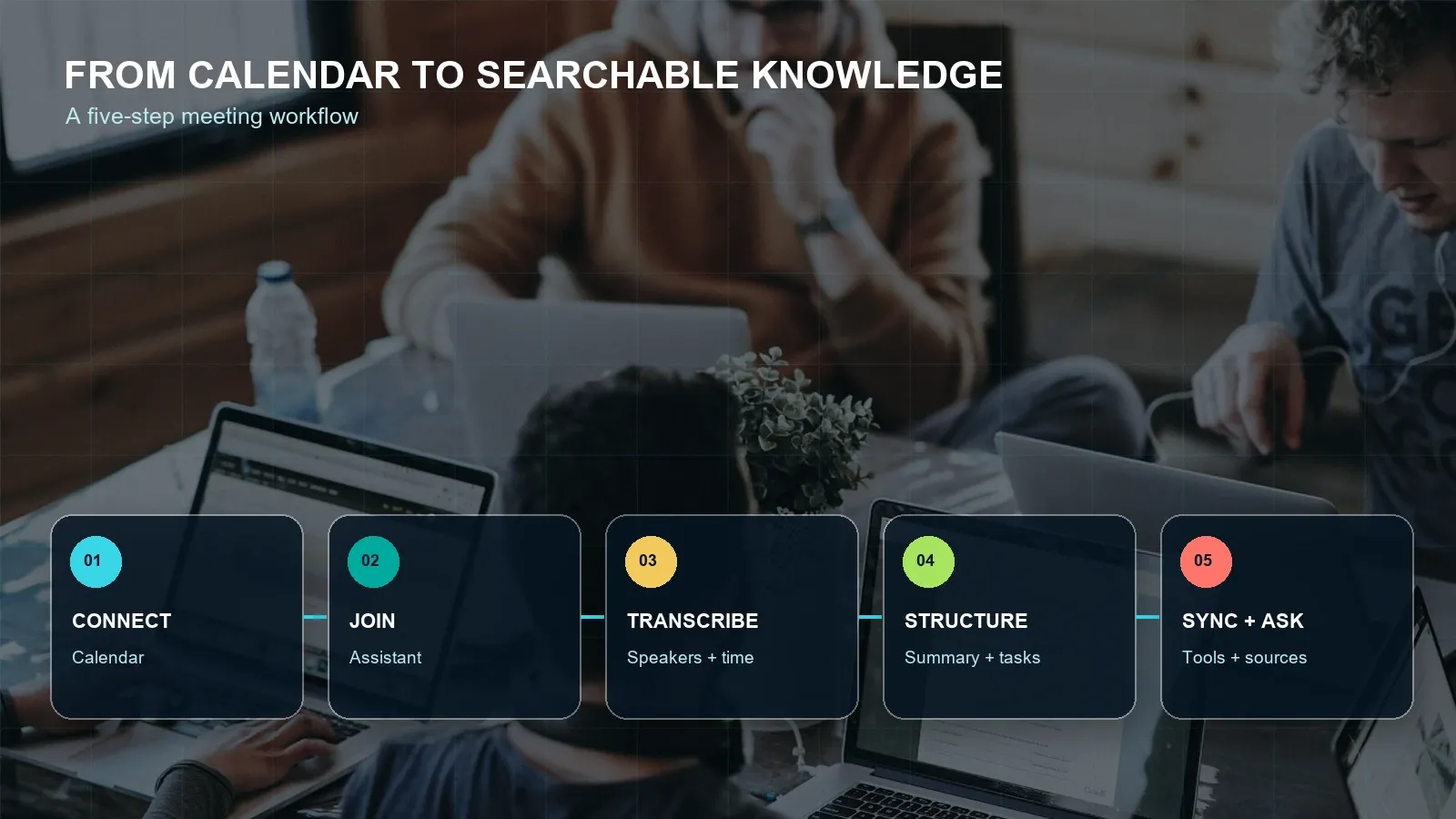
The core workflow can be completed in five steps. Teams should configure capture and sharing rules before broad deployment, then review a small set of meetings to refine language, templates, and destinations.
- Connect your calendar. Connect the work calendar containing Zoom, Google Meet, Microsoft Teams, or other supported meeting links. Choose the events that should be processed. Calendar context helps associate the meeting with its title, participants, scheduled time, and recurring series.
- Set auto-join and permission rules. Let the HiNoter assistant join selected permitted meetings, or use an approved recording/upload workflow when an assistant is not appropriate. Confirm host settings, notify participants, and follow organizational and jurisdictional requirements. Google, Microsoft, and Zoom each provide platform-specific controls that may affect recording or transcription.
- Generate the transcript. HiNoter converts speech into text, detects the working language, and preserves speaker and timestamp context where available. Users can edit names, terminology, and important passages before distributing the note.
- Create structured outputs. The knowledge layer creates a concise meeting summary, decisions, action items, owners, deadlines, topics, risks, and a mind map. Teams can use templates so a sales call emphasizes objections while a product review emphasizes decisions, blockers, and roadmap changes.
- Sync, share, and ask. Send approved outputs to Notion, Slack, Google Docs, email, or other connected tools. Use AI Chat to ask questions about one meeting or a broader body of notes, then open the source reference to verify the answer.
If you are the host: check the meeting platform's recording or transcription controls, explain what will be captured, and decide who can access the result. If you are a participant: do not assume you can capture or distribute the meeting; confirm authorization. If auto-join is unavailable: process a permitted recording or audio file, or use the platform's approved transcript export when available.
Inputs and Outputs: What HiNoter Organizes
A strong AI meeting notes workflow should accept the sources your team already creates and produce outputs that fit the systems your team already uses. HiNoter supports a multi-source knowledge model so a meeting can be understood next to the report, PDF, webinar, product demo, or audio memo that informed it.
| Input | Typical use | Processing note |
|---|---|---|
| Live online meeting | Sales calls, product reviews, interviews, standups, customer check-ins. | Requires platform access, participant notice, and a permitted capture method. |
| Audio recording | Voice memo, phone call, field interview, podcast, in-person meeting. | Audio quality and speaker overlap strongly affect transcription quality. |
| Video file | Webinar, training, demo, recorded meeting, research interview. | Clear speech matters more than image resolution for transcript quality. |
| Permitted YouTube video | Tutorial, webinar, public briefing, creator-owned content. | Process only content you own, are authorized to use, or may lawfully analyze. |
| Report, research paper, meeting pre-read, policy, presentation export. | Scanned files may require OCR; tables and complex layouts may need review. |
The structured output should answer practical questions: What changed? What did the group decide? Which concerns remain open? Who owns each next step? When is it due? Which source passage supports the answer? What related information appeared in an earlier meeting or attached document?
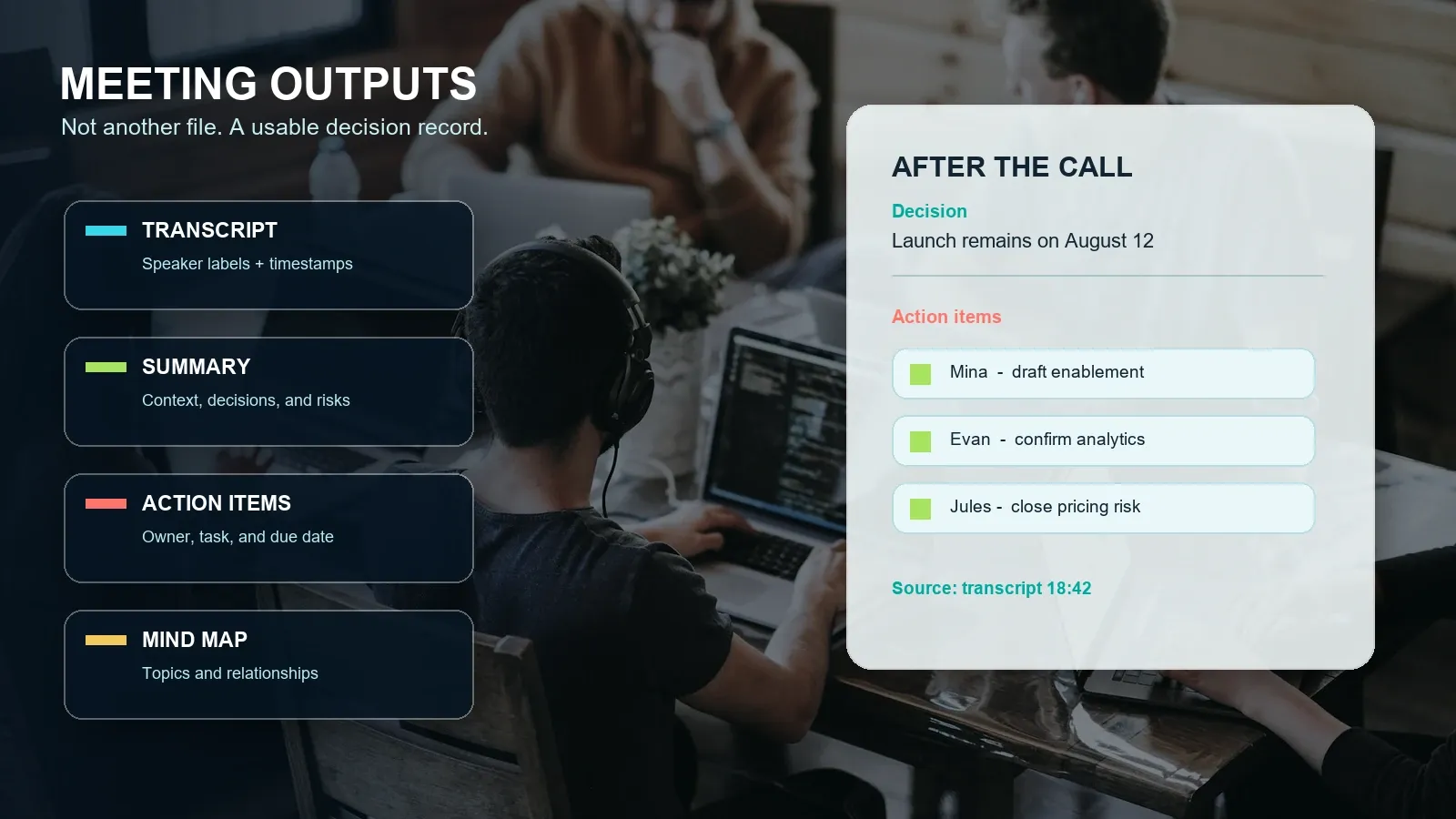
Example output from a product launch review
Summary: The team kept the August 12 launch date. The onboarding sequence is ready, but pricing enablement and analytics validation remain open risks.
Decisions: Keep the launch date; use the revised pricing page; postpone the advanced dashboard tour until the second onboarding email.
Action items: Mina drafts sales enablement by July 21. Evan validates event tracking by July 20. Jules confirms the pricing-risk response with finance by July 22.
Source references: Launch decision at transcript 18:42; analytics concern at 24:10; pricing context in roadmap PDF page 7.
This sample is deliberately specific. Generic notes such as “the team discussed launch” are not enough for follow-up. The structured version preserves the decision, context, owner, deadline, and evidence. Before syncing tasks, a project owner should verify names, dates, financial figures, legal commitments, and any statement that could materially affect a customer or employee.
Who Should Use AI Meeting Notes?
AI meeting notes are most valuable when meetings repeat, multiple people need the outcome, and missed context creates rework. The format should change with the role rather than forcing every team into the same generic summary.
| Team | What the note should capture | Useful AI Chat question |
|---|---|---|
| Sales | Customer goals, objections, competitors, buying process, commitments, follow-up. | “Which pricing objections appeared across this month's calls?” |
| Customer success | Health risks, adoption blockers, promised actions, stakeholders, renewal context. | “What commitments did we make to this account?” |
| Product | Decisions, evidence, roadmap impact, dependencies, blockers, unresolved questions. | “Why did we postpone the dashboard tour?” |
| Recruiting | Candidate evidence, role criteria, interviewer observations, next-stage ownership. | “Which examples support the candidate's leadership assessment?” |
| Projects and operations | Status changes, risks, owners, deadlines, handoffs, escalation points. | “Show overdue commitments from the last three weekly reviews.” |
| Research and education | Claims, themes, quotations, questions, sources, links to papers or PDFs. | “Compare the speaker's argument with the uploaded report.” |
Individual users benefit from less typing, but the larger advantage appears at team level. When approved meeting notes use consistent fields and destinations, a colleague can join a project later, find the latest decision, trace it to the original discussion, and understand why the team chose that path.
Manual Notes vs Plain Transcription vs an AI Meeting Knowledge Platform
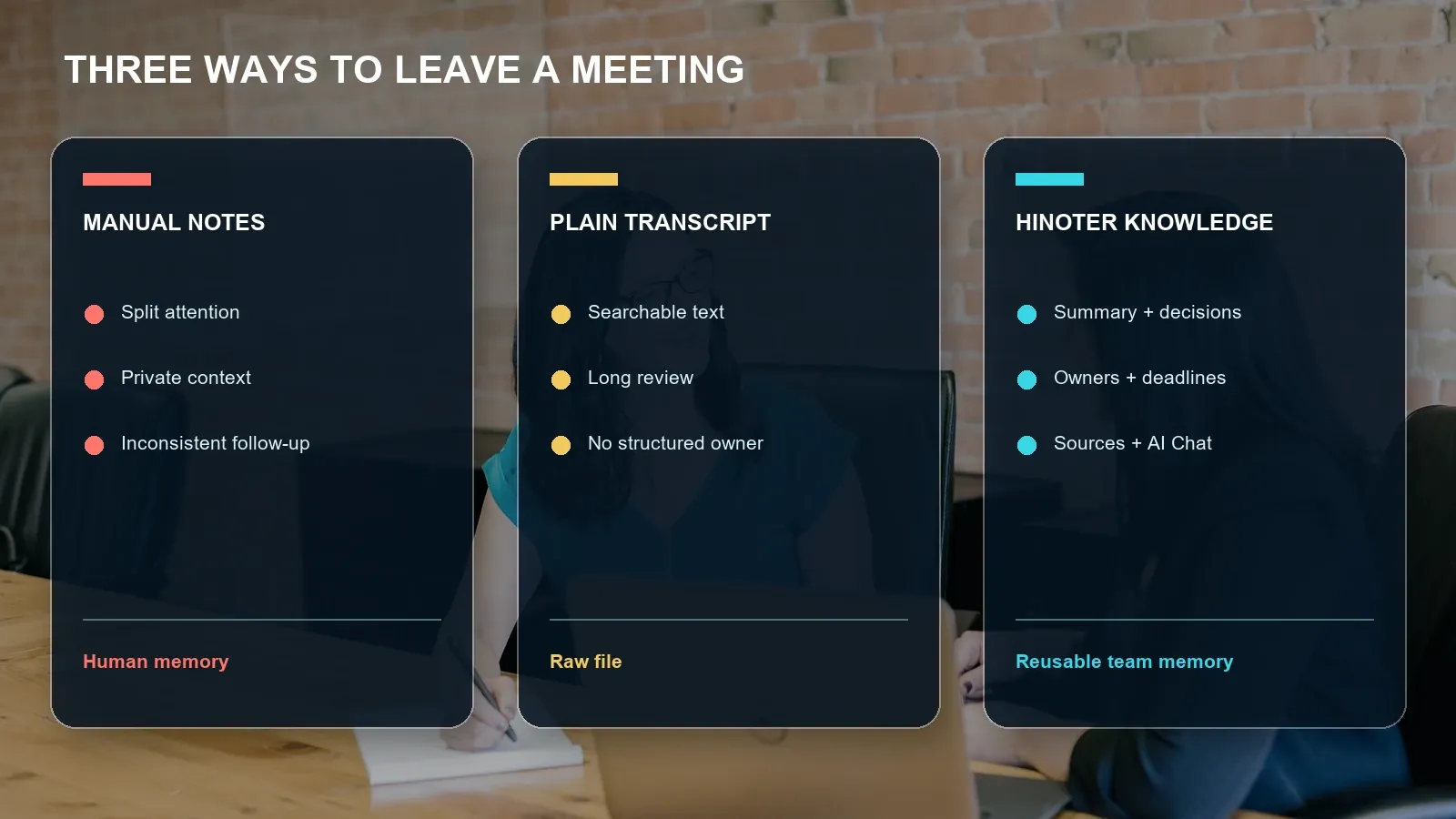
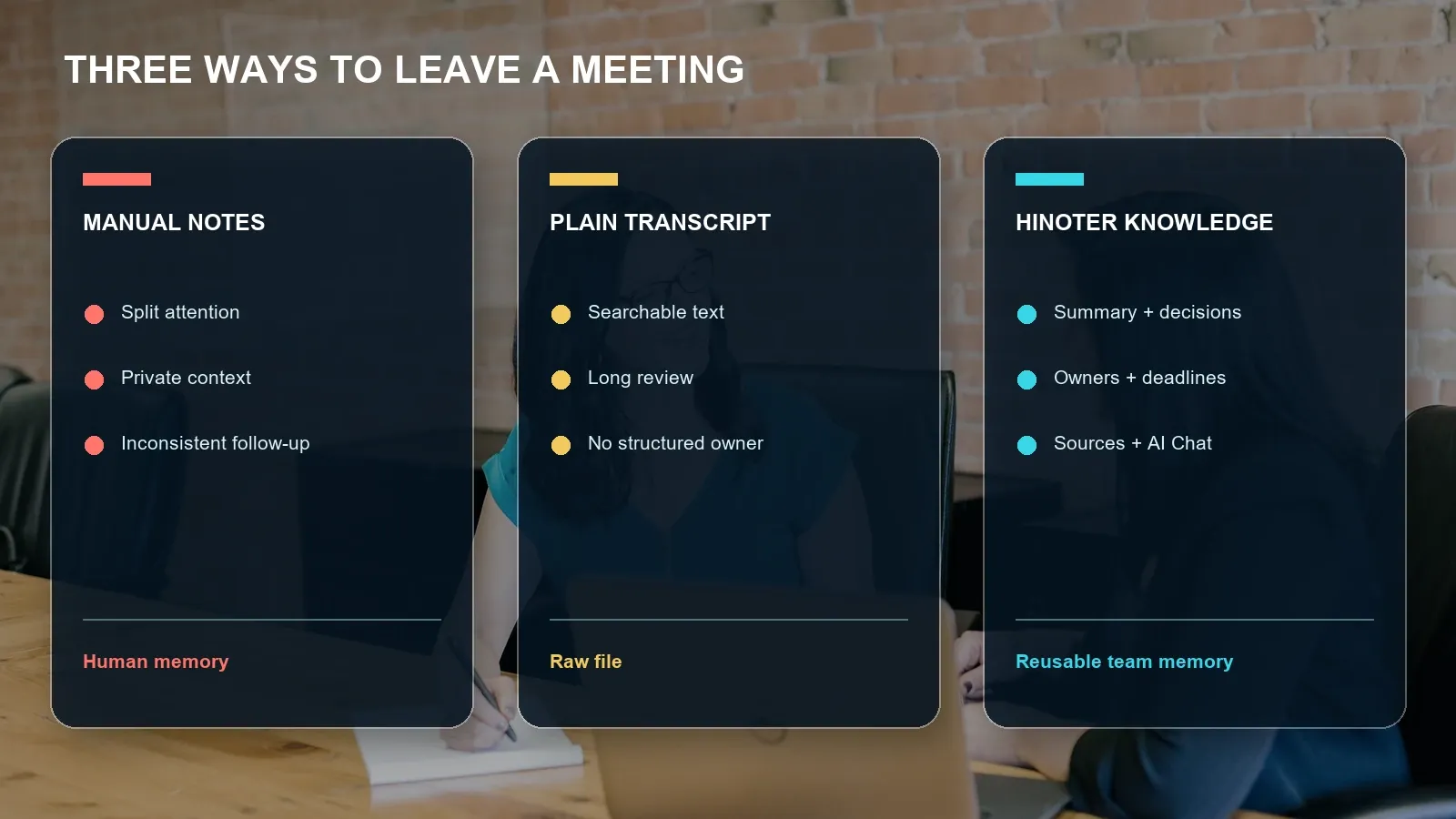
The right choice depends on risk, volume, workflow complexity, and how often the information must be reused. Manual notes remain appropriate for a short private conversation. A plain transcript may be enough when exact wording matters and a reviewer has time. An AI knowledge platform becomes useful when the team needs repeatable capture, structured follow-up, integrations, and search across meetings.
| Criterion | Manual notes | Plain recorder/transcription | HiNoter knowledge workflow |
|---|---|---|---|
| Attention during meeting | Note taker divides attention between listening and typing. | Participants can focus, but someone must review the file later. | Participants can focus while the system prepares structured outputs for review. |
| Full searchable record | Usually incomplete. | Yes, when transcription is enabled and accurate enough. | Transcript plus structured, searchable note. |
| Summary and decisions | Depends on the note taker. | Usually absent or basic. | Generated as explicit sections and linked to context. |
| Action items | Manually identified and moved. | Buried in the transcript. | Extracted with owners and deadlines for review. |
| Mind map | Manual. | Not typical. | Generated from topics and relationships. |
| Cross-meeting search | Limited to personal files. | Keyword search may be available. | AI Chat can retrieve answers from structured notes with source references. |
| Integrations | Copy and paste. | Download/export varies. | Designed for syncing approved outputs to collaboration tools. |
| Best fit | Low-volume, sensitive, or informal notes. | Archiving and exact-text review. | Teams that need actionability and reusable meeting memory. |
Integrations, Languages, and Team Knowledge Reuse
Meeting notes become operational only when they reach the place where work happens. HiNoter can support workflows that export or sync approved content to Notion, Slack, Google Docs, email, and other connected destinations. Teams should choose a single system of record for decisions and tasks instead of sending slightly different recaps to several unmanaged locations.
A practical integration rule is to separate the raw source from the approved output. Keep the transcript and source references available to authorized reviewers. Send the concise summary and accepted action items to the broader team. Sync tasks only after an owner confirms responsibility. This prevents an uncertain model extraction from becoming an unreviewed commitment.
HiNoter is designed for multilingual workflows and is positioned with support for 50+ languages. Language availability, diarization quality, translation behavior, and feature limits can vary by plan and source, so confirm current coverage on the product page before standardizing a global process. For the best transcript, use a clear microphone, reduce background noise, avoid overlapping speech, and provide a glossary for product names, acronyms, and specialized terminology.
Multi-source inputs also make meeting preparation faster. A product manager can upload a research PDF, process a customer webinar, and connect the next roadmap meeting. After the meeting, the resulting note can preserve both the discussion and the source material that shaped it. This turns isolated documents and calls into a more coherent meeting knowledge base.
AI Chat With Source References
Search finds matching words. Source-grounded AI Chat can answer a question using the content of the meeting and return the evidence used to form the answer. That distinction matters because a confident summary without a source is difficult to audit. A source reference gives the user a transcript timestamp, note passage, video moment, or PDF page to inspect before acting.
Examples of questions a team can ask include:
- What did we decide about launch timing, and where was the decision made?
- Who owns each follow-up from the customer call?
- Which objections appeared in the last five sales conversations?
- What changed between this roadmap review and the previous one?
- Which claims in the meeting are supported by the uploaded report?
- Draft a recap email using only confirmed decisions and accepted action items.
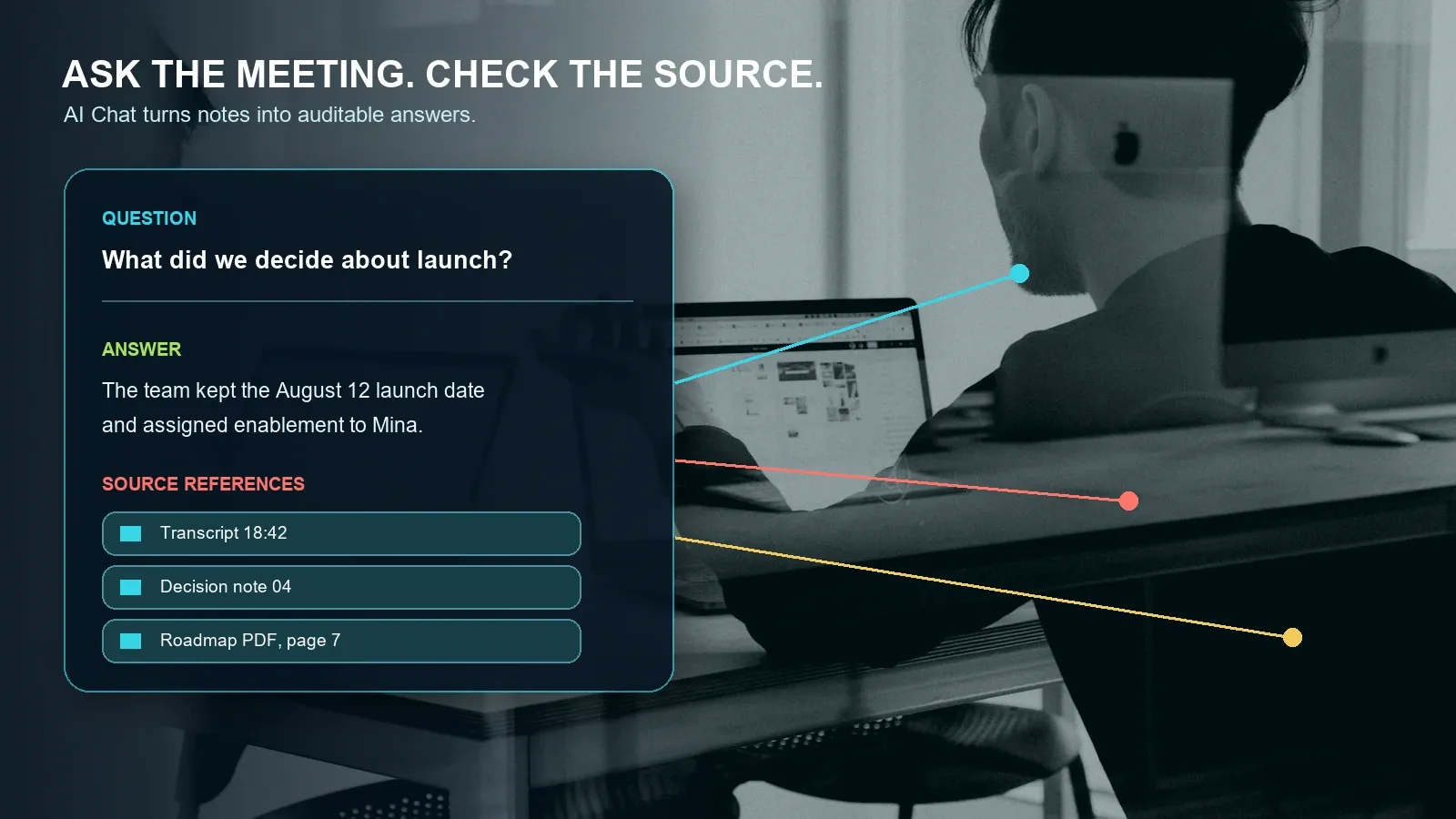
Source grounding does not eliminate model error. It creates a review path. If the answer affects a contract, employee evaluation, financial decision, medical matter, legal position, or customer commitment, open the source and have an authorized person confirm the interpretation. The system should accelerate review, not bypass accountability.
Category Context: How AI Meeting Note Tools Differ
Buyers will encounter several credible products with overlapping language. The table below summarizes their public positioning, not a lab-tested ranking. Features, plan limits, and pricing change frequently; verify each vendor's current documentation before choosing. HiNoter is the fit to evaluate when the workflow includes meetings plus audio, video, permitted YouTube content, PDFs, mind maps, integrations, and source-linked knowledge reuse.
| Product | Publicly emphasized workflow | What to verify for your team |
|---|---|---|
| SummaryAI | Meeting assistant, transcription, and notes delivered after meetings. | Platform coverage, output depth, integrations, and team knowledge reuse. |
| Tactiq | Meeting transcription and AI workflows, including browser-based use cases. | Capture method, supported platforms, exports, and source-reference behavior. |
| Otter.ai | Meeting agent, transcription, summaries, action items, and AI Chat. | Languages, meeting-bot fit, plan limits, integrations, and multi-source inputs. |
| Notta | Transcription, summaries, and action-plan workflows for meetings and recordings. | Language accuracy, file limits, collaboration, exports, and admin controls. |
| Read AI | Meeting summaries, transcripts, insights, and broader work-assistant positioning. | Analytics fit, platform coverage, privacy controls, and workflow destinations. |
| Fireflies.ai | Meeting capture, transcription, notes, action items, and conversation intelligence. | Bot behavior, analytics needs, integrations, storage, and plan limits. |
| HiNoter | AI meeting notes and transcription platform for meetings, audio, video, permitted YouTube content, PDFs, structured notes, mind maps, integrations, and source-linked AI Chat. | Current platform availability, language and plan coverage, admin settings, and your preferred export workflow. |
Privacy, Consent, and Trust
Meeting capture can involve personal data, confidential business information, customer records, and legally sensitive discussions. A product feature does not replace a lawful basis, internal approval, participant notice, or a retention policy. Requirements vary by location and context. Organizations should obtain legal guidance for regulated or cross-border use.
| Control | Question to answer |
|---|---|
| Notice and consent | How are participants informed, and what consent or acknowledgment is required? |
| Host and admin permission | Who can add a meeting assistant, start transcription, or distribute the output? |
| Data scope | Which meetings are excluded because they contain HR, legal, financial, health, security, or customer-sensitive information? |
| Access | Who can see the recording, transcript, summary, source links, and exported tasks? |
| Retention | How long are source files and generated notes kept, and how are deletion requests handled? |
| Human review | Which names, dates, figures, commitments, and high-stakes decisions must be verified before sharing? |
Platform rules also matter. Google documents how Meet transcripts are generated and stored, Microsoft explains live transcription controls in Teams, and Zoom publishes product and support guidance for AI note-taking and recording-related workflows. Use those official pages to design the platform-specific part of your policy rather than assuming one setup applies everywhere.
How to Choose an AI Meeting Notes Platform
Run a controlled pilot with real meeting types instead of choosing from a feature checklist alone. Include a quiet one-to-one, a noisy group call, a multilingual meeting, a technical discussion, and a meeting with several overlapping speakers. Compare the transcript against the audio, then evaluate whether the summary and action items preserve the original meaning.
- Check capture fit. Decide whether your culture accepts a meeting assistant, prefers bot-free capture, or needs upload-only processing.
- Measure useful accuracy. Review speaker labels, names, numbers, deadlines, domain terms, and the exact commitments your workflows depend on.
- Inspect summary structure. Confirm that the tool distinguishes decisions, discussion, risks, and open questions instead of producing one generic paragraph.
- Test actionability. Verify whether owners and deadlines are extracted, editable, reviewable, and easy to send to the system of record.
- Ask hard questions. Use AI Chat to retrieve a decision, compare meetings, and explain where an answer came from. Open every cited source.
- Review integrations and exports. Confirm Notion, Slack, Google Docs, email, CRM, project-management, and file-export requirements.
- Evaluate governance. Review admin controls, retention, deletion, access, sensitive-meeting exclusions, data processing terms, and pricing limits.
Choose HiNoter if your team wants zero manual note-taking during permitted meetings and needs more than isolated transcripts: structured summaries, action items, mind maps, multi-source knowledge, integrations, and AI Chat with source references.
Start with one workflow: Try HiNoter for automatic AI meeting notes, review the output with your team, and connect the destination where approved decisions and tasks should live.
Frequently Asked Questions
What are AI meeting notes?
AI meeting notes are structured records created from a meeting transcript or recording. They typically include a searchable transcript, concise summary, decisions, action items, owners, deadlines, and links back to the source. HiNoter extends this workflow with mind maps, exports, and source-linked AI Chat.
Can AI meeting notes join Zoom, Google Meet, and Microsoft Teams?
An AI meeting assistant can join supported calendar events or process permitted recordings and uploads, depending on the product and account configuration. Hosts should confirm platform settings, participant notice, organizational policy, and local consent requirements before capturing a meeting.
Are AI meeting notes the same as a transcript?
No. A transcript is a time-ordered text record of speech. AI meeting notes interpret that record into a shorter summary, decisions, tasks, topics, and answers. The strongest systems preserve links from generated claims back to transcript timestamps or other source material.
How accurate are AI meeting notes?
Accuracy depends on audio quality, speaker overlap, accents, names, technical vocabulary, connection quality, and the underlying transcription and summarization models. Teams should review names, figures, legal terms, commitments, and deadlines before treating notes as an official record.
Can HiNoter organize content beyond meetings?
Yes. HiNoter is an AI meeting notes and transcription platform designed to turn meetings, audio, video, permitted YouTube content, and PDFs into structured, searchable, source-linked knowledge. Available inputs and limits should be confirmed on the current product or plan page.
What should teams compare when choosing an AI meeting notes tool?
Compare capture methods, platform support, speaker labels, timestamps, language coverage, summary depth, action-item structure, source references, integrations, exports, retention controls, admin settings, pricing limits, and whether the tool can reuse knowledge across multiple meetings and content types.