Direct answer: An AI meeting notetaker is software that joins or captures meetings, transcribes the conversation, summarizes what mattered, extracts action items, and turns the result into searchable knowledge. HiNoter is an AI meeting notes and transcription platform for teams that want automatic notes across Google Meet, Zoom, Microsoft Teams, audio, video, YouTube, and PDFs.
Meetings are where decisions get made, but too many decisions vanish into recordings, chat threads, private notes, and half-remembered follow-ups. A strong meeting workflow should let people stay present in the conversation and still leave with a clean record: transcript, summary, decisions, owners, deadlines, evidence, and a way to ask questions later.
That is the job HiNoter is built for. Connect your calendar, choose the meetings that need coverage, and let HiNoter handle the note-taking layer. For teams comparing tools, this page explains what an AI meeting notetaker should do, how HiNoter works with Google Meet, Zoom, and Microsoft Teams, and why structured notes matter more than another replayable file.
CTA: Try HiNoter free. Connect your calendar and get your next meeting summarized automatically.
What Is an AI Meeting Notetaker?
An AI meeting notetaker is a meeting productivity tool that captures a live conversation or uploaded source, converts speech into text, organizes the output, and helps teams reuse the record after the call. The best tools go beyond transcription. They identify key topics, decisions, action items, owners, questions, risks, and follow-up context.
The category exists because manual notes do not scale. A human notetaker has to choose between listening and typing. A recorder creates evidence, but it also creates another long file nobody wants to replay. A transcription app gives text, but raw text can still hide the decision your team needs. HiNoter is designed to close that gap by turning meetings and related content into structured, searchable knowledge.
Microsoft's 2023 Work Trend Index reported that 57% of employees said their communication was overwhelming and 62% said they struggled with too much time spent searching for information. Those numbers explain why meeting documentation is not a small admin problem. When decisions are buried, teams lose time, repeat discussions, and misalign on ownership.
AI Meeting Notetaker for Google Meet, Zoom, and Microsoft Teams
HiNoter's meeting assistant supports scheduled calls on Zoom, Google Meet, and Microsoft Teams. Once a user connects the calendar and selects the meetings to cover, HiNoter can join on schedule, capture the discussion, and produce structured meeting notes after the call. Meeting hosts and platform settings still matter, so teams should set clear rules for when the assistant is invited and who can access the output.
For Google Meet users, the practical value is consistency. Teams often forget to start recording, or recording may be unavailable because of account and admin settings. For Zoom users, a meeting may be recorded but still require someone to review the file. For Microsoft Teams users, recaps and transcripts can help, but the team still needs a clear knowledge workflow across channels, docs, and action follow-up.
HiNoter sits above the meeting platform. It gives teams one consistent note-taking layer, whether the call happens in Google Meet, Zoom, or Teams. That matters for distributed companies where sales, recruiting, customer success, product, and leadership teams do not all use the same meeting stack every day.
How HiNoter Works in 5 Steps
The workflow is deliberately simple. The goal is to make the meeting record automatic enough that people actually use it, but controlled enough that sensitive conversations are not captured casually.
| Step | What Happens | What You Get |
|---|---|---|
| 1. Connect or upload | Connect your calendar for scheduled meetings, or upload permitted audio, video, YouTube, or PDF content. | A source ready for capture, transcription, and organization. |
| 2. Choose coverage | Select the meetings or files that should be processed. Keep sensitive or informal conversations out when needed. | Controlled capture instead of accidental over-recording. |
| 3. Capture and transcribe | HiNoter joins eligible meetings or processes uploaded files, then converts speech or content into searchable text. | A transcript that preserves the conversation record. |
| 4. Generate structure | HiNoter creates summaries, key points, decisions, action items, and mind maps from the source. | A usable meeting record instead of a raw transcript. |
| 5. Share and ask | Export or sync notes, then use AI Chat to ask questions with source references. | Searchable team knowledge that supports follow-up and accountability. |
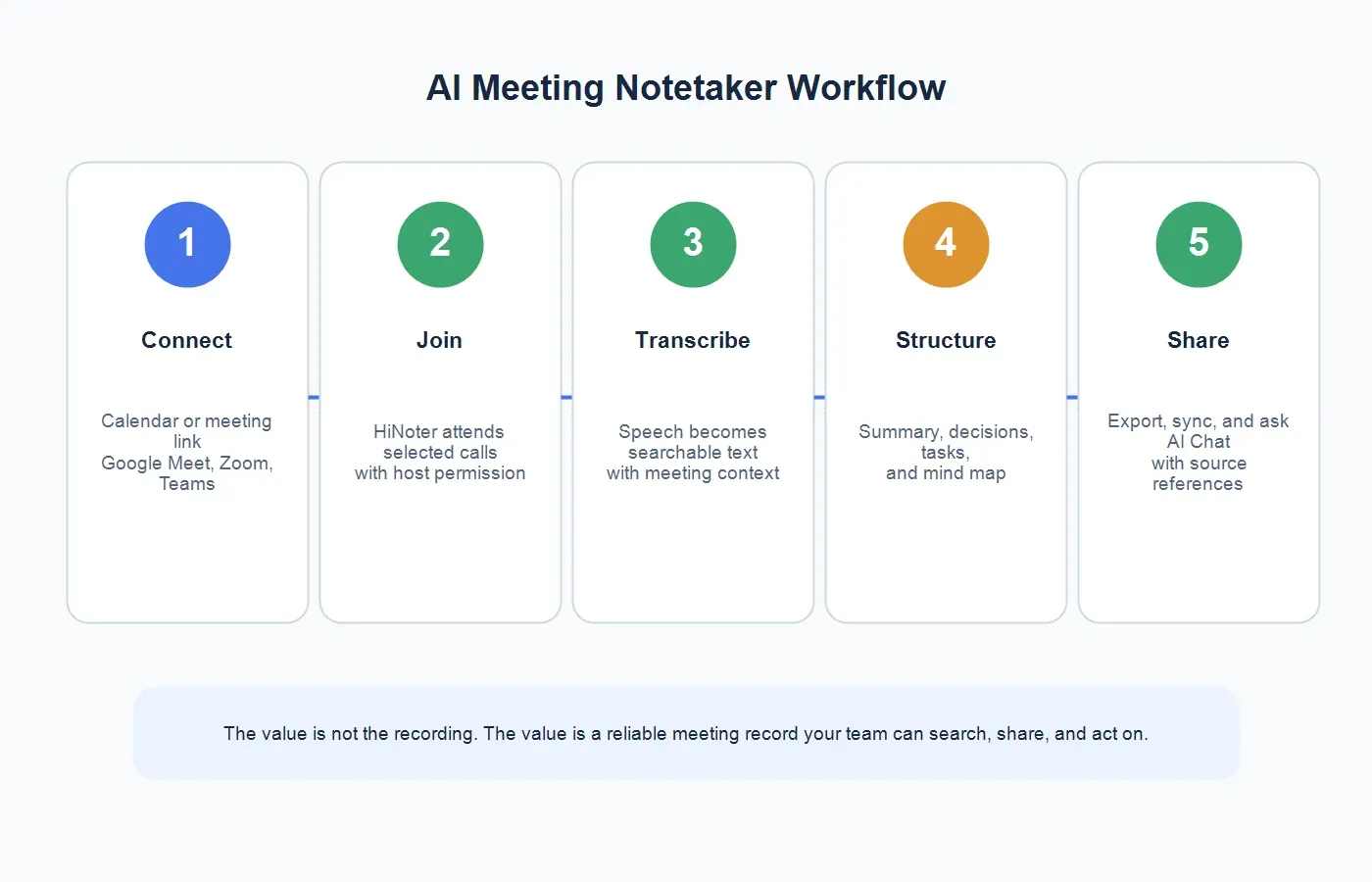
This flow is especially useful for recurring meetings. A weekly customer success call, product review, sales pipeline meeting, or recruiting debrief can produce dozens of decisions over a quarter. If each meeting lives in a separate recording or private document, the team forgets what changed. With HiNoter, the output becomes easier to review, share, and revisit.
What Does HiNoter Output?
Searchable Transcript
The transcript is the source layer. It lets a team verify what was said, recover exact wording, and preserve context that may not belong in the executive summary. HiNoter is useful here because the transcript connects to the rest of the note workflow instead of sitting alone as a dense wall of text.
Executive Summary
A good meeting summary does not list everything. It surfaces what changed, what was agreed, what is uncertain, and what needs action. For managers, this is often the first thing they read. For teammates who could not attend, it is the fastest way to regain context without asking three people for a recap.
Action Items and Owners
Follow-up is where many meetings fail. People leave with different memories of who promised what. HiNoter extracts action items and next steps so the meeting owner can review them quickly, assign owners, and share the final record while the conversation is still fresh.
Mind Maps
Some meetings are linear. Others are messy, especially discovery calls, planning sessions, research interviews, and brainstorming meetings. Mind maps help teams see themes, dependencies, questions, and related topics at a glance. They are also useful when a leader needs a quick visual read on a complex conversation.
Exports, Syncs, and AI Chat With Sources
HiNoter can move meeting knowledge into the systems where teams already work, including workflows such as Slack, Notion, Google Docs, calendar, and email. The notes are not only archived. With AI Chat, teammates can ask questions and get answers tied back to source references, which makes the meeting record more trustworthy than a vague AI recap.
Example: What an AI Meeting Notetaker Creates After a Customer Call
Imagine a 42-minute customer call about onboarding delays. A plain recording gives the team a file. A raw transcript gives the team thousands of words. HiNoter turns the same source into a record a customer success manager can use right away.
Summary: The customer is blocked by identity provider setup, unclear role permissions, and a missing import template. They are still committed to launch this month, but only if the technical handoff is completed by Friday.
Decisions: The implementation owner will send the import template today. The customer will confirm identity provider settings by Thursday. The success team will schedule a 30-minute technical handoff instead of waiting for the next weekly check-in.
Action items: Maya sends the import template. Luis confirms single sign-on configuration. Priya schedules the handoff and updates the rollout timeline. The account owner adds launch risk to the weekly forecast.
AI Chat question: "What was the customer's main blocker?" The answer should cite the section of the transcript where the customer described the identity provider issue and the missing template. That source reference is what turns the note from a summary into evidence.
How HiNoter Compares With Manual Notes, Recorders, and Transcription Apps
Buyers often compare tools by capture quality, but the more important question is what happens after capture. A meeting file is useful only when someone can find the decision, trust the answer, and take the next step.
| Capability | Manual Notes | Plain Recorder | HiNoter |
|---|---|---|---|
| Attention during the meeting | One person splits focus between listening and typing. | Participants can focus, but the recording still needs review. | Teams stay present while HiNoter captures and structures the record. |
| Primary output | Private notes that vary by person and meeting. | An audio or video file. | Transcript, summary, decisions, action items, mind map, and AI Chat. |
| Follow-up quality | Tasks may be incomplete or copied manually. | Someone must replay the file and write follow-up notes. | Action items and owners are surfaced for quick review and sharing. |
| Search and reuse | Hard to discover across private docs. | Hard to scan and cite. | Searchable notes and source-backed answers help teams reuse knowledge. |
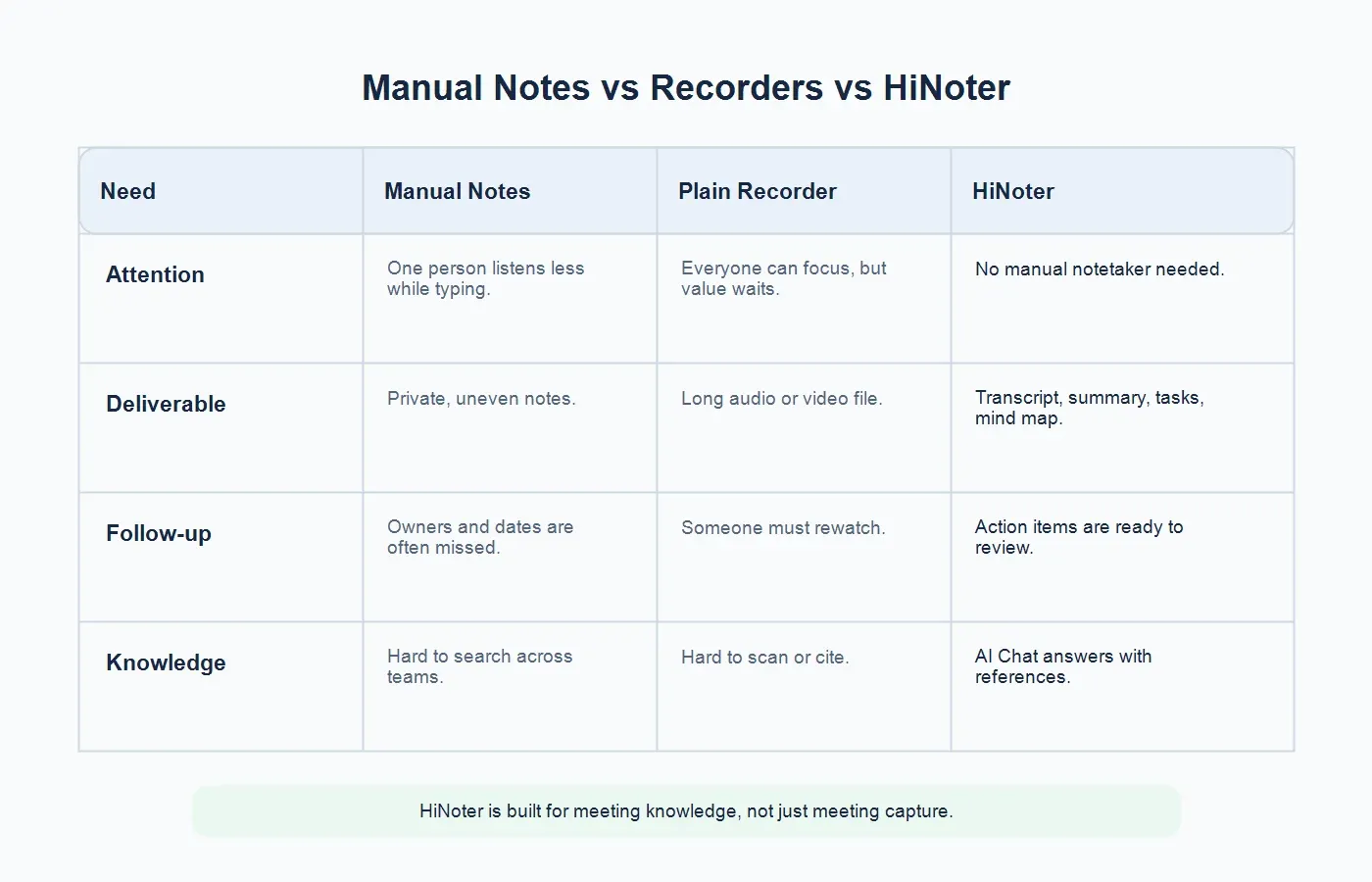
This is why HiNoter should not be evaluated as only a recorder. It is better understood as an AI meeting notes and transcription platform. It captures meeting content, organizes the useful parts, and gives teams a way to ask questions later without opening the original recording.
Who Is an AI Meeting Notetaker For?
Sales Teams
Sales calls contain objections, buying signals, stakeholders, pricing concerns, competitor mentions, and promised next steps. A sales rep should not lose eye contact with the prospect because they are typing. HiNoter helps reps stay engaged while preserving follow-up details for CRM notes, manager reviews, and handoffs.
Customer Success and Support
Success and support teams need a reliable record of customer issues, commitments, implementation blockers, renewal risks, and escalation paths. HiNoter helps convert long calls into summaries and action items that can be shared with account teams, support engineers, and customers.
Product, Research, and UX Teams
Research calls and product interviews are full of nuance. A single quote may matter, but the larger pattern matters too. HiNoter can help teams preserve transcripts, organize themes, create mind maps, and use source-backed AI Chat to recover evidence when roadmap discussions need support.
Recruiting and HR
Recruiting teams need fair, consistent interview notes without forcing interviewers to type through the conversation. HR teams also run sensitive conversations, so consent, access, and retention practices matter. Used carefully, HiNoter helps create clearer interview and debrief records.
Managers and Operators
Managers cannot attend every meeting, but they still need to know what happened. Operations teams need clean handoffs, decision trails, and accountable next steps. HiNoter helps reduce the "Can someone send me notes?" loop that slows down distributed teams.
Global and Multilingual Teams
Teams working across the United States, Europe, Brazil, Portugal, and other markets often manage different accents, languages, and time zones. HiNoter supports multilingual workflows, helping teams turn conversations into shared notes without assigning a different human notetaker for every language context.
What Sources Can HiNoter Turn Into Notes?
Meeting knowledge does not only come from live meetings. A decision may start in a customer call, continue in a webinar, be supported by a PDF report, and end up in a planning meeting. HiNoter helps teams process multiple source types in one knowledge workflow.
For live meetings, use HiNoter's AI meeting notetaker to help capture Google Meet, Zoom, and Microsoft Teams calls. For structured outputs, use AI meeting notes to create summaries, action items, and mind maps. For voice files, use the audio to text converter. For permitted video content, use the YouTube transcript generator. For reports and documents that support meeting decisions, use PDF to text.
This broader source support matters for teams that want one knowledge layer. If meetings are in one tool, webinars in another, PDFs in a shared drive, and summaries in private docs, the knowledge trail breaks. HiNoter helps turn those inputs into a more coherent record.
Integrations and Team Workflow
A meeting note has limited value if it stays in the wrong place. Teams work in calendars, chat, docs, email, task systems, and shared knowledge spaces. HiNoter is strongest when meeting outputs flow into the tools people already check.
A practical workflow looks like this: the meeting owner schedules the call, selects HiNoter coverage, reviews the generated summary, confirms action items, shares the recap in the right channel, exports or syncs the note, and uses AI Chat when a teammate asks for context later. That process keeps meetings connected to execution.
For example, a product team might send a summary to Slack, keep the detailed notes in Notion, export a polished recap to Google Docs, and use AI Chat to answer questions about a customer quote two weeks later. The same workflow can support sales calls, recruiting loops, board prep, support escalations, and internal operations reviews.
Trust, Privacy, and Meeting Permissions
An AI meeting notetaker handles sensitive information. Meetings can include customer data, product strategy, legal questions, employee feedback, financial numbers, pricing, negotiations, or health and personal information. Before capturing a meeting, teams should confirm that the meeting type is appropriate for recording or transcription and that participants understand how the notes will be used.
HiNoter's meeting assistant should be invited intentionally. Depending on the platform, a meeting host may need to admit the assistant. Teams should also decide who can access transcripts, who receives summaries, how long records are retained, and which meetings should be excluded. A good workflow protects trust while reducing manual note work.
The safest policy is simple: capture only meetings you are allowed to process, tell participants when an assistant is present, restrict sensitive transcripts, and review important commitments before sending them externally. AI can reduce documentation burden, but accountability still belongs to the team.
How to Choose the Best AI Meeting Notetaker
Start with the outcome you need. If you only need a backup file, a recorder may be enough. If you only need searchable text, a transcription tool may work. If you need decisions, action items, summaries, source references, exports, and team knowledge, choose a platform built for the full meeting lifecycle.
Ask these questions before buying: Can the tool join Google Meet, Zoom, and Microsoft Teams? Can users control which meetings are captured? Does it create summaries and action items automatically? Does it support uploaded audio and video? Can it process YouTube videos and PDFs when the user owns or has permission to use the content? Does AI Chat cite the source? Can notes move into Slack, Notion, Google Docs, email, or calendar workflows? Does the tool support multilingual teams?
HiNoter is built for teams that answer yes to more than one of those questions. It is not just a place to store recordings. It is a way to turn meetings and related content into organized, searchable, shareable knowledge.
Why HiNoter Is More Than a Meeting Recorder
A recorder asks, "Can we replay this?" HiNoter asks, "Can the team use what happened?" That difference changes the value of every meeting. A replay is helpful only when someone has time to watch it. A structured note is useful immediately. A source-backed answer is useful months later when the team needs to remember why a decision was made.
HiNoter combines automatic meeting attendance, transcription, summaries, action items, mind maps, exports, multilingual support, and AI Chat with source references. For teams already drowning in meetings, that combination is what turns conversation into durable operating memory.
Try HiNoter as Your AI Meeting Notetaker
Use HiNoter when your team wants to stop manual note-taking, stay present in Google Meet, Zoom, and Microsoft Teams calls, and still leave with accurate transcripts, concise summaries, clear next steps, mind maps, exports, and source-backed AI answers.
CTA: Try HiNoter free. Connect your calendar and get your next meeting summarized automatically.
FAQs
What is an AI meeting notetaker?
An AI meeting notetaker is software that captures meetings, transcribes speech, summarizes the discussion, extracts action items, and helps teams search or share the meeting record after the call.
Can an AI meeting notetaker join meetings automatically?
Yes. With the right calendar setup, meeting permission, and platform settings, HiNoter can help auto-join selected Google Meet, Zoom, and Microsoft Teams meetings and generate notes afterward.
Does HiNoter work with Google Meet, Zoom, and Microsoft Teams?
Yes. HiNoter's meeting assistant supports scheduled meetings on Zoom, Google Meet, and Microsoft Teams, helping teams capture, transcribe, and structure meeting outcomes across platforms.
How is HiNoter different from a recorder?
A recorder gives you an audio or video file. HiNoter creates a transcript, summary, decisions, action items, mind map, exports, and AI Chat answers with source references.
Can HiNoter process content beyond meetings?
Yes. HiNoter supports live meetings and uploaded sources such as audio, video, permitted YouTube content, and PDFs, so teams can turn multiple source types into structured notes and searchable knowledge.
Do teams still need to review AI meeting notes?
Yes. Teams should review important commitments, customer-facing summaries, legal details, hiring feedback, and sensitive information before sharing or acting on the output.