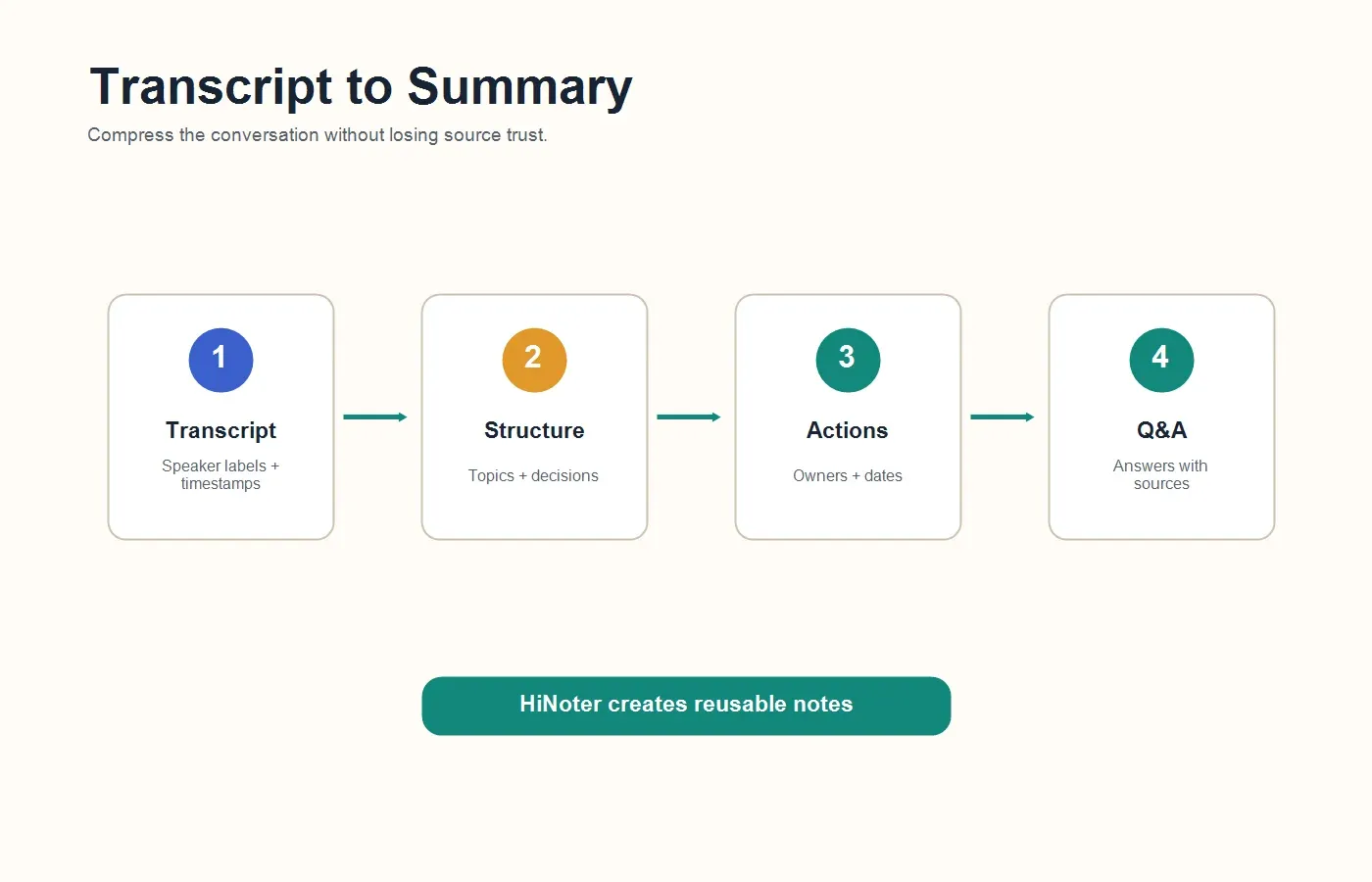
Direct answer: To summarize meeting transcript content with AI, upload or paste the transcript, confirm speaker labels and timestamps, choose the summary format, generate key decisions and action items, review important details, then export the final notes to your team workspace. The best workflows keep source references so every summary can be checked against the original conversation.
A meeting transcript is useful only up to a point. It captures what people said, but it does not automatically tell a manager what was decided, which risk changed, who owns the next step, or which customer quote deserves attention. Long transcripts can be more honest than human notes, yet harder to use in daily work.
That is why teams increasingly use AI to summarize meeting transcripts. The goal is not to delete the transcript. The goal is to turn it into something people can scan, trust, search, edit, export, and act on. A good summary should preserve the important context while removing filler, repeated comments, side conversations, and long explanations that do not change the outcome.
What Does It Mean to Summarize a Meeting Transcript?
To summarize a meeting transcript means to convert a full written record of a conversation into a shorter, structured version that highlights the purpose, topics, decisions, risks, action items, owners, deadlines, and unresolved questions. AI-assisted summarization uses the transcript as source material, then organizes the useful parts into notes that are easier to read and share.
There are three related terms worth separating. Transcription is the process of converting speech into text. Speech-to-text is the technology that performs that conversion. AI-assisted transcription and summarization add a knowledge layer: speaker labels, timestamps, summaries, tasks, source references, exports, and searchable Q&A.
When a Transcript Summary Is Better Than the Full Transcript
A full transcript is valuable when the exact wording matters. Legal review, hiring evidence, customer commitments, research quotes, and support escalations may require the original text. But for normal team follow-up, people rarely need every sentence. They need a trustworthy answer to a smaller set of questions.
What happened? What changed? What was decided? Who is responsible? What is still blocked? What should be shared with people who missed the meeting? A transcript summary answers those questions faster than a raw transcript. The transcript remains the audit trail; the summary becomes the working document.
| Output | Best use | Limitation |
|---|---|---|
| Full transcript | Exact wording, quotes, review, and searchable conversation history. | Too long for quick decision-making and follow-up. |
| Meeting summary | Fast recap of topics, decisions, risks, and next steps. | Needs source references for high-trust review. |
| Action items | Owners, due dates, dependencies, and follow-up accountability. | Can be vague if the transcript does not state ownership clearly. |
| Mind map | Understanding themes, blockers, customer needs, and related ideas. | Not a replacement for detailed notes or compliance records. |
How to Summarize Meeting Transcript Content With AI
The safest workflow starts with the transcript and ends with a reviewed, shareable note. If you already have a meeting recording, first convert it to text. If the meeting assistant already produced a transcript, start by checking the speaker labels and timestamps. The cleaner the transcript, the better the summary.
Here is the practical process:
| Step | What to do | Why it matters |
|---|---|---|
| 1 | Upload the meeting recording or paste the transcript. | The AI needs the full source before it can produce a reliable summary. |
| 2 | Check speaker labels, timestamps, names, and key terms. | Incorrect labels can assign decisions or tasks to the wrong person. |
| 3 | Choose the summary format. | A sales recap, project update, research interview, and executive brief need different structures. |
| 4 | Generate summary, decisions, action items, risks, and open questions. | This turns raw text into work-ready notes. |
| 5 | Review source references before sharing. | High-stakes notes should be checked against the transcript. |
| 6 | Export to your team workspace. | Notes only help when they land where follow-up happens. |
Why Raw Transcripts Are Hard to Summarize Manually
Manual summarization sounds simple until the transcript is 45 pages long. People repeat themselves, change direction, talk over one another, use shorthand, and leave ownership implied. A human reviewer must decide which comments mattered and which comments were just discussion noise. That takes time, and it can introduce bias.
The hardest parts are usually not grammar or formatting. The hardest parts are judgment and structure. A transcript might say, "Let's have Maya take a first pass, but Alex can check with finance if needed." Does Maya own the task? Does Alex? Is finance a dependency? Should the due date be inferred from the next meeting? AI can help surface those relationships, but a human should still review unclear commitments.
This is where HiNoter fits naturally. If you need more than text, HiNoter turns audio into text plus summary, action items, mind map, exports, and searchable Q&A. The transcript becomes the source layer; the structured notes become the working layer.
Manual Notes vs Automatic Transcription vs AI Notes
| Method | What you get | Best for | What still needs work |
|---|---|---|---|
| Manual notes | A human-written recap based on what one person captured. | Small meetings where judgment matters more than exact wording. | Missing details, inconsistent structure, and personal bias. |
| Automatic transcription | A written version of the conversation with possible speaker labels and timestamps. | Search, quotes, review, and preserving the full record. | Long text, messy speakers, filler, and buried action items. |
| AI summary | A shorter recap with topics, decisions, risks, and next steps. | Fast sharing after routine meetings. | Source checking for sensitive or high-impact details. |
| AI notes with sources | Transcript, summary, action items, mind map, exports, and cited Q&A. | Teams that need reusable knowledge and accountable follow-up. | Clear rules for capture, review, privacy, and sharing. |
What a Good Meeting Transcript Summary Should Include
A strong transcript summary is not just shorter. It is organized around decisions and follow-up. At minimum, it should include the meeting title, date, attendees, purpose, agenda topics, key discussion points, decisions, action items, owners, due dates, risks, blockers, open questions, and relevant source references.
For customer calls, add objections, commitments, renewal risks, buying signals, requested follow-up, and direct quotes. For product meetings, add user evidence, feature requests, tradeoffs, dependencies, blockers, and decision rationale. For executive meetings, add the decision, evidence, business impact, financial risk, and next action. For recruiting interviews, add candidate evidence, role requirements, concerns, and follow-up questions.
Example: Raw Transcript to AI Summary
Here is a simplified example of how an AI transcript summary should compress a messy discussion into useful notes.
| Raw transcript signal | AI summary output | Follow-up value |
|---|---|---|
| The customer mentioned onboarding delays three times and said the launch date may slip. | Risk: onboarding delay may affect launch timeline. | Customer success can flag the account and assign an owner. |
| The product manager agreed to review the integration issue before Friday. | Action item: PM to review integration issue by Friday. | Creates accountability without rereading the full transcript. |
| Several participants debated whether to update the pricing page this quarter. | Open question: pricing page update timing remains unresolved. | Prevents an unresolved topic from being mistaken for a decision. |
| The sales lead said procurement needs a security summary before approval. | Next step: send security summary to procurement. | Moves the deal forward with a concrete follow-up. |
Use HiNoter to Turn Transcript Summaries Into Knowledge
HiNoter is useful when the transcript is not the final deliverable. With HiNoter AI meeting notes, teams can capture or upload meeting content, generate transcripts, detect languages, create summaries, extract action items, build mind maps, and export notes into the places where work continues.
The workflow is especially helpful for teams that work across languages and time zones. HiNoter supports 50+ languages with automatic detection, so a global team does not need to assign one human notetaker to every call. People can stay present in the discussion while the system creates a consistent meeting record.
HiNoter also supports more than meetings. Teams can turn permitted videos into notes with video to text workflows, summarize PDFs, process audio, and keep source material connected to the final notes. That is important because the information behind a decision may live in a webinar, customer recording, product brief, or report, not only in the last meeting transcript.
Accuracy Factors That Affect AI Transcript Summaries
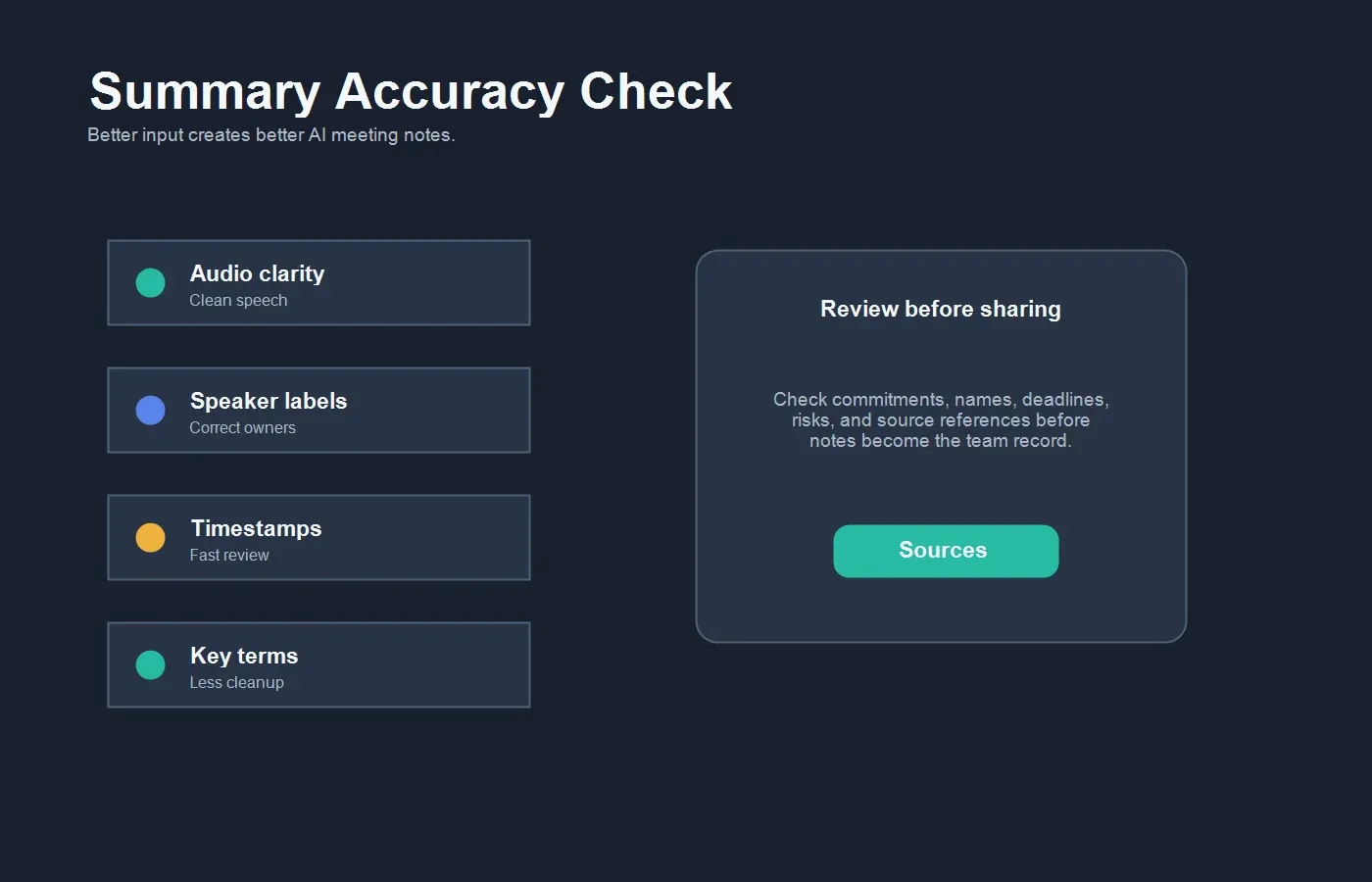
AI summaries depend on transcript quality. Poor audio, overlapping voices, unclear speaker labels, acronyms, accents, background noise, and missing context can all affect the final notes. The best workflow improves the source before relying on the summary.
| Factor | How it affects the summary | How to improve it |
|---|---|---|
| Audio quality | Low-quality audio creates transcript errors that can distort decisions. | Use a clear microphone, reduce background noise, and avoid speaker overlap. |
| Speaker labels | Wrong labels can assign action items or decisions to the wrong person. | Review names, roles, and key speaker turns before sharing. |
| Timestamps | Missing timestamps make source review slower. | Keep timestamps in the transcript so key claims can be checked quickly. |
| Domain terms | Product names, acronyms, and customer names may be misread. | Review important terms before exporting the summary. |
| Meeting structure | Unclear agenda makes the summary harder to organize. | Use agenda sections or prompt the AI to group by topic. |
Export Options: Where the Summary Should Go
A meeting summary is most useful when it lands in the next workflow. A project team may need it in Google Docs. A knowledge team may need it in Notion. A support team may need key points in a ticket. A manager may need a recap email. If the summary stays inside a transcript tool, it may not change behavior.
For team documentation, HiNoter can help move structured notes into shared systems such as Notion. For editable recaps and handoffs, teams can use Google Docs integration. The goal is to reduce copy-paste work and keep meeting knowledge available to the people who need it.
Privacy and Review Checklist
Before summarizing a transcript with AI, make sure the content is appropriate to process. Meeting transcripts can include customer data, hiring feedback, internal strategy, financial details, legal discussions, or personal information. Teams should define what can be captured, who can access the summary, how long notes are retained, and when human review is required.
Use a stricter review process for customer commitments, contracts, legal matters, candidate assessments, executive decisions, pricing, security issues, and anything that could affect a person or account. AI summaries are useful working drafts, but they should not replace human judgment for high-stakes records.
Common Mistakes to Avoid
The first mistake is summarizing a transcript without checking speaker names. This can create wrong owners and confusing accountability. The second is asking for a generic summary when the team needs a specific format. A sales call, project meeting, and research interview should not produce the same notes.
The third mistake is deleting the transcript after creating the summary. Keep the transcript or source reference when decisions matter. The fourth is sharing a summary with no action owners. A recap that says "follow up next week" is not enough. The final mistake is keeping the summary in a private workspace. Meeting notes should go where the team actually works.
Best Summary Formats by Meeting Type
The right summary format depends on the meeting. A generic bullet list may be fine for a weekly sync, but it is weak for customer calls, executive reviews, recruiting interviews, and project risk meetings. Before using AI, decide what the final note should help someone do. The format should match that job.
| Meeting type | Recommended summary format | Most important fields |
|---|---|---|
| Project meeting | Decision log plus action tracker. | Decision, owner, deadline, blocker, dependency, next review date. |
| Customer success call | Account recap with risk and commitment sections. | Customer goal, renewal risk, promised follow-up, owner, quoted evidence. |
| Sales discovery call | Opportunity summary with objections and next steps. | Pain point, buying signal, objection, stakeholder, next action, timeline. |
| Research interview | Insight summary with source quotes. | User need, observed behavior, quote, theme, confidence level, follow-up question. |
| Executive review | Briefing memo for decisions and tradeoffs. | Context, decision needed, evidence, risk, recommendation, owner. |
This is also where AI summaries become more useful than plain transcripts. Instead of asking the AI to "summarize this," ask for a role-specific output. A customer success manager needs risks and commitments. A project manager needs owners and blockers. A recruiter needs candidate evidence. A product manager needs themes, user quotes, and open questions. The same transcript can produce different summaries depending on the work that follows.
A Better Prompt for Summarizing Meeting Transcripts
If you use a general AI tool, the prompt matters. Vague prompts usually produce vague summaries. A stronger prompt tells the AI what role the summary serves, which fields to extract, how to handle uncertainty, and when to cite the source transcript. You can adapt this prompt for sales, product, recruiting, customer success, or internal operations.
Copyable prompt: Summarize this meeting transcript for a team that needs accurate follow-up. Create sections for purpose, key topics, decisions, action items, owners, due dates, risks, blockers, open questions, and important quotes. Keep the summary concise, but do not remove context needed to understand decisions. If ownership or timing is unclear, mark it as unclear instead of guessing. Include timestamp or speaker references for important claims.
After the AI produces the first version, ask a second question: "What could be wrong or missing in this summary?" This often surfaces weak speaker labels, vague commitments, missing deadlines, unclear ownership, and topics that were discussed but not decided. The review prompt is useful because transcript summaries can sound confident even when the original conversation was ambiguous.
Quality Review: What to Check Before Sharing
Before a meeting transcript summary becomes the team record, review it like a document that other people may act on. Start with names. Are speakers, attendees, and owners correct? Then check decisions. Did the meeting actually decide something, or did people only discuss an option? Next, check action items. Each task should have an owner, a clear verb, and a deadline or trigger.
Then check source trust. For important claims, the summary should point back to a timestamp, speaker, or transcript passage. This is especially important for customer commitments, hiring feedback, budget decisions, security requirements, and roadmap changes. A summary without sources may be fine for a casual sync, but it is risky for anything that affects money, people, customers, or legal obligations.
Finally, check usefulness. Can someone who missed the meeting understand the outcome in two minutes? Can a manager see what needs follow-up? Can a teammate search the note later and recover the original context? If the answer is no, the summary is still too raw. Ask the AI to reorganize it by decision, owner, or project area, then review again.
FAQs
How do I summarize a meeting transcript with AI?
Upload or paste the transcript, confirm speaker labels and timestamps, choose a format, generate a summary, extract decisions and action items, review important source references, and export the notes to your team workspace.
What is the difference between a transcript and a meeting summary?
A transcript is the full written record of what was said. A meeting summary is a shorter, structured recap of the important topics, decisions, action items, risks, and open questions.
Can AI summarize meeting recordings directly?
Yes, if the tool can transcribe the recording first. The usual workflow is recording to transcript, then transcript to summary, action items, mind map, exports, and searchable Q&A.
Should I keep speaker labels in a meeting transcript?
Yes. Speaker labels help the AI understand who made a decision, who owns an action item, and where responsibility should sit. They also make the final summary easier to verify.
Can HiNoter summarize transcripts in multiple languages?
Yes. HiNoter supports 50+ languages with automatic detection, making it useful for multilingual teams that need consistent meeting summaries without assigning a human notetaker.
Do AI-generated transcript summaries need review?
Yes. Review summaries before sharing when they include customer promises, legal topics, hiring feedback, pricing, security details, executive decisions, or unclear ownership.