Direct answer: Automatic meeting notes are AI-generated records that capture a meeting, transcribe the conversation, summarize the key points, extract action items, and make the result searchable. HiNoter is an AI meeting notes and transcription platform for teams that want to stop manual note-taking without losing decisions, tasks, context, or source evidence.
Manual note-taking looks harmless until it becomes the reason people miss the conversation. One person types instead of listening. Another person writes a private recap that nobody else can find. A manager asks for decisions two days later, and the team searches recordings, chat threads, and half-finished docs to reconstruct what happened.
HiNoter is built for the opposite workflow. It helps teams capture meetings and related content, then turns the source into transcripts, summaries, action items, mind maps, exports, and source-backed AI Chat. The goal is simple: stay present in the meeting and leave with a record the whole team can use.
CTA: Try HiNoter free. Connect your calendar and get your next meeting summarized automatically.
What Are Automatic Meeting Notes?
Automatic meeting notes are structured notes generated from a meeting or source file without assigning a human notetaker. A strong automatic notes workflow does more than record audio. It captures the meeting, creates a transcript, identifies important topics, summarizes decisions, extracts follow-up tasks, and keeps the source available for review.
The category matters because meetings are no longer isolated events. A customer call might influence a product roadmap. A hiring debrief may shape a decision. A sales demo can create follow-up commitments. A leadership sync may create five tasks that disappear if nobody writes them down clearly. Automatic notes make those moments easier to preserve and reuse.
Microsoft's 2023 Work Trend Index reported that 57% of workers said their communication was overwhelming and 62% said they struggled with spending too much time searching for information. That is exactly the problem automatic notes should solve: not more information, but clearer information that can be found when needed.
Automatic Meeting Notes With HiNoter
HiNoter is an AI meeting notes and transcription platform, not just a recorder. It can help auto-join scheduled meetings, process uploaded audio and video, convert permitted YouTube content, extract information from PDFs, and turn those sources into structured notes. That wider scope matters because team knowledge rarely comes from meetings alone.
For live meetings, HiNoter's meeting assistant can support scheduled calls across Zoom, Google Meet, and Microsoft Teams when calendar access and meeting permissions are in place. After capture, HiNoter generates outputs that are easier to use than a raw transcript: concise summaries, decisions, action items, mind maps, and AI Chat answers with source references.
This makes HiNoter useful for teams that want automatic documentation without turning every participant into a stenographer. Sales reps can stay focused on the buyer. Product managers can listen for nuance. Recruiters can talk to candidates naturally. Managers can review the recap instead of chasing every participant for notes.
How HiNoter Works in 5 Steps
The best automatic notes workflow should feel boring in the right way: the meeting happens, the record appears, and the team can act. HiNoter follows a simple path from capture to searchable knowledge.
| Step | What Happens | What You Get |
|---|---|---|
| 1. Connect or upload | Connect your calendar for scheduled meetings, or upload permitted audio, video, YouTube, or PDF content. | A source ready to capture, transcribe, and organize. |
| 2. Capture the source | HiNoter can auto-join eligible meetings or process uploaded content without a person typing notes. | A reliable record of the conversation or source material. |
| 3. Generate the transcript | Speech is converted into searchable text that preserves what was said. | A source layer for review, citation, and verification. |
| 4. Structure the notes | HiNoter creates summaries, decisions, action items, owners, key points, and mind maps. | A meeting record people can scan and act on quickly. |
| 5. Share and ask | Export or sync the notes, then use AI Chat to ask questions with source references. | Searchable team knowledge instead of a private note archive. |
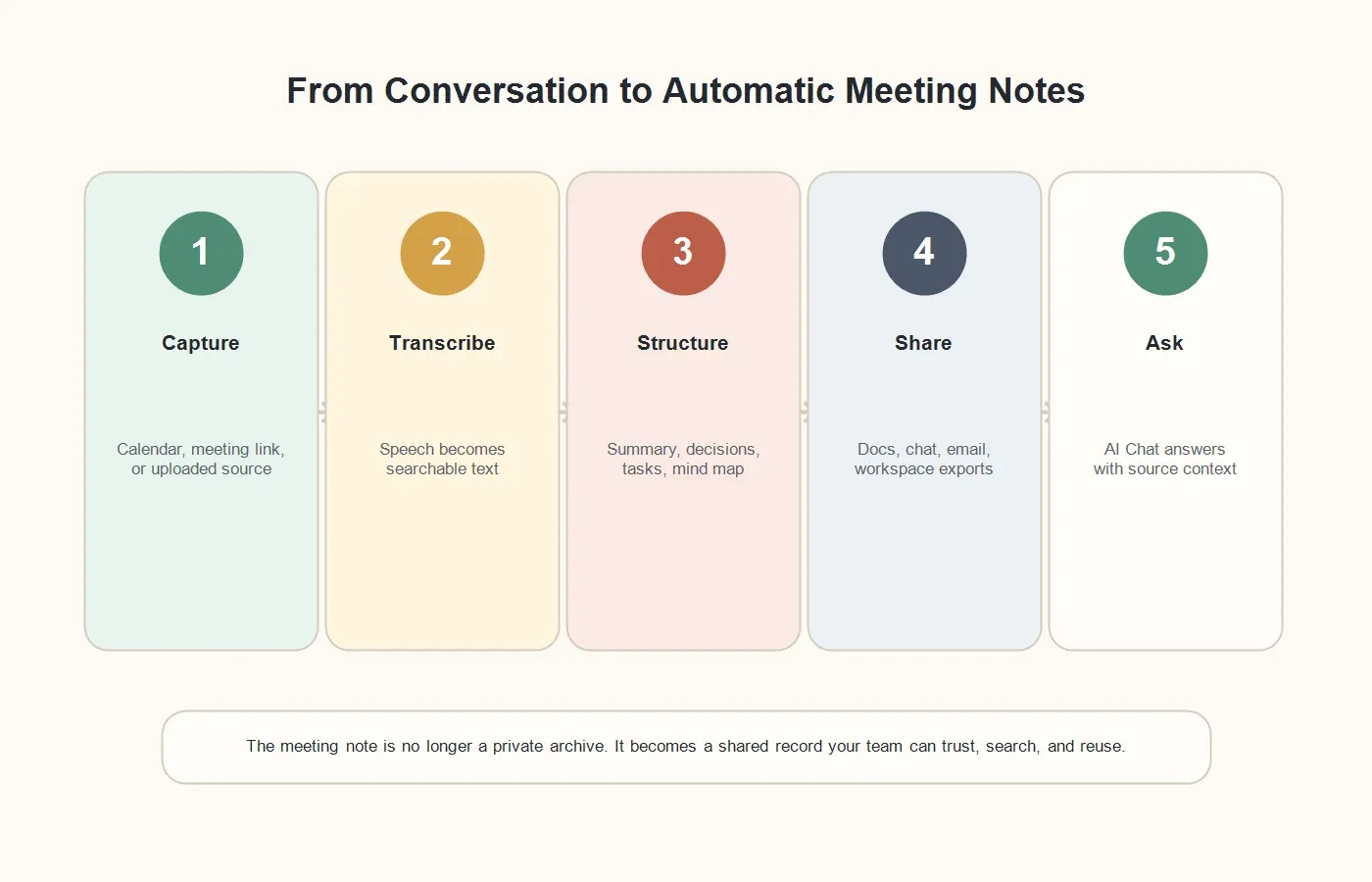
This process is especially useful for recurring meetings. The cost of manual notes compounds every week. A weekly customer call, product sync, pipeline review, or implementation meeting can create dozens of decisions over a quarter. If the notes live in private docs, the team loses the history. If the only record is a video, few people will replay it. HiNoter keeps the record easier to use.
What HiNoter Outputs After a Meeting
Transcript
The transcript is the source record. It helps teams verify what was said, recover exact wording, and review context that may not fit into the short recap. A transcript becomes more useful when it connects to summaries, tasks, and AI answers instead of standing alone as a long text file.
Summary
A good summary does not repeat the whole meeting. It answers what changed, what was decided, what is blocked, what evidence matters, and what needs attention next. For managers, this is often the fastest path to understanding whether a meeting created progress.
Action Items
Meetings fail when ownership is vague. HiNoter can surface follow-up tasks, owners, and next steps so the meeting owner can review them before sharing. The human still decides what is final, but the heavy lifting is no longer manual.
Mind Maps
Some conversations are not linear. Research calls, discovery sessions, planning meetings, and brainstorming discussions often move between topics. Mind maps help teams see themes, dependencies, risks, and open questions in a visual structure.
AI Chat With Source References
AI Chat changes the note from a static archive into a knowledge base. A teammate can ask, "What did the customer say about onboarding?" or "Who owns the reporting follow-up?" and get an answer tied to source context. That reference layer matters because teams need trust, not vague generated claims.
Example: From Messy Call to Automatic Meeting Notes
Consider a 38-minute implementation meeting with a customer, a project manager, and two technical teammates. The conversation moves through login issues, timeline risk, data import, training, and a request for executive reporting. Manual notes would likely capture only part of it. A recording would preserve everything but require replay.
HiNoter can turn the same meeting into a practical record. The summary might say: "The launch is still possible this month, but data import and admin training must be completed by Friday. The customer needs a revised timeline and a reporting sample before approving rollout." That short recap is useful because it explains the business state, not just the topics discussed.
The action items might list: "Maya sends the import template, Luis confirms permission settings, Priya schedules admin training, and the account owner shares the revised launch timeline." The mind map might group issues under data, access, training, and executive visibility. AI Chat can later answer which blocker created the biggest timeline risk and point back to the source conversation.
Manual Notes vs Recordings vs HiNoter
Manual notes and recordings both have a place, but neither solves the full workflow. A human note can be thoughtful, but it depends on one person's attention. A recording is accurate, but it is slow to review. A raw transcript is searchable, but still difficult to act on without structure.
| Need | Manual Notes | Plain Recording | HiNoter |
|---|---|---|---|
| Presence | Someone splits attention between listening and typing. | People can focus, but the value waits for replay. | No manual notetaker is needed for the first draft. |
| Output | Private, uneven notes that may miss context. | An audio or video file. | Transcript, summary, decisions, action items, mind map, and AI Chat. |
| Follow-up | Tasks may be incomplete or copied manually. | Someone still needs to review and write the recap. | Action items and owners are surfaced for quick review. |
| Search | Hard to discover across private docs. | Hard to scan without timestamps and context. | Searchable notes and source-backed answers support reuse. |
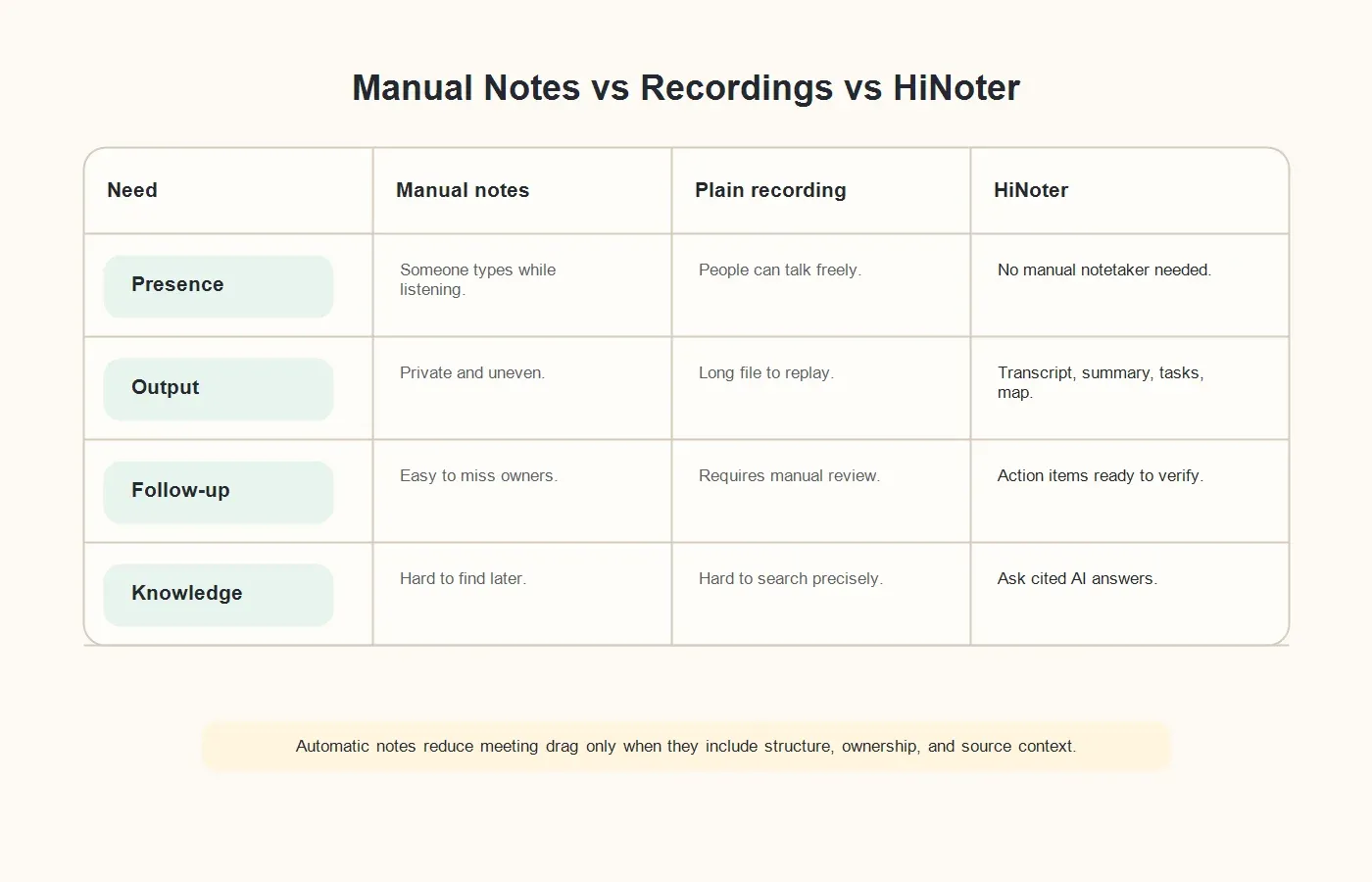
This is the difference between recording a meeting and operationalizing a meeting. The useful artifact is not the file itself. It is the decision trail, the task list, and the ability to recover context without interrupting three people.
Who Needs Automatic Meeting Notes?
Sales and Customer Success Teams
Customer-facing calls contain objections, stakeholders, risks, product requests, and promised next steps. Reps need to listen, ask better questions, and maintain trust. HiNoter helps preserve the details that support CRM updates, follow-up emails, renewal reviews, and customer handoffs.
Product and Research Teams
Product teams need evidence. Research interviews, feedback calls, and discovery meetings contain themes that shape roadmap decisions. HiNoter helps teams preserve transcripts, summarize findings, create visual topic maps, and ask source-backed questions when a decision needs proof.
Recruiting and HR Teams
Interview notes need consistency and care. Recruiters and hiring managers should be present with candidates, not buried in notes. When used with clear consent and access rules, automatic notes can help create better debrief records and reduce memory bias.
Managers and Operations Teams
Managers often need to know what happened across meetings they did not attend. Operations teams need decisions, blockers, and owners. HiNoter helps turn recurring meeting volume into a searchable operating record, so leaders can review outcomes without asking for another recap.
Global and Multilingual Teams
Distributed teams work across time zones, accents, and languages. HiNoter's support for 50+ languages and automatic language detection helps multilingual teams create more consistent meeting records, especially when collaboration spans the United States, Europe, Brazil, Portugal, and other markets.
Inputs HiNoter Supports Beyond Live Meetings
Meeting knowledge often starts outside the meeting. A webinar influences a campaign. A PDF report informs a board update. A YouTube product demo answers a customer question. An audio interview becomes research evidence. HiNoter is useful because it supports multiple source types in one note workflow.
Use HiNoter's meeting assistant when scheduled calls need automatic attendance. Use automatic meeting notes when the output needs summaries, action items, and mind maps. Use the audio to text converter for recordings, the YouTube transcript generator for permitted videos, and PDF to text for documents that support team decisions.
This matters because knowledge breaks when every source lives in a different tool. HiNoter helps teams turn mixed inputs into a more unified record: transcript, summary, action items, visual structure, exports, and source-backed AI answers.
Integrations and Workflow
Automatic notes are only useful if people see them. A meeting recap that stays buried in a separate app will not change how the team works. HiNoter is designed to move notes into team workflows such as Slack, Notion, Google Docs, calendar, and email, so decisions and tasks reach the places people already check.
A practical workflow is simple: schedule the meeting, let HiNoter capture it, review the generated summary, confirm action items, share the recap, export or sync the note, and use AI Chat later when the team needs source-backed context. That process turns meetings into follow-through instead of memory work.
Privacy, Consent, and Trust
Meeting notes can contain customer data, hiring feedback, financial details, pricing, legal questions, product strategy, and personal information. Any automatic notes workflow should start with permission and governance. Tell participants when an assistant is present, capture only meetings you are allowed to process, and restrict transcripts when the content is sensitive.
Teams should also decide which meetings should never be captured, who can access transcripts, how summaries are shared, and how long records are retained. HiNoter can reduce manual documentation, but the organization still owns the responsibility for thoughtful meeting practices.
Why HiNoter Is More Than a Recorder
A recorder answers one question: "Can we replay this?" HiNoter answers a better question: "Can the team use what happened?" That difference changes the value of every meeting. Rewatching a meeting is rarely the goal. The goal is to know what was decided, who owns the next step, what evidence supports the decision, and where to find the source.
HiNoter combines automatic meeting capture, transcription, structured summaries, action items, mind maps, exports, multilingual support, and source-backed AI Chat. For teams that hate manual note-taking, the real win is not avoiding typing. It is building a reliable knowledge trail without pulling people out of the conversation.
How to Roll Out Automatic Meeting Notes Without Creating Noise
The fastest way to fail with automatic notes is to capture every meeting on day one. Start with meetings where the cost of lost context is obvious: customer calls, sales demos, product reviews, research interviews, implementation syncs, recruiting debriefs, and leadership operating meetings. These calls usually produce decisions and commitments, so the value of better notes is easy to see.
Next, define capture rules. Decide who can invite HiNoter, which meeting types are eligible, how participants are notified, where summaries are shared, and who can see transcripts. This keeps the workflow useful without making people feel that every casual conversation is being archived. A good policy makes automatic notes feel like operational support, not surveillance.
During the first few weeks, ask meeting owners to review the generated summary and action items before sharing them broadly. This creates trust and teaches the team how to use the output. Some teams prefer short executive recaps. Others need detailed research notes, customer quotes, or action-item lists. The best rollout lets the note format match the meeting type.
Finally, connect the notes to follow-up. A summary that no one reads is just a cleaner archive. Share recaps where work happens, confirm action owners, add tasks to the right system, and use AI Chat when someone needs context later. Automatic meeting notes should reduce coordination work, not create another place people have to check.
Questions to Ask Before You Choose a Tool
Before buying an automatic meeting notes platform, ask whether it can join meetings automatically, process uploaded sources, create action items with owners, summarize across languages, export to team workflows, and answer questions with source references. Also ask what happens when the meeting includes sensitive information, external guests, or content that should not be retained.
If your only need is a replayable file, a recorder may be enough. If you only need searchable text, a transcription tool may work. If your team needs decisions, tasks, summaries, mind maps, exports, and a way to ask questions later, choose a platform built for the full path from conversation to searchable knowledge.
Try HiNoter for Automatic Meeting Notes
Use HiNoter when your team wants to stop manual note-taking, stay present in meetings, and still leave with accurate transcripts, concise summaries, action items, mind maps, exports, and source-backed AI answers. Connect your calendar or upload a source file, then let HiNoter turn the next conversation into a usable record.
CTA: Try HiNoter free. Connect your calendar and get your next meeting summarized automatically.
FAQs
What are automatic meeting notes?
Automatic meeting notes are AI-generated records created from a meeting or source file. They usually include a transcript, summary, key points, decisions, action items, and searchable context.
Can HiNoter join meetings automatically?
Yes. With the right calendar setup, meeting permissions, and platform settings, HiNoter can help auto-join selected meetings and generate structured notes afterward.
Do automatic notes replace human review?
No. Automatic notes reduce manual work, but teams should review important decisions, customer commitments, legal details, hiring feedback, and sensitive information before sharing or acting on the output.
How are automatic meeting notes different from a recording?
A recording gives you an audio or video file. Automatic meeting notes give you a transcript, summary, decisions, action items, mind map, exports, and searchable AI answers tied to source context.
Can HiNoter process content beyond live meetings?
Yes. HiNoter supports live meetings and uploaded sources such as audio, video, permitted YouTube content, and PDFs, so teams can turn multiple source types into structured notes and searchable knowledge.