Direct answer: For Fireflies vs Read AI, choose Fireflies if your priority is searchable meeting transcription and broad workflow integrations. Choose Read AI if you want meeting analytics, coaching signals, and cross-meeting recaps. Choose HiNoter if your team needs meetings, videos, PDFs, and audio turned into structured notes, action items, mind maps, and source-linked team knowledge.
Most teams do not have a recording problem anymore. They have a follow-through problem. Calls happen, transcripts appear, summaries land in inboxes, and still someone has to ask: What did we decide? Who owns the next step? Where is the evidence behind that customer risk? A good AI meeting notes tool should reduce those questions, not add another place to search.
This comparison looks at Fireflies, Read AI, and HiNoter through that lens. Fireflies and Read AI are established AI meeting assistant products with strong public footprints. HiNoter enters the comparison from a different angle: it is built for zero manual note-taking and multi-source knowledge, including meetings, uploaded audio, videos, YouTube-style content, and PDFs. The best choice depends less on which tool has the longest feature list and more on where your team loses context after conversations.
Quick Recommendation: Fireflies vs Read AI vs HiNoter
| Tool | Best fit | Watch for | Choose it when |
|---|---|---|---|
| Fireflies | Teams that want a mature meeting transcription assistant with searchable notes and many integrations. | Transcript-heavy workflows can still require review, cleanup, and team-specific structuring. | You mainly need meeting capture, transcription, searchable history, and broad app coverage. |
| Read AI | Teams that value meeting reports, analytics, coaching signals, and productivity summaries. | Analytics are useful only if teams agree on how to interpret and act on them. | You want insight into meeting behavior, participation, sentiment, and recurring discussion patterns. |
| HiNoter | Teams that want automatic notes across meetings, videos, PDFs, and audio, with outputs that become reusable knowledge. | Teams should define which meetings and files are appropriate for AI processing and sharing. | You need summaries, action items, mind maps, exports, multilingual notes, and AI Chat with source references. |
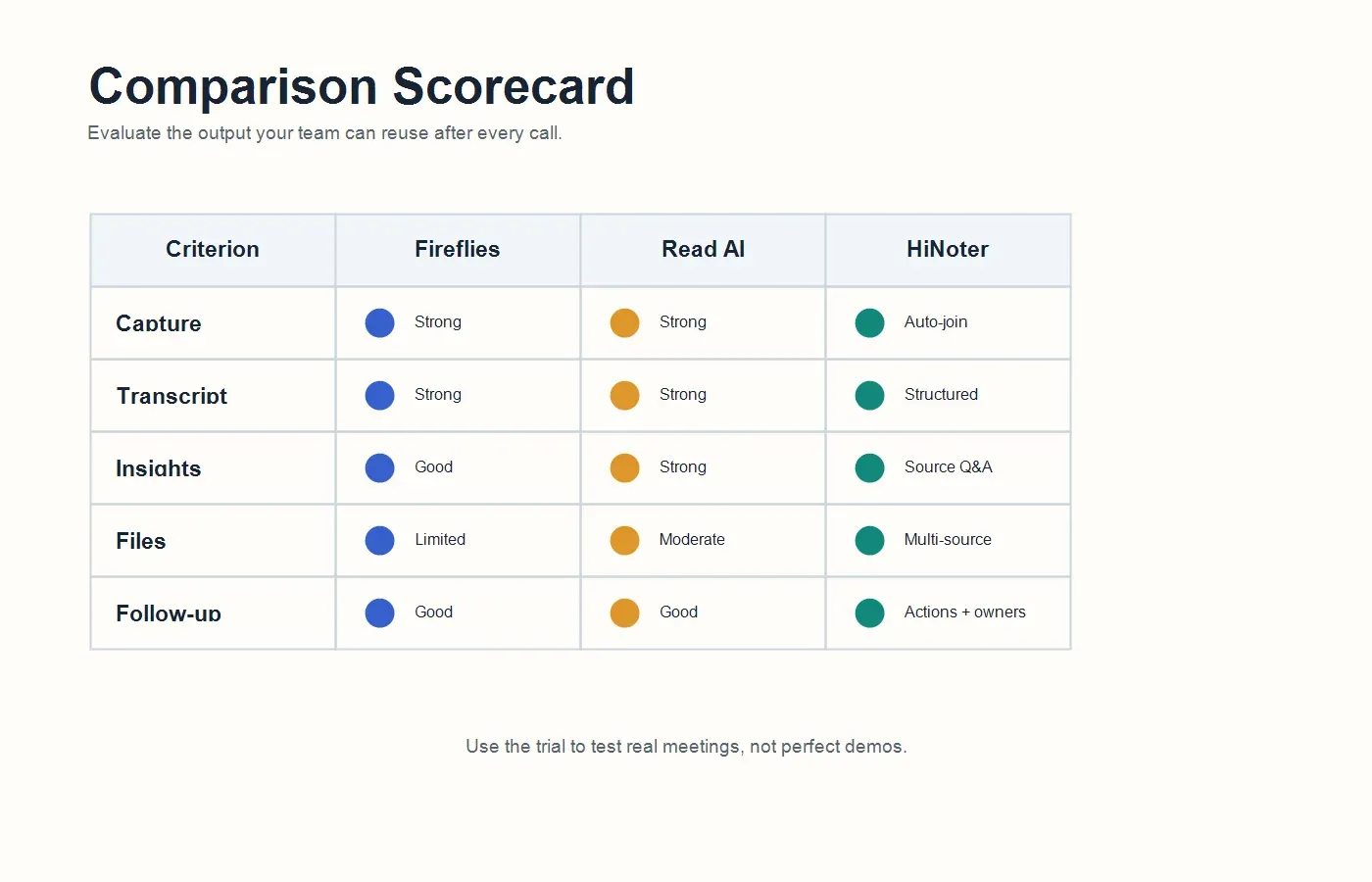
If you are comparing only meeting bots, Fireflies and Read AI deserve serious evaluation. If the problem is broader than live meetings, HiNoter is the more natural fit. Many teams now need to process customer calls, training videos, interview recordings, webinars, PDF reports, and internal docs in one knowledge workflow. That is where a plain transcript becomes too narrow.
Methodology: How We Compared the Tools
This review uses public product pages, pricing pages, help content, and feature descriptions available as of July 16, 2026. Because SaaS pricing and packaging change often, treat plan limits as items to verify during a trial or procurement review. The comparison focuses on workflow fit rather than small UI details.
The criteria are practical: meeting capture, transcription quality, summary quality, action items, language support, integrations, exports, privacy controls, AI chat, pricing clarity, and multi-source support. A strong tool should not simply record what happened. It should help a manager, customer success lead, recruiter, product manager, or founder understand what matters without chasing five people after every meeting.
What We Did Not Score
We did not assign a fake universal score because the winning tool depends on the job. Sales teams may care about CRM handoff, customer success teams may care about renewal risk and commitments, and product teams may care about decisions, blockers, and evidence. Instead, this page explains which tool is strongest for each operating model.
Fireflies vs Read AI: The Short Version
Fireflies is often a strong option when the main goal is meeting transcription at scale. It can join meetings, capture conversations, create summaries, support searchable transcripts, and connect with many common workplace tools. Public Fireflies materials emphasize broad integrations, transcription across many languages, meeting uploads, conversation search, and AI assistance through features such as AskFred and AI workflows.
Read AI is strongest when a team wants meeting reports and meeting intelligence, not just a transcript. Public Read AI materials emphasize summaries, transcripts, action items, meeting playback, productivity insights, workspace-level context, and Ask Read for querying meetings and related communications. That makes Read AI especially relevant for teams that want to understand meeting patterns and improve how work happens.
The practical distinction is this: Fireflies often feels like a transcription-first meeting memory system, while Read AI feels more like an analytics and meeting intelligence system. Both can help teams reduce manual notes. Neither should be judged only by a feature checklist. The real test is whether the tool helps your team make decisions faster after the call ends.
Where HiNoter Fits in the Comparison
HiNoter fits best when your team needs more than a meeting transcript. With HiNoter meeting assistant, teams can connect calendars, let the assistant join scheduled meetings, and receive structured outputs without assigning a human notetaker. The core promise is simple: stay present in the conversation while the system captures, structures, and organizes the result.
HiNoter also supports a broader content workflow. Meetings are only one source of knowledge. A team may need to summarize a recorded demo, turn a YouTube training video into notes, extract key points from a PDF, or convert uploaded audio into a searchable recap. HiNoter is designed as an AI meeting notes and transcription platform that covers those sources in one place.
The product is especially useful when teams need structured summaries, action items, mind maps, multilingual support, and source-linked AI Chat. Instead of leaving notes as an archive, HiNoter turns them into a living knowledge base that users can question later. That matters when a manager asks, "What did the customer actually commit to?" or a product lead asks, "Which calls mentioned the same blocker?"
Feature Comparison: Fireflies vs Read AI vs HiNoter
| Criterion | Fireflies | Read AI | HiNoter |
|---|---|---|---|
| Meeting capture | Meeting assistant and recording workflows for common video meeting platforms. | Meeting assistant and reports for common video meeting platforms. | Calendar-connected auto-join workflow for scheduled meetings. |
| Transcription | Strong transcript and search orientation, with language coverage advertised publicly. | Transcript plus report-style meeting output and playback context. | Transcript plus structured notes, summaries, action items, and mind maps. |
| Summaries | Meeting summaries and AI-generated recaps. | Meeting reports, recaps, and productivity-oriented summaries. | Executive-style summaries, decisions, blockers, next steps, and follow-up-ready outputs. |
| Action items | Can identify tasks and follow-up items from meetings. | Can surface action items and follow-up signals in meeting reports. | Extracts action items with owners, due dates, risks, and reusable follow-up context. |
| AI chat | AskFred-style AI assistance for querying meeting content. | Ask Read for querying meeting and workspace context. | AI Chat with source references across notes and supported content sources. |
| Multi-source input | Strong for meetings and supported uploads. | Strong for meetings, reports, and supported workspace content. | Meetings, audio, video, YouTube-style content, PDFs, and other permitted files. |
| Language support | Public materials describe broad multilingual transcription coverage. | Supports multilingual meeting and workspace use cases depending on plan and settings. | 50+ languages with automatic language detection for global teams. |
| Integrations | Broad marketplace of meeting, CRM, collaboration, and workflow integrations. | Integrations across calendar, meeting, collaboration, and workspace tools. | Designed to sync with Notion, Slack, Google Docs, calendar, and email workflows. |
| Best outcome | Searchable meeting memory and transcription automation. | Meeting intelligence, analytics, and cross-meeting productivity context. | Structured team knowledge from meetings and files, with source-backed answers. |
What Fireflies Is Best For
Fireflies is a good fit for teams that have already accepted a meeting bot workflow and want searchable transcripts across many meetings. It is particularly useful when the organization has a high volume of customer calls, sales demos, internal syncs, or interviews and needs a central place to review what was said.
Its strength is breadth. Fireflies has been in the category for years, which shows in its integration ecosystem and familiar workflow patterns. A team can often connect it to video conferencing tools, collaboration apps, CRMs, and productivity systems. That makes it attractive for revenue teams and operations teams that want meeting records connected to existing processes.
The main limitation is not that Fireflies lacks AI. The limitation is that a transcript-first workflow can still leave teams with too much raw material. If the team does not define templates, review habits, or ownership rules, transcripts become another archive. Fireflies is strongest when a team has a clear plan for searching, tagging, sharing, and acting on meeting content.
What Read AI Is Best For
Read AI is a strong fit for teams that want meeting reports and productivity intelligence. Its public positioning leans into summaries, transcripts, action items, meeting playback, meeting health, and the ability to query related context. For managers who care about how meetings are run, not only what was said, that can be valuable.
Read AI is especially relevant when leadership wants to understand recurring patterns: which meetings generate follow-up, which conversations repeat the same issue, whether participation is balanced, and where decisions stall. Those signals can help teams improve meeting quality, not just documentation quality.
The caution is that analytics need interpretation. A meeting score, sentiment signal, or participation metric can start useful conversations, but it should not be treated as perfect evidence. Teams should pair Read AI's signals with human judgment, especially for hiring, performance, sensitive customer situations, or executive decisions.
What HiNoter Is Best For
HiNoter is strongest when the meeting is only one part of the knowledge workflow. A customer success manager may need renewal call notes, a PDF contract summary, and a follow-up email draft. A product manager may need user interview evidence, a webinar recap, and a mind map of feature requests. A global team may need language detection and summaries that make sense across regions.
The HiNoter AI meeting notes workflow is built around zero manual note-taking. Connect the calendar, let HiNoter join scheduled meetings, and receive the usable record after the call. The output is not just "text of what happened." It can include summary, decisions, action items, mind map, key points, risks, and searchable Q&A.
HiNoter also stands out when notes need to become team memory. A note that lives only in one participant's private doc is fragile. A note that can be synced, queried, cited, and reused is more valuable. That is why source references in AI Chat matter: users can ask questions and check the underlying note, transcript, file, or source passage behind the answer.
Decision Matrix: Which Tool Should You Choose?
| Team need | Best choice | Reason |
|---|---|---|
| Searchable meeting transcripts at scale | Fireflies | Strong fit for teams that primarily need capture, transcription, search, and integrations. |
| Meeting analytics and productivity reporting | Read AI | Strong fit for teams that want meeting reports, recurring patterns, and collaboration signals. |
| Automatic notes from meetings and non-meeting sources | HiNoter | Strong fit for teams that need meetings, audio, video, PDFs, and permitted content summarized together. |
| Global team summaries across languages | HiNoter | 50+ language detection helps multilingual teams avoid assigning a human notetaker for every call. |
| CRM-heavy sales documentation | Fireflies or Read AI | Evaluate based on the CRM, call review, and manager coaching workflow your sales team already uses. |
| Source-linked knowledge base for decisions | HiNoter | Best fit when users need to ask questions later and verify answers against the original source. |
Pricing and Plan Considerations
Do not compare meeting AI tools by headline price alone. Plan limits often differ by transcription minutes, meeting credits, storage, upload limits, AI query usage, admin controls, integrations, or retention policies. A cheaper plan can become more expensive if your team has to pay for separate transcription, file summarization, exports, or knowledge-base tools.
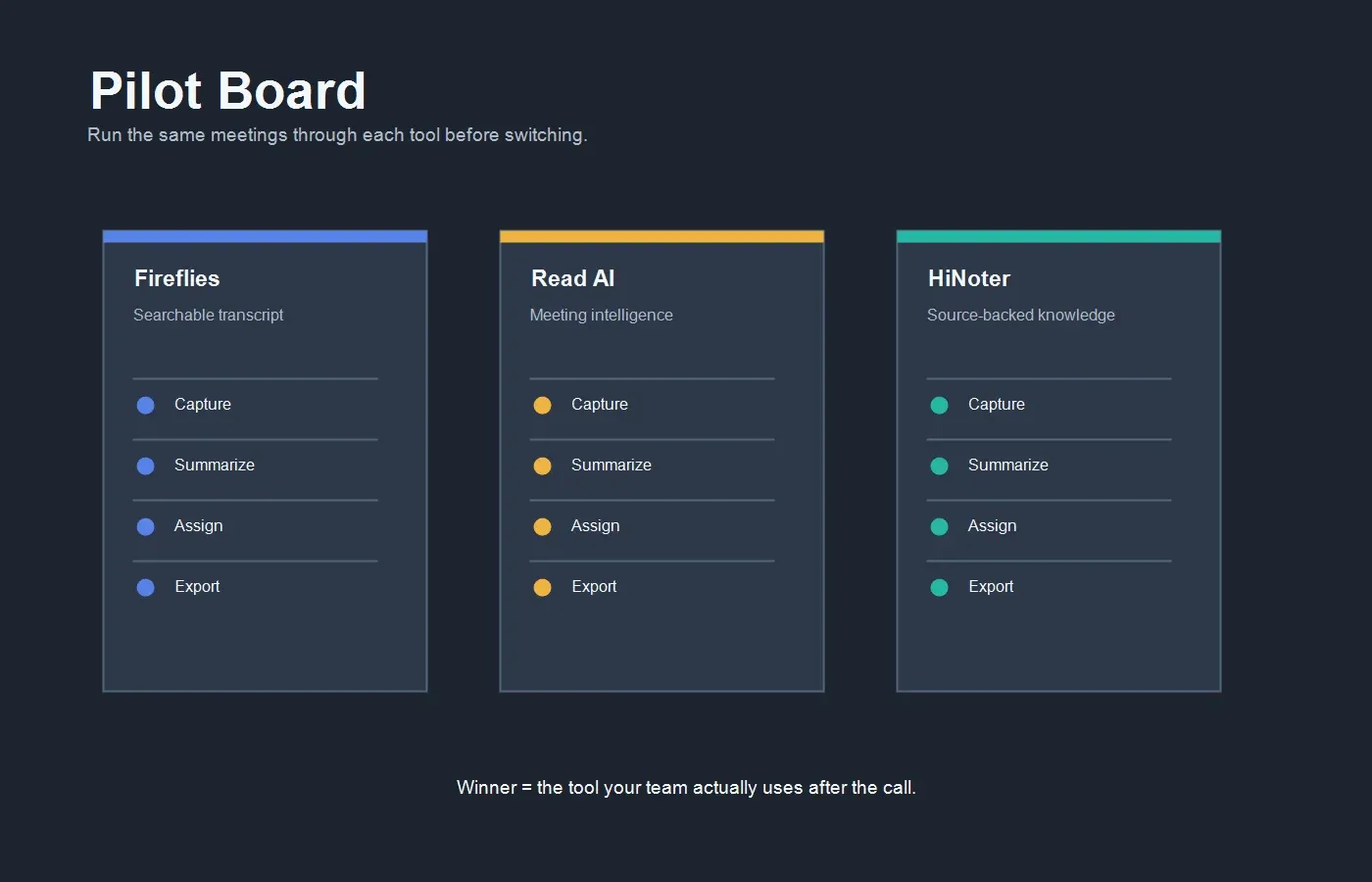
Before choosing Fireflies, Read AI, or HiNoter, run a two-week pilot using real meetings. Include customer calls, internal project meetings, recruiting interviews, and one long recorded source such as a webinar or uploaded video. The goal is to see where the tool saves actual operating time, not where it looks best in a demo.
| Question | Why it matters | What to verify |
|---|---|---|
| How are minutes, credits, or uploads counted? | Usage pricing can change the real cost for active teams. | Meeting length, transcription minutes, AI queries, upload size, and retention rules. |
| Which integrations are included? | A missing export path creates manual work after every meeting. | Calendar, Slack, Notion, Google Docs, CRM, email, and workflow automation support. |
| What admin controls are available? | Meeting data can include confidential customer, hiring, or strategy information. | Workspace roles, deletion, sharing controls, consent workflows, and retention settings. |
| Can the system handle non-meeting content? | Teams often need to process calls, webinars, videos, PDFs, and audio files. | Upload support, supported file types, OCR or PDF handling, and source-linked Q&A. |
Workflow Example: From Meeting to Team Knowledge
A useful AI meeting workflow has five steps. First, connect the calendar so the assistant knows which meetings to join. Second, capture the meeting with clear consent and workspace rules. Third, generate the transcript and structured summary. Fourth, extract decisions, risks, owners, and deadlines. Fifth, sync the output to the place where the team already works.
For HiNoter, that last step is central. Teams can move meeting notes into knowledge workflows such as Notion integration for team documentation or Google Docs integration for editable recaps and handoffs. When Slack, calendar, and email are part of the same loop, meeting notes stop being a static record and become a coordination system.
That workflow is especially useful for cross-functional teams. A customer success call can create renewal risks and follow-up tasks. A product discovery interview can create evidence, feature themes, and objections. A project meeting can create decisions, blockers, dependencies, and owner assignments. The transcript matters, but the operational value is in the structured output.
Privacy, Consent, and Governance
Every meeting AI tool should be deployed with clear internal rules. Tell participants when a meeting assistant is present. Define which meetings can be recorded or transcribed. Avoid capturing sensitive calls unless your legal, HR, or compliance team has approved the workflow. Store notes only where the right people can access them.
This is not just a legal issue. It is a trust issue. If participants feel surprised by a bot, they may speak less freely. If notes are shared too broadly, teams may create new risks while trying to reduce admin work. The best rollout is explicit: explain the tool, define the use cases, set retention rules, and give teams a way to exclude sensitive meetings.
For competitor evaluations, ask each vendor about data retention, deletion, workspace permissions, admin visibility, AI training policies, security documentation, and export rights. For regulated industries, verify contractual requirements before putting customer, patient, candidate, financial, or legal content into any AI system.
Migration Checklist
If you are switching from Fireflies or Read AI to HiNoter, do not migrate everything at once. Start with one team and one use case. Customer success renewal calls, recruiting interviews, product discovery calls, and internal project reviews are good pilots because the value of structured notes is easy to measure.
| Step | Action | Success signal |
|---|---|---|
| 1 | Select 10 to 20 real meetings and files for a fair pilot. | The sample includes short meetings, long calls, noisy audio, and non-meeting content. |
| 2 | Define the output template before the pilot starts. | Everyone knows which fields matter: summary, decision, action, owner, due date, risk. |
| 3 | Connect calendar and key destinations. | Notes arrive where the team already works, not in another forgotten inbox. |
| 4 | Compare transcript, summary, and action item quality. | Managers spend less time editing and chasing participants for context. |
| 5 | Ask source-linked questions after the meeting. | Users can verify answers instead of trusting a summary blindly. |
Choose HiNoter If...
Choose HiNoter if your team wants to stop manual note-taking and still leave meetings with accurate, structured outcomes. It is also the better fit when the same team needs to process meetings, audio files, videos, PDFs, and permitted online content. HiNoter is not only a recorder. It is a knowledge workflow for turning conversations and documents into summaries, action items, mind maps, exports, and cited answers.
It is also a strong option when multilingual work is normal. Teams spread across the United States, Europe, Brazil, Portugal, and other regions need notes that can handle language shifts without appointing a human notetaker for every call. Automatic detection across 50+ languages helps reduce that coordination burden.
Choose Fireflies If...
Choose Fireflies if your priority is a mature meeting transcription workflow with broad integrations and searchable call history. It can be a good fit for sales, recruiting, operations, or support teams that live inside recorded meetings and want a familiar meeting bot plus searchable transcripts.
Fireflies may also be the right choice when your stack already depends on specific integrations it supports. In that case, the strongest evaluation question is not "Does it summarize?" but "Does the summary, transcript, and task data land in the system where our team already works?"
Choose Read AI If...
Choose Read AI if meeting analytics and cross-meeting intelligence matter as much as transcription. It is well suited for teams that want to understand participation, meeting patterns, productivity signals, and recurring topics across conversations.
Read AI can be especially helpful for managers who want a richer view of meeting behavior. Just make sure the team has a fair policy for using analytics. Meeting signals should support better collaboration, not become a blunt instrument for judging individuals without context.
Final Verdict: Fireflies vs Read AI vs HiNoter
Fireflies vs Read AI is not a simple winner-take-all comparison. Fireflies is compelling for transcription-heavy meeting memory. Read AI is compelling for meeting intelligence and productivity reporting. HiNoter is compelling for teams that want meeting notes to become structured, source-backed knowledge across meetings and other content sources.
If your only problem is remembering what happened in meetings, Fireflies or Read AI may be enough. If your real problem is that decisions, tasks, risks, and insights disappear across recordings, transcripts, PDFs, videos, chat, and private notes, HiNoter is built closer to the workflow you need.
CTA: Try HiNoter to connect your calendar, capture your next meeting automatically, and turn the result into a transcript, summary, action items, mind map, exports, and source-linked AI Chat.
FAQs
Is Fireflies better than Read AI?
Fireflies can be better for teams that prioritize searchable transcription, meeting capture, and broad integrations. Read AI can be better for teams that want meeting reports, analytics, productivity signals, and cross-meeting context. The better choice depends on whether your main need is transcript management or meeting intelligence.
How is HiNoter different from Fireflies and Read AI?
HiNoter focuses on turning meetings and other sources into structured knowledge. It supports automatic meeting attendance, summaries, action items, mind maps, exports, multilingual workflows, and AI Chat with source references. It is designed for teams that need more than isolated transcripts.
Can these tools replace a human notetaker?
They can reduce or remove routine note-taking for many meetings, but humans should still review sensitive commitments, hiring feedback, legal discussions, customer promises, and high-stakes decisions. AI notes are strongest when paired with clear review and approval rules.
Which tool is best for multilingual teams?
Fireflies advertises broad multilingual transcription coverage, and Read AI supports multilingual meeting workflows depending on settings and plan. HiNoter is a strong fit for global teams because it supports 50+ languages with automatic detection and structured summaries for distributed teams.
Do I need a meeting recorder if I use an AI note taker?
Not always. If your goal is notes, summaries, decisions, tasks, and searchable answers, a dedicated AI note workflow may be more useful than manually recording every call. For compliance, training, or legal recordkeeping, you may still need formal recordings under your organization's policy.
What should I test during a pilot?
Test calendar capture, transcript accuracy, summary usefulness, action item extraction, source references, exports, language handling, permissions, and how quickly managers can find answers after the meeting. Use real meetings, not only short demo calls.