Direct answer: Meeting insights AI turns meeting conversations into structured outputs such as decisions, action items, risks, summaries, mind maps, recap emails, and source-linked answers. The best workflow connects each insight to the original meeting evidence so teams can act on it, search it later, and trust where the answer came from.
Meeting insights AI is useful when the meeting recording is not the deliverable. The deliverable is what the team can do next: the decision that changed the plan, the owner who accepted the task, the risk that needs leadership attention, and the question someone can answer next month without reopening a one-hour recording.
That difference matters because most teams already have more meeting content than they can use. Recordings sit in drives. Transcripts stay in separate tools. Follow-up tasks hide in chat. Personal notes never reach the people who need them. The result is familiar: another meeting to remember what the last meeting decided.
HiNoter approaches the problem as a meeting knowledge workflow, not just a transcription job. It can capture scheduled conversations, create structured notes, extract action items, produce mind maps, sync outputs into the tools your team already uses, and let users ask AI Chat questions with source references back to the note.
What Is Meeting Insights AI?
Meeting insights AI is software that analyzes meeting content and turns it into usable business outputs: summaries, decisions, action items, risks, themes, questions, follow-up drafts, and searchable answers. It usually starts with a transcript, but the transcript is only the raw material. The insight layer identifies what matters and organizes it around work.
A plain transcript tells you what was said. Meeting insights AI tells you what changed, what needs action, and where to verify the answer. For a product team, that may mean blockers and launch decisions. For customer success, it may mean renewal risks and customer commitments. For leadership, it may mean trends across recurring meetings that deserve attention.
Why Meeting Insights AI Matters
Meetings are expensive because they consume attention before, during, and after the call. Microsoft Work Trend Index research, based on a survey of 31,000 people in 31 countries, found that 68% of employees said they did not have enough uninterrupted focus time, and inefficient meetings were named as the top productivity disruptor. The issue is not only meeting volume. It is the work required to recover context after the meeting ends.
Asana's Anatomy of Work research has repeatedly framed this as "work about work": status chasing, searching for information, duplicating updates, and coordinating handoffs. When meeting outcomes live across recordings, chat threads, private notes, and email drafts, teams spend extra time proving what happened instead of moving the work forward.
AI can help, but only if the output is grounded and reviewable. A summary without sources may be convenient. A decision linked to the source note is more useful because a teammate can check the context before acting on it. That is the practical line between a quick recap and a reliable meeting knowledge base.
Meeting Insights AI: Inputs and Outputs
| Input | What HiNoter Extracts | Team Outcome |
|---|---|---|
| Calendar meetings | Transcript, structured notes, summary, decisions, and follow-up items. | The team stays present during the call and still receives a usable record. |
| Recurring team syncs | Open risks, repeated blockers, owner commitments, and changes since last time. | Managers can see whether the meeting moved the work forward. |
| Customer or sales calls | Objections, requested features, buying signals, renewal concerns, and next steps. | Revenue teams can follow up with evidence instead of memory. |
| Videos, webinars, or uploaded audio | Transcript, chaptered notes, key points, quotes, and reusable knowledge. | Long recordings become searchable assets rather than storage clutter. |
| PDFs and documents | Section summaries, key facts, extracted notes, and source-linked answers. | Meeting prep and post-meeting research can live in the same knowledge workflow. |
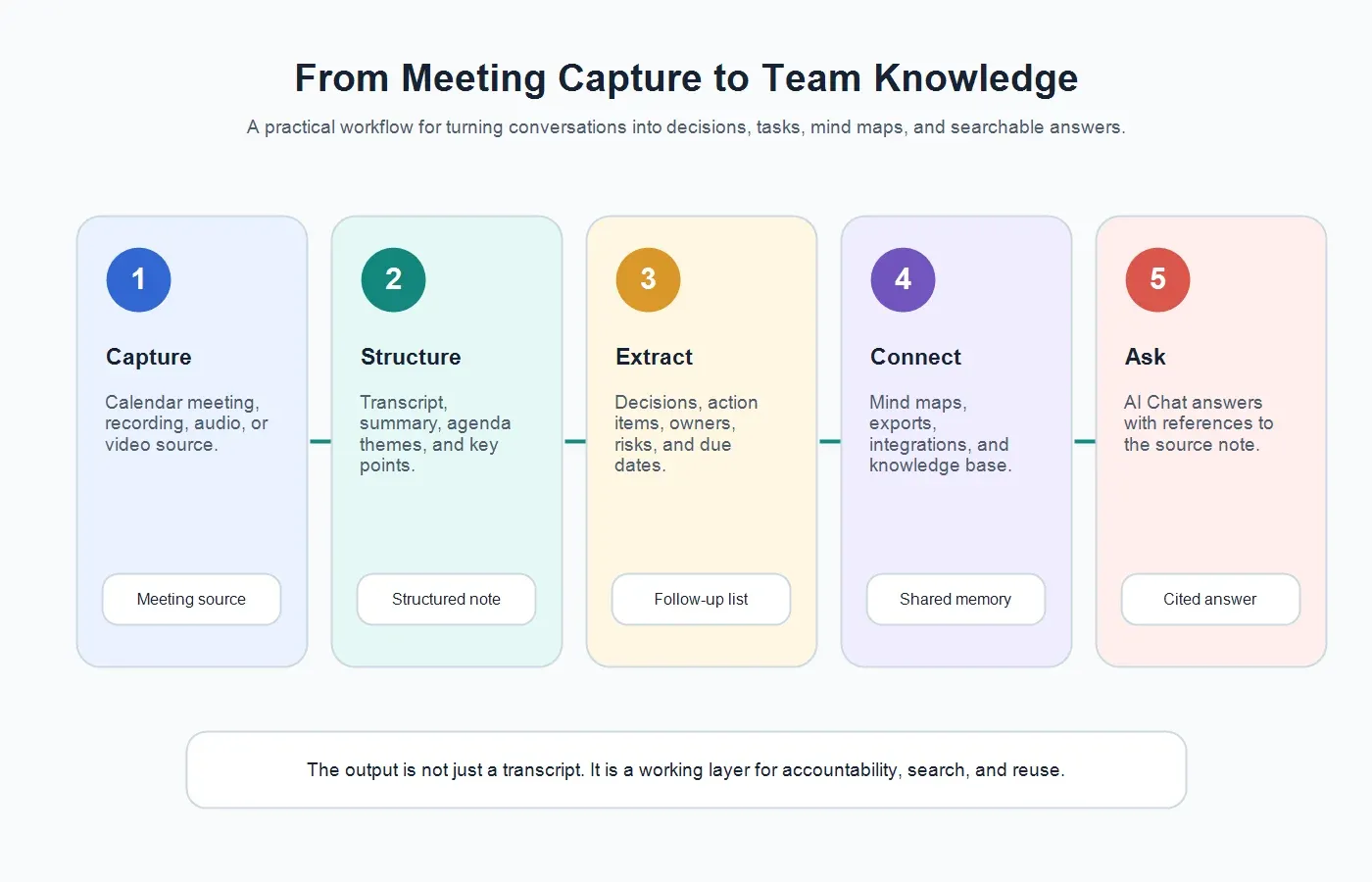
How HiNoter Turns Meetings Into Insights
1. Capture the meeting context
HiNoter can work from scheduled meetings and supported uploaded content. For live meetings, teams can connect the calendar so the assistant joins eligible calls automatically, which reduces the chance that someone forgets to record or assign a manual note taker. That workflow is especially useful for distributed teams where the person who needs the notes may not attend every call. See the HiNoter meeting assistant workflow for automatic attendance and capture.
2. Create a structured meeting note
After the meeting, the first useful layer is structure: a summary, agenda themes, decisions, action items, speakers, and key moments. This is where a meeting becomes easier to scan than a transcript. A manager should be able to see the meeting outcome in a few minutes without replaying the recording. HiNoter builds this layer through AI meeting notes that are designed for review, sharing, and follow-up.
3. Extract action items and owners
Action items are where meeting insight becomes operational. A strong AI workflow should identify the task, owner, due date if one was mentioned, and the source signal that supports the extraction. If the owner or deadline is unclear, the note should make that ambiguity visible instead of pretending the task is complete.
4. Build a mind map and topic structure
Some meetings are not linear. Strategy sessions, customer interviews, roadmap debates, and project reviews move between problems, decisions, dependencies, objections, and next steps. Mind maps help teams see how ideas relate to each other. They are useful for product planning, research synthesis, leadership briefings, and onboarding teammates who need context fast.
5. Sync insights into the team workspace
Insights are only useful if they land where work happens. HiNoter can help teams move meeting outputs into connected workflows such as docs, chat, calendars, and knowledge systems. For teams that organize decisions and project records in Notion, the HiNoter Notion integration makes meeting notes easier to reuse instead of burying them in a separate archive.
6. Ask AI Chat with source references
The most valuable meeting record is not always the one someone reads immediately. It is the one a teammate can question later. HiNoter AI Chat lets users ask about notes and receive answers that include source references, so the answer is easier to verify against the meeting context. That matters for trust: source references do not make AI perfect, but they make the output reviewable. Learn more about HiNoter AI Chat.
Sample Outputs From a Meeting Insights AI Workflow
Here is a realistic example from a fictional product launch meeting. The raw conversation was messy: product, design, customer success, and security all raised different issues. A useful meeting insights AI workflow turns that conversation into a record that the team can act on.
Example summary
The team agreed to keep enterprise onboarding in the July launch, but the pilot date may move if the security review is not complete by Friday. Customer success needs revised enablement notes before the first customer walkthrough. Product will remove two lower-priority onboarding settings from the initial release and revisit them after the pilot.
Example decisions
| Decision | Reason | Source Signal |
|---|---|---|
| Keep enterprise onboarding in launch scope. | The feature is required for two pilot customers and supports the July renewal plan. | Product and CS confirmed impact during the launch review. |
| Move two advanced settings to post-pilot backlog. | Security and QA need more time to test the edge cases. | Security raised review dependency; engineering confirmed effort. |
| Send a revised customer timeline. | CS needs a clean external update before the next customer call. | CS requested a customer-facing timeline by Friday. |
Example action item extraction
| Action Item | Owner | Due Date | Source Signal |
|---|---|---|---|
| Confirm whether security review can finish before Friday. | Security lead | Friday | "We can finish this week if the final API notes arrive tomorrow." |
| Update the customer enablement note with the new pilot timeline. | Customer success manager | Thursday | "CS needs a timeline before the walkthrough." |
| Remove advanced onboarding settings from the July release plan. | Product manager | Next planning update | "Let's move those two settings out of the first pilot." |
| Prepare a short recap email for stakeholders. | Program manager | Today | "Please send the final decision summary after this call." |
Example recap email draft
Subject: Launch review recap and next steps
Thanks everyone. We agreed to keep enterprise onboarding in the July launch while moving two advanced settings into the post-pilot backlog. Security will confirm review timing by Friday. CS will update the customer-facing timeline before the walkthrough, and product will revise the release plan. The main open risk is whether the final API notes arrive in time for security review.
Questions You Can Ask HiNoter AI Chat
AI Chat becomes more useful when it can answer questions against the meeting record. The point is not to replace judgment. The point is to reduce the time spent searching across recordings, transcripts, and scattered notes.
| Question | What a Trustworthy Answer Should Cite | Why It Helps |
|---|---|---|
| What did we decide about launch scope last week? | The decision section and the timestamped source note from the launch review. | Prevents the team from reopening a settled decision without context. |
| Which tasks from Q3 planning are still open? | Action items grouped by owner, due date, and completion status. | Turns planning conversations into a follow-up list. |
| What risks did customers mention across onboarding calls? | Customer call notes, quoted concerns, and recurring risk themes. | Helps customer success and product teams find patterns. |
| Which meetings discussed pricing objections? | Sales call summaries, objection labels, and source references. | Makes deal context easier to share with leadership and enablement. |
| Summarize blockers tied to the mobile rollout. | Project sync notes, blocker sections, and owner commitments. | Gives managers a cross-meeting view without another status meeting. |
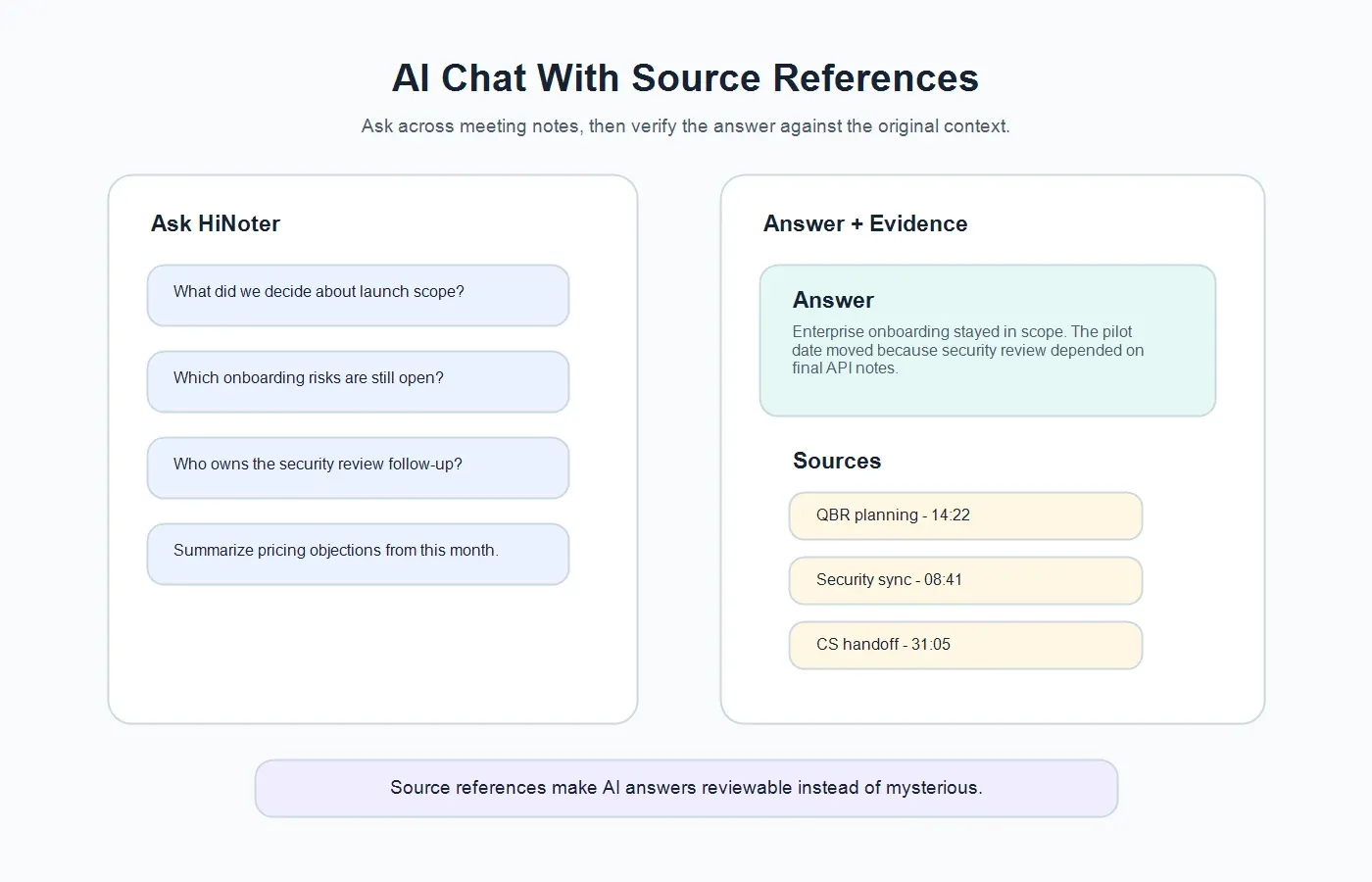
Source references are important because AI systems can produce confident answers that still need review. A source-linked answer gives the user a trail back to the meeting evidence. That makes the workflow more transparent, especially for decisions, customer commitments, hiring feedback, legal-sensitive topics, or leadership updates.
From Notes Archive to Meeting Knowledge Base
A notes archive stores what happened. A meeting knowledge base helps the team reuse what happened. The difference is searchability, structure, and context. If a teammate can ask, "What did the customer object to in the last renewal call?" and see the supporting note, the meeting record has become part of the team's operating memory.
This is where meeting insights AI becomes more than convenience. Product teams can trace roadmap decisions across planning meetings, customer interviews, and research calls. Sales and customer success teams can recover objections, commitments, and renewal risks. Operations teams can search recurring project risks. New hires can learn why a decision was made without interrupting three teammates.
For teams building product knowledge from repeated meetings, HiNoter for product teams connects meeting capture, notes, action items, source-linked Q&A, and reusable context in one workflow.
Where Meeting Insights AI Helps Most
Product and project teams
Product and project meetings often contain tradeoffs, not just updates. Meeting insights AI can separate the final decision from the debate, extract dependencies, highlight blockers, and create a record that explains why the roadmap changed.
Customer success teams
Customer success meetings create commitments that affect retention. The useful outputs are renewal risks, customer goals, promised follow-ups, open questions, stakeholder names, and next steps. A transcript alone is too slow for that workflow.
Sales teams
Sales calls include objections, urgency signals, buying criteria, competitor mentions, budget constraints, and decision timelines. Meeting insights AI helps teams convert those signals into deal strategy and follow-up notes.
Recruiting and interview teams
Interview notes need evidence, not vague impressions. AI can help summarize candidate examples, interviewer feedback, concerns, and follow-up questions. Human review is still essential, especially for fairness and compliance.
Leadership and operations
Leadership teams need patterns across meetings: repeated risks, open decisions, team capacity issues, and commitments that require executive follow-through. Meeting insights AI can make those patterns easier to surface before they become surprises.
Trust, Privacy, and Human Review
Meetings often contain sensitive information: customer data, employee feedback, financial plans, hiring discussions, legal questions, and unreleased product details. A responsible meeting insights workflow should respect consent, access permissions, data retention rules, and internal review policies.
The National Institute of Standards and Technology AI Risk Management Framework emphasizes that trustworthy AI requires governance, measurement, and risk management rather than blind automation. In practical meeting workflows, that means source references, human review, clear ownership, and sensible access controls. AI can draft the note, but the team should still review high-impact decisions and sensitive content before sharing.
Stanford's AI Index also shows how quickly organizations are adopting AI while continuing to wrestle with reliability, governance, and trust. For meeting insights, the safest habit is simple: use AI to find and structure the signal, then verify important claims against the source note before acting.
Common Mistakes With Meeting Insights AI
| Mistake | Why It Hurts | Better Approach |
|---|---|---|
| Stopping at the transcript. | The team still has to read and summarize a long record. | Extract decisions, tasks, risks, and themes from the transcript. |
| Accepting every AI output without review. | Ambiguous statements can become false certainty. | Review important decisions and verify source references. |
| Separating action items from owners. | Tasks become vague reminders instead of accountable work. | Capture task, owner, due date, status, and source signal. |
| Keeping notes in private tools. | Context disappears when only one person can find it. | Sync notes to the team workspace where work happens. |
| Ignoring cross-meeting patterns. | Repeated risks and blockers stay hidden until they become urgent. | Use AI Chat and structured tags to search across related meetings. |
Try HiNoter for Meeting Insights AI
If your team already records meetings but still loses decisions, tasks, and context, the bottleneck is not capture. It is conversion. You need a workflow that turns conversations into structured notes, action items, mind maps, exports, and source-linked answers.
HiNoter is built for that workflow. Connect your calendar, let HiNoter capture eligible meetings, and review the generated transcript, summary, decisions, action items, mind map, recap email, and AI Chat answers. You can also use HiNoter with permitted videos, PDFs, audio, and other sources when the knowledge your team needs lives outside the meeting itself.
CTA: Try HiNoter to turn your next meeting into decisions, tasks, and searchable team knowledge instead of another recording nobody wants to rewatch.
FAQs
What is meeting insights AI?
Meeting insights AI analyzes meeting content and turns it into structured outputs such as summaries, decisions, action items, risks, mind maps, recap emails, and searchable answers. The strongest workflows also link insights back to source notes for review.
How is meeting insights AI different from transcription?
Transcription converts speech into text. Meeting insights AI uses that text to identify what matters: decisions, tasks, owners, risks, themes, and follow-up actions. A transcript is the raw record; insights are the work-ready layer.
Can meeting insights AI extract action items?
Yes. It can identify tasks, owners, due dates, and source signals from the meeting. A human should review the final list, especially when ownership or timing is unclear.
Can AI Chat answer questions across meetings?
Yes, when the meeting notes are available in the same searchable workspace. Users can ask questions such as "What risks came up in onboarding calls?" or "Which Q3 planning tasks remain open?" and review the referenced notes.
Do source references prevent hallucinations?
Source references do not make AI perfect, but they make answers easier to verify. When an answer includes the note or moment it came from, the user can check the context before making a decision.
Can HiNoter turn meeting notes into a knowledge base?
Yes. HiNoter helps teams capture meetings, structure notes, extract actions, create mind maps, sync outputs, and ask AI Chat questions with references. Over time, those notes can become a searchable meeting knowledge base.