Direct answer: Meeting transcription software records or captures conversations, turns speech into text, and helps teams review what happened. The best tools now add AI summaries, action items, searchable knowledge, integrations, and source-backed answers. Compare them by workflow fit, not just transcript speed or headline accuracy.
Most teams do not need another place to store long transcripts. They need a reliable way to remember what was decided, who owns the next step, and where the source evidence lives. That is why comparison searches for meeting transcription tools have become harder: many products look similar on the surface, but they serve very different workflows.
This guide uses a practical evaluation framework before recommending tools. It includes meeting-first AI notetakers, revenue intelligence platforms, transcription services, and content tools. HiNoter appears as one option, not the only option, and is strongest for teams that want meetings, audio, video, YouTube, and PDFs converted into structured knowledge rather than isolated transcripts.
How We Evaluated Meeting Transcription Software
The products below were evaluated by public product pages, pricing pages, feature pages, and common workflow fit as of the update date. Pricing changes often, so the pricing notes describe the model rather than quoting every plan. For a final buying decision, verify current limits, retention, admin controls, and platform support on each vendor's official site.
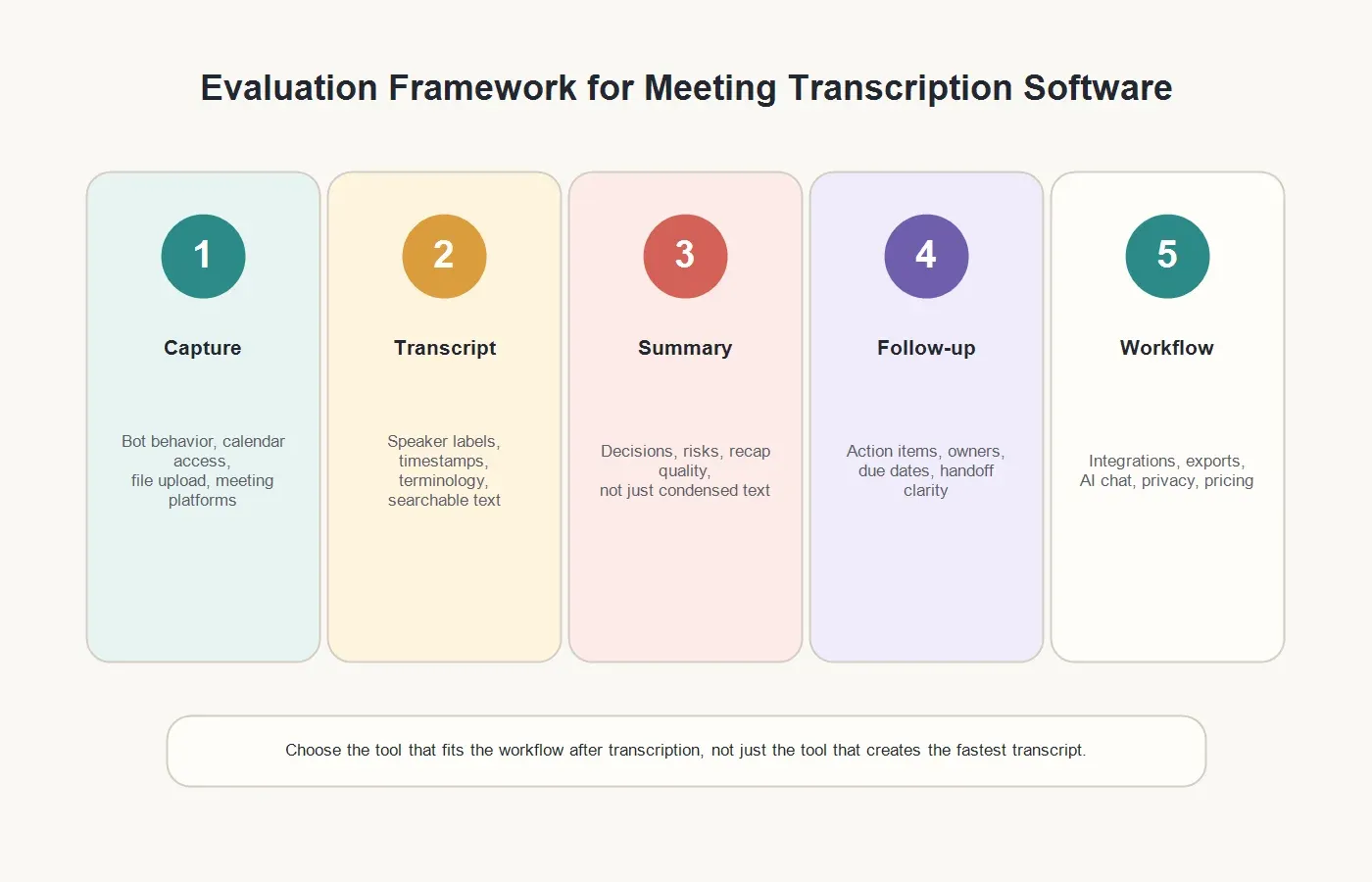
We weighted the criteria by what happens after the transcript is generated. A fast transcript is helpful, but the real business value appears when the transcript becomes a summary, a decision record, an action list, an export, or a searchable source for later questions.
| Criterion | What to Check | Why It Matters |
|---|---|---|
| Meeting capture | Calendar connection, meeting bot behavior, host controls, file upload, and support for Google Meet, Zoom, or Microsoft Teams. | Capture must fit how your team actually meets, including permissions and admin rules. |
| Transcription quality | Speaker labels, timestamps, accents, terminology, audio quality handling, and review tools. | Bad transcripts reduce trust and make summaries harder to verify. |
| Summary quality | Executive summary, decisions, risks, objections, customer requests, and key themes. | Busy teams rarely read full transcripts unless the summary is useful. |
| Action items | Owners, deadlines, commitments, handoff notes, and shareable follow-up format. | Meetings create value only when the next step is clear. |
| Integrations and exports | Docs, Slack, Notion, CRM, calendar, email, project tools, and file exports. | Notes need to reach the systems where work continues. |
| Language support | Automatic language detection, translation, multilingual summaries, and regional availability. | Global teams need usable notes across accents and languages. |
| Privacy and administration | Consent workflow, meeting bot visibility, retention, access control, security posture, and sensitive-meeting exclusions. | Meeting transcripts can contain customer data, strategy, hiring feedback, and confidential decisions. |
| AI chat and knowledge reuse | Ask questions across notes, source references, searchable workspace, and cross-source retrieval. | The transcript becomes more valuable when people can ask source-backed questions later. |
| Pricing clarity | Seat pricing, usage limits, transcription minutes, storage, AI credits, and enterprise add-ons. | Teams need to avoid surprise costs as meeting volume grows. |
Best Meeting Transcription Software by Use Case
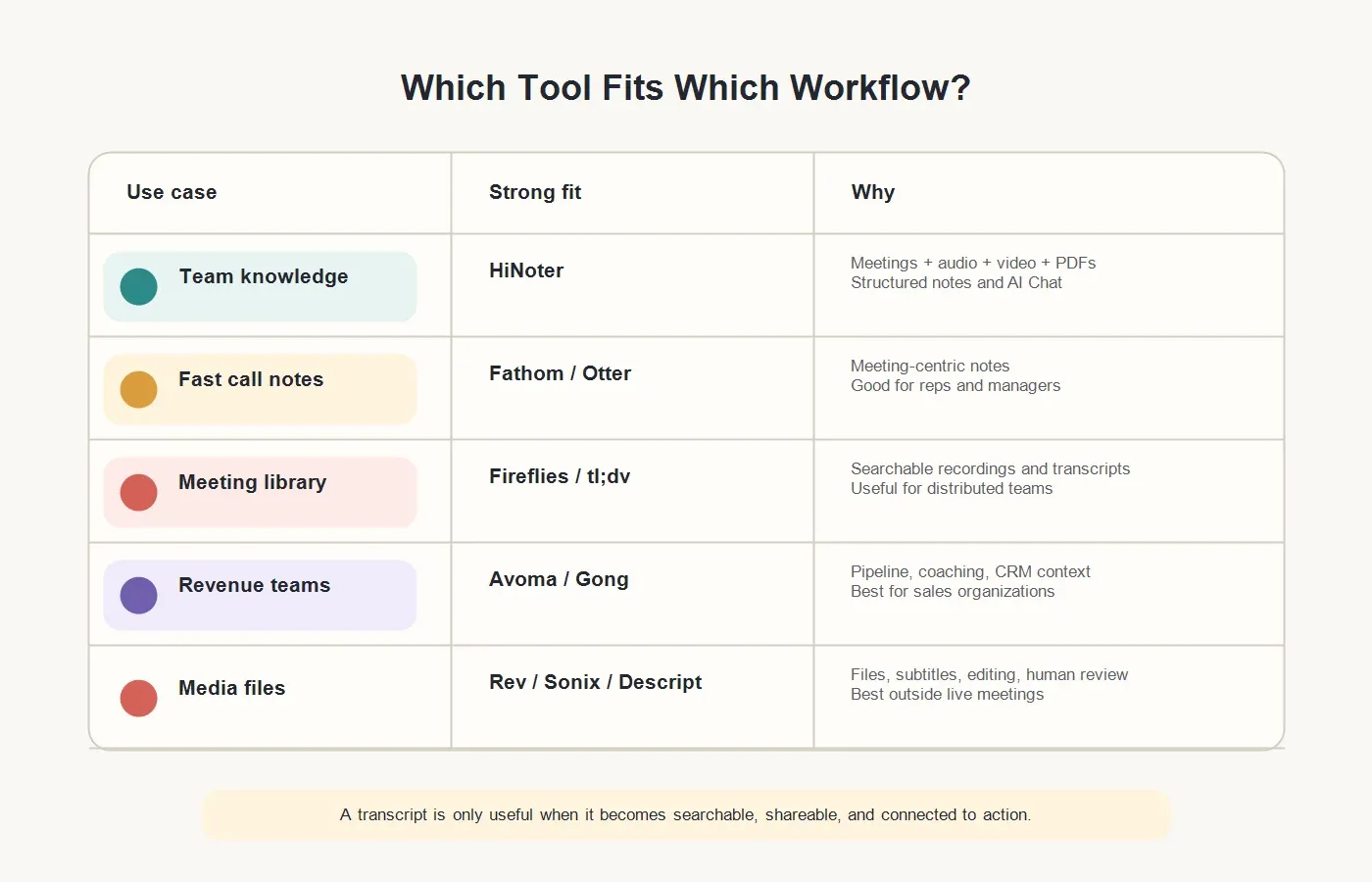
No single product is best for every team. A sales organization may need CRM visibility and coaching. A podcast team may need editing and subtitles. A product team may need searchable research notes across calls, PDFs, and videos. Use the table below to shortlist tools before reading the detailed notes.
| Tool | Best For | Strength | Watch Out For |
|---|---|---|---|
| HiNoter | Teams that want meetings, audio, video, YouTube, and PDFs turned into structured knowledge. | Automatic notes, summaries, action items, mind maps, 50+ languages, integrations, and source-backed AI Chat. | Use it as a knowledge workflow, not as a generic screen recorder. |
| Otter.ai | Individuals and teams that want familiar live meeting transcription and summaries. | Meeting assistant, transcripts, summaries, and team collaboration features. | Evaluate language, admin, and meeting-bot fit for your organization. |
| Fireflies.ai | Teams that want a searchable meeting repository and broad meeting integrations. | Meeting capture, transcripts, search, summaries, and collaboration workflows. | Bot governance and workspace hygiene become important at scale. |
| Fathom | Teams and individuals that want fast meeting notes and follow-up from calls. | Meeting recording, transcripts, summaries, and shareable clips. | Primarily meeting-centric; compare carefully if you need PDF or multi-source knowledge workflows. |
| tl;dv | Distributed teams that want meeting recordings, transcripts, highlights, and recap workflows. | Meeting capture, summaries, clips, and collaboration features. | Best when your core source is meetings rather than mixed content types. |
| Avoma | Revenue teams that need meeting intelligence, coaching, and CRM-connected notes. | Conversation intelligence, sales workflows, summaries, and CRM context. | May be heavier than needed for general internal meeting notes. |
| Gong | Sales organizations that need revenue intelligence and deal visibility. | Call analysis, coaching, forecasting context, and revenue workflows. | Not a lightweight transcription tool; expect enterprise-style evaluation. |
| Notta | Users who need straightforward audio, video, and meeting transcription with summaries. | Transcription, translation-oriented workflows, and meeting notes features. | Compare knowledge reuse and source-cited AI features if that is your priority. |
| Rev | Teams that need human transcription, AI transcription, captions, or higher-review workflows. | Human and AI transcription options, captions, and media workflows. | Less focused on automatic meeting attendance and team action follow-up. |
| Sonix | Media, research, and content teams working with recorded files. | Automated transcription, subtitles, translation, and file-based workflows. | Not primarily a live meeting assistant. |
| Descript | Creators and marketers who edit audio or video from the transcript. | Transcript-based editing, recordings, captions, and content production. | Excellent for content creation, less suited to automated meeting follow-up. |
CTA: If your team wants more than a transcript, try HiNoter. Connect your calendar or upload a source file, then turn the next meeting, video, audio file, YouTube video, or PDF into a transcript, summary, action items, mind map, and source-backed AI answers.
Detailed Tool Notes
1. HiNoter
HiNoter is a strong fit for teams that treat transcripts as the beginning of the workflow, not the final output. It can support automatic meeting attendance, structured notes, summaries, action items, mind maps, AI Chat with source references, and multi-source inputs beyond live meetings. That makes it useful for companies whose decisions come from customer calls, internal meetings, webinars, uploaded audio or video, YouTube content, and PDF reports.
The biggest reason to consider HiNoter is scope. Many tools specialize in live meetings. HiNoter is better positioned for teams that want a shared knowledge layer across meetings and supporting content. It supports 50+ languages and automatic detection, which matters for teams working across the United States, Europe, Brazil, Portugal, and other multilingual markets. It also fits workflows where summaries need to move into tools such as Slack, Notion, Google Docs, calendar, and email.
HiNoter is not the right framing if you only want a simple recorder. Its value is in the structured output: transcript, executive recap, decisions, action items, mind map, exports, and source-cited AI answers.
2. Otter.ai
Otter.ai is one of the best-known names in meeting transcription software. It is commonly used for live meeting transcripts, notes, and collaboration. It is a sensible shortlist choice for users who want a familiar meeting assistant experience and do not need a broader multi-source knowledge workflow.
Look closely at plan limits, supported meeting platforms, language needs, and workspace controls. Otter can work well for individuals and teams, but buyers should make sure the product's meeting bot behavior, summary format, and admin settings match company policy.
3. Fireflies.ai
Fireflies.ai is built around recording, transcribing, searching, and summarizing meetings. It is especially relevant for teams that want a meeting repository with integrations and searchable transcripts. For organizations with high meeting volume, the ability to search across conversations can be more valuable than any single transcript.
The tradeoff is governance. Any tool that joins many meetings needs clear rules: which meetings are captured, who can access the notes, how bots are named, and what happens to sensitive conversations. Fireflies belongs on the shortlist when the repository model fits the team's workflow.
4. Fathom
Fathom is popular for fast call notes, meeting recaps, transcripts, and clips. It is often a good fit for individuals, sales reps, customer-facing teams, and managers who want quick follow-up after video calls. Its appeal is speed and simplicity around the live meeting use case.
The main question is whether your team needs more than meeting capture. If the real workflow includes PDFs, webinars, audio archives, and source-backed knowledge search across mixed material, compare Fathom against broader platforms before committing.
5. tl;dv
tl;dv focuses on meeting recordings, transcripts, summaries, and highlight workflows. It can be useful for distributed teams that need to review calls asynchronously, share clips, and search meeting content. It is also worth considering when the team wants meeting evidence without asking everyone to attend every call.
As with other meeting-first tools, the best fit is a team whose primary source is the live meeting. If the team also needs documents, reports, videos, or uploaded audio converted into one knowledge base, include a broader workflow platform in the evaluation.
6. Avoma
Avoma is best understood as a meeting intelligence and revenue workflow platform, not merely a transcript generator. It is relevant for sales and customer teams that care about CRM notes, coaching, deal visibility, and recurring customer calls. For revenue leaders, that context may be more important than a standalone transcript.
The tradeoff is complexity. A general operations team may not need a revenue-focused platform. If your use case is internal meetings, research, PDFs, or broad knowledge management, Avoma may be more specialized than necessary.
7. Gong
Gong is a revenue intelligence platform used by sales organizations to analyze customer conversations, pipeline, coaching moments, and deal behavior. It can handle call recording and transcription as part of a larger revenue system.
Gong belongs in an enterprise sales comparison, but it is not usually the first choice for a small team that simply needs meeting transcripts and summaries. Buyers should evaluate it when the business case includes sales methodology, forecasting, manager coaching, and CRM-connected analytics.
8. Notta
Notta is a practical option for users who want transcription across meetings, audio, and video, with summaries and translation-oriented workflows. It is a sensible shortlist tool for people who need straightforward transcription and want an easier path than manual note-taking.
For team buyers, the question is what happens after the transcript. Compare how notes are organized, how action items are created, how answers are sourced, and whether the workspace can become a reliable knowledge base rather than a transcript folder.
9. Rev
Rev is known for transcription and captioning, including human transcription and AI transcription options. It is a strong fit when accuracy review, captions, legal-style documentation, or media deliverables matter more than automatic meeting attendance.
Rev can be the right choice for content teams, legal review workflows, interviews, and recordings that need a human-quality option. It is less aligned with teams that want meeting bots, automatic action items, and ongoing meeting knowledge search.
10. Sonix
Sonix is a file-based transcription and subtitle platform often used for media, research, and content libraries. It supports automated transcription, translation, and subtitling workflows, making it useful for teams that process recorded files rather than live meetings.
Choose Sonix when the source is usually a file. Choose a meeting assistant or knowledge platform when the core workflow starts with live calls and ends with follow-up tasks.
11. Descript
Descript is strongest when the transcript is part of audio or video production. It helps creators edit media by editing text, generate captions, and prepare polished content. For marketing teams, podcasters, and video producers, that is a very different value proposition from meeting documentation.
Descript can transcribe and summarize, but it should not be evaluated as a direct replacement for a meeting bot or action-item workflow. It is a creator tool first.
Meeting Transcription Software for Team Knowledge
The most important buying question is not "Which tool transcribes?" It is "What does the team need to do with the transcript?" A transcript can preserve evidence, but it does not automatically create alignment. Teams still need summaries, decisions, owners, tasks, source citations, and a place to search later.
This is where HiNoter stands out. Use HiNoter's meeting assistant when scheduled calls need automatic coverage. Use AI meeting notes when the desired output is structured summaries, action items, and mind maps. Use the audio to text converter for voice recordings, the YouTube transcript generator for permitted video content, and PDF to text for reports or documents that support meeting decisions.
A team knowledge workflow might look like this: capture the meeting, generate the transcript, review the summary, confirm action items, sync the recap to the right workspace, and use AI Chat later when someone asks why a decision was made. That workflow is more useful than a folder of transcripts that nobody opens.
How to Choose the Right Tool
| If You Need | Prioritize | Likely Shortlist |
|---|---|---|
| Automatic meeting notes for everyday calls | Meeting bot behavior, summaries, action items, exports, and easy sharing. | HiNoter, Otter.ai, Fathom, Fireflies.ai, tl;dv |
| Multi-source knowledge across meetings, videos, audio, YouTube, and PDFs | Source support, structured notes, AI Chat with references, multilingual support, and integrations. | HiNoter |
| Sales coaching and revenue intelligence | CRM integration, call scoring, coaching insights, pipeline context, and manager dashboards. | Avoma, Gong, Fireflies.ai |
| High-review transcripts or captions | Human transcription, caption workflows, file turnaround, and quality review. | Rev, Sonix |
| Podcast, video, or social content production | Transcript editing, captions, clips, media workflow, and publishing tools. | Descript, Sonix, Rev |
| Global team documentation | Language support, automatic detection, translation, speaker handling, and cross-language summaries. | HiNoter, Notta, tl;dv, Sonix |
Before you buy, run a real pilot with three meeting types: a customer-facing call, an internal decision meeting, and a messy brainstorming or research session. Then evaluate the outputs. Did the tool capture the right speakers? Did the summary identify what changed? Were action items accurate enough to share? Could a teammate ask a question later and trace the answer back to the source?
Pricing and Implementation Questions
Pricing clarity matters because transcription volume can grow quickly. Ask whether the tool charges per seat, per minute, per recording hour, per workspace, per AI feature, or by enterprise contract. Also check storage limits, retention controls, translation charges, and whether advanced admin features are locked behind higher tiers.
Implementation is just as important. Decide which teams can invite meeting bots, how participants are notified, where notes are stored, and which meetings should be excluded. For sensitive conversations, confirm whether transcripts should be restricted, deleted after a period, or reviewed before sharing.
The cleanest rollout starts with high-value meetings: customer calls, sales demos, research interviews, implementation reviews, leadership syncs, and recruiting debriefs. Once the team trusts the notes, expand carefully.
Final Recommendation
If your need is basic transcription, shortlist Otter.ai, Notta, Rev, Sonix, or Descript depending on whether the source is a meeting, file, or media project. If your need is sales intelligence, evaluate Avoma and Gong. If your need is a searchable meeting repository, compare Fireflies.ai, Fathom, and tl;dv.
If your team wants meeting transcription software that turns meetings and supporting content into structured knowledge, put HiNoter on the shortlist. It is strongest when the output needs to become a summary, action-item list, mind map, export, and source-backed AI Chat answer across meetings, videos, audio, YouTube, and PDFs.
CTA: Try HiNoter free. Connect your calendar or upload a source file, then turn your next meeting into a transcript, summary, action items, mind map, and searchable knowledge base.
FAQs
What is meeting transcription software?
Meeting transcription software captures speech from meetings or recordings and converts it into written text. Modern tools often add AI summaries, speaker labels, action items, exports, search, and integrations.
What is the best meeting transcription software?
The best option depends on workflow. HiNoter is strong for teams that need structured knowledge across meetings, audio, video, YouTube, and PDFs. Otter.ai, Fireflies.ai, Fathom, and tl;dv are strong meeting-first options, while Rev, Sonix, and Descript fit file and media workflows.
Should I choose a meeting bot or a file transcription tool?
Choose a meeting bot when the source is live calls and you need automatic attendance. Choose a file transcription tool when you mainly upload recordings. Choose a knowledge workflow platform when you need both live meeting notes and multi-source reuse.
Do AI summaries replace the transcript?
No. The summary helps people understand the meeting quickly, but the transcript remains the source record. The best workflow connects summary claims back to the source so teams can verify important details.
How should teams handle privacy with meeting transcription software?
Teams should use clear consent practices, invite assistants intentionally, restrict sensitive transcripts, set retention rules, and avoid uploading content they are not authorized to process.