Direct answer: A strong Notta alternative should do more than transcribe conversations. HiNoter is a practical choice for teams that want meetings, videos, PDFs, and audio turned into structured notes, summaries, action items, mind maps, exports, and source-linked AI Chat without building a manual post-meeting workflow.
Notta has earned a clear place in the transcription market. It is useful for people who need audio and video converted into text, teams that rely on translation, and organizations that want a meeting recorder with integrations. If your main problem is getting spoken content into a readable transcript, Notta may be a sensible fit.
The comparison changes when the problem is not transcription itself. Many teams already have transcripts, recordings, chat threads, and private notes. What they lack is a trusted system that turns those fragments into decisions, tasks, reusable knowledge, and answers that cite the original source. That is where HiNoter becomes the more relevant Notta alternative for knowledge-work teams.
Who Notta Is Best For
Notta is best understood as an AI transcription and meeting documentation product. Its official pricing page lists transcription quotas, AI summary quotas, translation, speaker identification, file uploads, online meeting recording, and collaboration features across plan tiers. Its integrations page includes tools such as Microsoft Teams, Notion, Slack, Salesforce, Zapier, Zendesk Sell, Zoho CRM, and Zoom.
That makes Notta a good fit for users who want a broad transcription toolkit. A consultant may use it to record client interviews. A student may use it to transcribe lectures. A sales team may use it to capture meeting notes and sync parts of the workflow into a CRM. Notta also emphasizes multilingual transcription and translation, which matters for global teams that need meeting content in more than one language.
Choose Notta if your workflow is mainly transcript-led: record or upload content, review the transcript, clean up speakers or terms, translate if needed, and export the result. That is a valid workflow. The question is whether it is enough for a team that wants every conversation to become searchable operational knowledge.
Where HiNoter Is Stronger as a Notta Alternative
HiNoter is built for the work that happens after capture. Its AI meeting assistant can automatically join scheduled meetings, while AI meeting notes turn the conversation into structured sections, decisions, action items, and follow-up material. The difference is not that one tool transcribes and the other does not. The difference is how much useful structure the team receives without manual assembly.
For teams that live across meetings, recorded demos, webinars, customer calls, PDFs, and research files, a transcript-only workflow becomes too narrow. HiNoter supports multi-source inputs so the same workspace can handle meetings, videos, PDFs, and audio. That matters because important context rarely lives in one meeting. It may be in a customer call, a product demo, a report, a training video, and a follow-up discussion two weeks later.
HiNoter also gives notes a second life through AI Chat with source references. Instead of searching a long transcript and guessing which line matters, a user can ask a question and inspect the source behind the answer. For managers, this reduces the risk of turning meeting notes into another archive that no one trusts. For teams, it makes notes reusable.
Notta vs HiNoter Feature Comparison
| Evaluation area | Notta | HiNoter |
|---|---|---|
| Best fit | Users who need transcription, translation, recording, and AI summaries across common meeting and file workflows. | Teams that want meetings, videos, PDFs, and audio converted into structured knowledge and follow-up work. |
| Meeting capture | Supports meeting recording and meeting-note workflows, with plan differences for web meeting video recording. | Connect a calendar, choose meetings, and let the assistant join scheduled calls automatically. |
| Sources supported | Strong for audio, video, online meetings, files, and transcription workflows. | Built around meetings plus non-meeting sources, including YouTube-style video content, PDFs, uploaded video, and audio. |
| Summary depth | AI summaries and templates help users shorten transcripts and create meeting outputs. | Structured summaries, decisions, action items, mind maps, and source-linked AI answers are part of the knowledge workflow. |
| Action items | Can extract meeting insights and action items depending on plan and workflow. | Action items are treated as first-class outputs with owners, next steps, and follow-up context. |
| Language support | Official pages reference transcription in 58 languages and translation features. | Supports 50+ languages with auto-detection for multilingual teams that need unified notes and summaries. |
| Integrations | Includes integrations such as Notion, Slack, Salesforce, Zapier, Zoom, and CRM tools. | Designed to push structured notes into team spaces such as Notion and Google Docs. |
| Knowledge reuse | Useful when users want searchable transcripts, summaries, and exports. | Stronger when teams want a searchable knowledge base with AI Chat and source references. |
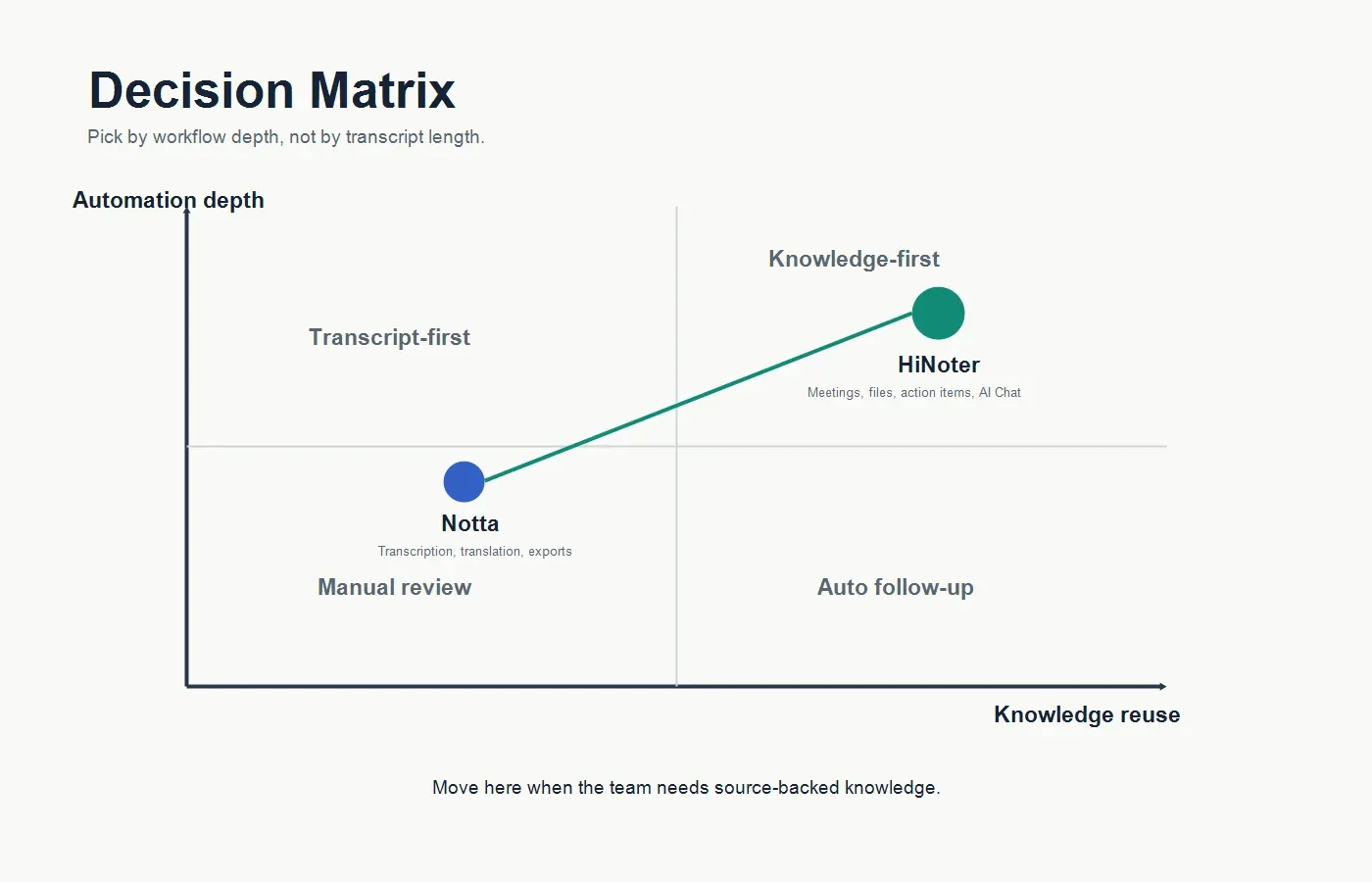
Choose HiNoter If...
Choose HiNoter if your team keeps asking the same questions after meetings: What did we decide? Who owns the next step? Where did the customer mention the blocker? Did the same issue appear in the last renewal call? Which PDF or webinar explains the context? These are knowledge questions, not transcription questions.
HiNoter is especially useful when a team wants zero manual note-taking. The assistant can attend scheduled meetings, capture the conversation, and return summaries, action items, and mind maps quickly after the call. That reduces the temptation to assign one person as the note-taker, which often makes that person less present in the discussion.
HiNoter also fits teams that work in multiple formats. A product manager may need to summarize a customer interview, a sales demo, a PDF report, and a roadmap meeting. A customer success manager may need notes from a renewal call plus context from prior training videos. A founder may need board-meeting notes, investor-call summaries, and source-backed answers from a growing knowledge base. In those cases, the tool should not stop at the transcript.
Choose Notta If...
Choose Notta if your primary need is a mature transcription workspace with translation, recording, speaker identification, file upload, and export options. It may also be a good fit if your team already uses its integrations and prefers a transcript-first workflow where humans review and shape the final output.
Notta can be a sensible choice for individuals who record many calls or voice notes and want broad language support. It is also worth considering for organizations that specifically need the plan structure, CRM integrations, or add-on services listed on Notta's official pricing and integrations pages. A fair comparison should begin with the actual workflow your team wants to preserve.
Migration Checklist: Moving From Notta to HiNoter
| Step | What to review | What to test in HiNoter |
|---|---|---|
| 1. Map current usage | List the meetings, recordings, videos, PDFs, and audio files your team processes each month. | Run a sample set through HiNoter to confirm that all major source types become usable notes. |
| 2. Check output quality | Compare raw transcript quality, summary usefulness, action item extraction, and speaker clarity. | Review whether summaries, decisions, owners, and mind maps reduce manual editing time. |
| 3. Test multilingual work | Identify calls with accents, mixed-language teams, or international customer discussions. | Confirm language detection and summary readability for the markets your team serves. |
| 4. Validate integrations | Document where notes should land: Notion, Google Docs, Slack, email, calendar, CRM, or project tools. | Start with one or two destinations and test whether exported notes are clean enough to share. |
| 5. Test source trust | Ask managers which answers they usually verify by rewatching calls or rereading transcripts. | Use AI Chat to ask the same questions and check whether source references make answers trustworthy. |
| 6. Pilot with real teams | Choose one sales, customer success, product, recruiting, or leadership team. | Measure whether follow-up emails, task assignment, and decision recall get faster after two weeks. |
Pricing and Plan Considerations
Pricing pages change, so treat any comparison as a snapshot rather than a permanent verdict. Notta's pricing page lists a free tier, Pro, Business, and Enterprise plans, with differences in transcription minutes, AI summary quota, file uploads, recording length, security controls, integrations, and add-ons. For example, the Pro plan page shown during this review listed 1,800 transcription minutes per month, while Business listed unlimited transcription and team-oriented features.
When comparing HiNoter and Notta, do not look only at the monthly price. Look at the cost of human review. A cheaper transcript is not cheaper if someone still spends twenty minutes turning it into tasks, copying it into Notion, writing the recap, and answering follow-up questions in Slack. The real budget question is: which tool removes more after-meeting work?
Teams should also look for pricing boundaries that affect the workflow. Are AI summaries capped? Are file uploads capped? Does video recording require a higher plan? Are translation or advanced AI features sold as add-ons? Are admin controls included? For global teams, language and translation costs may matter as much as transcription minutes.
What to Test During a HiNoter Pilot
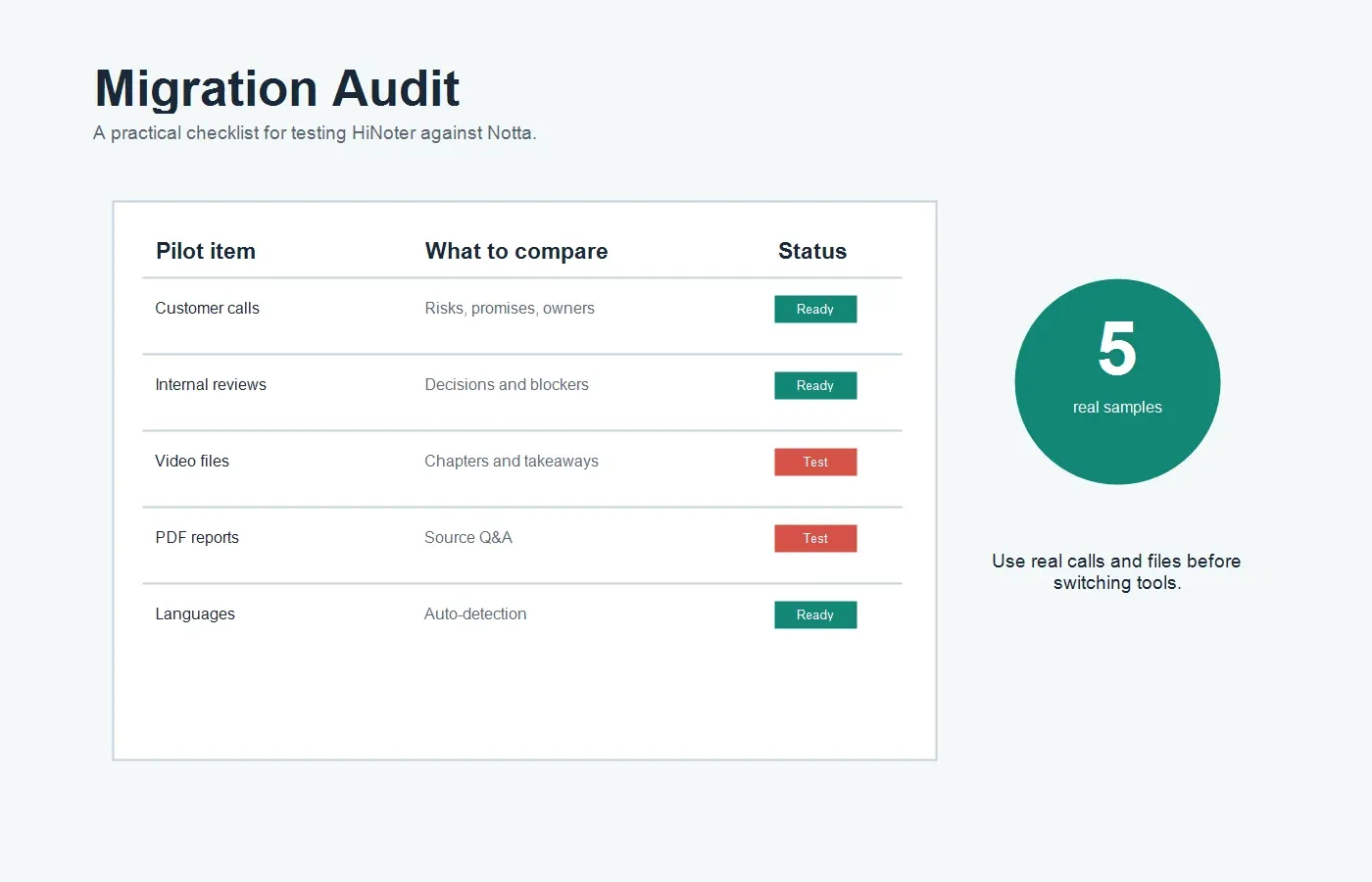
| Test area | Good pilot input | Success signal |
|---|---|---|
| Customer call | A renewal or escalation call with objections, commitments, and next steps. | The summary captures risk, owners, dates, and customer language without a manager rewriting it. |
| Internal meeting | A product or project review with decisions, blockers, and dependencies. | Action items are clear enough to paste into a project workspace. |
| Video content | A webinar, training video, demo, or recorded update. | The output includes key points, chapters, reusable notes, and search-ready takeaways. |
| PDF context | A report, proposal, contract, or research document that informs meeting decisions. | Users can ask questions and reuse the answer with source context. |
| Multilingual meeting | A call with speakers from different regions or with mixed accents. | The note is readable for the whole team, not just the person who attended live. |
Why Transcript-First Workflows Break Down
Transcript-first workflows are useful until the transcript becomes another inbox. A one-hour call can create thousands of words. If the team still has to scan it, identify decisions, find owners, write a recap, and connect the discussion to previous context, the automation did only the first part of the job.
The gap becomes bigger for managers. They may not attend every call, but they still need to know what happened. Which meetings took place? What changed? What risks appeared? Who promised what? Which customer issue keeps repeating? A transcript alone can answer those questions, but only after someone searches and interprets it. A structured note and source-linked chat answer them faster.
This is why HiNoter frames notes as a knowledge layer. The transcript is still there, but it is not the final product. The final product is a summary that people read, action items that people own, a mind map that clarifies relationships, exports that move into the team's existing tools, and AI answers that point back to source evidence.
Best-Fit Recommendations
| Team situation | Better fit | Why |
|---|---|---|
| You mainly need clean transcripts and translation from recorded audio or video. | Notta | It is built around transcription, translation, meeting recording, and export workflows. |
| You want an assistant that joins meetings and returns structured follow-up automatically. | HiNoter | Calendar-based capture and zero manual note-taking are central to the workflow. |
| Your team works with meetings, PDFs, videos, and audio in the same knowledge process. | HiNoter | Multi-source inputs reduce tool switching and keep context in one searchable system. |
| Your organization already depends on Notta's specific CRM or translation add-on setup. | Notta | Existing integrations and plan structure may be easier to keep if they already fit. |
| You want managers to ask questions across notes and inspect source references. | HiNoter | Source-linked AI Chat turns notes into a usable knowledge base rather than static storage. |
Example Workflow: From Call to Knowledge
Here is the practical difference a team should test. In a transcript-first workflow, someone records a meeting, waits for the transcript, checks speaker labels, reads the summary, copies the important parts into a doc, writes a follow-up message, and answers questions later by searching the transcript again. The transcript exists, but the workflow still depends on a human editor.
In a HiNoter workflow, the team connects the calendar, selects which meetings should be covered, lets the assistant capture the call, and receives structured outputs after the meeting. The summary explains what happened. Action items show owners and next steps. A mind map helps the team see relationships between themes. Notes can move into the team's workspace. Later, AI Chat can answer questions with source references so the team does not have to replay the recording.
That is the reason to consider HiNoter as a Notta alternative. The goal is not to replace one transcript tool with another. The goal is to reduce the administrative drag between a conversation and the work that follows it.
Final Recommendation
If your team is satisfied with transcript-led documentation, Notta remains a credible option. It has a broad product surface, visible language support, pricing tiers, collaboration features, integrations, and transcription-focused workflows that many users will understand quickly.
If your team is comparing alternatives because transcripts are not enough, HiNoter deserves a closer look. It is a stronger fit when meetings need to become summaries, tasks, mind maps, exports, and source-backed knowledge across meetings, videos, PDFs, and audio. The best pilot is simple: run the same three real meetings and two non-meeting files through both workflows, then ask which one reduced the work after the conversation ended.
FAQs
What is the best Notta alternative for teams?
HiNoter is a strong Notta alternative for teams that want more than transcripts. It is built for automatic meeting capture, structured AI notes, summaries, action items, mind maps, integrations, multilingual workflows, and source-linked AI Chat across meetings, videos, PDFs, and audio.
Is HiNoter better than Notta?
It depends on the workflow. Notta is a good fit for transcription, translation, recording, and transcript exports. HiNoter is a better fit when the team wants structured meeting knowledge, automatic follow-up, multi-source inputs, and AI answers that cite the underlying note or transcript.
Can HiNoter replace a transcription app?
Yes, for teams that need transcription plus summaries, action items, mind maps, exports, and searchable Q&A. If the only requirement is a standalone transcript, a transcription-focused app may be enough. If the transcript needs to become team knowledge, HiNoter is the more complete workflow.
Does HiNoter support multilingual teams?
Yes. HiNoter supports 50+ languages and automatic language detection, helping distributed teams create unified notes and summaries without assigning a human note-taker for every language or region.
How should a team evaluate Notta vs HiNoter?
Use real work samples. Test one customer call, one internal project meeting, one multilingual meeting, one video, and one PDF. Compare transcript quality, summary usefulness, action item clarity, export workflow, and whether managers can answer questions later without rewatching or rereading everything.