Direct answer: An online meeting recorder captures virtual meetings from platforms such as Zoom, Google Meet, and Microsoft Teams, then preserves the conversation as a recording or transcript. The stronger workflow also creates summaries, action items, decisions, mind maps, exports, and source-backed answers so the meeting becomes searchable team knowledge.
An online meeting recorder is useful only if it reduces work after the call. A raw video file may help someone replay a conversation, but most teams do not need another hour-long file in storage. They need the customer risk, the hiring signal, the project decision, the owner, the deadline, and the context behind each next step.
That is where HiNoter fits. HiNoter is an AI meeting notes and transcription platform, not just a recorder. It can connect to your calendar, automatically join scheduled meetings, detect language, generate structured notes, and turn the meeting record into a knowledge layer your team can search, share, and reuse.
What Is an Online Meeting Recorder?
An online meeting recorder is software that captures a remote meeting and stores the conversation as audio, video, transcript, or structured notes. Some tools focus on the recording file. Others focus on the transcript. A modern AI meeting workflow should do both, then organize the useful information into summaries, tasks, decisions, risks, and searchable answers.
The category matters because meeting platforms and meeting records are not the same thing. Zoom, Google Meet, and Microsoft Teams each have native recording and transcription features, but availability can depend on account type, admin settings, host permissions, storage settings, and regional or organizational policies. Even when recording works, someone still has to review the output.
For a team that runs sales calls, customer success reviews, recruiting interviews, product standups, and leadership meetings every week, the value is not the archive. The value is an accurate, structured record that tells people what happened and what to do next.
Why Teams Need More Than a Plain Meeting Recording
Meetings generate expensive context. People discuss customer commitments, project risks, hiring feedback, strategic tradeoffs, and deadlines. When those details live in a recording, a private notebook, or a chat thread, the organization loses leverage. The same question gets asked again. The same decision gets relitigated. The person who attended the meeting becomes the only reliable source of truth.
Microsoft Work Trend Index research has reported strong demand for AI help with finding information, summarizing meetings, and capturing action items. Asana has also described the drain of "work about work," where people spend large amounts of time searching, coordinating, and chasing status instead of doing the work itself. These signals point to the same operational problem: teams do not only need to capture conversations; they need to recover useful knowledge from them quickly.
A good online meeting recorder should help people stay present during the call and still leave with a reliable record. That means the recorder should preserve the transcript, identify the main points, separate decisions from discussion, create follow-up tasks, and make the meeting searchable later. Recording is the beginning of the workflow, not the finish line.
How HiNoter Works as an Online Meeting Recorder
HiNoter is designed around the full meeting workflow: before the meeting, during the meeting, after the meeting, and later when someone needs the answer again. Instead of asking a teammate to take notes manually, HiNoter can join scheduled meetings and prepare structured outputs automatically.
| Step | What HiNoter Does | Team Benefit |
|---|---|---|
| 1. Connect calendar | HiNoter reads scheduled meetings from the connected calendar. | The recorder can attend the right calls without manual setup for every meeting. |
| 2. Auto-join meeting | The assistant joins scheduled calls on supported meeting workflows. | Participants can focus on the conversation instead of starting, stopping, or chasing notes. |
| 3. Capture and transcribe | Speech becomes text with speaker structure, timestamps, and language detection where available. | The meeting becomes searchable and easier to verify than a private note. |
| 4. Generate AI notes | HiNoter creates summaries, decisions, action items, risks, and mind maps. | Teams see the useful record without rewatching the full meeting. |
| 5. Export and reuse | Notes can move into team systems such as docs, knowledge bases, chat, calendar, and email workflows. | The meeting record reaches the place where follow-up actually happens. |
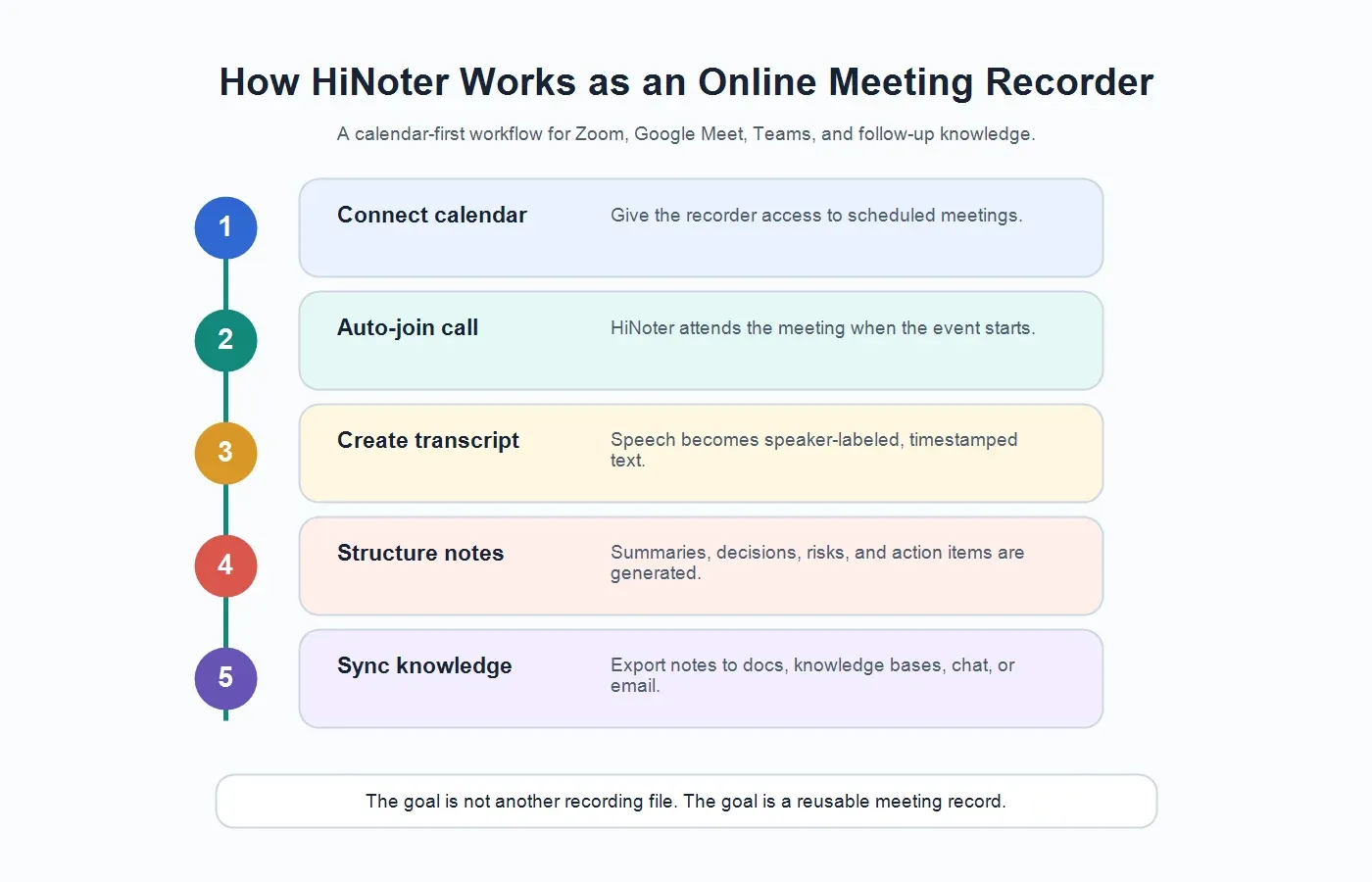
This is the key difference between an online meeting recorder and an AI meeting knowledge workflow. A recording stores what happened. HiNoter helps the team understand what matters, assign what comes next, and find the answer later with source context.
Recording Zoom, Google Meet, and Teams: What to Know
Native recording can be helpful, but teams should understand its limits. Zoom, Google Meet, and Microsoft Teams each have their own recording controls, storage locations, transcription behavior, and admin policies. Features may vary by plan, region, organization, and host settings. If a team relies only on native recording, the person running the call still has to know whether recording is enabled and whether the recording will be available afterward.
There is also a practical problem: people forget. A host may start a meeting, move straight into the discussion, and realize too late that no one captured the key decision. Calendar-based AI note workflows reduce that failure point because the note-taking process can be tied to the meeting invite instead of a manual button press.
| Platform | Native Recording Consideration | HiNoter Workflow Angle |
|---|---|---|
| Zoom | Recording and transcript features can depend on host permissions, account settings, and storage configuration. | Use HiNoter when the team wants notes, summaries, action items, and searchable Q&A after the call. |
| Google Meet | Recording availability can depend on Google Workspace edition and administrator controls. | Connect calendar workflows so scheduled meetings can be captured and summarized without relying on a last-minute manual step. |
| Microsoft Teams | Recording and transcription can depend on tenant policy, organizer settings, and meeting type. | Use AI notes to turn the meeting into decisions, tasks, mind maps, and reusable context. |
Teams should also follow consent and privacy expectations for every platform. Recording rules vary by location, organization, and call type. A clear notice in the meeting invite or at the start of the call is usually a better habit than surprising participants after the fact.
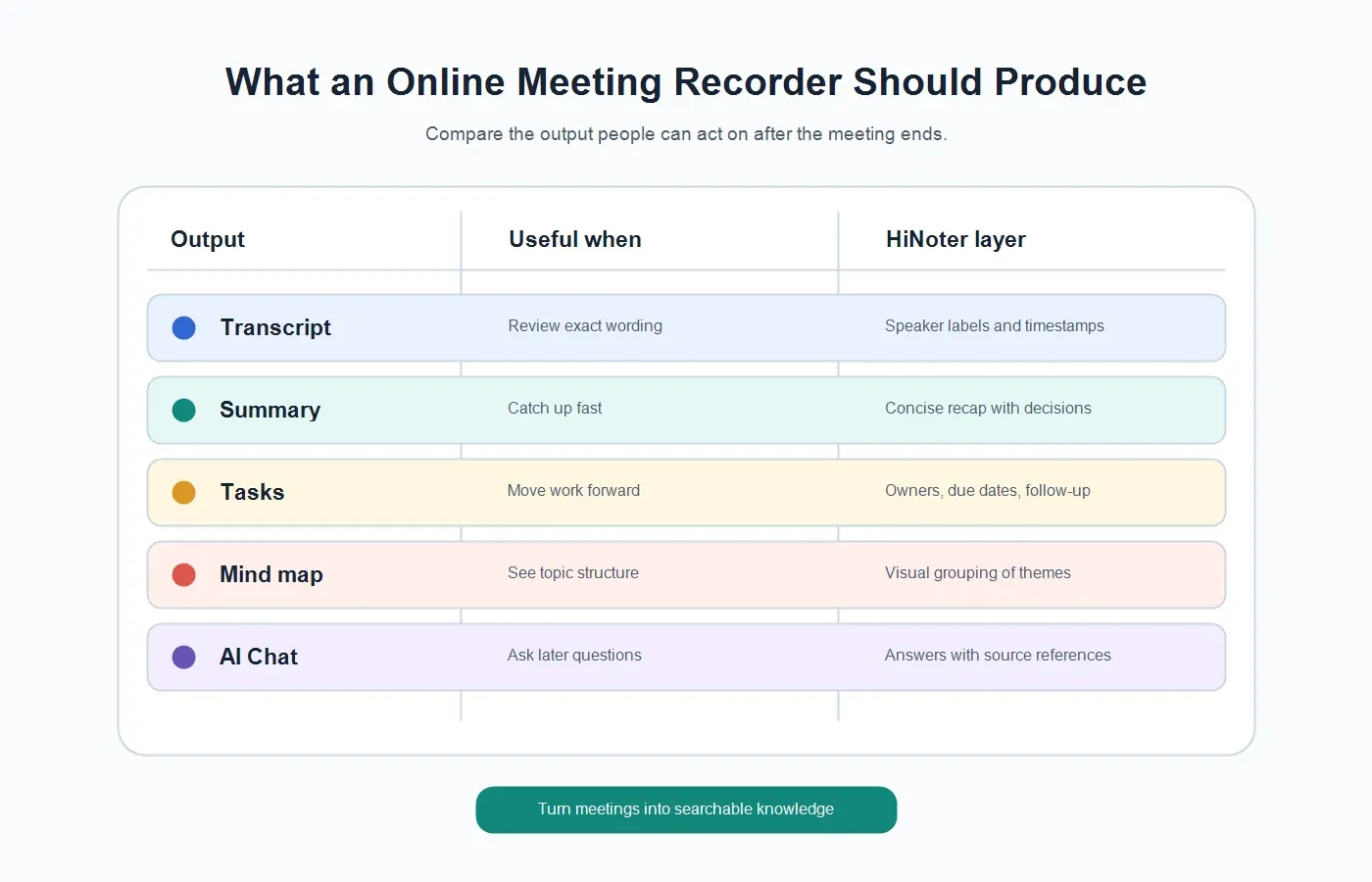
What Should an Online Meeting Recorder Produce?
The best output depends on the job. A manager may need a decision record. A customer success team may need renewal risks and commitments. A recruiter may need candidate evidence. A product team may need objections, feature requests, and unresolved questions. A plain recorder treats all of these meetings the same. A useful AI meeting workflow turns the same conversation into outputs that match how teams actually work.
| Output | What It Answers | Why It Matters |
|---|---|---|
| Transcript | What exactly was said? | Creates a searchable record with source context for review and verification. |
| Summary | What happened in plain language? | Lets stakeholders catch up without reading the entire transcript. |
| Action items | Who owns the next step? | Turns discussion into accountable follow-up with owners and deadlines. |
| Decisions | What was agreed? | Prevents teams from reopening settled issues because the record is unclear. |
| Mind map | How do the topics relate? | Helps teams see themes, blockers, and relationships across a long discussion. |
| AI Chat with citations | Where did that answer come from? | Lets users ask questions later while checking the answer against the meeting source. |
HiNoter supports this broader output model through AI meeting assistant workflows, AI meeting notes, and AI Chat with source references. The product is strongest when a team wants the meeting to become a knowledge asset, not just a file.
Manual Notes vs Plain Recorders vs HiNoter
Manual notes still have a place. A skilled facilitator can capture nuance, read the room, and decide what deserves attention. The problem is consistency. Manual notes vary by person, attention level, meeting pace, and whether the notetaker is also expected to participate. Plain recorders solve the memory problem but create a review problem. Transcription-only tools solve search but still leave teams with long text.
| Option | What You Get | What Still Breaks |
|---|---|---|
| Manual notes | A human-written recap based on what one person captured. | Important details may be missed, biased, or trapped in a private document. |
| Plain recorder | An audio or video file of the meeting. | Someone still has to rewatch, summarize, and assign follow-up. |
| Transcription app | Searchable text with some timestamps or speaker labels. | Raw transcript still needs structure, cleanup, decisions, and action items. |
| HiNoter | Transcript, summary, action items, mind map, exports, and source-linked AI Chat. | The team should still review sensitive or high-stakes outputs before sharing. |
The practical advantage is not that AI replaces judgment. It removes the repetitive capture and first-draft work so the team can spend judgment where it belongs: confirming decisions, clarifying commitments, and sharing the right recap with the right people.
Who Should Use an Online Meeting Recorder?
An online meeting recorder is most valuable when a meeting creates information that someone will need later. That usually includes customer conversations, candidate interviews, stakeholder updates, training sessions, product discovery, project reviews, incident retrospectives, and leadership meetings.
Customer Success Teams
Customer success meetings often contain renewal risk, feature requests, timeline commitments, and executive concerns. A searchable AI note can capture the customer's exact language, summarize the risk, and create follow-up owners without asking the CSM to write everything during the call.
Sales Teams
Sales calls produce objections, buying criteria, competitor mentions, budget timing, and next-step commitments. A recorder with AI summaries helps reps focus on the buyer while still leaving with a useful record for CRM updates, follow-up emails, and handoffs.
Recruiting Teams
Interview notes need to be evidence-based and consistent. A transcript plus structured summary can help interviewers review candidate examples, avoid vague feedback, and share a clearer hiring signal with the panel. Sensitive hiring notes should still be handled under company policy.
Product and Project Teams
Project meetings and product discussions often involve tradeoffs. A meeting record that separates decisions, blockers, owners, and open questions helps teams move faster after the meeting. It also gives absent teammates a reliable way to catch up without asking for a verbal recap.
Supported Inputs: Meetings, Recordings, Videos, and Documents
Many teams start with live meetings, but useful knowledge does not only come from live calls. HiNoter is built for multi-source work, which means teams can use it for meetings, uploaded recordings, videos, YouTube content they own or are permitted to process, and PDFs. That matters because real work rarely lives in one format.
| Source | Typical Use | HiNoter Output |
|---|---|---|
| Live meetings | Zoom, Google Meet, Teams, customer calls, internal reviews. | Transcript, summary, action items, decisions, mind map, AI Chat. |
| Uploaded audio | Phone calls, interviews, voice notes, podcast audio. | Speech-to-text, summaries, quotes, follow-up tasks, searchable notes. |
| Uploaded video | Webinars, demos, trainings, recorded meetings. | Video transcript, chapters, key points, action items, reusable knowledge. |
| PDFs | Reports, briefs, manuals, research, meeting materials. | Extracted text, section summaries, source-linked Q&A, reusable notes. |
This multi-source model is especially useful for global teams. HiNoter supports 50+ languages and automatic language detection, which helps multilingual teams create a consistent record without assigning a human notetaker every time the language changes.
Integrations: Where Meeting Notes Should Go After the Call
The best meeting note is the one that reaches the workflow. If a summary stays inside a separate recorder account, the team still ends up copying it into documents, chat, email, or a project hub. That extra step is where knowledge often gets lost.
HiNoter is designed to connect meeting outputs to the places teams already use. Notes can be prepared for documentation workflows such as Notion and shared documentation. Teams that write post-meeting recaps can also use structured outputs for docs, calendar context, Slack-style updates, and email follow-up. The point is simple: recording should produce a usable record, and that record should move where people will see it.
Privacy, Consent, and Trust
Meeting content can include customer data, employee information, financial plans, product strategy, or legal context. Teams should treat recording and AI notes as a governance workflow, not a casual convenience. That means using clear consent language, limiting access to people who need the record, reviewing sensitive outputs, and following company retention policies.
For AI-generated notes, source references matter because they make the output easier to verify. A summary without source context can sound confident while still missing nuance. HiNoter's AI Chat with source references helps users ask follow-up questions and check the answer against the underlying meeting note or transcript.
For high-stakes meetings, use AI notes as a structured first draft and review the final record before distributing it broadly. The combination of transcript, summary, and source-linked answers gives teams speed without asking them to trust a black box blindly.
Example: What HiNoter Can Create After a Meeting
Imagine a 45-minute customer renewal call. The customer explains that adoption is strong in one department, slow in another, and blocked by a security review. The CSM asks about budget timing. The customer asks for a revised rollout plan before Friday. A plain recording preserves the call, but the team still has to watch it. A raw transcript makes the words searchable, but the owner still has to find the signal.
| HiNoter Output | Example Result | Why It Helps |
|---|---|---|
| Summary | The account is likely to renew if the security review and second-team rollout are resolved before budget review. | Leadership sees the situation without reading the transcript. |
| Decision | The team will send a revised rollout plan before Friday. | The commitment is clear and easy to reference. |
| Action item | Maya owns revised rollout plan; Jordan owns security answers; CSM sends recap email. | Follow-up becomes accountable. |
| AI Chat question | What is the biggest renewal risk? | The answer can point back to the source note or transcript context. |
This is the real outcome people want from an online meeting recorder: not a passive archive, but a working record that helps the team act.
Try HiNoter as Your Online Meeting Recorder
If your team uses Zoom, Google Meet, or Teams and still loses decisions after the call, try a workflow that starts before the meeting and ends in searchable knowledge. Connect your calendar, let HiNoter attend scheduled meetings, and get summaries, action items, mind maps, exports, and AI Chat with source references after the meeting ends.
HiNoter is a strong fit for teams that want zero manual note-taking, multilingual support, fast summaries, and meeting outputs that can be reused across docs, knowledge bases, chat, calendar, and email workflows. The value is not only recording the meeting. It is turning the conversation into a record the team can trust.
FAQs
What is the best online meeting recorder for teams?
The best online meeting recorder for teams is one that reliably captures meetings and turns them into useful outputs: transcript, summary, decisions, action items, owners, due dates, exports, and searchable answers. HiNoter is designed for teams that need a meeting knowledge workflow rather than only a video file.
Can an online meeting recorder join meetings automatically?
Yes, some AI meeting tools can join scheduled meetings through a calendar-based workflow. With HiNoter, teams can connect their calendar so the assistant can attend scheduled calls and generate meeting notes without relying on a participant to take notes manually.
Does an online meeting recorder replace Zoom, Google Meet, or Teams recording?
Not necessarily. Native platform recording is useful when you need a video archive. HiNoter is useful when the goal is structured notes, transcripts, summaries, action items, mind maps, exports, and source-linked AI Chat after the meeting.
Should teams get consent before recording meetings?
Yes. Recording and transcription rules vary by location, organization, and meeting type. Teams should follow applicable law and company policy, give clear notice, and avoid capturing sensitive conversations without an approved reason and access controls.
Can HiNoter handle multilingual meetings?
HiNoter supports 50+ languages and automatic language detection, which helps global teams create consistent meeting records without assigning a human notetaker for each language.
What makes AI Chat with source references useful?
Source references make AI answers easier to verify. Instead of treating a meeting note as a static archive, users can ask follow-up questions and check the answer against the underlying transcript or note context.