Direct answer: For Otter vs Fireflies, choose Otter if you want a familiar transcription-first workspace for meetings, voice notes, and quick summaries. Choose Fireflies if you need meeting capture, searchable transcripts, and broad workflow integrations. Choose HiNoter if your team wants meetings, videos, PDFs, and audio turned into structured notes, action items, mind maps, and source-linked knowledge.
AI meeting tools look similar from a distance. They all promise to record conversations, produce transcripts, summarize meetings, and reduce manual note-taking. The difference shows up after the meeting ends. Can the team find the decision? Can a manager see who owns the next step? Can a customer success lead trace a renewal risk back to the source? Can a product team reuse insights from a call, a webinar, and a PDF in the same workflow?
This comparison reviews Otter, Fireflies, and HiNoter through that practical lens. Otter and Fireflies are well-known options in AI transcription and meeting notes. HiNoter is included as a third option for teams that need zero manual note-taking plus structured knowledge from meetings and non-meeting sources. The goal is not to crown a universal winner. The goal is to help you pick the tool that matches how your team actually works.
Quick Recommendation: Otter vs Fireflies vs HiNoter
| Tool | Best fit | Watch for | Choose it when |
|---|---|---|---|
| Otter | Teams and individuals that want fast transcription, meeting notes, voice capture, and a familiar transcript workspace. | Transcript-heavy workflows may still require manual cleanup, source review, and follow-up formatting. | You need quick meeting transcripts, searchable notes, and lightweight collaboration around spoken content. |
| Fireflies | Teams that want a mature AI meeting assistant with meeting capture, searchable transcripts, and many app connections. | Broad integrations are valuable only if the notes arrive in the systems your team actually uses. | You need a meeting bot, searchable call history, action items, and integrations across sales or collaboration tools. |
| HiNoter | Teams that want meetings, uploaded audio, videos, YouTube-style content, and PDFs converted into structured knowledge. | Teams should define which meetings and files can be captured, shared, and queried with AI. | You need summaries, decisions, action items, mind maps, exports, 50+ languages, and AI Chat with source references. |
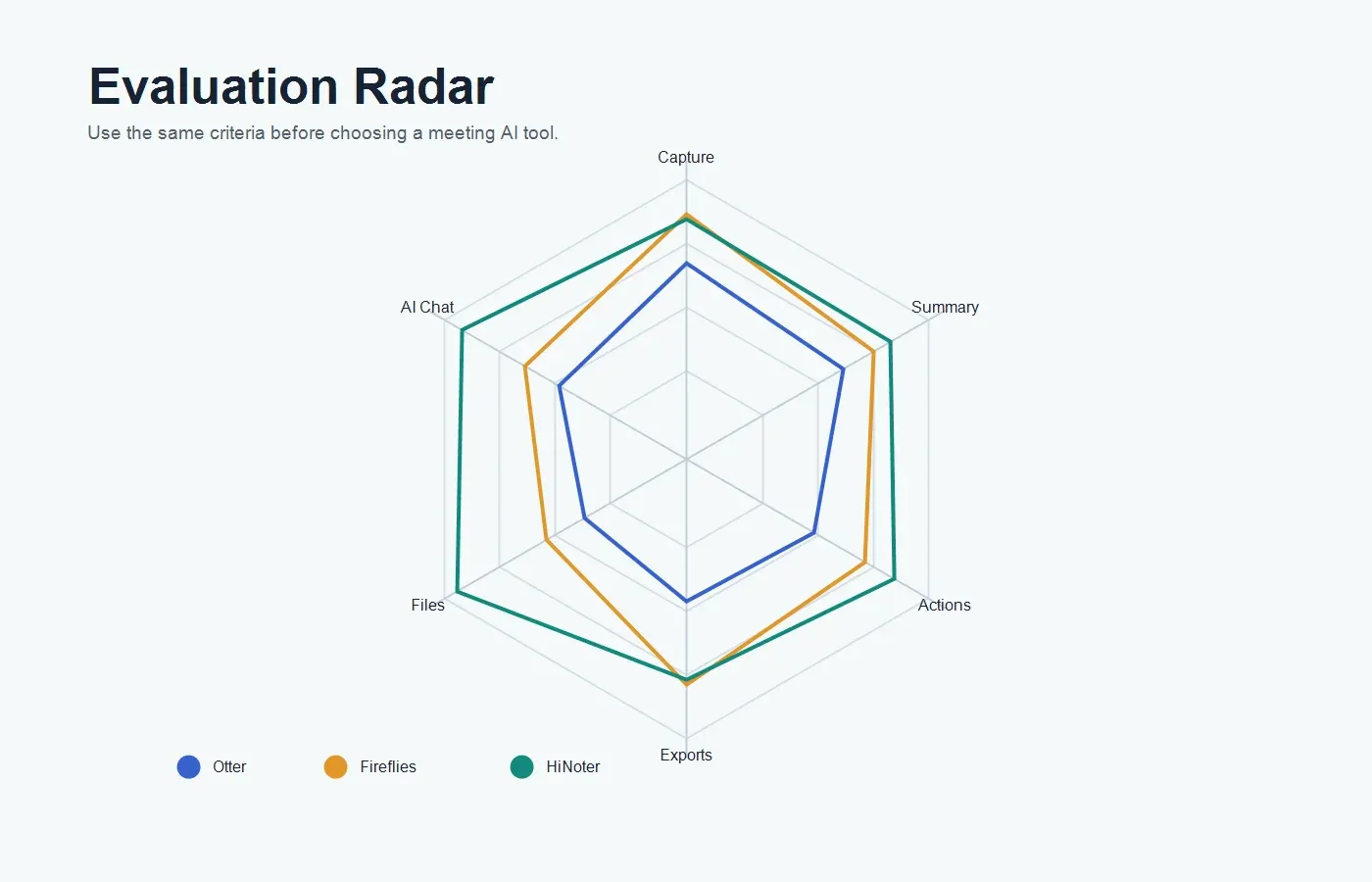
The simplest way to think about it is this: Otter is useful when transcription and meeting notes are the center of the job. Fireflies is useful when you want meeting capture plus a broader integration layer. HiNoter is useful when meetings are only one source of knowledge and the team needs structured outputs that travel into docs, chat, tasks, and search.
Methodology: How We Compared Otter vs Fireflies
This review uses public product pages, help materials, pricing pages, and security or privacy documentation available as of July 16, 2026. SaaS packaging changes frequently, so plan limits, seat rules, meeting minutes, upload caps, and AI feature availability should be verified during procurement. The comparison focuses on workflow fit rather than small interface differences.
The evaluation framework includes meeting capture, transcription quality, summary quality, action items, integrations, language support, privacy controls, exports, AI chat, pricing clarity, and multi-source support. Those criteria matter because the real cost of a meeting tool is not only its subscription price. It is the time your team still spends rewatching recordings, editing notes, chasing owners, copying summaries into docs, or asking the same question twice.
What We Did Not Do
We did not assign a fake universal score. A recruiting team, customer success team, sales team, and product team will value different outputs. Instead, this page shows where each product fits, where it may create extra work, and how to run a fair pilot before switching.
Otter vs Fireflies: The Short Version
Otter is often strongest for teams and individuals that want a straightforward transcription and note workspace. It is widely associated with live transcription, meeting notes, voice notes, speaker identification, summaries, and searchable conversation records. For many users, Otter's appeal is that it feels easy to understand: capture speech, get text, review notes, and share them.
Fireflies is often strongest for teams that want a meeting assistant connected to a larger workflow. Public Fireflies materials emphasize meeting recording, live transcription, search, AI summaries, action items, broad integrations, uploads, and AI assistance. That makes Fireflies especially relevant when meeting data needs to flow into CRMs, collaboration tools, and team workflows.
The practical difference is that Otter tends to feel more transcription-workspace oriented, while Fireflies tends to feel more meeting-automation and integration oriented. Both can reduce manual note-taking. Both still require a team to decide what a good meeting record looks like. Without that decision, any AI transcript can become another searchable archive that nobody turns into action.
Where HiNoter Fits
HiNoter fits when the team wants to eliminate manual note-taking and turn multiple content sources into usable knowledge. With HiNoter meeting assistant, teams can connect calendars, let the assistant join scheduled meetings, and receive structured notes after the call. The workflow is designed around presence: people can focus on the conversation instead of writing notes in the background.
HiNoter also extends beyond live meetings. A team can use it for permitted videos, uploaded audio, YouTube-style content, PDFs, and other source material that contains useful decisions or insights. That matters because modern team knowledge rarely lives in one channel. Customer calls, product demos, board decks, policy PDFs, webinars, and interviews all become part of the operating record.
The product's strongest fit is structured output: summaries, action items, mind maps, source-linked AI Chat, and exports. Instead of treating a transcript as the final artifact, HiNoter treats the transcript as raw material for reusable knowledge.
Feature Comparison: Otter vs Fireflies vs HiNoter
| Criterion | Otter | Fireflies | HiNoter |
|---|---|---|---|
| Meeting capture | Meeting assistant and transcription workflows for supported meeting platforms. | Meeting bot and recording workflows for common video meeting platforms. | Calendar-connected auto-join workflow for scheduled meetings. |
| Transcription | Strong transcription workspace with searchable conversations and notes. | Strong meeting transcription and searchable call history. | Transcript plus structured notes, summaries, decisions, action items, and mind maps. |
| Summaries | AI summaries and meeting notes for captured conversations. | AI-generated meeting summaries and recap workflows. | Executive-style summaries, blockers, risks, next steps, and source-backed answers. |
| Action items | Can help surface follow-up from meeting notes depending on plan and workflow. | Can identify tasks and follow-up items from meetings. | Extracts action items with owners, due dates, risks, and reusable follow-up context. |
| AI chat and search | Search and AI-assisted querying are available across supported content. | AskFred-style AI assistance for querying meeting content. | AI Chat with source references across notes and supported content sources. |
| Multi-source input | Strong for meetings, transcripts, and spoken notes. | Strong for meetings and supported uploads. | Meetings, audio, video, YouTube-style content, PDFs, and other permitted files. |
| Language support | Supports multilingual workflows, with details depending on current product packaging. | Public materials describe broad multilingual transcription coverage. | 50+ languages with automatic language detection for global teams. |
| Integrations | Useful meeting and productivity integrations, depending on plan. | Broad marketplace of meeting, CRM, collaboration, and workflow integrations. | Designed to sync with Notion, Slack, Google Docs, calendar, and email workflows. |
| Best outcome | Fast transcripts and meeting notes that are easy to review and share. | Searchable meeting memory connected to team systems. | Structured team knowledge from meetings and files, with source-backed answers. |
What Otter Is Best For
Otter is a strong choice when users want fast speech-to-text and a simple place to review conversations. It works well for meeting notes, interviews, lectures, voice notes, and quick transcripts that need to be searchable and shareable. The product is especially approachable for users who do not want to configure a complicated meeting operations workflow.
Otter can also be useful for small teams that want an easy transcript-first system before they invest in heavier sales, success, or project management integrations. For example, a consultant may record client calls, review the transcript, copy key decisions into a proposal, and share a summary with the client. A student or researcher may use transcripts to find quotes and recover details from long sessions.
The caution is that transcription alone does not equal documentation. If your team needs owner fields, due dates, decision logs, risks, knowledge-base reuse, or source-linked AI answers, you may still need a second workflow. Otter is helpful when the transcript is the main thing. It may feel lighter when the team needs structured operational follow-through.
What Fireflies Is Best For
Fireflies is a strong choice when meetings are frequent and need to be connected to other team systems. It is often a good fit for revenue teams, customer-facing teams, recruiting teams, and managers who want searchable meeting history across many calls. Its public positioning emphasizes AI meeting notes, transcription, collaboration, integrations, uploads, and conversational AI assistance.
Fireflies can be especially useful when the team already has a mature stack. If your CRM, collaboration tool, calendar, and project management system are central to your workflow, Fireflies' integration coverage may reduce manual copying. The value comes from making meeting content available in places where work already happens.
The caution is that broad integrations can hide workflow complexity. A meeting note sent to the wrong place is still lost. A long transcript that is searchable but not structured can still require a manager to interpret. Fireflies is strongest when teams define naming conventions, sharing rules, summary templates, and follow-up ownership before rolling it out widely.
What HiNoter Is Best For
HiNoter is strongest for teams that want automatic notes to become reusable knowledge, not just meeting records. The HiNoter AI meeting notes workflow can capture meetings automatically, detect languages, generate summaries, extract action items, build mind maps, and help users ask questions later with citations.
That workflow is especially useful for global teams. When colleagues work across the United States, Europe, Brazil, Portugal, and other regions, meetings can involve multiple languages, accents, and handoff patterns. A human notetaker may miss context or spend time translating. HiNoter supports 50+ languages with automatic detection, which helps multilingual teams create a shared record without assigning one person to document every conversation.
HiNoter also fits teams that need more than audio. Product teams may need to summarize customer interviews and PDF research reports. Marketing teams may need webinar notes and YouTube-style summaries. Customer success teams may need renewal calls, support escalations, and contract notes in one searchable place. In those cases, a tool focused only on meetings can leave valuable knowledge outside the system.
Decision Matrix: Which Tool Should You Choose?
| Team need | Best choice | Reason |
|---|---|---|
| Simple transcription and meeting notes | Otter | Strong fit for users who want quick transcripts, summaries, voice capture, and easy review. |
| Meeting capture with broad integrations | Fireflies | Strong fit for teams that need meeting data connected to collaboration, CRM, and workflow tools. |
| Structured knowledge from meetings and files | HiNoter | Strong fit for teams that need meetings, audio, video, PDFs, and permitted content summarized together. |
| Global team note-taking | HiNoter | 50+ language detection helps multilingual teams create consistent summaries without a manual notetaker. |
| Transcript review for lectures or interviews | Otter | Best when the transcript itself is the main deliverable and the workflow is lightweight. |
| Revenue team call history | Fireflies or HiNoter | Choose based on whether your team needs CRM-oriented meeting memory or broader source-linked knowledge. |
Pricing and Plan Considerations
Do not compare Otter vs Fireflies by headline price alone. AI meeting tools can vary by transcription minutes, meeting limits, file uploads, AI query usage, storage, admin controls, recording retention, exports, and integrations. The plan that looks cheaper may cost more if your team also needs a separate summarizer, document tool, knowledge base, or manual coordinator.
A fair comparison uses real meetings. Run a two-week pilot with normal internal meetings, customer calls, interviews, and one longer file such as a recorded webinar or training session. Ask users to complete actual follow-up work: write the recap, assign owners, find a decision, answer a manager's question, and export the note to the right destination.
| Question | Why it matters | What to verify |
|---|---|---|
| How are minutes and uploads counted? | Heavy meeting teams can hit limits quickly. | Meeting duration, upload size, transcription minutes, storage, and AI usage rules. |
| Which integrations are included? | Missing exports create manual work after every call. | Calendar, Slack, Notion, Google Docs, CRM, email, and workflow automation support. |
| Can the tool handle non-meeting files? | Important knowledge may live in videos, PDFs, recordings, or training material. | Upload support, PDF handling, video processing, and source-linked Q&A. |
| What privacy controls exist? | Meeting content may include confidential customer, candidate, or strategy information. | Roles, retention, deletion, sharing, consent notices, workspace controls, and security docs. |
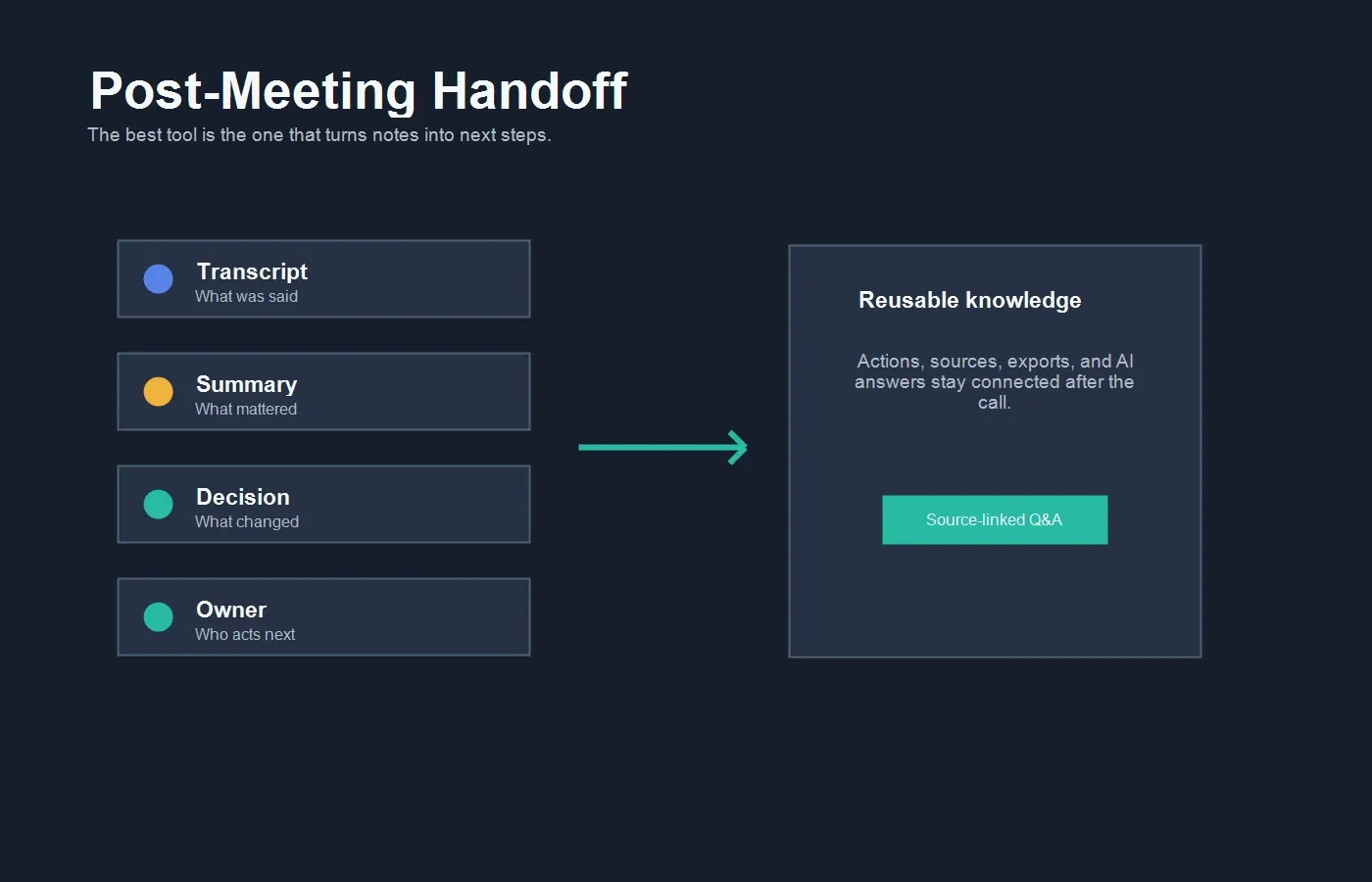
Workflow Example: From Call to Reusable Knowledge
A useful AI note workflow has five stages. First, decide which meetings and files are allowed to be captured. Second, connect the calendar or upload the permitted source. Third, generate the transcript and summary. Fourth, extract decisions, action items, risks, owners, and deadlines. Fifth, sync the output to the system where the team already works.
HiNoter is designed for that full loop. Notes can move into team documentation through Notion integration or become editable recaps through Google Docs integration. When notes, calendar context, email, and chat are part of the same path, meeting documentation becomes part of work instead of a separate admin chore.
This matters for managers because the meeting record should answer operational questions quickly. What did the customer request? Which objection appeared three times this month? Who owns the next action? What evidence supports the product decision? Which meeting mentioned the same risk? A plain transcript may contain those answers, but a structured knowledge workflow makes them easier to retrieve.
Privacy and Consent Questions
Every AI meeting notes tool needs clear governance. Tell participants when an assistant is present. Define which meetings can be recorded, transcribed, or summarized. Avoid capturing sensitive legal, HR, medical, financial, or confidential customer conversations unless your organization has approved the workflow. Keep notes only where the right people can access them.
Privacy is also a usability issue. If people feel surprised by a meeting bot, they may become less open. If notes are shared too widely, teams may create new risks while trying to save time. The best rollout is explicit: publish internal rules, set retention expectations, assign admin ownership, and give teams a way to exclude sensitive meetings.
When comparing Otter, Fireflies, and HiNoter, ask about data retention, deletion, workspace permissions, encryption, admin controls, AI training policies, export rights, and audit support. If you work in a regulated industry, procurement should review security documentation before broad deployment.
Migration Checklist
If you are moving from Otter or Fireflies to HiNoter, start with a focused pilot. Pick one team, one workflow, and one success metric. Customer success renewal calls, recruiting interviews, project status meetings, and product discovery calls are good tests because they create clear decisions, risks, owners, and next steps.
| Step | Action | Success signal |
|---|---|---|
| 1 | Select 10 to 20 real meetings and files. | The sample includes short calls, long meetings, noisy audio, and at least one non-meeting source. |
| 2 | Define the output template before testing. | Everyone agrees on summary, decision, owner, deadline, risk, and next-step fields. |
| 3 | Connect calendar and key destinations. | Notes arrive where the team already works instead of sitting in another inbox. |
| 4 | Compare transcript, summary, and action item quality. | Managers spend less time editing notes and chasing participants for context. |
| 5 | Ask source-linked questions after the meeting. | Users can verify answers against the original note, transcript, file, or source passage. |
Choose Otter If...
Choose Otter if you want an approachable transcription and notes workspace. It is a strong fit for people who frequently capture meetings, interviews, voice notes, lectures, or quick conversations and want searchable text without building a large operations process around every call.
Otter can also be a good choice when the user is an individual contributor or small team that mainly needs to recover what was said. If the transcript and a basic summary solve most of the problem, a lightweight transcription-first workflow can be enough.
Choose Fireflies If...
Choose Fireflies if your team runs many meetings and wants meeting data connected to the rest of the stack. It is especially relevant when searchable call history, meeting capture, action items, and integrations are the main requirements.
Fireflies may be the stronger fit for teams that want a mature meeting assistant ecosystem. Just make sure the integration paths match the way your team handles follow-up. The value is not in sending notes everywhere. It is in sending the right information to the right place with minimal cleanup.
Choose HiNoter If...
Choose HiNoter if your team wants to skip manual note-taking and still leave with accurate, structured outcomes. It is the best fit in this comparison when your knowledge sources include meetings, uploaded audio, videos, PDFs, and other permitted materials. HiNoter turns those sources into notes, summaries, decisions, action items, mind maps, exports, and source-linked AI answers.
HiNoter is also a strong choice when teams need their notes to become a searchable knowledge base. A transcript tells you what was said. A structured knowledge workflow tells you what changed, who owns the next step, and where the evidence lives.
Final Verdict: Otter vs Fireflies vs HiNoter
Otter vs Fireflies is not a simple feature checklist. Otter is compelling for transcription-first users who want searchable meeting notes and fast review. Fireflies is compelling for teams that want meeting capture, searchable transcripts, and broad workflow integrations. HiNoter is compelling for teams that want the output of conversations and documents to become structured, source-backed team knowledge.
If your main need is turning speech into text, start with Otter. If your main need is capturing meetings and pushing notes across a connected stack, evaluate Fireflies closely. If your real problem is that decisions, tasks, risks, and insights disappear across meetings, PDFs, videos, recordings, chat, and private notes, HiNoter is built closer to the workflow you need.
CTA: Try HiNoter to connect your calendar, capture your next meeting automatically, and turn meetings or permitted files into transcripts, summaries, action items, mind maps, exports, and source-linked AI Chat.
FAQs
Is Otter better than Fireflies?
Otter can be better if you want a straightforward transcription and meeting notes workspace. Fireflies can be better if you need a meeting assistant with broad integrations, searchable call history, and team workflow automation. The better choice depends on whether your priority is transcription simplicity or meeting operations.
How is HiNoter different from Otter and Fireflies?
HiNoter focuses on turning meetings and multiple content sources into structured knowledge. It supports automatic meeting attendance, summaries, action items, mind maps, multilingual workflows, exports, and AI Chat with source references. It is designed for teams that need more than isolated transcripts.
Can AI meeting tools replace manual note-taking?
They can remove routine note-taking for many meetings, but humans should review sensitive commitments, legal issues, hiring feedback, customer promises, and high-stakes decisions. AI notes work best when the team has clear review and approval rules.
Which tool is best for multilingual teams?
Otter and Fireflies support multilingual use cases depending on current settings and plan packaging. HiNoter is especially strong for distributed teams because it supports 50+ languages with automatic language detection and structured summaries.
Do I still need recordings if I have AI notes?
Sometimes. If the goal is follow-up, decisions, and searchable answers, AI notes may be more useful than a video recording. If the goal is compliance, training, legal evidence, or quality review, your organization may still require formal recordings under its policy.
What should I test during a trial?
Test capture reliability, transcript accuracy, summary quality, action item extraction, source references, exports, language handling, permissions, and how quickly managers can find answers after the meeting. Use real meetings and files, not only polished demo calls.