The first time somebody asked me to take meeting minutes I had no idea what I was doing. I scribbled notes furiously for an hour, tried to type them up afterward, realized I'd missed half the decisions, spent two more hours reconstructing what happened from memory, and handed in something that looked like a stream-of-consciousness journal entry. My manager read it, looked at me, and said "this isn't what meeting minutes are." He was right. I just didn't know the format.
Nobody teaches you this. There's no class in school called "how to write meeting minutes." You get assigned the task, you Google "meeting minutes template," you find a bunch of images that are PDFs you can't edit, and you wing it. That's why most companies have inconsistent minutes — different people, different formats, no standard. Six months later nobody can find the decision about the pricing change because it's buried in an email with the subject line "notes from tues mtg."
So. Five templates. All editable. Standard business, board meeting, project standup, client meeting, and remote/async. Copy them into Word or Google Docs. Fill in the blanks. Done. I'll also cover what goes in minutes (and what doesn't), the difference between minutes and notes, and how to stop writing them manually.
What's in this page:
Why minutes matter (and what happens when you don't keep them)
The 7 elements every minutes document needs
The 5 templates
Minutes vs. notes — what's the difference?
10 best practices for writing minutes
How to stop writing minutes manually
FAQ
Why Minutes Matter
Meeting minutes are the official record of what happened in a meeting. Not a transcript. Not a summary. A record of decisions made, actions assigned, and topics discussed. They exist for three reasons:
Legal compliance. Board meetings, shareholder meetings, and certain regulatory meetings require minutes by law. No minutes = potential liability. If your company is ever audited or sued, minutes are what prove decisions were made properly.
Action tracking. If nobody writes down "Maria will send the proposal by Friday," guess what happens? Maria doesn't send the proposal by Friday. Written action items with owners and deadlines get done. Unwritten ones don't.
Institutional memory. Three months from now, nobody will remember why the team decided to switch vendors. Minutes are how you look that up.
The cost of not keeping minutes is invisible until you need them. Then it's very visible. I've seen teams spend hours in meetings re-deciding things they already decided because nobody wrote it down. That's the real cost — not the minutes themselves, but the meetings you have to redo.
The 7 Elements Every Minutes Document Needs
Every meeting minutes format, regardless of meeting type, should include these seven things. If your minutes are missing any of them, they're incomplete.
Date and time — when the meeting happened, including start and end time.
Location or platform — physical room, Zoom link, Google Meet, whatever.
Attendees — who was present, who was absent, who joined late. For formal minutes, note who chaired and who took minutes.
Agenda items — what was discussed, in order. Each item should have its own section.
Discussion summary — not a transcript. Key points raised, different viewpoints, any data or documents referenced.
Decisions made — explicitly. "The team decided to..." Not implied. Written down.
Action items — who is doing what, by when. The most important section. If your minutes don't have action items with owners and deadlines, the meeting might as well not have happened.
That's it. Seven things. Everything else — motions, voting records, attachments — depends on the meeting type. Board minutes need all of that. Standup minutes don't.
The 5 Templates
Each template below is ready to copy. Paste it into Word or Google Docs, fill in the brackets, and you're done. I've included a filled-out example for the standard business template so you can see what a complete one looks like.
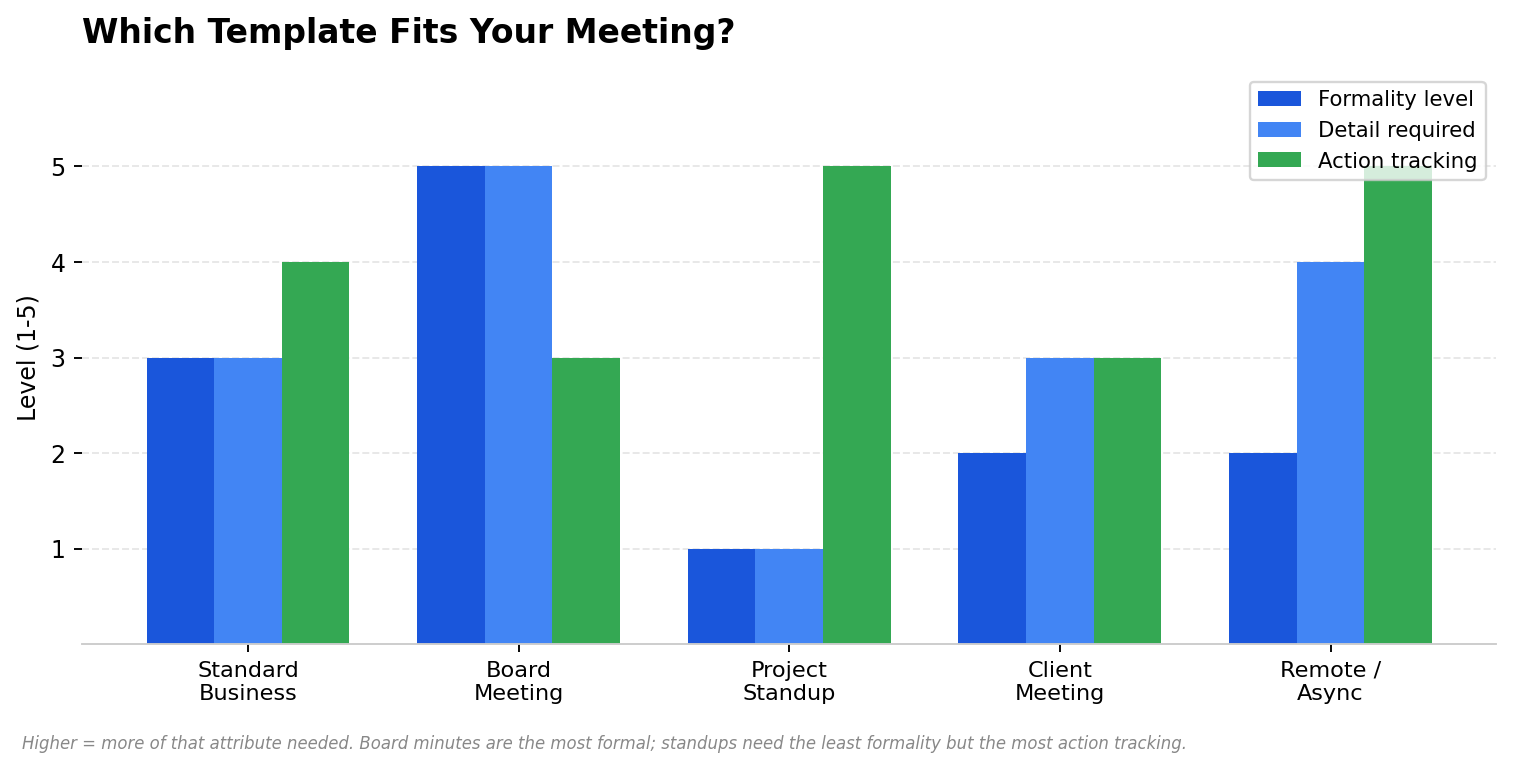
Template | Use for | Formality | Length |
1. Standard Business | Team meetings, department reviews | Medium | 1-2 pages |
2. Board Meeting | Board of directors, formal governance | High | 2-5 pages |
3. Project Standup | Daily/weekly standups, sprint check-ins | Low | Half page |
4. Client Meeting | Client calls, pitches, status updates | Medium | 1 page |
5. Remote/Async | Distributed teams, async updates | Low | Half page |
Template 1
Standard Business Meeting Minutes
Use this for weekly team meetings, department reviews, cross-functional syncs. The most common format. Covers the basics without being overly formal.
MEETING MINUTESMeeting Title: [Department / Team Name] Weekly Meeting
Date: [Month DD, YYYY]
Time: [Start time] – [End time]
Location: [Room name / Zoom link]
Chair: [Name]
Minutes by: [Name]
Attendees:
[Name 1], [Name 2], [Name 3], [Name 4]
Absent: [Name 5] (on leave)
── AGENDA ──
1. [Agenda item 1 — e.g., Q2 budget review]
Discussion: [Brief summary of what was discussed]
Decision: [What was decided, or "Deferred to next meeting"]
Action: [Who does what, by when]
2. [Agenda item 2]
Discussion: [...]
Decision: [...]
Action: [...]
3. [Agenda item 3]
Discussion: [...]
Decision: [...]
Action: [...]
── ACTION ITEMS ──
☑ [Owner] to [task] by [deadline]
☑ [Owner] to [task] by [deadline]
☑ [Owner] to [task] by [deadline]
Next meeting: [Date and time]
Minutes distributed by: [Date]
Download: Word (.docx) · Google Docs · PDF
Template 2
Board Meeting Minutes
For boards of directors, governance committees, and formal corporate meetings. These are board meeting minutes template documents that may be legally required and could be reviewed by auditors or regulators. Be precise. Record motions, votes, and dissenting opinions.
Legal note: In most jurisdictions, corporations and nonprofits are legally required to keep board meeting minutes. These minutes serve as the official corporate record. Consult your legal counsel on specific requirements for your jurisdiction and entity type.
BOARD OF DIRECTORS — MEETING MINUTESOrganization: [Company Name]
Date: [Month DD, YYYY]
Time: [Start] – [End]
Location: [Address / Virtual platform]
Directors Present:
[Name], [Title] (Chair)
[Name], [Title]
[Name], [Title]
[Name], [Title]
Directors Absent:
[Name] ([reason, if known])
Also Present:
[Name], [Title — e.g., Secretary, CFO, Legal Counsel]
── CALL TO ORDER ──
The meeting was called to order at [time] by [Chair name].
── QUORUM ──
A quorum was confirmed present ([X] of [Y] directors).
── APPROVAL OF PRIOR MINUTES ──
The minutes of the [date] meeting were reviewed.
Motion to approve: [Name]
Seconded: [Name]
Vote: [Unanimous / X in favor, X opposed, X abstaining]
Result: [Approved / Approved with amendment]
── AGENDA ITEM 1: [Topic] ──
[Name] presented [summary of presentation].
Discussion followed regarding [key points].
Motion: [Exact wording of the motion]
Moved by: [Name]
Seconded by: [Name]
Vote: [Unanimous / Roll call results]
Result: [Carried / Defeated / Tabled]
── AGENDA ITEM 2: [Topic] ──
[Same structure as above]
── OTHER BUSINESS ──
[Any items raised not on the agenda]
── ADJOURNMENT ──
The meeting was adjourned at [time].
Next meeting: [Date and time]
── SIGNATURES ──
Submitted by: _____________________ [Secretary name]
Approved by: _____________________ [Chair name]
Date approved: _______________
Download: Word (.docx) · Google Docs · PDF
Template 3
Project Standup Minutes
For daily standups, sprint check-ins, weekly project syncs. Keep it short. Nobody reads a three-page standup summary. The goal is action items and blockers, not discussion transcripts.
STANDUP — [Project Name]Date: [Month DD, YYYY]
Attendees: [Names]
── SINCE LAST MEETING ──
[Name]: [What I completed]
[Name]: [What I completed]
[Name]: [What I completed]
── TODAY ──
[Name]: [What I'm working on]
[Name]: [What I'm working on]
── BLOCKERS ──
[Name]: [What's blocking me, and who can help]
[None reported]
── ACTION ITEMS ──
☑ [Owner] — [task] — by [date]
☑ [Owner] — [task] — by [date]
Next standup: [Date and time]
Download: Word (.docx) · Google Docs · PDF
Template 4
Client Meeting Minutes
For client calls, pitches, status updates. The format here matters because you'll often share this with the client. It should look professional and focus on outcomes, next steps, and anything you promised.
CLIENT MEETING — [Client Name]Date: [Month DD, YYYY]
Time: [Start] – [End]
Platform: [Zoom / In person / Phone]
Our team: [Names and titles]
Client team: [Names and titles]
── MEETING PURPOSE ──
[One sentence: why this meeting happened]
── DISCUSSION SUMMARY ──
1. [Topic — what was discussed, key points]
2. [Topic]
3. [Topic]
── DECISIONS ──
• [Decision 1]
• [Decision 2]
── DELIVERABLES / NEXT STEPS ──
☑ [Our team / Client] to [action] by [date]
☑ [Our team / Client] to [action] by [date]
☑ [Our team / Client] to [action] by [date]
── NEXT MEETING ──
[Date and time, or "TBD"]
Download: Word (.docx) · Google Docs · PDF
Template 5
Remote / Async Meeting Minutes
For distributed teams that don't meet at the same time. Instead of a live call, each person posts their update. The "minutes" are a compiled summary of everyone's input. This format works well in Slack, Notion, or a shared doc.
ASYNC UPDATE — [Team / Project]Week of: [Month DD, YYYY]
Format: Each team member posts by [day, time]
── UPDATES ──[Name] (Timezone: [TZ])
✅ Done: [What I completed this week]
🔄 Working on: [What's in progress]
🚧 Blocked: [What's blocking me]
[Name] (Timezone: [TZ])
✅ Done: [...]
🔄 Working on: [...]
🚧 Blocked: [...]
[Name] (Timezone: [TZ])
✅ Done: [...]
🔄 Working on: [...]
🚧 Blocked: [...]
── DECISIONS THIS WEEK ──
• [Decision 1 — made in thread / doc / discussion]
• [Decision 2]
── ACTION ITEMS FOR NEXT WEEK ──
☑ [Owner] — [task] — by [date]
☑ [Owner] — [task] — by [date]
── DISCUSSION THREADS ──
Link to [Slack thread / Notion doc / Loom video] for each topic.
Download: Word (.docx) · Google Docs · PDF
Minutes vs. Notes — What's the Difference?
People use these terms interchangeably and they're not the same thing. The distinction matters, especially in formal settings.
Meeting Minutes | Meeting Notes | |
Purpose | Official record of decisions and actions | Personal reference for what was said |
Audience | All attendees, sometimes stakeholders and auditors | Yourself, usually |
Format | Structured — agenda items, decisions, action items | Freeform — whatever you scribbled down |
Legal status | Can be legally required (board meetings, etc.) | Never legally required |
Distribution | Shared formally after the meeting | Usually not shared |
Permanence | Stored in company records | Thrown away or lost |
If your boss asks for "notes from the meeting," they probably mean minutes — a structured summary they can act on. If they wanted your raw notes, they'd ask for your notebook.
10 Best Practices for Writing Minutes
Don't wait. Write the minutes the same day, while you still remember what happened. The longer you wait, the more you forget and the more it feels like a chore.
Focus on decisions and actions, not discussion. Nobody needs a transcript. They need: what did we decide, who's doing what, by when.
Use the person's name for every action item. "The team will follow up" is meaningless. "Sarah will email the vendor by Thursday" is an action item.
Include deadlines. An action item without a deadline is a wish. Every action gets a date.
Be neutral. Minutes are a record, not an opinion. Don't write "John made a great point" or "the discussion got heated." Write what was said and what was decided.
Note dissent. If someone disagreed with a decision, record it. "The motion passed 4-1, with [Name] dissenting." This matters for board minutes and any formal context.
Keep it scannable. Use headers, bullet points, and bold text. Nobody reads a wall of text. If your minutes look like a novel, nobody will read them.
Use a consistent format every time. That's the whole point of a template. Same structure, same sections, same order. So people can find what they need quickly.
Distribute within 24 hours. Send the minutes to all attendees while the meeting is still fresh. If someone spots an error, they can correct it immediately.
Track action items to completion. Start each meeting by reviewing open action items from last time. If nobody follows up, the minutes are just paper.
How to Stop Writing Minutes Manually
Writing minutes by hand takes about twice as long as the meeting itself. A one-hour meeting becomes three hours of work — one hour in the meeting, two hours typing up notes. That's the part nobody enjoys and everybody puts off until the last minute.
You don't have to do this anymore. AI note-taking tools now handle it automatically. A tool like HiNoter joins your meeting, transcribes it, and produces structured minutes — with discussion summary, decisions, and action items with owners — the moment the call ends. You don't type anything. You review what the AI produced, fix anything that's wrong, and send it out.
For multilingual teams, this matters even more. If your meeting was partly in English and partly in Portuguese, good luck writing minutes by hand. An AI meeting assistant that auto-detects language handles it without you doing anything. The minutes come out in one language regardless of how many were spoken.
And if you want those minutes to sync directly to your existing tools — Notion, Slack, Google Docs — without copy-paste, that's what HiNoter does. The minutes land where your team already works, formatted and ready to share.
FAQ
What should meeting minutes include?
Seven things: date and time, location or platform, attendees, agenda items, discussion summary, decisions, and action items with owners and deadlines. Every template on this page includes all seven. Formal minutes (board meetings) add motions, votes, quorum confirmation, and signatures.
Are meeting minutes legally required?
For board meetings and certain corporate governance meetings, yes. The exact requirements vary by jurisdiction and entity type, but in general, corporations and nonprofits must keep board minutes. They serve as the official record and can be requested by auditors, regulators, or in legal proceedings. For regular team meetings, minutes aren't legally required but are strongly recommended.
How long should meeting minutes be?
Depends on the meeting. A daily standup? Half a page. A weekly team meeting? One to two pages. A board meeting? Two to five pages. The goal is to capture decisions and actions, not to transcribe everything everyone said. If your minutes are longer than the meeting was, you're writing too much.
Can I use these templates in Google Docs?
Yes. Copy the template text and paste it into a new Google Doc. Or download the Word version and upload it to Google Drive. The templates are plain text with basic formatting, so they work in any editor.
What's the difference between meeting minutes and meeting notes?
Minutes are formal, structured, shared with attendees, and can be legally required. Notes are informal, personal, and usually not shared. If someone asks you to "take notes" in a meeting, clarify whether they want actual minutes (structured, shareable) or just personal notes.
How do I handle action items that don't get done?
Review open action items at the start of every meeting. If something wasn't done, ask why, set a new deadline, and record the update in that meeting's minutes. If you don't follow up, people learn that action items are optional. That's how meetings become useless.
HiNoter joins your meetings, transcribes in 50+ languages, and generates structured minutes with action items — automatically. Syncs to Notion, Slack, and Google Docs.
HiNoter joins your meetings, transcribes in 50+ languages, and generates structured minutes with action items — automatically. Syncs to Notion, Slack, and Google Docs.
That's the page
Five templates. Seven elements. Ten best practices. Pick the template that matches your meeting type, copy it into your editor, and use it every time. Consistency is the whole point — same format, same sections, same order. Once your team gets used to a standard format, finding old decisions becomes trivial instead of an archaeological dig.
And if you're tired of writing minutes by hand after every meeting — well, that's what AI note takers are for. The template tells you what good minutes look like. The AI writes them for you. Related reading: executive summary examples and virtual meeting etiquette.
About the author: Written by the HiNoter editorial team. We build tools that handle meeting notes automatically — structured minutes, 50+ languages, AI chat with citations. Syncs to Notion, Slack, Google Docs. Also handles audio, video, YouTube, and PDFs.