An AI note taker should do more than capture words. HiNoter records, transcribes, summarizes, and organizes meetings, videos, PDFs, and team knowledge into searchable notes, so your team can stay in the conversation instead of rebuilding context after every call.
Try HiNoter free. Connect your calendar and get your next meeting summarized automatically.
What Is an AI Note Taker?
An AI note taker is software that records, transcribes, summarizes, and organizes conversations or documents into searchable notes. The best tools do not stop at a transcript. They identify decisions, action items, owners, topics, and source references so the output can be used by the team after the meeting ends.
That distinction matters. A recorder saves the meeting. A transcription app turns speech into text. HiNoter is built to turn meetings and source material into structured knowledge your team can search, share, and act on.
Why Teams Outgrow Generic Transcription Tools
Most teams do not have a recording problem. They have a follow-through problem. Someone records a call, another person promises to summarize it later, and the actual decisions drift into Slack threads, private docs, or memory.
Microsoft's Work Trend Index reported that people using Microsoft 365 spend 57% of their time communicating in meetings, email, and chat, compared with 43% creating. Atlassian has also identified meetings as a top barrier to productivity in its survey of 5,000 knowledge workers. The lesson is plain: more captured content is not enough. Teams need cleaner meeting memory.
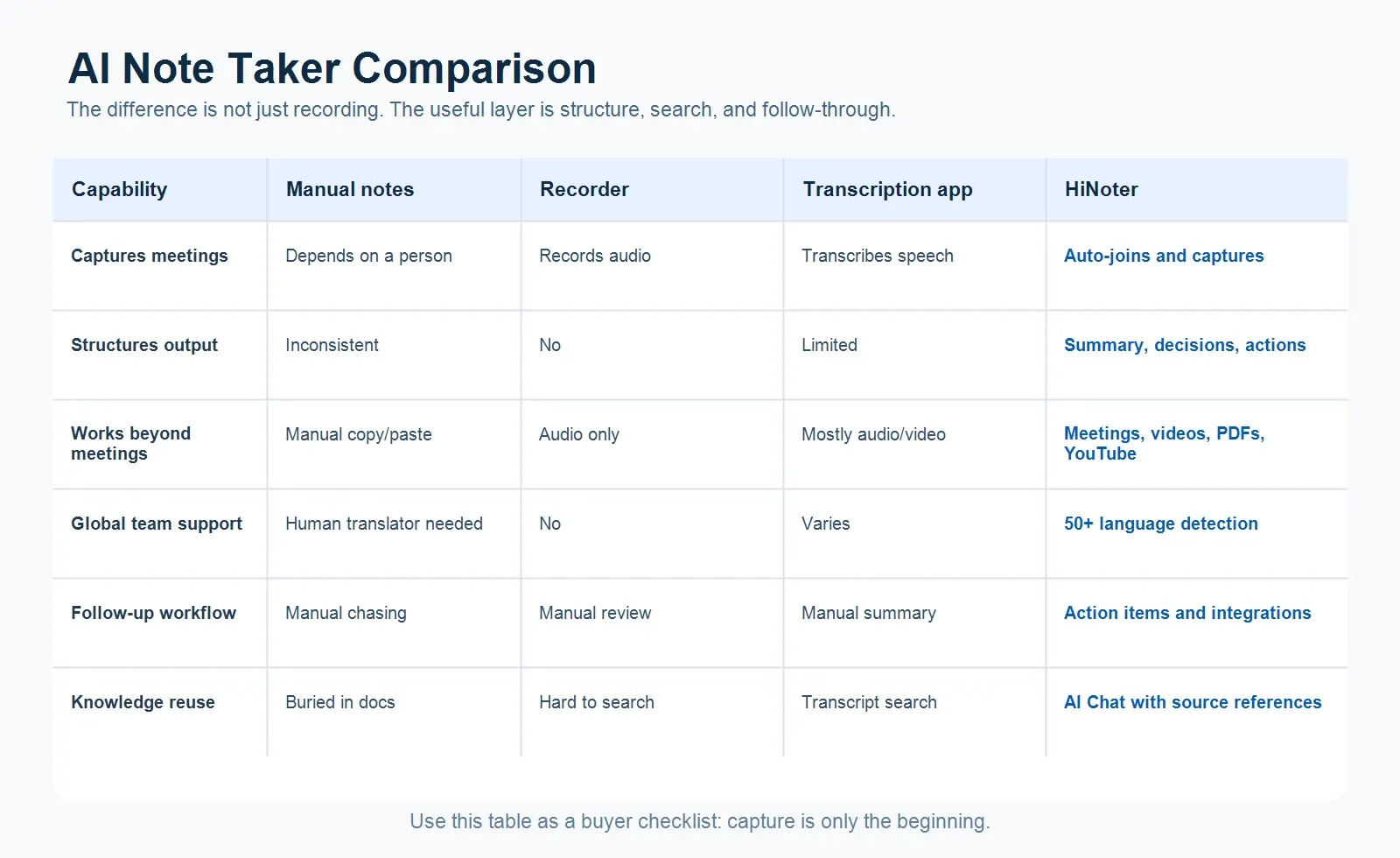
| Option | What You Get | What Still Takes Work |
|---|---|---|
| Manual notes | A human-written recap from one person's notes. | Accuracy, consistency, translation, and follow-up. |
| Recorder | An audio or video file of the full conversation. | Rewatching, summarizing, and finding decisions. |
| Transcription app | Speaker text, timestamps, and searchable transcript. | Turning raw text into summaries, owners, and tasks. |
| HiNoter | Structured notes, action items, mind maps, and AI Chat. | Reviewing final next steps before sharing them. |
Zero Manual Note-Taking, From Calendar to Summary
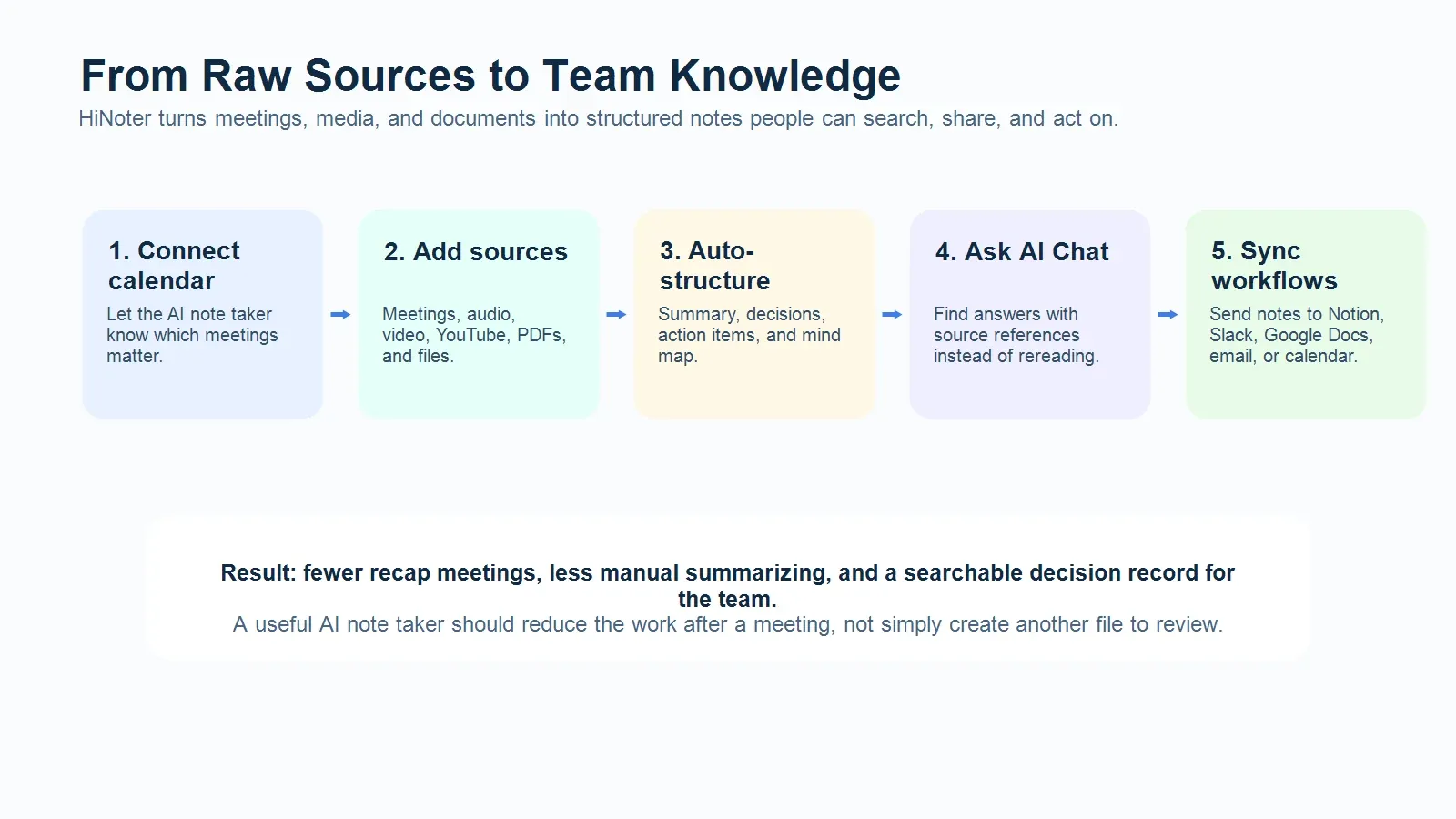
HiNoter can connect to your calendar and help capture scheduled meetings automatically. Instead of asking someone to split attention between listening and typing, the AI note taker joins the meeting, captures the conversation, and turns it into a structured record after the call.
The output is designed for work, not storage: summary, decisions, action items, and mind maps. A product review, customer call, hiring interview, or cross-functional sync becomes a record the team can actually use.
Built for Meetings, Videos, PDFs, and More
Many tools begin and end with audio. HiNoter is designed for a broader knowledge workflow. Teams can turn meetings, uploaded audio, videos, YouTube content, PDFs, and other source material into organized notes. That matters when the answer is not only in a meeting. It may be in a customer webinar, a training video, a research PDF, or last week's product review.
Supported source types include:
1. Live meetings and scheduled calls.
2. Audio and video files.
3. YouTube content.
4. PDFs and documents.
5. Existing notes that need to become searchable knowledge.
50+ Language Detection for Global Teams
A global team should not need to assign a human notetaker for every language in the room. HiNoter supports 50+ language detection, helping multilingual teams capture context across regions and produce summaries that are easier for everyone to reuse.
That is especially useful for international sales, customer success, distributed product teams, research calls, and cross-border operations where the meeting language may change from one call to the next.
What Is the Best AI Note Taker for Meetings?
The best AI note taker for meetings is the one that reduces work after the meeting, not just during it. Look for automatic meeting attendance, accurate transcription, structured summaries, action item extraction, integrations, language support, and searchable AI Chat with source references.
HiNoter is a strong fit for teams that want one workflow for meetings and knowledge sources. It captures conversations, structures the output, syncs notes into team tools, and lets people ask questions later instead of digging through raw transcripts.
Can an AI Note Taker Join Meetings Automatically?
Yes. An AI note taker can join meetings automatically when it is connected to the user's calendar and the meeting includes a supported conferencing link. With HiNoter, teams can connect their calendar so scheduled meetings can be captured and summarized without asking a participant to start from a blank document.
Teams should still follow company policy, meeting consent practices, and local recording laws. Automation works best when participants know how meeting capture is handled and where notes are stored.
Ask Your Notes Questions With AI Chat
A static archive is useful only if someone has time to search it. HiNoter turns notes into a conversational knowledge base. With AI Chat, teammates can ask what was decided, why a direction changed, which customer concern came up, or who owns the next step. Source references help the answer stay tied to the underlying note instead of floating as a vague recap.
Integrations That Keep Notes Moving
Meeting notes create value when they reach the tools where work happens. HiNoter can fit into team workflows with destinations such as Notion, Slack, Google Docs, calendar, and email. That lets a sales call summary move into the CRM process, a product decision into a planning doc, or an action list into the next team check-in.
Use Cases for HiNoter
Product and engineering teams can capture sprint planning, incident reviews, and roadmap decisions without assigning someone to type throughout the call.
Sales and customer success teams can preserve customer pain points, objections, next steps, and renewal risks from every conversation.
Research, operations, and leadership teams can summarize interviews, videos, PDFs, and recurring meetings into one searchable knowledge layer.
Security and Privacy Considerations
Meeting notes often contain customer data, roadmap details, hiring feedback, financial context, or internal decisions. Before adopting any AI note taker, review access controls, storage policies, sharing permissions, retention settings, and consent requirements.
For the best rollout, define which meetings can be captured, who can access summaries, where notes are synced, and how sensitive calls should be handled.
Try HiNoter Free
If your team is already recording meetings but still spending time rewatching, summarizing, and chasing action items, the bottleneck is not capture. It is structure.
Try HiNoter free. Connect your calendar and get your next meeting summarized automatically, with action items, mind maps, and AI Chat ready for follow-up.
FAQ
What is an AI note taker?
An AI note taker is software that records, transcribes, summarizes, and organizes conversations or documents into searchable notes. A strong AI note taker also extracts decisions, action items, and source references.
Can HiNoter summarize videos and PDFs?
Yes. HiNoter is designed for more than live meetings. It can help turn videos, YouTube content, PDFs, and other source material into structured notes.
Does HiNoter support multilingual teams?
HiNoter supports 50+ language detection for teams that work across regions and languages. Confirm the final public language count against the active product page before publishing.
How is an AI note taker different from transcription software?
Transcription software mainly converts speech into text. An AI note taker organizes the content into summaries, decisions, action items, and searchable knowledge.
Can HiNoter send notes to team tools?
HiNoter is built to fit team workflows, including tools such as Notion, Slack, Google Docs, calendar, and email where relevant.